
I’m a sim racer and amateur racer with a passion for Motorsport, good racecraft and the technical and setup aspect of sim racing.
I’ve been sim racing in iRacing for years now, and I thought the force feedback was fine. Clinical, perhaps. A bit icy at times. But fine.
Then I discovered MAIRA – Marvin’s Awesome iRacing App – and realised I’d been missing half the information the simulator was trying to tell me. MAIRA isn’t another data overlay tool sitting at the edge of your screen. MAIRA transforms what your hands feel through the wheel. The difference is interesting!
Today’s article explains what MAIRA does, how it works, and why it might be worth a go to see how it impacts your iRacing FFB
What is MAIRA? Understanding Force Feedback Enhancement
MAIRA stands for Marvin’s Awesome iRacing App. Technically it’s a backronym, but the name’s stuck. The app’s primary function is processing and enhancing iRacing’s force feedback signal before sending it to your wheelbase.
MAIRA hooks directly into iRacing’s 360Hz steering column torque telemetry stream. It splits this signal into AC components (fine details like road bumps and tyre chatter) and DC components (steady forces like steering load and weight transfer). This separation allows control without adding latency beyond what’s inherent in the simulator itself.
The key point – MAIRA operates by replacing iRacing’s native FFB completely. You must disable iRacing’s “Enable Force Feedback” checkbox. If you don’t, MAIRA won’t work. Once disabled, MAIRA becomes your wheelbase’s sole FFB source, processing that 360Hz telemetry stream and sending its own enhanced signal.
MAIRA is free, donation-supported software developed by Marvin Herbold. It’s Windows-only. MAIRA Classic (version 1.x) was open source under GPL-3.0. MAIRA Refactored (version 2.0), currently in public beta, is free with an explicit commitment to remain free. No paid tiers, no feature paywalls, no time limits.
I’ve tested MAIRA on my Simucube 2 Pro extensively, and the engineering behind the AC/DC split is genuinely brilliant. Most sim racers don’t realise that iRacing’s FFB isn’t actually “icy” – it’s that the native implementation prioritises physics accuracy over “feeling good.” MAIRA doesn’t add fake effects. It reveals detail that was always there but buried in the signal noise floor.
The AC/DC Split: Engineering That Actually Makes Sense
The AC/DC split is MAIRA’s core technical innovation. Let me explain what this actually means in practical terms.
AC component = alternating current detail. This covers road texture vibrations, tyre chatter, surface imperfections. The fine-grained information your hands use to detect subtle car behaviour. DC component = direct current steady force. This handles steering load, weight transfer during cornering, the continuous pressure you’re fighting against when turning the wheel.
Why does separating these matter? Because your arms can’t physically handle 20Nm of rattling vibration all day. But they can handle 20Nm of smooth force with subtle vibrations layered on top. That’s the fundamental insight MAIRA exploits.
Traditional FFB implementations blend AC and DC together. You get either both strong (physically exhausting) or both weak (disconnected from the car). MAIRA’s separation gives you independent control. Strong steady forces with moderate detail. Or heavy detail with lighter overall load. Your choice, depending on your preference and wheelbase capability.
The processing maintains iRacing’s 360Hz signal rate. No added latency beyond what the simulator already has. The separation isn’t perfect – you can’t completely eliminate detail from the DC component – but it’s close enough that most users consider it effectively independent control.
When I first read about the AC/DC split, I thought it sounded gimmicky. But once you actually use it, you realise it’s addressing a fundamental problem in FFB design. It’s the difference between a master volume control and a proper mixing desk. Where iRacing gives you one FFB strength slider, MAIRA gives you “Overall Scale” for steering weight and “Detail Scale” for surface texture.
MAIRA Refactored (2.0): Public Beta
MAIRA Classic (version 1.x) is no longer actively updated. The focus has shifted entirely to MAIRA Refactored (version 2.0), currently in public beta. The beta is stable enough for daily use – I’m running it on my primary racing rig without issues.
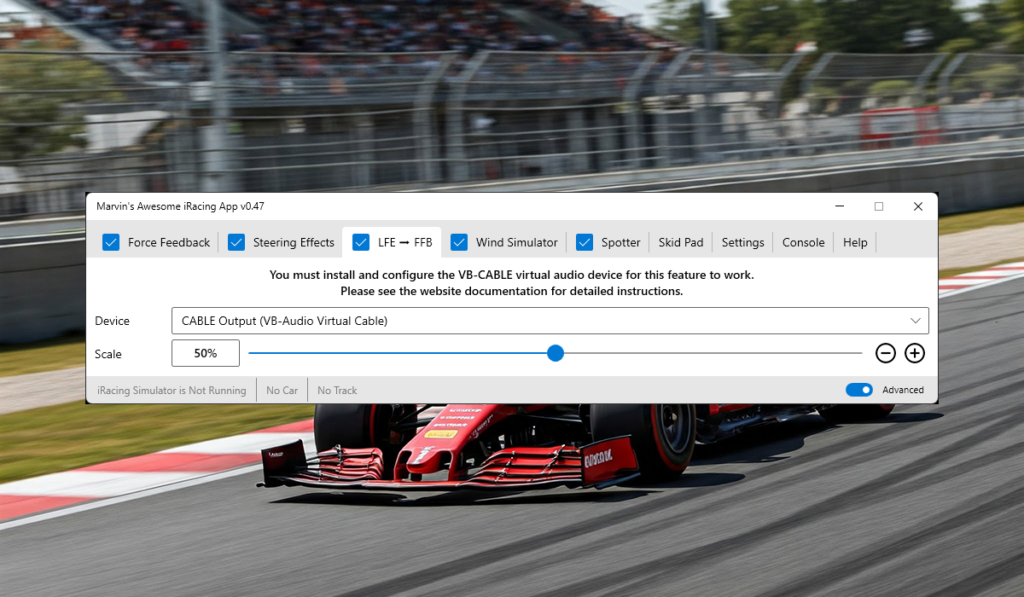
Major additions in 2.0 include an experimental spotter system, SimHub integration for users who already run SimHub for telemetry, and native support for the Simagic Haptic Pedal Reactor. The per-car and per-track FFB settings alone make the upgrade worthwhile. Finally, I can have different FFB profiles for my GT3 cars versus Formula cars without manually adjusting settings every session.
Marvin Herbold maintains highly active development. He consistently ships updates, engages with beta testers in the forums, and maintains a public Trello roadmap so you can see what’s coming. A dedicated Discord server for MAIRA community discussion is planned.
Beta status hasn’t deterred adoption. What I’ve read on the iRacing forums is that users report good stability and are willing to accept occasional bugs in exchange for the latest features. The fact that Classic (1.x) remains available provides a stable fallback if you hit showstopper issues.
To be completely fair, this is beta software developed by one person. If you’re expecting 24/7 enterprise-grade customer support, this isn’t a commercial product with support contracts. But Marvin’s reputation within the iRacing community is excellent. He’s responsive to bug reports and has consistently delivered on promised features.
Core Features: What MAIRA Actually Does
MAIRA’s feature set goes well beyond basic FFB enhancement. Here’s what you actually get:
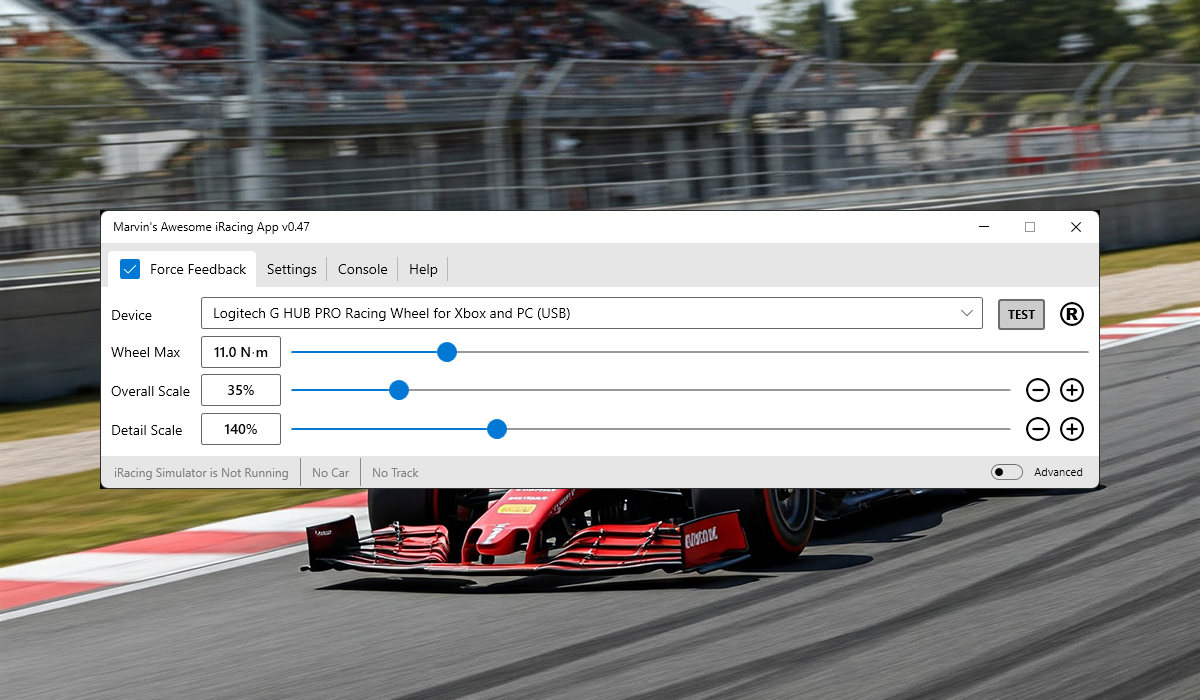
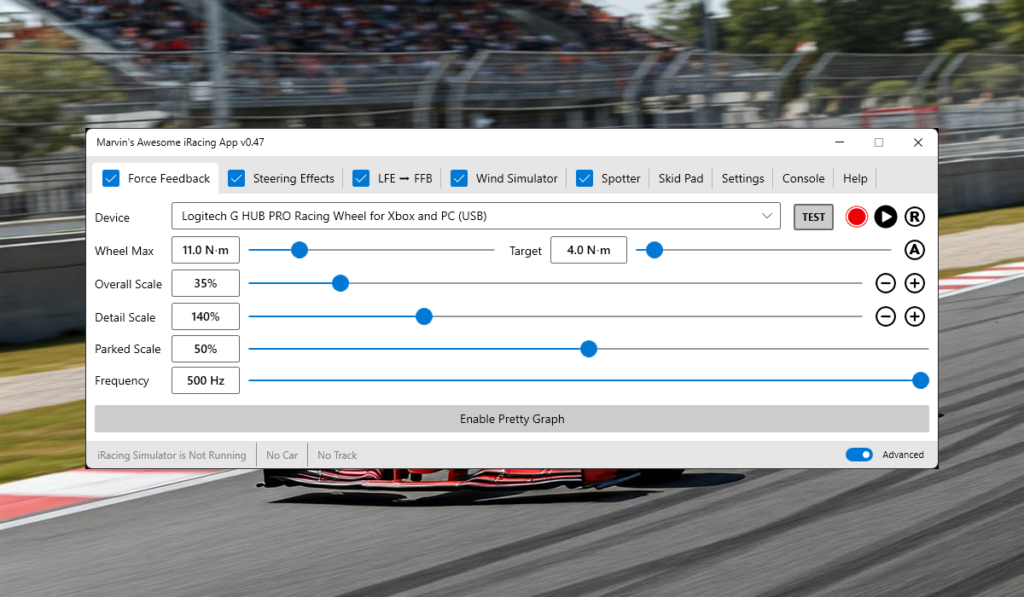
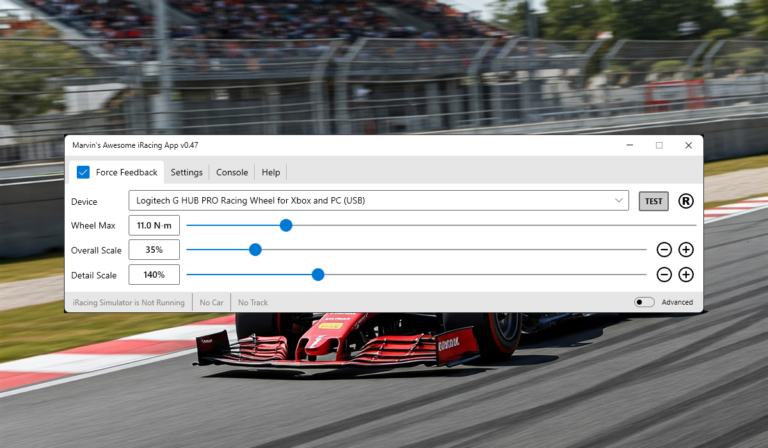
FFB customisation core: Overall Scale controls steering strength (the DC component, essentially). Detail Scale controls road texture intensity (the AC component). Parked Strength sets how much force the wheel applies when stationary. These three sliders form the foundation of MAIRA’s FFB control.
Frequency range: MAIRA supports 62.5Hz to 500Hz FFB output, whilst processing iRacing’s internal 360Hz steering torque signal. More on why higher isn’t always better in a dedicated section below.
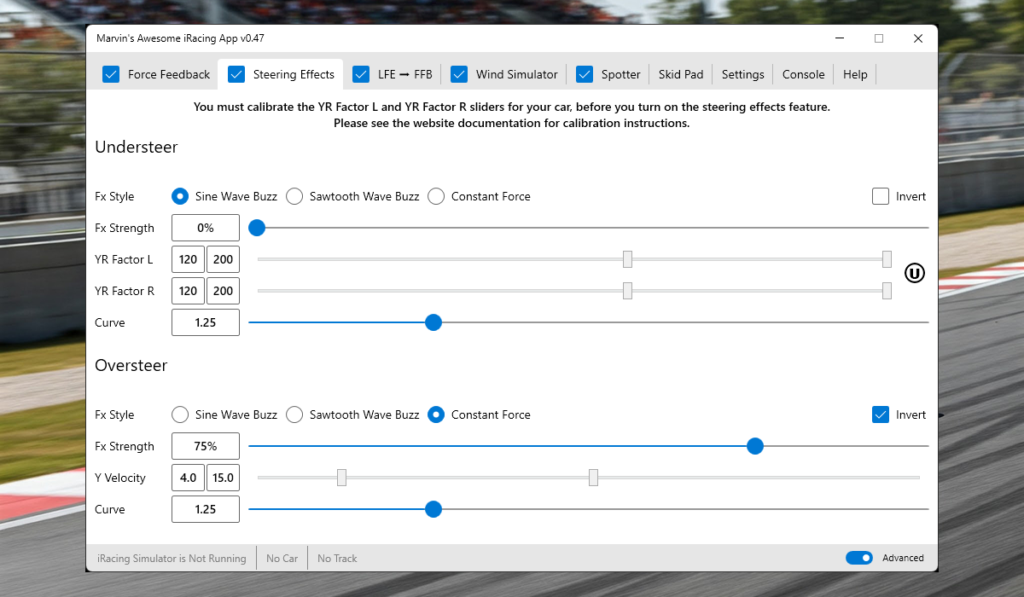
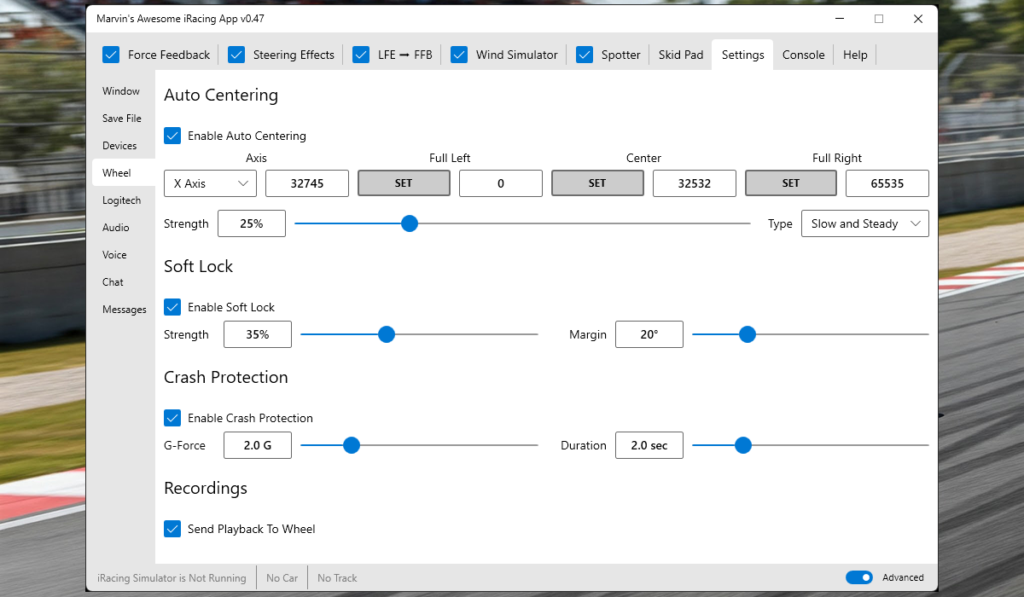
Steering effects: Oversteer and understeer warnings can be configured as sine wave pulses, sawtooth patterns, or constant force signals through the wheel. I personally keep these disabled – I prefer pure FFB without synthetic effects – but they’re there if you want them.
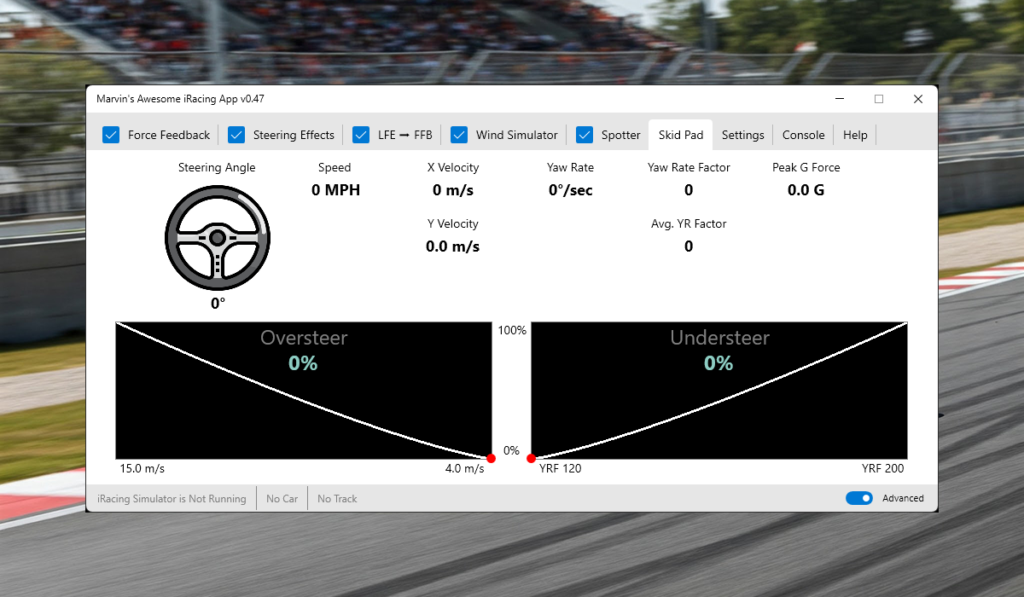
Safety features: Soft lock prevents wheel rotation beyond realistic steering limits. Crash protection automatically reduces Detail Scale during heavy impacts (more on this critical safety feature below). Curb protection can be tuned to reduce FFB spikes when hitting kerbs.
FFB output control: Adjustable signal curve shapes the FFB response. Auto-scale prevents clipping by dynamically adjusting output to stay within wheelbase limits. LFE (Low Frequency Effects) to FFB routing sends bass shaker signals through the wheel for users without dedicated tactile transducers.
Hardware-specific features: Native Simagic HPR haptic pedal support. Logitech wheel RPM indicator light control. Automatic wheel centering when the car goes off-track (prevents wheel spinning wildly in gravel).
Integration: SimHub plugin available for users running SimHub alongside MAIRA. Per-car and per-track settings (2.0 Refactored only) allow you to save optimal configurations for different vehicle types and circuits.
The feature list sounds overwhelming, but you don’t need to touch most of these to get the core FFB improvement. I use Overall Scale, Detail Scale, and crash protection. Everything else I’ve left at defaults. The complexity is optional.
Installation and Setup: Easier Than It Looks
MAIRA’s setup process is straightforward if you follow the steps carefully. Skip one and you’ll be confused why nothing works.
Step 1: Download and install. Standard Windows installer from herboldracing.com. No tricks here.
Step 2: Disable iRacing’s FFB. This is the critical step everyone forgets. Open iRacing, go to Options > Force Feedback, and uncheck “Enable Force Feedback.” If this box remains ticked, MAIRA won’t work because iRacing and MAIRA will fight for wheelbase control.
Step 3: Select your wheel. Open MAIRA, use the dropdown to select your wheelbase from the list. Most major brands are supported (Fanatec, Simucube, Moza, Simagic, Thrustmaster, Logitech).
Step 4: Set Wheel Max. Enter your wheelbase’s maximum torque in Newton-metres. For example, my Simucube 2 Pro is 25Nm, but I set this to 20Nm because I don’t need the full output. Check your wheelbase manual if you’re unsure of the spec.
Step 5: Adjust scales. Start with Overall Scale at 50-70% and Detail Scale at 30-50%. Drive a practice session and adjust to preference. There’s no “correct” setting – it depends on your wheelbase, driving style, and personal sensitivity to FFB detail.
Optional Step 6: Map buttons. If your wheel has spare buttons, you can map them to adjust Overall Scale and Detail Scale on the fly without alt-tabbing out of the sim.
Logitech-specific gotcha: Logitech wheels need an additional step. Edit MAIRA’s app.ini file and change loadTrueForceAPI=1 to loadTrueForceAPI=0 to disable iRacing’s TrueForce. Also consider changing resetWhenFFBLost=1 to resetWhenFFBLost=0 to prevent iRacing from regaining FFB control mid-session, which Logitech wheels are prone to doing.
Common issues I’ve seen on the forums: forgetting to disable iRacing FFB (most frequent mistake), not knowing the wheelbase’s max torque spec, and wheels “going to sleep” during long sessions (use MAIRA’s Reset button to wake them).
My first MAIRA setup took maybe 10 minutes, and half of that was hunting for my Simucube’s torque spec in the manual. Once I found it, everything just worked. I’ve spent more time tweaking the Detail Scale to my preference than I spent on initial setup.
The Frequency Question: Why 360Hz Is Plenty
MAIRA supports FFB output from 62.5Hz all the way up to 500Hz. Naturally, people assume “higher Hz = better feel.” Reality is more nuanced.
iRacing’s native steering torque signal runs at 360Hz. This is the source data MAIRA processes. When you set MAIRA to output at 500Hz, it’s using cubic interpolation to synthesise additional data points that weren’t in the original signal. The engineering challenge is maintaining signal fidelity during this upsampling process.
Here’s the counter-intuitive finding: 360Hz is fast enough for even the most responsive direct drive wheels on the market. The general consensus on r/iRacing is that users who’ve experimented with 500Hz report marginal improvement at best, and some notice subtle artifacts during quick steering corrections.
The physics here are straightforward. 360Hz means the FFB signal updates every 2.78 milliseconds. Your brain cannot consciously process changes that fast. Even if your wheelbase hardware can physically respond to 500Hz input (most can’t), the difference is below human perception thresholds.
If the interpolation isn’t clean, going to 500Hz can actually introduce ringing artifacts or false detail that’s worse than the original 360Hz signal. Marketing tells you “higher Hz = better.” Engineering says “processing quality matters more than raw frequency numbers.”
I tested both 360Hz and 500Hz on my Simucube 2 Pro in blind tests, swapping between settings without looking. I couldn’t reliably tell them apart. The 360Hz signal is already stupidly fast – faster than my brain can consciously process individual updates. So I stick with 360Hz and avoid any potential interpolation issues.
That said, MAIRA gives you the option. If you have a wheelbase that genuinely benefits from 500Hz output (rare), experiment and decide for yourself. But don’t assume more is automatically better without testing.
Real-World Performance: Does Better FFB Actually Make You Faster?
The obvious question: will MAIRA improve your lap times? Based on community reports and my own testing, yes. Measurably.
Users on r/iRacing report 0.5-1.0 second improvements in qualifying times within 30 minutes of using MAIRA for the first time. One user specifically mentioned: “I’ve been using iRacing for 5 years and thought the FFB was fine. Tried MAIRA and within 30 minutes knocked 0.9 seconds off my quali time at Watkins Glen. I could actually feel the car starting to slide.”
The mechanism is straightforward. Enhanced FFB detail allows earlier detection of tyre slip. You feel the car starting to slide before it fully breaks away. This gives you time to correct preemptively rather than reactively. Better information leads to better decisions.
More importantly, haptic feedback through the wheel is faster than visual cues. By the time you see oversteer developing on screen, you’re already behind the correction curve. When you feel it through your hands, you’re correcting as it happens. This is particularly valuable during trail braking, where the transition from straight-line to corner entry requires precise brake modulation.
To be fair, I’m not claiming MAIRA will make you an alien overnight. Performance improvement scales with driver skill level. Intermediate drivers who are still learning car limits tend to gain the most. Alien-level drivers with years of muscle memory built on iRacing’s native FFB might see smaller gains. But for the majority of iRacers – competent club racers who aren’t setting world records – the enhanced FFB genuinely helps you push closer to the limit with more confidence.
I’m not an alien. But I can consistently push my GT3 car harder with MAIRA than I could before. The difference shows up in sector times, particularly through technical sections where tyre grip is critical. That translates to real lap time, not placebo.
Marvin Herbold and the Free Software Model
Marvin Herbold is MAIRA’s sole developer. His reputation within the iRacing community is excellent – responsive to bug reports, consistent with feature delivery, transparent about development roadmaps.
MAIRA Classic (version 1.x) was released under GPL-3.0 open source licence. MAIRA Refactored (version 2.0) is free with an explicit public commitment to remain free. No paid tiers, no feature paywalls, no time-limited trials. The entire feature set is available to everyone.
Development is donation-supported. Users contribute voluntarily if they find value. There’s no obligation, no recurring subscription, no pressure. This model has built enormous goodwill within the community.
For context, RaceLabs and Kapps use freemium models. Basic features are free, but advanced functionality (custom layouts, additional telemetry data, advanced timing) requires Pro subscriptions at £40-60 per year. Crew Chief and JRT are donation-supported but less actively developed. MAIRA combines the best of both approaches: free access to all features plus consistent active development.
I’ve watched quite a few “free” projects go commercial once they gain traction. Marvin’s explicit commitment to keeping MAIRA free is refreshing and has built significant community trust. I donated anyway because the value I’m getting from enhanced FFB easily justifies supporting the development financially.
The qualification is important: this is a one-man passion project, not a commercial enterprise with support contracts. If you’re expecting instant responses to support tickets at 2 AM on Sunday, that’s not the model here. But Marvin engages actively with users on forums, ships updates regularly, and has proven reliable over multiple years of MAIRA development
Who Should Use MAIRA?
MAIRA delivers the most value for specific user profiles:
Best for: Active iRacers frustrated with iRacing’s native FFB feel, particularly direct drive wheel owners where enhanced detail is actually reproducible through high-quality hardware. Drivers who want independent control of FFB strength versus detail. Users who’ve spent time tweaking iRacing’s FFB settings and hit limitations. Endurance racers dealing with arm fatigue from excessive FFB vibration.
Still valuable but less transformative for: Casual iRacers on entry-level wheels (belt-driven or gear-driven wheelbases). The enhanced detail MAIRA provides exists in the signal, but lower-end hardware can’t reproduce it with the same fidelity. You’ll still benefit from the AC/DC split and crash protection, but the “holy shit this feels different” moment is less pronounced.
Probably not worth the effort for: Drivers who are completely satisfied with iRacing’s native FFB and don’t feel it’s lacking anything. If you’re genuinely happy with the default feel, MAIRA might be fixing a problem you don’t have.
The good news: MAIRA is free and easy to try. Worst case scenario, you spend 10 minutes setting it up, decide it’s not for you, uninstall, and re-enable iRacing’s native FFB. There’s no financial risk or long-term commitment.
My advice: if you’re an active iRacer with a direct drive wheel and you’ve ever thought “the FFB could be better,” download MAIRA Refactored (2.0), disable iRacing’s FFB, spend 30 minutes adjusting the scales to your preference, and see if it clicks. For most people in that category, it will.
Conclusion: MAIRA Is Worth Your Time
MAIRA transforms iRacing’s force feedback from clinically accurate but disconnected to communicative and confidence-inspiring. The AC/DC split engineering approach, crash protection system, and signal processing fidelity represent proper technical work rather than quick hacks or synthetic effects.
The software is free, actively developed, and backed by excellent community support. It complements existing companion apps (Crew Chief, RaceLabs, JRT) rather than competing with them. Users report measurable performance improvements – typically 0.5-1.0 seconds in qualifying within 30 minutes of first use.
Setup is straightforward: disable iRacing’s FFB checkbox, select your wheelbase, enter max torque, adjust Overall and Detail scales to taste. The complexity is optional – advanced features exist if you want them, but the core benefit comes from those two fundamental sliders.
My recommendation is simple: download MAIRA Refactored (2.0) from herboldracing.com, follow the setup steps carefully (particularly disabling iRacing’s FFB), drive a practice session, and decide for yourself whether the enhanced feedback changes your iRacing experience. For most direct drive wheel owners, it will.
I’ve been using MAIRA for months now. I can’t imagine going back to iRacing’s native FFB. The information I get through my hands makes me a more confident, more consistent driver. That’s the entire point of force feedback, and MAIRA finally delivers it properly.
Download link: herboldracing.com
Related Articles
MAIRA for iRacing: Marvin’s Awesome iRacing App Transforms Force Feedback
What is the Custom Shaders Patch for Assetto Corsa and what does it do?

What is the Pure Weather mod for Assetto Corsa and How do I Install it?

Install Content Manager, Custom Shaders Patch and Pure with our installation Guide in Assetto Corsa
Le Mans Ultimate – Sorting Out the FFB Settings with Revosim