

I’m a sim racer and amateur racer with a passion for Motorsport, good racecraft and the technical and setup aspect of sim racing.
Simagic’s Alpha EVO range gives you three torque levels – 9Nm, 12Nm, and 18Nm – priced between $399 and $699, and it’s quietly become the best value direct drive lineup you can buy in early 2026. A 21-bit encoder and Simagic’s DFDF algorithm deliver kerb detail and road feel that has no business being this good at mid-range money. It’s PC only, no console support at all, but if you’re on Windows and want the most torque per dollar in a new direct drive base, I don’t think anything else comes close right now.
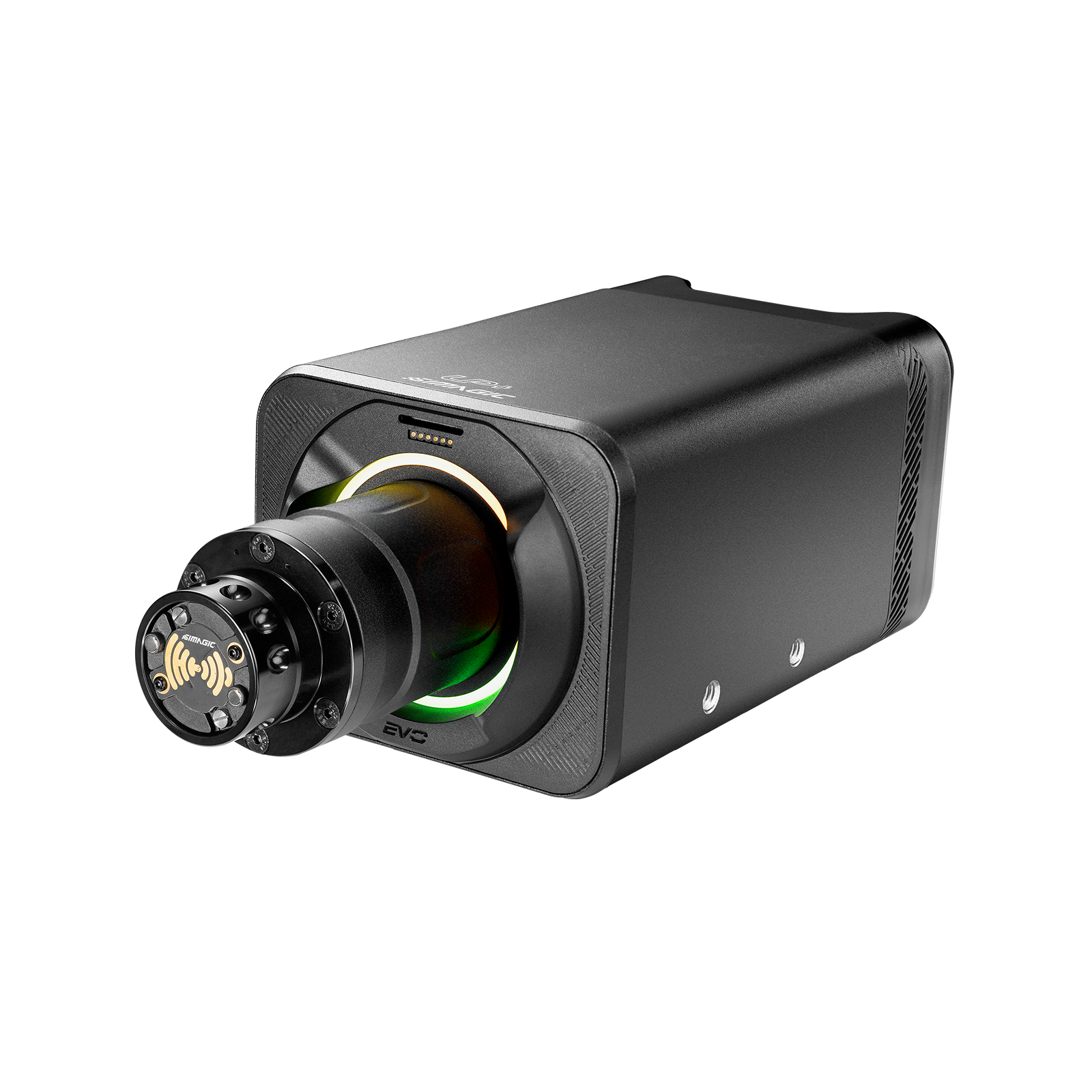
Technical Specifications
The EVO Pro weighs 8.6kg and measures 130 x 110 x 317mm – noticeably smaller and lighter than the old Alpha 15Nm, which weighed 10.5kg and felt like a boat anchor on the rig. The 21-bit encoder gives you over two million positions per revolution, which translates to properly fine-grained kerb detail. The internal processing rate runs at 20KHz (0.05ms), which likely explains why the cogging performance is as clean as it is – reviewers who compared it back-to-back with the MOZA R12 V2 consistently noted the Simagic was smoother at low steering speeds.
| Specification | Value |
|---|---|
| Peak Torque | 9Nm (Sport) / 12Nm (Standard) / 18Nm (Pro) |
| Drive Type | Direct Drive |
| Motor Type | Ultra-Low Inertia Motor |
| Encoder Resolution | 21-bit (2,097,152 positions/revolution) |
| MCU | 180MHz processor |
| Internal Response Rate | 20KHz (0.05ms) |
| USB Polling Rate | 1000Hz (1ms) |
| FFB Algorithm | DFDF (Dynamic Force Domain Filter) |
| Quick Release | D-spec/NRG-style with wireless data (Simagic wheels) |
| I/O Ports | 8x RJ45, 3x USB-A, 1x USB-C, 1x USB-B |
| Dimensions | 130 x 110 x 317mm (EVO Pro) |
| Weight | 8.6kg (EVO Pro) |
| Platform | PC only (Windows 10/11) |
| Software | SimPro Manager |
| Mounting | Front (4 holes), bottom (4 holes), side (2 per side) |
| LED Ring | Configurable colour ring (front-mounted) |
| Dashboard Mount | Magnetic mount point (top of housing) |
Two specs that actually matter beyond the headline torque figure: the DFDF algorithm and the quick release. DFDF (Dynamic Force Domain Filter) splits force feedback tuning into three sub-parameters – Dynamic Prediction Level, Steering Torque Assist, and Filter Level – so you’re not stuck with a single “strength” slider. The D-spec/NRG quick release is the same standard you’ll find in actual race cars, shared with MOZA’s range, and Simagic wheels connect wirelessly through it – no USB cable running through the steering column. Simagic publish a full Alpha EVO user manual (PDF) covering installation, SimPro Manager setup, and all the DFDF parameters in detail.
Force Feedback and Road Feel
The EVO’s force feedback is smoother than a base at this price has any right to be. The 21-bit encoder translates to properly fine-grained kerb detail – you can pick out individual rumble strip segments that cheaper bases blur into one vague buzz. Simagic’s DFDF algorithm does something genuinely interesting with grip-to-slip transitions too, producing a sharpness to the breakaway moment that caught Boosted Media off guard in their review – they scored the EVO Pro 8.6/10 overall, with a perfect 10/10 for value, which is rare from that channel.
It’s not Simucube 2 Pro levels of refinement, but honestly it’s closer than the price gap suggests. The cogging difference between the EVO and a MOZA R12 V2 is obvious in back-to-back testing – zero on the Simagic, noticeable grit on the MOZA at low speeds, which the 20KHz internal processing rate probably explains. Noise is the other thing that stands out: the EVO is genuinely quiet, which matters if you’re streaming or in a shared room. At 18Nm you’ve got more than enough grunt for prototype cars without the wheel going vague mid-corner, and the 9Nm Sport handles GT3 and GT4 stuff brilliantly if your budget doesn’t stretch further.
The out-of-the-box FFB defaults are too soft, though. The Dutch reviewers at simrace-blog.nl had to crank FFB from 30% to 60% before the wheelbase came alive, and I’ve seen the same complaint on r/simracing. Plan on spending twenty minutes with SimPro Manager dialling in the DFDF settings before you judge it – the defaults don’t show what this base can actually do.
Build Quality and Design
The CNC aluminium housing feels properly solid – push on it under load and there’s zero flex from the casing. At 8.6kg it’s noticeably lighter than the old Alpha, and the size reduction means it’ll fit on rigs where the previous generation was a squeeze. The LED colour ring on the front is configurable through SimPro Manager, and the magnetic dashboard mount on top is genuinely useful if you’ve got a Simagic display to stick to it.
The quick release uses the D-spec/NRG standard, shared with MOZA’s range, and the connection is firm with zero play – something the Dutch review team at simrace-blog.nl specifically praised after long-term testing. The shifter paddles on Simagic’s own wheels are magnetic, similar in feel to Fanatec’s rocker-style paddles on the CSL GT3.
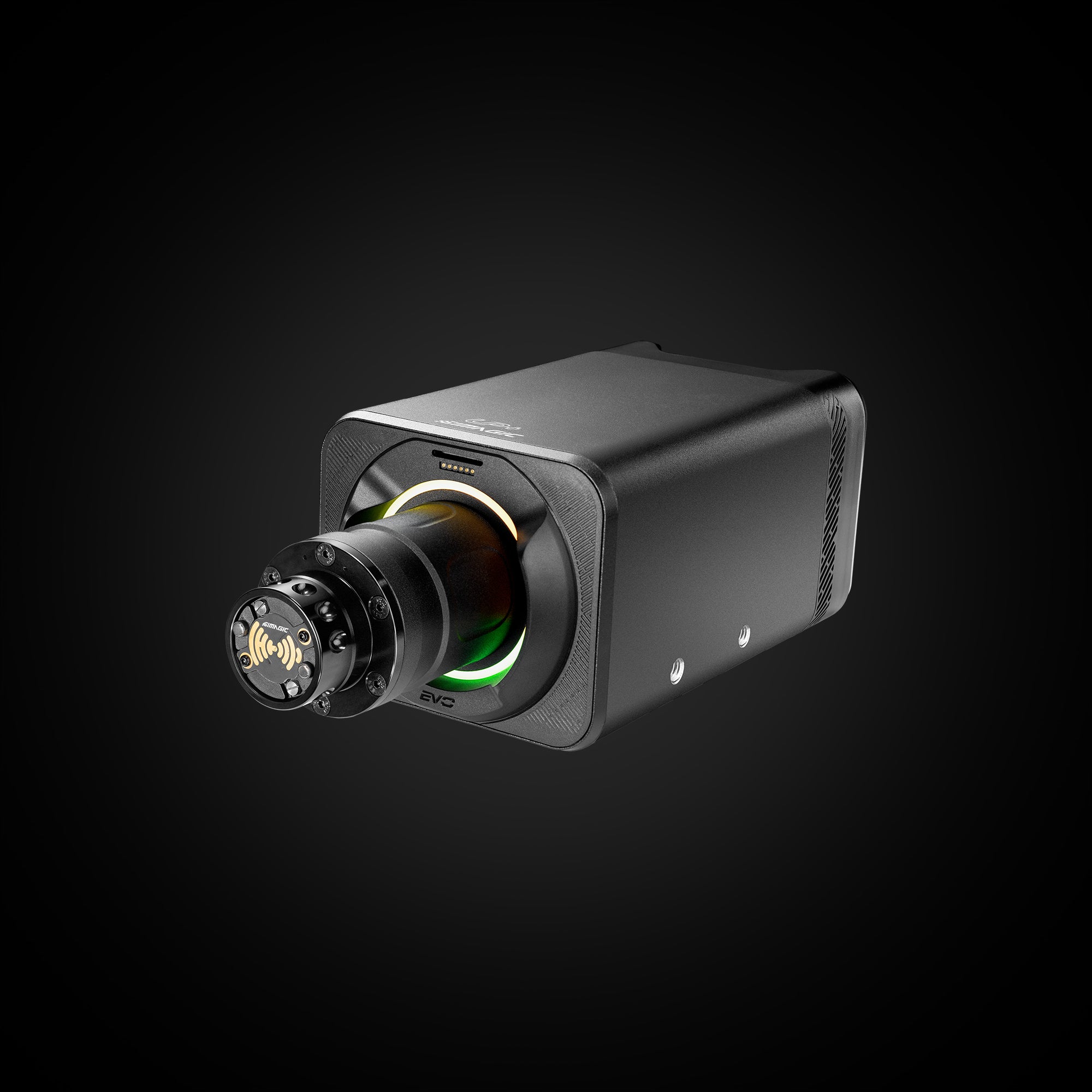

Port placement is the one genuine gripe. They’re on both sides of the housing rather than the rear, which looks tidy in product photos but makes cable routing a pain on an aluminium profile rig. You’ve got eight RJ45 ports, three USB-A, a USB-C, and a USB-B – loads of connectivity – but budget an extra twenty minutes for cable management the first time you set it up. Plan your cable routing before you bolt it down, because those side-mounted ports make repositioning a hassle.
Compatibility and Ecosystem
Simagic’s ecosystem has expanded properly over the last year. Their own wheels – FX Pro, GT Neo, GT4, GTC, GT Cup – all connect wirelessly through the QR with zero setup. No USB cable through the column, which makes wheel changes during a session genuinely quick. Simagic are also releasing a USB QR adapter (roughly $100) for third-party wheels, which will give you wired data through the D-spec mount if you’ve got a Cube Controls or Ascher wheel you want to use.
One thing worth knowing before you commit: MOZA wheels physically bolt onto the QR because they share the NRG standard, but you won’t get wireless data transfer between brands. The mount fits, the electronics don’t talk to each other. It’s not quite the ecosystem lock-in of Fanatec’s QR2 – you can at least physically mount other NRG-standard wheels – but wireless only works within Simagic’s own range.
On the software side, SimPro Manager auto-detects your games, saves per-game FFB profiles, and handles firmware updates. The UI isn’t as polished as Fanatec’s FanaLab, but functionally it covers everything you’d want from a wheelbase companion app. The DFDF tuning is where it gets genuinely interesting – you’re not limited to a single strength slider. Three sub-parameters give you real control over how the wheel behaves through corner entry and exit, which competitive iRacing drivers will appreciate.
Pedals are straightforward – any USB set works independently, or Simagic’s own P-LCM, P1000, and P2000 plug into the RJ45 CAN-bus hub for tidier cable runs. Standard bolt patterns fit SimLab, Trak Racer, Next Level Racing, and most aluminium profile rigs, with four holes up front, four on the bottom, and two per side. Windows 10/11 only – there’s no Xbox, PlayStation, or Mac support and Simagic haven’t announced plans for any.
Issues and Things to Know
The one-year warranty is genuinely poor for a product costing $550+. Fanatec offer three years under Corsair’s ownership, and Simucube offer two. For something that’s going to take sustained 18Nm loads session after session, one year isn’t enough peace of mind. Hop on r/simracing and it’s the single thing people bring up more than anything else about Simagic.
If you pull off the front plate for a cleaner look, you’ll need the $49 adapter to mount from the side or bottom instead. Worth knowing before you buy if you’re planning a flush-mount setup. And if you ever need to reposition the base on your rig, those side ports mean you’re probably re-routing cables too.

The out-of-the-box defaults need work. Simrace-blog.nl reported needing to nearly double the FFB strength before the base showed its potential, and that matches what most Reddit owners describe. Plan on spending time with SimPro Manager before you race. The defaults undersell the hardware badly.
There’s zero console support – no Xbox, no PlayStation, nothing announced – and Simagic haven’t hinted at adding it. If you might want console at some point, Fanatec’s CSL DD QR2 is the only direct drive option in this price range that does both.
How It Compares
Against the MOZA R12 V2, the EVO Standard costs $120 more at $549 versus $429, and the cogging difference alone justifies the premium if you race more than casually. The Simagic is noticeably cleaner through centre and doesn’t have that gritty texture the R12 produces at low steering speeds. SimPro Manager beats MOZA’s Pit House for per-game profiles too, which matters if you’re switching between iRacing and ACC regularly.
The matchup that really matters is EVO Pro against the MOZA R16 V2, both at $699. Simagic gives you 18Nm to MOZA’s 16Nm and a 21-bit encoder to their 18-bit – better specs at the same money. Browse r/simracing for Alpha EVO threads and you’ll see the same opinion coming up over and over: better FFB quality, better software, better wheel build quality than MOZA at comparable prices.
Fanatec’s CSL DD QR2 only really makes sense if you need Xbox compatibility, because 8Nm for $480 is simply less wheelbase for similar money when you’re on PC. The maths doesn’t work unless consoles matter to you.
The Simucube 2 Sport is the one that’ll tempt anyone chasing the best possible FFB – brilliant hardware, genuinely premium feel, 22-bit encoder – but it costs double. I read a simracing-pc.de review that concluded the Alpha EVO “can keep up with Simucube, Asetek and Co.” and having spent time comparing reviewer findings and community impressions across both, I’d say they’ve called it about right. Most drivers won’t pick between the EVO Pro and a Simucube 2 Sport in normal use – it takes very deliberate back-to-back testing to feel the difference.
Who Should Buy This
If you’re on a belt-drive wheel and want proper direct drive without spending Simucube money, the EVO range is where I’d point you. The 9Nm Sport at $399 is the cheapest way into a genuinely good direct drive base, the 12Nm Standard at $549 is the sweet spot for most people, and the 18Nm Pro at $699 matches or beats everything at its price on specs. The price-to-torque ratio across the whole range is bonkers.
If you’re already in the Simagic ecosystem or planning to go all-in on their wheels, pedals, and peripherals, the EVO is an easy choice. The wireless QR with Simagic’s own wheels is genuinely excellent – no USB cable, instant wheel changes, proper data transfer. I’ve seen full Simagic setups on r/simracing where every component is theirs – base, wheel, pedals, shifter, handbrake – and honestly there’s no weak link in the chain.
That said, two things would steer me away from the EVO. First: consoles. If you need Xbox or PlayStation now or later, the Fanatec CSL DD QR2 at $479.99 does both and the EVO does neither. Second: if money isn’t the primary concern and you want the absolute best FFB quality, the Simucube 2 Sport at $1,109+ with its 22-bit encoder and True Drive software is where you should look. But for the vast majority of sim racers who want excellent FFB at a sensible price, the EVO is the one to beat right now.
Pros
- The price-to-torque ratio is outstanding across the whole range – $399 for 9Nm, $549 for 12Nm, $699 for 18Nm
- 21-bit encoder means you can feel individual kerb strips and surface changes that cheaper bases blur together
- Zero cogging thanks to the DFDF algorithm, and the tuning goes three layers deep rather than just a strength slider
- 8.6kg and compact – noticeably smaller and lighter than the old Alpha it replaces
- Wireless QR with Simagic wheels works brilliantly, no USB cable through the steering column
- LED ring and magnetic dashboard mount – neither essential, both appreciated once you’ve got them
Cons
- One-year warranty is genuinely poor when Fanatec offer three years and Simucube offer two
- Ports on both sides rather than the rear – cable management on an aluminium rig takes more planning than it should
- Out-of-the-box FFB defaults are too soft and need significant adjustment before the base shows its potential
- PC only with no Xbox or PlayStation support whatsoever
Pricing and Where to Buy
The Alpha EVO range runs from $399 for the 9Nm Sport to $699 for the 18Nm Pro, with the 12Nm Standard sitting at $549. Simagic sell direct and there are authorised retailers in most regions. Simagic have teased an EVO Ultra at 28Nm as well, but there’s no confirmed price or shipping date yet. Stock has been consistent since launch and at the time of writing all three current variants are showing as available.
Video Reviews
Boosted Media tested all three EVO variants back to back and scored them 8.4, 8.4, and 8.6 out of 10 for the Sport, Standard, and Pro respectively – with all three getting a perfect 10/10 for value. The review spends a good chunk of time on how DFDF handles the transition between grip and slip, covers the LED ring and QR system in detail, and walks through SimPro Manager’s per-game profile setup. Particularly useful if you can’t decide between the three torque levels, because Boosted Media tests each one separately with on-screen FFB traces.
This one’s a head-to-head comparison of the 12Nm EVO Standard against the MOZA R12, Simucube 2 Pro, and Fanatec DD1. Includes a cogging comparison test you can actually hear in the video – the EVO is noticeably cleaner than the R12. The reviewer calls $549 for 12Nm “incredible value” but does flag the one-year warranty as a real concern, which mirrors what comes up on Reddit constantly. Also shows the front mount removal for a cleaner look, though you’ll need the $49 adapter to mount it from the side or bottom instead.