
I’m a sim racer and amateur racer with a passion for Motorsport, good racecraft and the technical and setup aspect of sim racing.
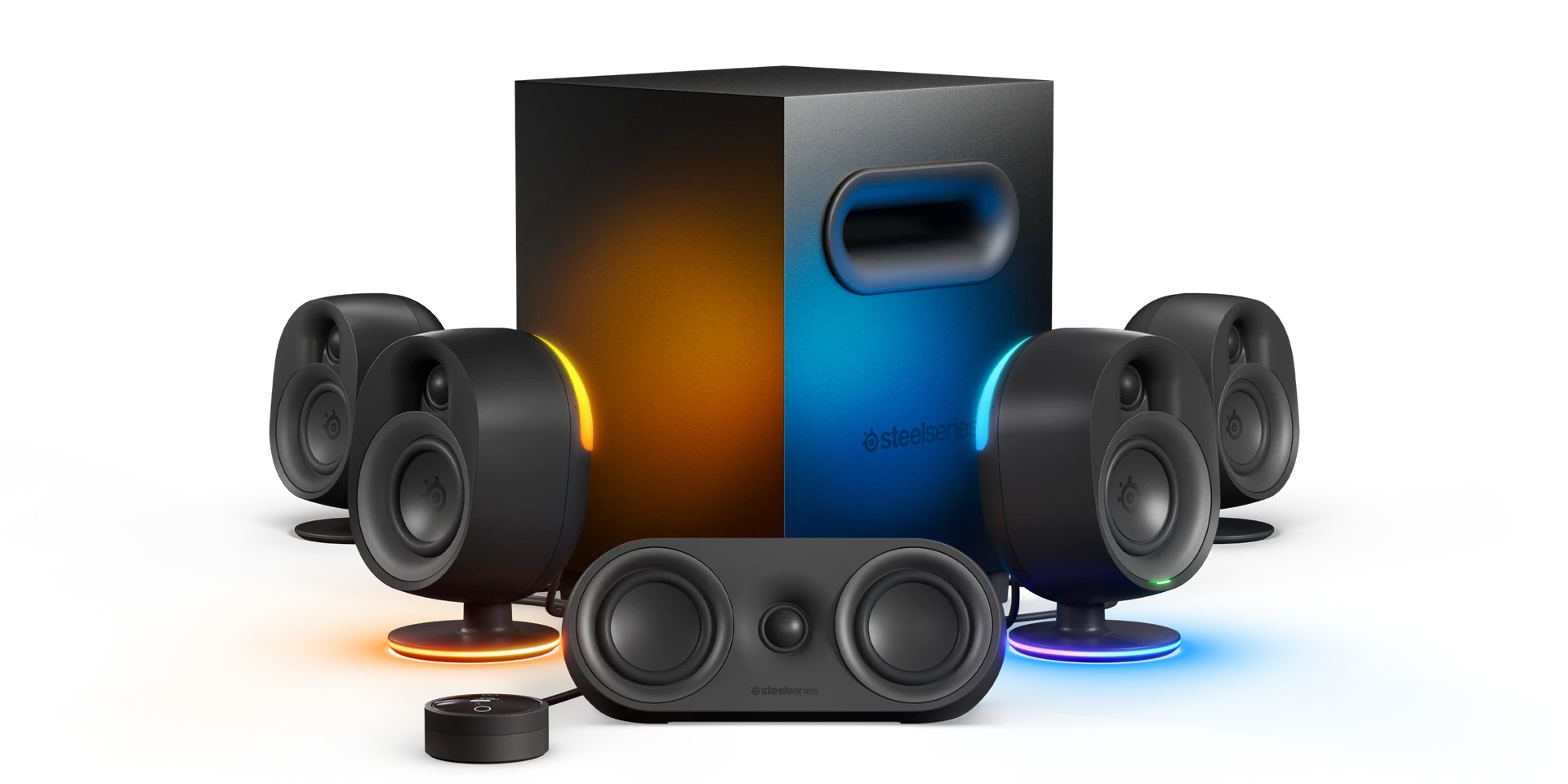
Featured Image: SteelSeries Arena 9
One item that’s often forgotten by sim racers is the speakers. However, just like any other constituent that adds to the realism factor of sim racing, a good set of speakers can increase your immersion level in simulation games and, therefore, your performance when playing.
Quick Navigation
Jump directly to what you’re looking for:
What speakers I use |
My desktop speakers |
Speakers for sim racers |
Best Amazon deals |
Creative Pebble Plus |
Redragon GS500 |
Logitech Z313 |
Cyber Acoustics CA-3810 |
Creative T100 |
AudioEngine HD3 |
Logitech Z906 |
Razer Leviathan V2 |
Buttkickers
What Gaming Speakers Do I use?
I’ve been running a Logitech Z407 system on my racing rig for a few years, paired with a ButtKicker Gamer 2 for the past two. My desktop setup uses Kanto YU 2 speakers with a Tannoy HTS subwoofer – both systems chosen after testing various gaming speakers over the years.

I’ve written this gaming speaker guide to focus on measurable performance rather than marketing specifications. I’ll explain the technical differentiators that help while you’re driving in the sim – materials, amplifier classes, power delivery constraints, and frequency response characteristics – alongside the products I’ve personally tested.
With so many components that go into building your first simulator setup, it’s easy to overlook the sound aspect. Speakers get forgotten by sim racers, yet a good set increases your immersion level and obviously, your performance. Hearing your left-rear tire start to lose grip 200 milliseconds before the visual slide begins can save a lap time – provided your speakers accurately reproduce the 2-4kHz frequency range where tyre screech occurs.
Why the Logitech Z407’s?
The main reason I bought my Z407’s are that they’re Bluetooth, so you’ve got one less cable to worry about. But the volume control, which I mount on my keyboard tray, is also wireless – just such a nice touch. Soundwise we’re talking mid-range gear here. They deliver 40 watts RMS total (20W subwoofer, 2x10W satellites), which provides adequate volume for solo practice sessions but can feel underpowered during pack racing scenarios where multiple engines compete for acoustic space.
I compensate with my ButtKicker:

The Z407 with a ButtKicker (and, if you’re lucky, some pedal rumble motors) is genuinely all you need for an immersive audio experience in the simulator. The ButtKicker handles the 5-50Hz sub-bass that you feel rather than hear – chassis vibration, kerb strikes, road texture – whilst the Z407 covers the 50-200Hz engine fundamentals and critical 2-4kHz tire feedback range.
Naturally, I’ve listed a bunch of alternatives below, all of which I rather like. Some get pricey, so do be warned.
My Desktop Gaming Speakers
I also have a desktop gaming setup for Minecraft and Fall Guys – my 9-year-old loves it. The desk is a standing desk, so I use Kanto YU 2 active speakers with Bluetooth.

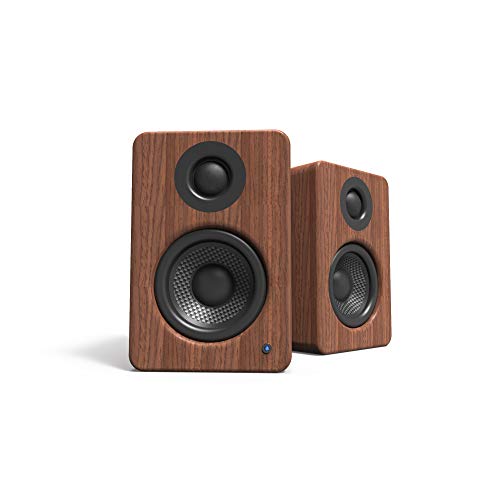
Kanto YU2 Powered Desktop Speakers 2.0
- 50W RMS total with 3″ composite drivers
- Built-in USB DAC for high-quality audio
- 3/4″ silk dome tweeters for clarity
- MDF cabinet with rear bass port
The Kantos deliver 25 watts RMS per channel (50 watts total peak power) using Class D amplification. Class D amplifiers run at over 90 percent efficiency, generating minimal heat whilst enabling compact powered speaker designs. The alternative – Class A/B amplifiers at 60-70 percent efficiency – require larger enclosures for heat dissipation but some prefer their sound signature. For gaming purposes, both work fine.

I added a 100-watt Tannoy HTS 101 subwoofer to cover the 30-80Hz range the Kantos can’t reproduce cleanly. The combination provides accurate stereo imaging for directional audio cues whilst the sub handles low-frequency impact.

Gaming Speakers for Sim Racers
Selecting gaming speakers for sim racing requires understanding what differentiates marketing claims from measurable performance. Power delivery, driver materials, frequency response characteristics, and amplifier topology all impact your ability to detect critical audio cues during racing.
What’s changed for 2026: a couple of names have moved on since I first wrote this. Bose has left the desktop-speaker market entirely (the Companion line is gone), and Razer’s older Nommo Chroma and original Leviathan are both retired in favour of the V2 versions. If you want something newer than the mainstays below, the Creative Pebble X Plus adds USB-C audio, Bluetooth 5.3 and RGB over the older Pebble, and SteelSeries’ Arena range (the Arena 9 is the one in the header image) is worth a look if you want reactive lighting and proper 2.1 or surround without wiring up a full AV receiver.
Power Delivery: USB vs Wall Power
USB power limits are fundamental physics. USB 2.0 delivers 5 volts at 0.5 amps, equalling 2.5 watts maximum. USB 3.0 improves this to 5 volts at 0.9 amps, delivering 4.5 watts. Any USB-powered speaker advertising 10W or 16W RMS is either using creative marketing or requires additional wall power to reach stated figures.
Wall-powered systems access 10-500 watts actual delivery. My Logitech Z313 delivers 25W RMS (15W subwoofer, 2x5W satellites) – roughly ten times the acoustic output of a USB-powered system. For solo hotlapping where you’re listening for subtle tire scrub, 2.5 watts suffices. During race starts with 20 cars revving simultaneously, USB systems lack headroom.
Driver Materials Matter
Speaker cone material directly impacts transient response and frequency accuracy. Paper cones provide good damping and natural midrange reproduction but suffer moisture sensitivity and can flex at high sound pressure levels. Polymer drivers (typically polypropylene) offer better moisture resistance and smoother response but deliver slower transient response.
Glass fiber drivers maintain rigidity at high volume. The Razer Nommo V2 uses glass fiber cones that prevent flexing during rapid frequency changes – critical for tracking tire lockup sounds in the 2-4kHz range. The stiffness-to-weight ratio determines how quickly the driver responds to signal changes. When your rear tires start sliding, you need to hear that transition instantly.
Aramid fiber (Kevlar family) combines paper cone damping with polymer durability plus exceptional rigidity. The AudioEngine HD3 uses 2.75-inch aramid fiber woofers that extend clean bass response to 60-70Hz despite their small size – covering engine fundamentals that typical paper cones miss below 80-100Hz.
Frequency Response for Sim Racing
Engine notes span 40-200Hz depending on RPM and load. Idle sits around 40-60Hz fundamentals. Mid-RPM operation produces 60-120Hz content. High-RPM running generates 100-200Hz fundamentals with harmonics extending to 400Hz. Tyre screech and lockup detection requires accurate 2-4kHz reproduction. Wind noise occupies 4-8kHz.
Budget USB speakers often specify frequency response starting at 270Hz – missing all engine fundamentals entirely. Mid-range 2.1 systems with 4-inch subwoofers cover 50-150Hz comfortably. Premium 2.0 systems using advanced driver materials extend to 60-70Hz without dedicated subs.
Best Gaming Speaker Deals – Amazon

Nylavee Computer Speakers 2.0 (Budget)
- 10W USB-C powered (actual: 4-5W via USB)
- 9 LED lighting modes
- Passive radiators for bass augmentation
- Compact design for tight desk spaces

littoak Bluetooth PC Speakers 2.0
- 30W total (2×15W channels)
- 3 EQ modes: Game/Movie/Music
- 6 RGB lighting modes
- Bluetooth 5.0 connectivity
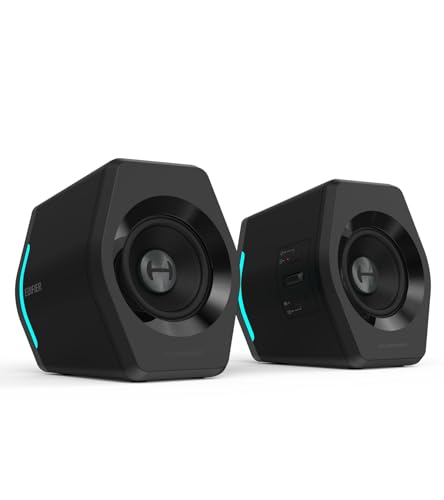
Edifier G2000 RGB Gaming Speakers
- 32W peak power (16W RMS)
- 12 RGB lighting effects
- Game/Movie/Music sound modes
- Bluetooth 5.1, USB, 3.5mm inputs
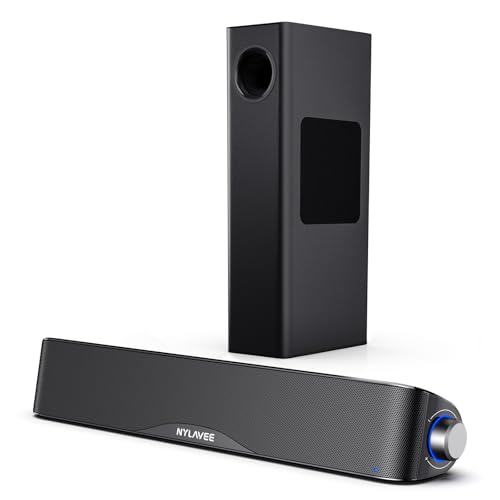
Nylavee Computer Speakers 2.1 with Subwoofer
- 60W peak (30W RMS actual)
- 5.25-inch subwoofer for bass extension
- Bluetooth 5.4 connectivity
- Multiple input options: BT/AUX/USB

Bluedee Computer Speakers 2.0
- 20W peak power
- Egg-shaped design with RGB
- Bluetooth 5.4 wireless
- 360-degree sound dispersion

Klipsch ProMedia 2.1 THX Certified (Premium)
- 200W peak power, THX Certified
- 6.5-inch ported subwoofer
- MicroTractrix horn-loaded satellites
- Professional-grade audio performance
Creative Pebble Plus 2.0
The Creative Pebble Plus markets itself as delivering 16W RMS (8W satellites, 8W subwoofer), but achieving this requires an external USB power adapter rated for 5V 2A – not the USB 2.0 port connection alone. Here’s where physics intervenes: USB 2.0 delivers a maximum 2.5 watts total from a standard port. The marketed 16W figure requires the included USB power adapter supplying 10 watts, not power drawn directly from your motherboard’s USB port.

Real-world wattage likely sits around 4-6W total if using USB 3.0, or 2-3W via USB 2.0. For solo hotlapping sessions at moderate volume, this suffices – you can hear tire scrub and track surface changes clearly. Pack racing scenarios where multiple engines compete acoustically expose the power limitations. The system simply lacks headroom for dynamic peaks.
That said, if you’re running a tight desk setup with triple monitors and no room for larger speakers, the Pebble Plus delivers exactly what it physically can within USB power constraints. Just don’t expect the marketed 16W performance. Compare this to the wall-powered Logitech Z313 delivering actual 25W RMS – roughly five to ten times more acoustic output depending on USB version.
The 4-inch down-firing subwoofer provides bass presence around 60-80Hz, though the USB power limitation means it won’t deliver chest-thumping impact. For nearfield desktop listening where you need to hear detail rather than feel rumble, it works reasonably well.
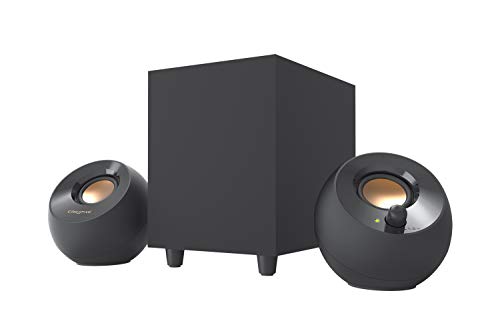
Creative Pebble Plus 2.1 USB-Powered Speakers
- 8W RMS (requires 5V 2A USB adapter)
- 4″ down-firing subwoofer
- 45° elevated 2″ drivers
- USB-powered with High Gain mode
Redragon GS500 Stentor
Redragon’s GS500 Stentor occupies the budget USB-powered category. The specifications reveal a critical limitation: frequency response starts at 270Hz. This means the speakers cannot reproduce any content below 270Hz – missing all engine fundamentals entirely.

Engine notes at idle (40-60Hz), mid-RPM (60-120Hz), and high-RPM (100-200Hz) all fall well below the speaker’s capabilities. What you hear is mid-bass emphasis and higher frequencies – exhaust harmonics rather than fundamental engine tones. The result sounds thin, lacking the weight and body that makes engine sounds satisfying.
Marketed power sits at 10W peak, though actual USB delivery limits this to 2-3W RMS via USB 2.0. Redragon makes the GS500 in a compact size to fit tight desktop spaces and provides plug-and-play connectivity through one USB port, a 3.5mm jack, and mic cables for online racing communication.
Best suited for background audio during practice sessions rather than immersive racing. The 270Hz low-frequency limit makes this unsuitable if engine note accuracy matters to your driving.

Redragon GS500 Stentor PC Gaming Speaker
- USB powered 2.0 stereo (2-3W actual)
- Frequency response starts at 270Hz
- Red LED backlight accent
- Compact design for tight spaces
Logitech Z313 2.1
The Logitech Z313 delivers 25W RMS actual power distribution: 15 watts to the subwoofer, 5 watts per satellite. This represents roughly ten times the acoustic output of USB-powered systems – a meaningful difference during pack racing scenarios.

The 4-inch subwoofer uses bass reflex port tuning, likely optimised around 60Hz. Port tuning creates a resonance that reinforces specific frequencies – in this case, the mid-bass region where engine fundamentals sit. The benefit is strong presence and punch. The trade-off comes from port tuning’s tendency toward one-note bass when not carefully implemented.
During engine note reproduction spanning 40-200Hz across different RPM ranges, over-tuned ports can make all engine sounds blend together rather than revealing RPM changes and load variations. The Z313’s tuning emphasises impact over articulation – you feel the bass presence but may miss subtle detail in the 30-50Hz road texture range.
At this price point, the emphasis on punch rather than analytical detail makes sense. For sim racers prioritising visceral impact during race starts and heavy braking zones, the Z313 delivers. If you need to differentiate between individual cars’ engine notes in close formation, the port tuning may obscure that level of detail.
The caveat: bass reflex ports can create audible chuffing noise at high volume – air turbulence through the port becomes noticeable. Keep volumes moderate to avoid this.
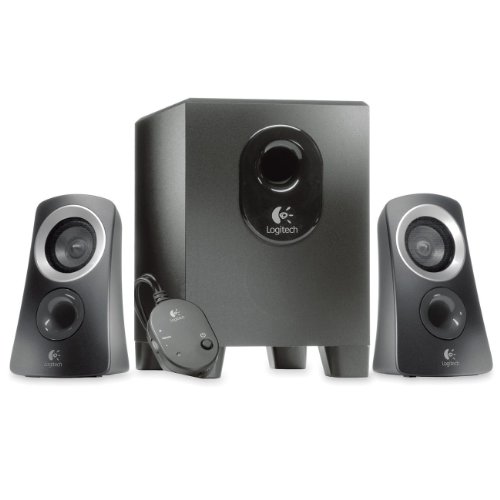
Logitech Z313 2.1 Speaker System
- 25W RMS (15W subwoofer, 2x5W satellites)
- 4-inch down-firing subwoofer
- Wired volume control with power button
- 3.5mm input for universal compatibility
Cyber Acoustics CA-3810 2.1
The Cyber Acoustics CA-3,810 uses a 5.25-inch power-ported subwoofer – notably larger than the Z313’s 4-inch driver. Larger drivers move more air at lower frequencies, extending bass response deeper. The CA-3,810 delivers 20W RMS total: 10 watts to the subwoofer, 5 watts per satellite.

The power-ported design trades articulation for volume. Port tuning augments specific low frequencies, and the 5.25-inch driver provides more bass quantity than the Z313. However, poorly tuned bass ports can create boomy or muddy bass that obscures detail. You get powerful presence in the 40-80Hz range but may lose the ability to distinguish road texture changes from engine rumble.
The adjustable bass control proves useful here – you can balance impact against detail based on what you’re driving. GT3 cars with smoother power delivery might benefit from reduced bass, whilst rally cars on gravel surfaces suit heavier bass emphasis for terrain feedback.
Best for sim racers prioritising visceral rumble over analytical detail. If you want to feel kerb strikes and heavy braking in your chest, the 5.25-inch sub delivers. For close racing where you need to hear individual tire behaviours, the port tuning may prove too blunt an instrument.

Cyber Acoustics CA-3810 2.1
- 40W RMS (80W peak) total power
- 5.25″ side-firing ported subwoofer
- Dual 2″ satellite drivers
- Control pod with volume and bass adjustment
Creative T100 2.0
Creative’s T100 delivers 40W RMS (20W per channel) with BasXPort technology augmenting the 2.75-inch drivers. Bass reflex ports typically extend low-frequency response by 10-20Hz below what sealed enclosures achieve with the same driver size. The T100 likely reaches 60-70Hz before rolloff – covering engine fundamentals cleanly.

The optical input provides a cleaner signal path than 3.5mm analog connection. Motherboard audio stages introduce electrical noise from nearby components – USB peripherals, graphics cards, voltage regulators all create interference. Optical connection bypasses the motherboard’s analog stage entirely, delivering digital signal directly to the speaker’s DAC. The result is a quieter noise floor and clearer detail retrieval.
Multiple EQ modes target different content types. Gaming mode typically emphasises the 2-4kHz tire-screech range whilst boosting sub-bass for impact. Music mode aims for flatter response. Film mode often lifts dialogue frequencies around 1-3kHz. The specific frequency curves vary by manufacturer, but the principle remains: different content benefits from different emphasis.
Compare the T100’s 40W RMS to USB speakers’ 2-4W actual delivery – roughly ten times more acoustic output. For triple-monitor setups where speaker placement options are limited, the T100’s combination of adequate power, optical input, and bass augmentation via ports makes this a solid mid-range choice.

Creative T100 2.0 Compact Speakers
- 40W RMS (20W per channel) digital amplifier
- BasXPort technology for enhanced bass
- Bluetooth 5.0, Optical, AUX, USB inputs
- 4 EQ modes: Movie, Music, Concert, Gaming
AudioEngine HD3 Wireless Speakers 2.0
The AudioEngine HD3 represents premium compact 2.0 design, using 2.75-inch aramid fiber woofers paired with 0.75-inch silk dome tweeters. Aramid fiber sits in the Kevlar family of materials – high tensile strength, light weight, exceptional stiffness-to-weight ratio. These properties enable smaller drivers to move more air without cone flexing.

Typical 2.75-inch paper cone drivers deliver clean response to 80-100Hz before rapid rolloff. The HD3’s aramid fiber construction extends clean bass to 60-70Hz – covering engine fundamentals that smaller drivers miss. Engine notes at idle (40-60Hz) and mid-RPM (60-120Hz) fall within this range. You lose only the deepest road texture rumble below 60Hz.
AudioEngine chose Class A/B amplification despite the HD3’s compact desktop form factor. Class D amplifiers run at over 90 percent efficiency, generating minimal heat whilst enabling tight packaging. Class A/B operates at 60-70 percent efficiency, requiring larger heatsinks and ventilation. The engineering decision favours sonic character over maximum efficiency – Class A/B’s analog amplification stage appeals to some listeners, though both classes work fine for gaming.
The HD3 delivers 30W RMS total using a built-in AKM AK4396 DAC supporting 24-bit/48kHz via USB connection. High-resolution audio specifications (24-bit/96kHz) provide wider dynamic range and frequency response than human hearing requires. CD quality sits at 16-bit/44.1kHz, delivering 96dB dynamic range and 22kHz frequency response – sufficient for all audible content. Gaming audio typically arrives at 16-bit/48kHz anyway.
The practical benefit comes from DAC implementation quality rather than bit depth numbers. A well-designed 16-bit/48kHz DAC outperforms a mediocre 24-bit/96kHz converter. The HD3’s AKM chip provides clean conversion with low noise floor – more important than the supported resolution figures.

AudioEngine HD3 Wireless Speakers 2.0
- 60W total with 2.75″ aramid fiber woofers
- 0.75″ silk dome tweeters for clarity
- Bluetooth aptX-HD codec support
- USB, RCA, and 3.5mm AUX inputs
Bluetooth connectivity supports aptX HD codec for high-quality wireless streaming. However, aptX HD prioritises audio quality over latency, maintaining roughly 150 milliseconds delay between audio signal and output. Standard SBC (Subband Coding) and AAC codecs also introduce 150-200ms latency. Only aptX Low Latency reduces delay to 30-40ms – acceptable for sim racing where audio needs synchronisation with visual feedback.
The HD3 doesn’t support aptX Low Latency. Bluetooth proves useful for music during rig setup but creates unacceptable lag for active racing. Use wired connection (USB, optical, or 3.5mm analog) for sim racing. The 150ms delay means you’ll hear tire screech after your eyes see the slide begin – backwards from optimal feedback timing.
Silk dome tweeters deliver smooth high-frequency response opposite to metal dome “brightness.” Tire screech, wind noise, and suspension detail occupy 2-8kHz. Silk domes reproduce this range without the peaky resonances metal domes sometimes exhibit. Combined with the aramid fiber woofers’ articulate bass, the HD3 provides detailed sound without requiring a subwoofer.
The trade-off: you lose chest-thumping impact below 60Hz. The Z313’s 4-inch sub or Z906’s 6.5-inch sub deliver physical rumble the HD3 cannot match. If you prioritise articulate detail over visceral impact – hearing individual tire behaviours rather than feeling pack racing chaos – the HD3’s driver technology excels.
Logitech Z906 5.1
The Logitech Z906 delivers 500W RMS distributed across six drivers: 165 watts to the 6.5-inch subwoofer, 75 watts to each of five satellites. This isn’t marketing theatre – wall power enables genuine 500W delivery. The significant aspect isn’t the total wattage but that this system is THX Certified.

THX certification tests complete systems, not individual components. Requirements include achieving 85 dB SPL (Sound Pressure Level) at the listening position across all channels simultaneously, with 20dB headroom for dynamic peaks. This means 105 dB capability without distortion. Total Harmonic Distortion must stay below 0.5 percent at reference level. Frequency response must maintain ±3dB from 80Hz-20kHz across all satellites. Tonal balance must match between channels.
Non-certified systems may spec similar numbers but lack verified performance as a complete, integrated system. THX testing validates that the Z906 delivers consistent, accurate sound across all channels at high volume. For pack racing scenarios demanding high SPL without distortion – multiple engines, wind noise, tire screech, collision sounds competing simultaneously – the certification provides confidence the system handles complexity without muddying detail.
Discrete speaker positioning fundamentally differs from soundbar virtual surround. The Z906 places physical speakers at specific angles: front left, front right, centre, rear left, rear right, plus subwoofer. Sound actually originates from different positions. Your brain doesn’t need HRTF processing tricks; it hears genuine directional cues from physically separated sources.
Each satellite handles a specific frequency range and spatial zone. The centre channel carries dialogue and central audio elements. Front left/right create stereo imaging. Rear left/right provide spatial positioning for sounds behind you. The 6.5-inch subwoofer covers 35-150Hz – deep enough for all road texture rumble and engine fundamentals.
Setup complexity represents the trade-off. Five satellites plus subwoofer require proper positioning for optimal imaging. You need space behind your seating position for rear channels. Cable management across the room. Time spent positioning speakers at correct angles. For dedicated sim rig rooms with space for proper speaker placement, the Z906 delivers unmatched positional accuracy among desktop gaming speakers.
Digital inputs (optical, coaxial) bypass motherboard analog stages, plus analog 3.5mm for flexibility. The Z906 works with consoles, PCs, and any source supporting multi-channel output. For triple-monitor setups where accurate directional audio matches peripheral vision cues, discrete 5.1 positioning provides immersion soundbars cannot deliver.
Compare the Z906’s 75W per satellite to typical 2.0 systems’ 15-30W per channel. Each satellite delivers more power than many complete 2.0 systems. During race starts with 20 cars creating acoustic chaos, the headroom matters – you’ll hear individual elements clearly rather than compressed mush.
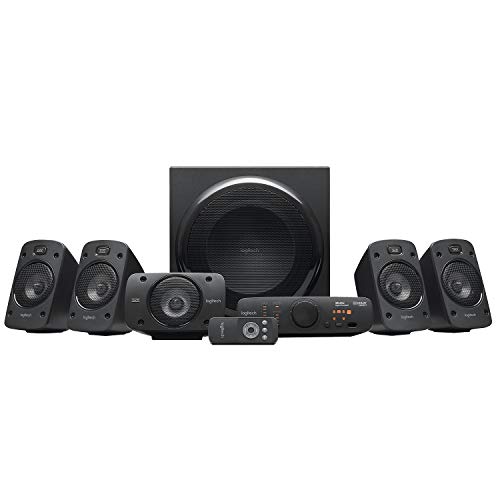
Logitech Z906 5.1 Surround Sound System
- 500W RMS (165W sub, 5×67W satellites)
- THX Certified for cinema-quality sound
- Dolby Digital & DTS decoding
- 6 device inputs with remote control
Razer Leviathan V2
Razer replaced the original Leviathan with the V2 model, maintaining the soundbar form factor whilst updating connectivity and processing. The V2 uses THX Spatial Audio processing – an evolution of the original’s Dolby Virtual Speaker system.

THX Spatial Audio creates virtual height channels alongside width – attempting to simulate overhead audio cues. The physics limitation remains: all sound originates from a single soundbar position. Processing can create the impression of wider or higher soundstage, but your brain still localises the actual source. For sim racing where vertical audio positioning matters little (cars don’t fly overhead), the height channels provide minimal benefit.
The V2 adds Bluetooth 5.3 connectivity, improving on the original’s Bluetooth 4.2. Latency through Bluetooth remains problematic for sim racing – even with improved codec support, wireless audio introduces 100-150ms delay. Use wired connection for racing; Bluetooth suits music during setup.
For single-monitor sim racers with limited desk space, the Leviathan V2 provides adequate immersion through virtual surround processing. The compact form factor and reasonable price make this accessible. However, triple-monitor users benefit more from discrete 5.1 systems where physical speaker positioning matches peripheral vision cues.

Razer Leviathan V2 X PC Soundbar
- USB Type C power and audio delivery
- Two full-range drivers + passive radiators
- Bluetooth 5.0 connectivity
- 14-zone Razer Chroma RGB lighting
Optional Extras: Buttkickers
ButtKickers provide tactile transducer feedback – you feel bass frequencies through your seat rather than hearing them. The technology differs fundamentally from speakers. ButtKickers use electromagnetic motors to shake your seat in response to low-frequency audio signals, typically below 100Hz.

My ButtKicker Gamer 2 handles the 5-50Hz range that I feel rather than hear – chassis vibration from kerb strikes, road surface texture, suspension loading, engine vibration transmitted through the chassis. This frequency range sits below what most speakers reproduce cleanly, and below the threshold where acoustic bass becomes tactile sensation.

Combining speakers with ButtKicker creates division of labour: speakers handle 50-20,000Hz acoustic information you hear, the ButtKicker covers 5-50Hz tactile feedback you feel. My Logitech Z407 doesn’t need to reproduce deep sub-bass cleanly because the ButtKicker handles that range. This allows the Z407 to focus on mid-bass, midrange, and treble without over-emphasising frequencies it can’t reproduce accurately.

The advantage: you can run modest speakers for acoustic reproduction whilst the ButtKicker provides physical immersion. A 2.0 system lacking deep bass extension becomes adequate when paired with tactile feedback. You hear engine notes and tire detail through speakers, feel road texture and suspension through the transducer.

Alternative bass shakers exist from companies like Dayton Audio and Aura, operating on similar electromagnetic principles. ButtKicker’s Gamer series targets sim racing specifically, with appropriate power ratings and mounting hardware. Professional models (ButtKicker Pro) deliver more force but require separate amplification and installation complexity that exceeds most sim racing requirements.
Build the rest of the rig
Audio sits in a wider rig context – if you’re spec-ing the build, my hardware guides cover the rest: the gaming PC buyer’s guide for sim racing, the best sim rigs on the market, VR headsets for sim racing (immersion + spatial audio context), and the direct drive wheels buyer’s guide.
Best Thrustmaster Wheel and Pedal Mods (2026)
ButtKicker and Tactile Feedback for Sim Racing: The Highest-ROI Upgrade You Shouldn’t Skip (2026 Beginner’s Guide)
Sim Racing Motion Platforms: A Beginner’s Guide to Adding Motion to Your Rig (2026)
D-Box Sim Racing: The FIA-Supplier Haptic System Explained (2026 Buyer’s Guide)
Best Throttle for Flight Simulator 2026: MOZA, Honeycomb, Thrustmaster, WinCTRL Compared