

I’m a sim racer and amateur racer with a passion for Motorsport, good racecraft and the technical and setup aspect of sim racing.
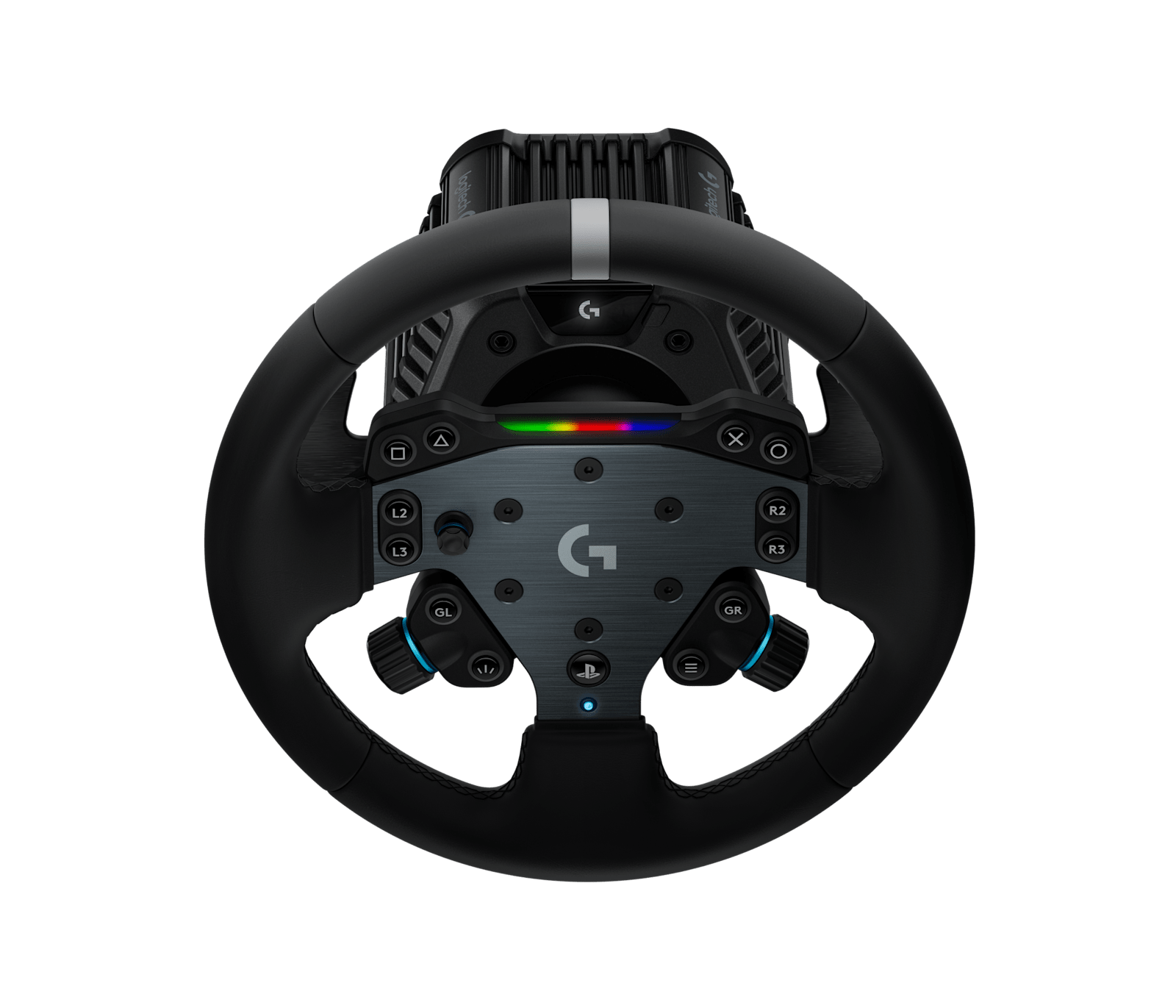
Featured image: the Logitech G RS50 System with the RS round wheel for PlayStation (Image: Logitech)
If you’ve got a Logitech RS50 plugged into a PS5 or an Xbox, you’ll want to know which games it works in and how to set it up for each one. Today we’re taking a look at Logitech’s own settings for the big console games, on the RS50 first and then in each game’s menus. Every other console game Logitech lists for the RS50 is in here too, with the five RS50 settings for each.
Quick Navigation
Jump directly to what you’re looking for:
RS50 on console |
GT7 |
F1 25 |
ACC |
Forza Motorsport |
Forza Horizon |
EA WRC |
Compatible games |
Fine-tuning
The RS50 on PS5 and Xbox
There are two versions of the RS50, the RS50 System for PlayStation/PC and the RS50 System for Xbox/PC. They’re separate products, with different model numbers for the base and the wheel hub, but both deliver 8 Nm of FFB (force feedback) with TrueForce.
The numbers here come from Logitech’s RS50 settings list, which has a PlayStation table and an Xbox table, five settings on the RS50 for every game and a screenshot of each game’s own menu. They’re the values as Logitech last updated them, on 23 September 2026. The same game can take different numbers on each console, so where a game is on both of Logitech’s lists, you’ll find both sets of numbers below. Every value assumes the RS50 is running at its full 8 Nm.
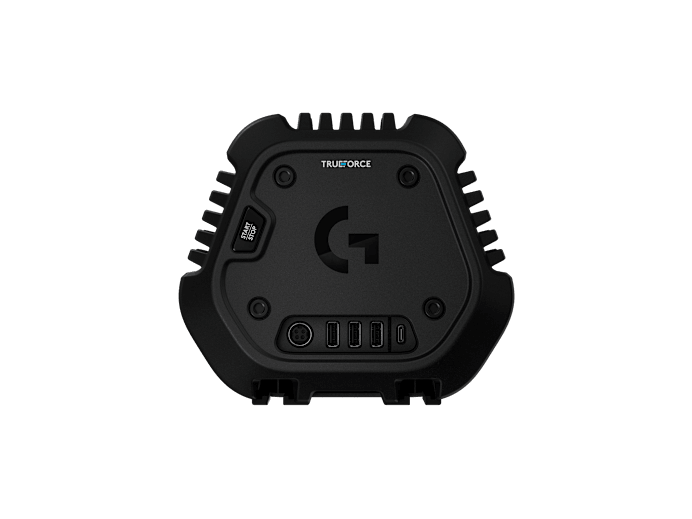
You set all five on the RS50 itself, from its OLED settings screen. There are two Compatibility Modes, RS and PRO, and in PRO mode the RS50 works as Logitech’s PRO Racing Wheel, so a game that already supports the PRO wheel picks it up automatically. Whichever you pick, set it before you start the game, as changing it mid-game can cause odd behaviour.
The FFB Filter smooths the force feedback, so a higher number feels smoother and a lower one more raw. The Dampener calms a direct drive wheel that moves too quickly, and Logitech’s advice is to keep it as low as possible. TF Audio sets the gain for TrueForce, which is Logitech’s layer of vibration effects on top of the force feedback. Where a game has no TrueForce, Logitech lists the setting as N/A. Angle is the RS50’s overall rotation, and whether you need to change it depends on the game and the console. Logitech’s example is F1, where on a console you’d leave the RS50 at its maximum and let the game take care of it. Logitech’s F1 25 PlayStation row says 360 degrees, though, and only one PlayStation game and nine Xbox games on its lists are left at the full 2700.
If a game supports the G29, G920 or G923, Logitech says the RS50 should work in it too, though it may need some setup first.
Gran Turismo 7 settings
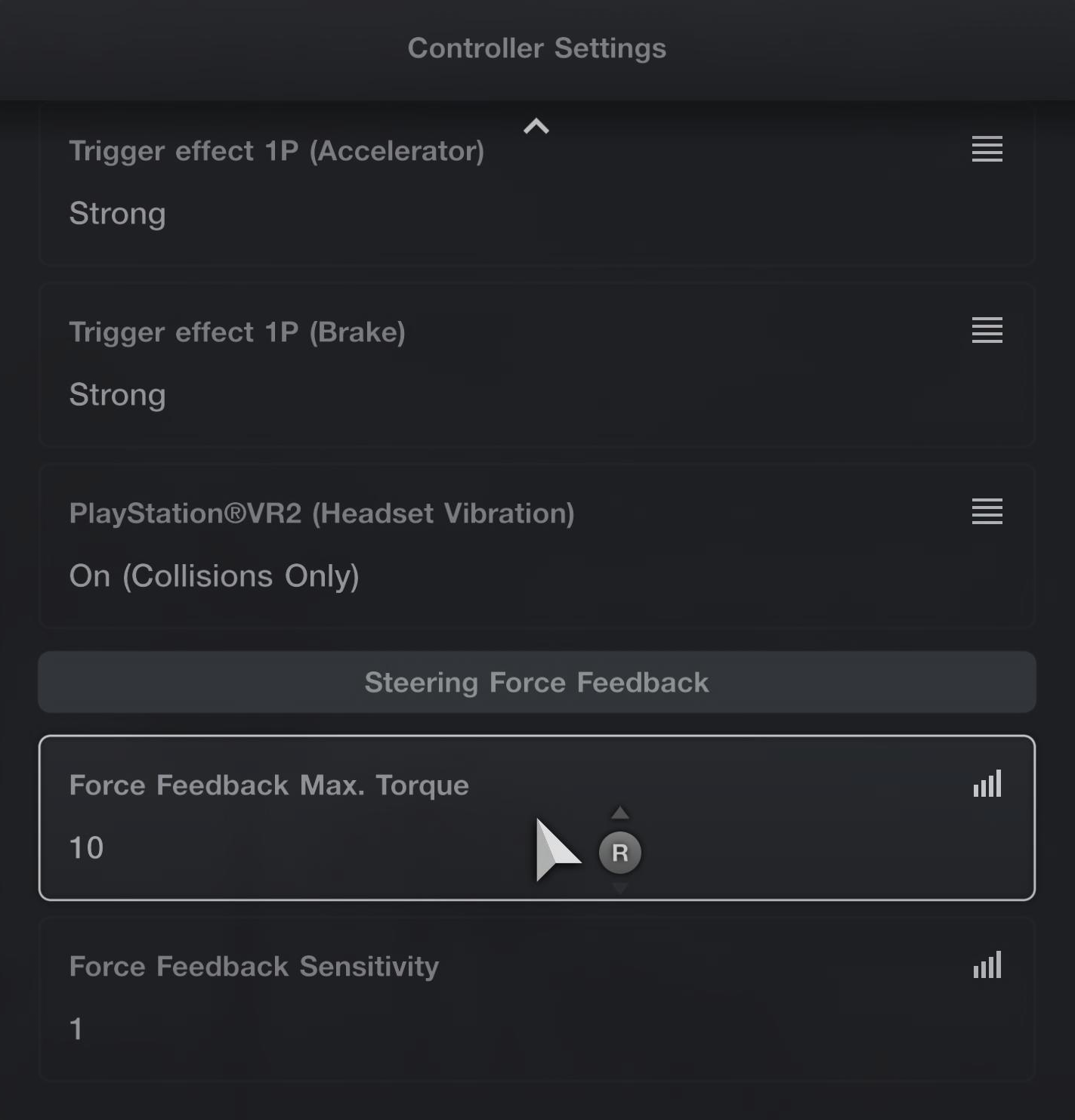
Logitech’s GT7 settings on the RS50 are the same for road cars and Gr. cars, with the angle left for the game to set for each car. The difference is in the game, where Force Feedback Max. Torque drops from 10 for road cars to 5 for Gr. cars.
Logitech’s support note on GT7 says the game puts a very strong centring force through the RS50, which can make it oscillate in some cars, especially Gr.3 to Gr.1. Turning Force Feedback Sensitivity up makes it worse, and if it happens to you, the fix is the first item under Fine-tuning.
On the RS50, set these for GT7 on PS5:
- Compatibility Mode: RS
- FFB Filter: 6
- Dampener: 20
- TF Audio: 100
- Angle: Set by game per car automatically
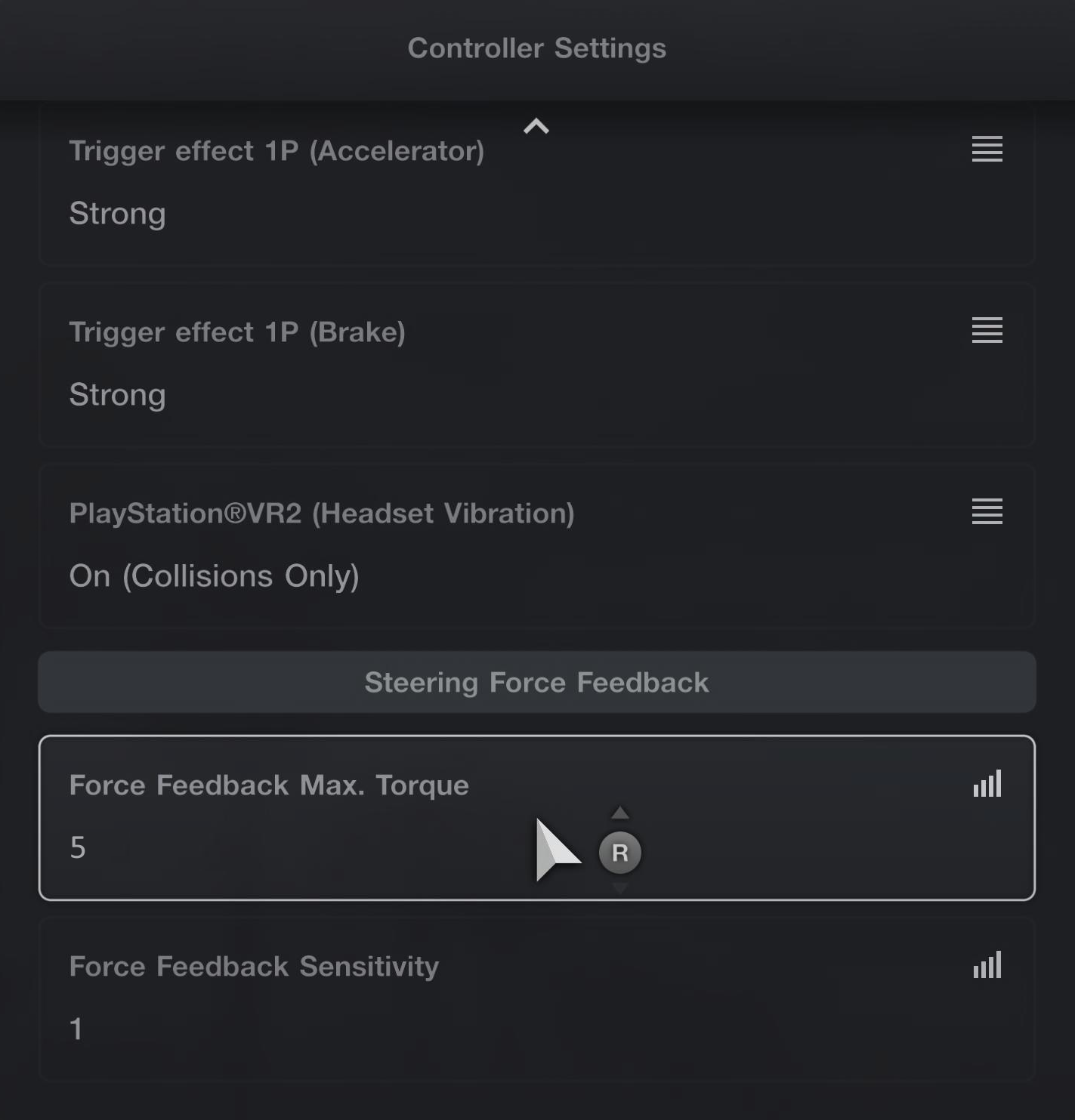
Then in GT7’s Controllers tab, set Max. Torque and Sensitivity under Controller Settings > Steering Force Feedback, and the two vibration settings under Vibration function:
Visit Our Sponsors
- Road cars:
- Force Feedback Max. Torque: 10
- Force Feedback Sensitivity: 1
- Gr. cars:
- Force Feedback Max. Torque: 5
- Force Feedback Sensitivity: 1
- Vibration function (P1): On
- Vibration Strength: 100
F1 25 settings
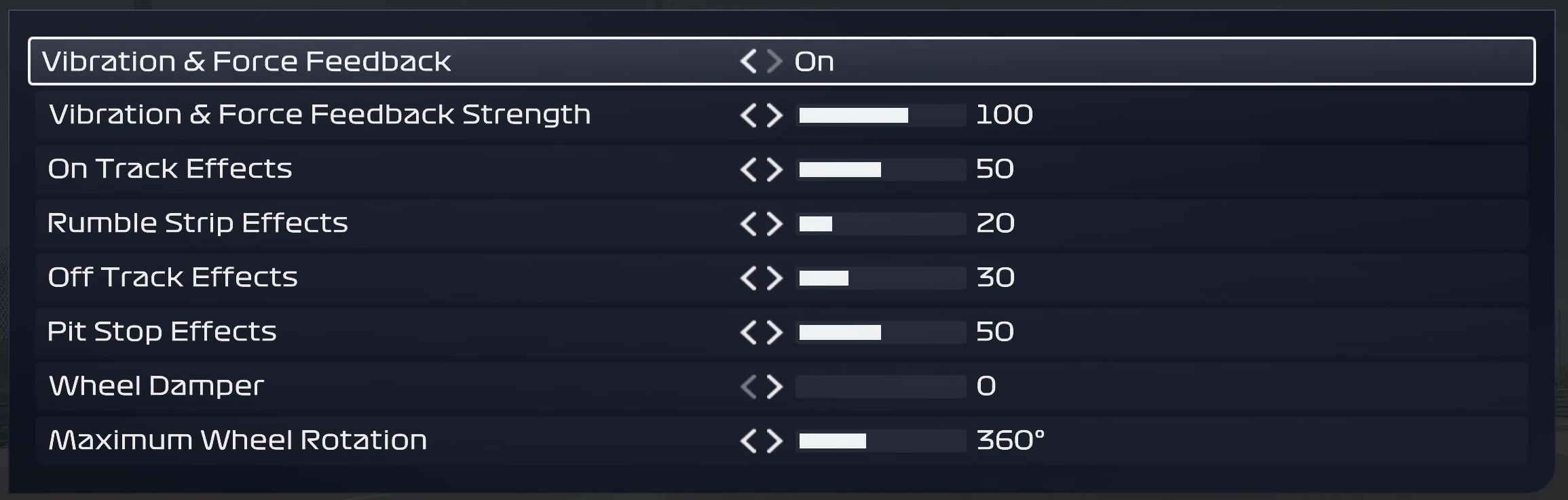
F1 25 added RS50 support on PC, Xbox and PS5 in its v1.13 patch on 14 October 2025, and v1.14 followed on 10 November 2025 with fixes for PS5 issues with the RS50. Logitech listed F1 25 in PRO mode back in March 2026 and has it in RS mode on both consoles now, so if you set it up from the older list, switch the RS50 over to RS. The in-game screen is the same on both consoles, with Maximum Wheel Rotation at 360°, but Logitech sets the RS50’s angle to 360 on PlayStation and leaves it at the full 2700 on Xbox.
Set these on the RS50 for F1 25:
- On PS5:
- Compatibility Mode: RS
- FFB Filter: 1
- Dampener: 70
- TF Audio: 20
- Angle: 360°
- On Xbox:
- Compatibility Mode: RS
- FFB Filter: 5
- Dampener: 70
- TF Audio: 20
- Angle: 2700°
Then in F1 25’s own settings, use these on either console:
- Vibration & Force Feedback: On
- Vibration & Force Feedback Strength: 100
- On Track Effects: 50
- Rumble Strip Effects: 20
- Off Track Effects: 30
- Pit Stop Effects: 50
- Wheel Damper: 0
- Maximum Wheel Rotation: 360°
Assetto Corsa Competizione settings
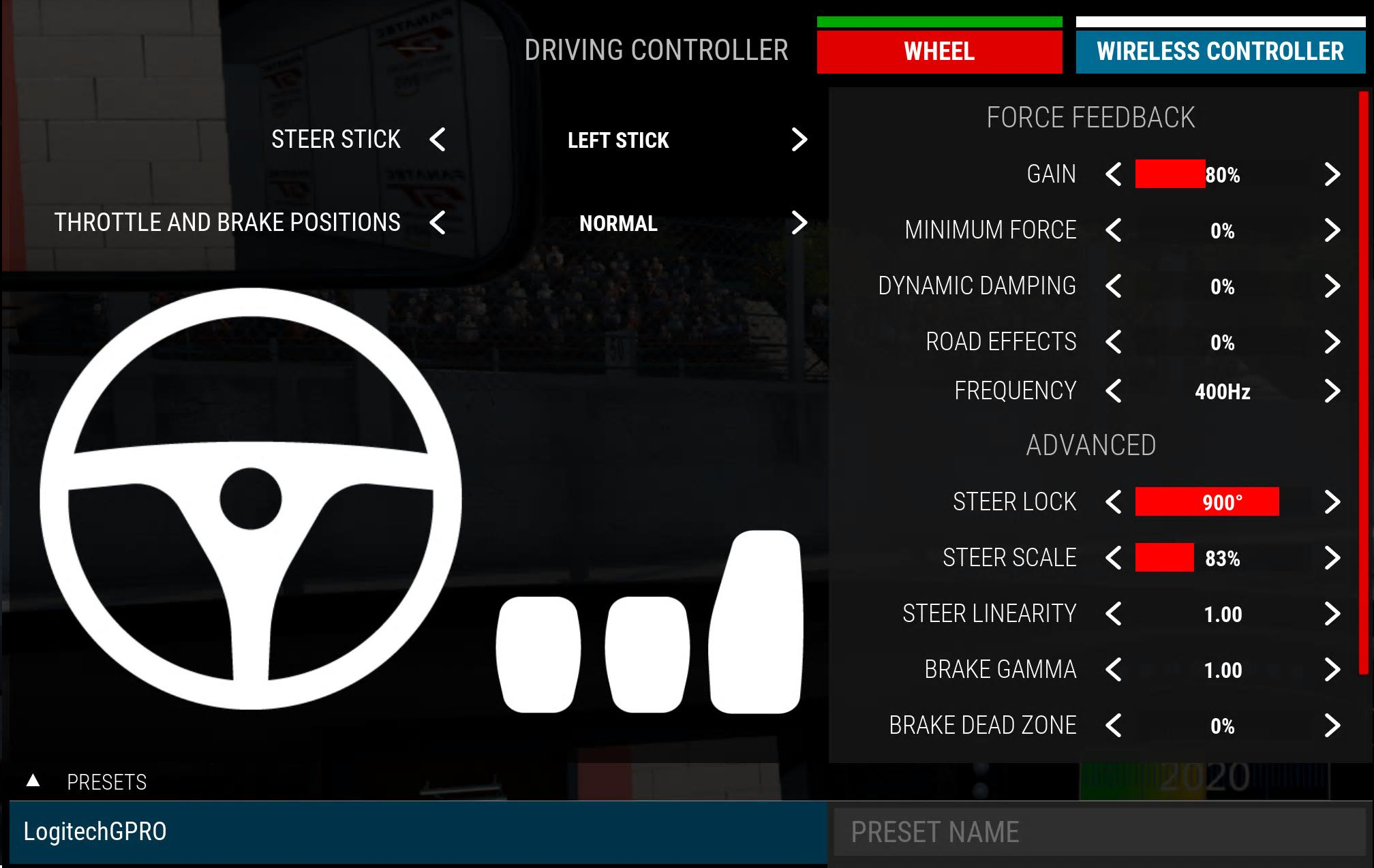
Assetto Corsa Competizione runs in PRO mode on both consoles, with the game’s LogitechGPRO preset loaded on each. On PlayStation it has to be the PS5 version, as Logitech says the PS4 version isn’t supported. The biggest gaps between the consoles are the RS50’s Dampener and the game’s Dynamic Damping, at 25 and 0% on PS5 but 70 and 100% on Xbox. On PS5, Logitech’s table puts the RS50’s angle at 1080 degrees, but its screenshot has ACC’s Steer Lock at 900°. On Xbox, the two match at 1080.
For ACC, set the RS50 to these on each console:
- On PS5:
- Compatibility Mode: PRO (PS5 version only)
- FFB Filter: 7
- Dampener: 25
- TF Audio: 50
- Angle: 1080°
- On Xbox:
- Compatibility Mode: PRO
- FFB Filter: 8
- Dampener: 70
- TF Audio: 30
- Angle: 1080°
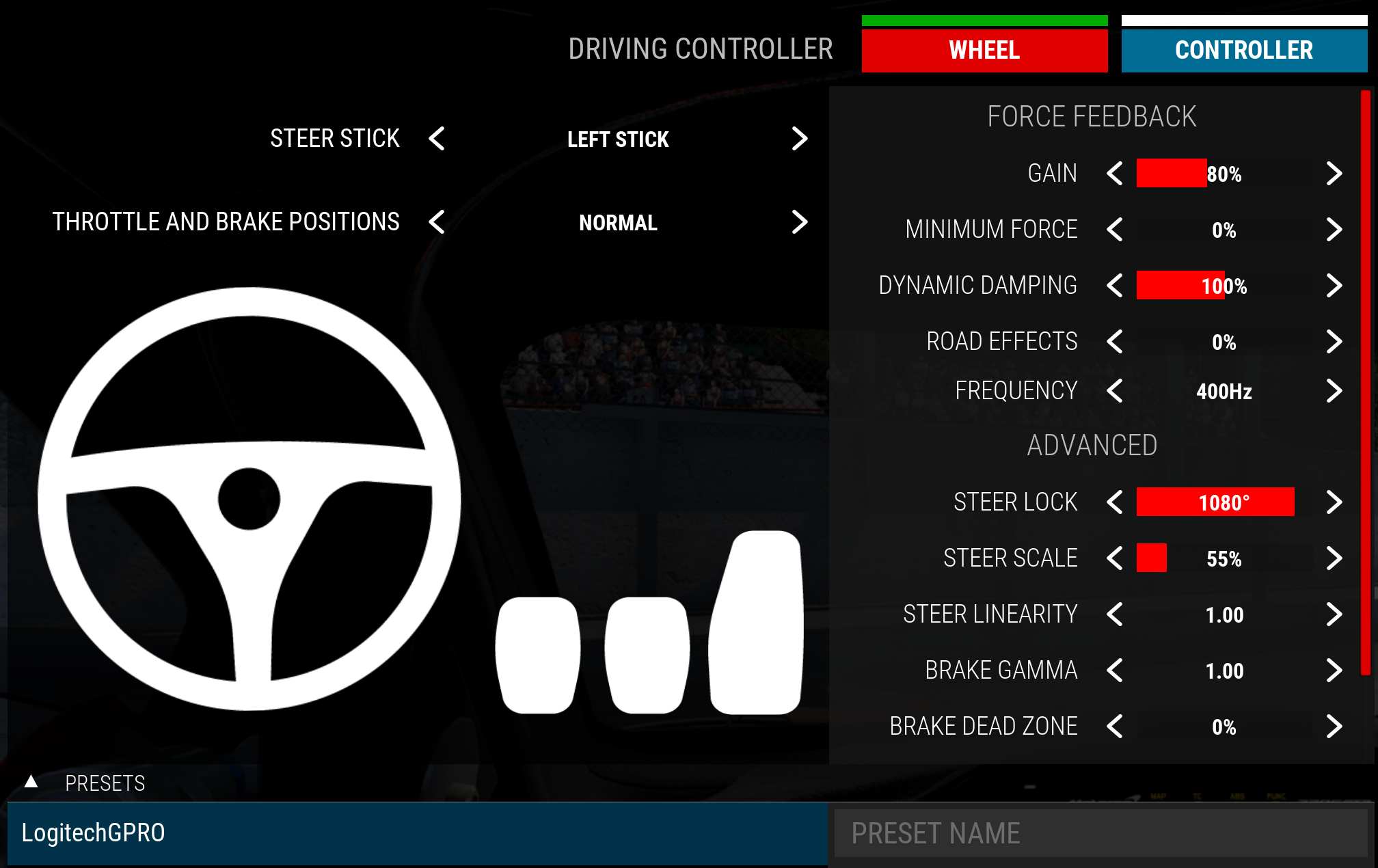
Then in ACC, go to Driving Controller > Wheel, load the LogitechGPRO preset and set:
- On PS5:
- Preset: LogitechGPRO
- Gain: 80%
- Minimum Force: 0%
- Dynamic Damping: 0%
- Road Effects: 0%
- Frequency: 400Hz
- Steer Lock: 900° (Logitech’s table has the RS50’s Angle at 1080°)
- Steer Scale: 83%
- Steer Linearity: 1.00
- Brake Gamma: 1.00
- Brake Dead Zone: 0%
- On Xbox:
- Preset: LogitechGPRO
- Gain: 80%
- Minimum Force: 0%
- Dynamic Damping: 100%
- Road Effects: 0%
- Frequency: 400Hz
- Steer Lock: 1080°
- Steer Scale: 55%
- Steer Linearity: 1.00
- Brake Gamma: 1.00
- Brake Dead Zone: 0%
Forza Motorsport settings
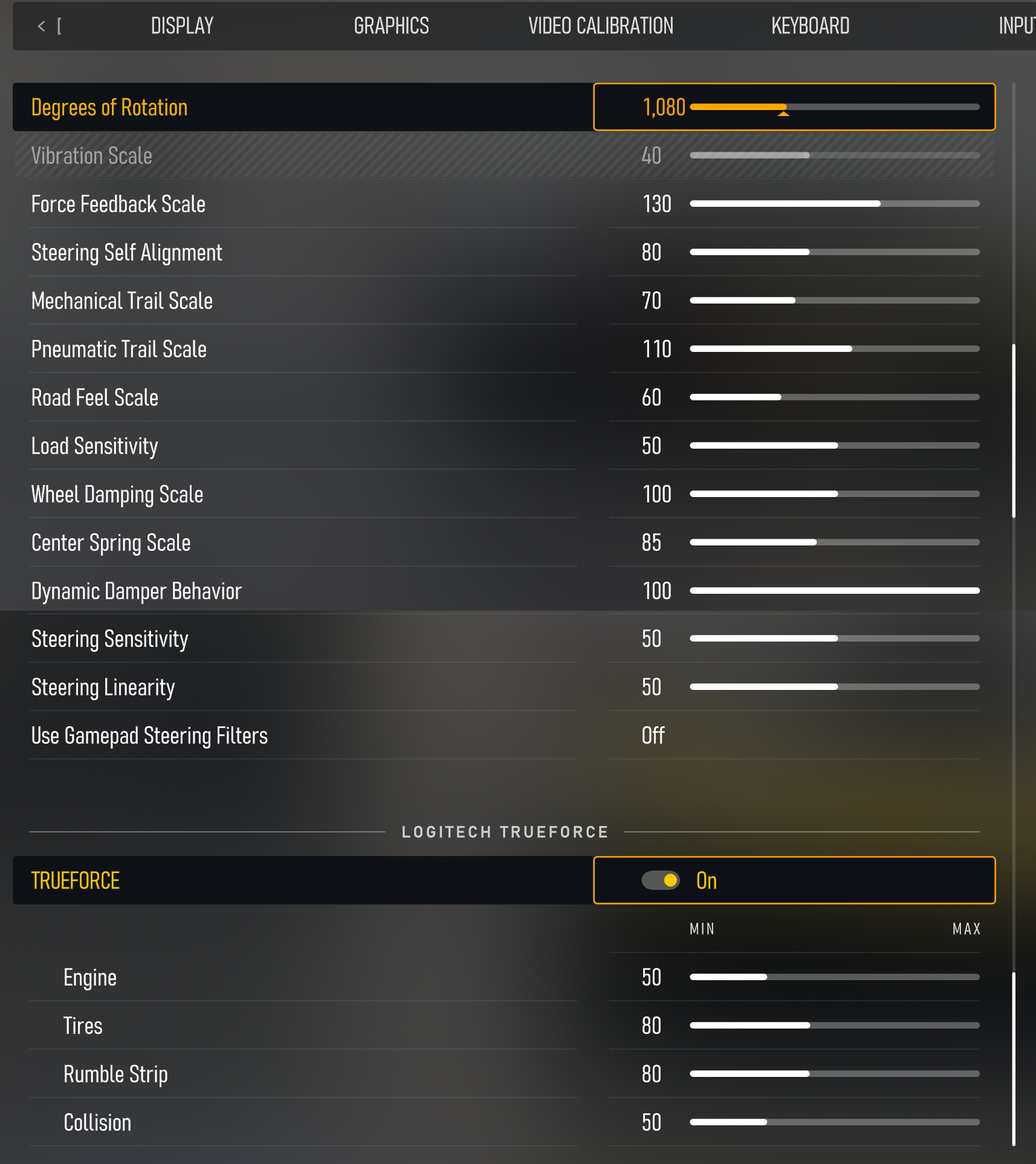
On console, Forza Motorsport is on Logitech’s Xbox list only. Logitech has the RS50 in RS mode with its angle at the full 2700, and sets the game’s Degrees of Rotation to 1,080.
On the RS50, set these for Forza Motorsport on Xbox:
- Compatibility Mode: RS
- FFB Filter: 8
- Dampener: 15
- TF Audio: 100
- Angle: 2700°
Then in Forza Motorsport’s settings, including its Logitech TrueForce section, set:
- Degrees of Rotation: 1,080
- Force Feedback Scale: 130
- Steering Self Alignment: 80
- Mechanical Trail Scale: 70
- Pneumatic Trail Scale: 110
- Road Feel Scale: 60
- Load Sensitivity: 50
- Wheel Damping Scale: 100
- Center Spring Scale: 85
- Dynamic Damper Behavior: 100
- Steering Sensitivity: 50
- Steering Linearity: 50
- Use Gamepad Steering Filters: Off
- Logitech TrueForce: On
- Engine: 50
- Tires: 80
- Rumble Strip: 80
- Collision: 50
Forza Horizon 5 and 6 settings
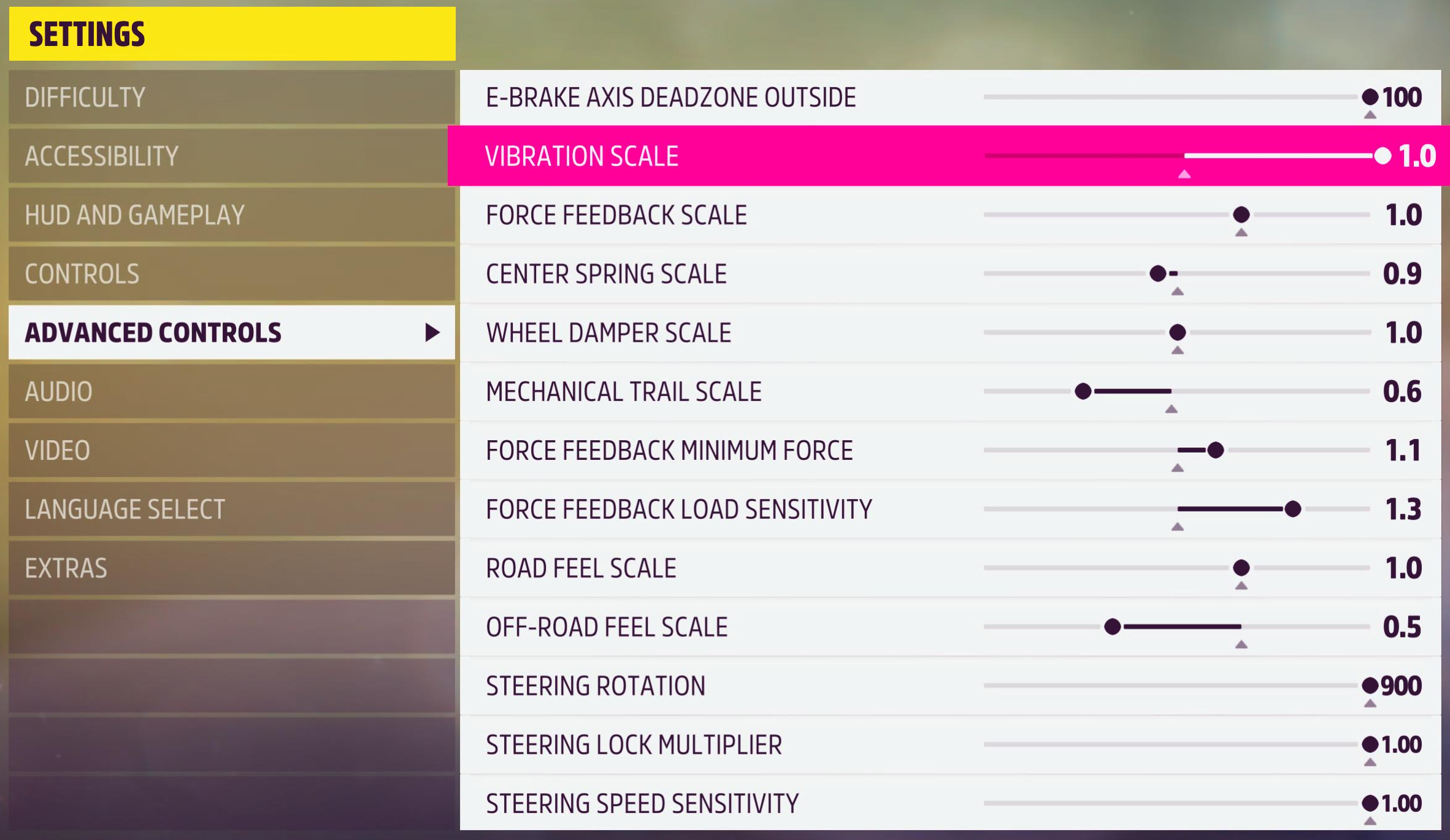
Forza Horizon 5 has no TrueForce, and Logitech’s settings for it are the same on PS5 and Xbox apart from the FFB Filter, which is 9 on PlayStation and 6 on Xbox. Forza Horizon 6 is on the Xbox list only, with the Dampener off and a different set of in-game values.
Set these on the RS50 for Forza Horizon:
- Forza Horizon 5 on PS5:
- Compatibility Mode: RS
- FFB Filter: 9
- Dampener: 30
- TF Audio: N/A (no TrueForce in this game)
- Angle: 900°
- Forza Horizon 5 on Xbox:
- Compatibility Mode: RS
- FFB Filter: 6
- Dampener: 30
- TF Audio: N/A (no TrueForce in this game)
- Angle: 900°
- Forza Horizon 6 on Xbox:
- Compatibility Mode: RS
- FFB Filter: 5
- Dampener: Off
- TF Audio: N/A (no TrueForce in this game)
- Angle: 900°
For Forza Horizon 5, go to Settings > Advanced Controls and set:
- Vibration Scale: 1.0
- Force Feedback Scale: 1.0
- Center Spring Scale: 0.9
- Wheel Damper Scale: 1.0
- Mechanical Trail Scale: 0.6
- Force Feedback Minimum Force: 1.1
- Force Feedback Load Sensitivity: 1.3
- Road Feel Scale: 1.0
- Off-Road Feel Scale: 0.5
- Steering Rotation: 900
- Steering Lock Multiplier: 1.00
- Steering Speed Sensitivity: 1.00
- E-Brake Axis Deadzone Outside: 100
For Forza Horizon 6 on Xbox, use these in-game values instead:
- Vibration Scale: 0.6
- Force Feedback Scale: 1.1
- Centre Spring Scale: 0.0
- Wheel Damper Scale: 0.0
- Mechanical Trail Scale: 0.7
- Force Feedback Minimum Force: 1.0
- Force Feedback Load Sensitivity: 1.3
- Road Feel Scale: 0.6
- Off-Road Feel Scale: 0.8
- Steering Rotation: 900
- Steering Lock Multiplier: 1.00
- Steering Speed Sensitivity: 1.00
- E-Brake Axis Deadzone Outside: 100
EA Sports WRC settings
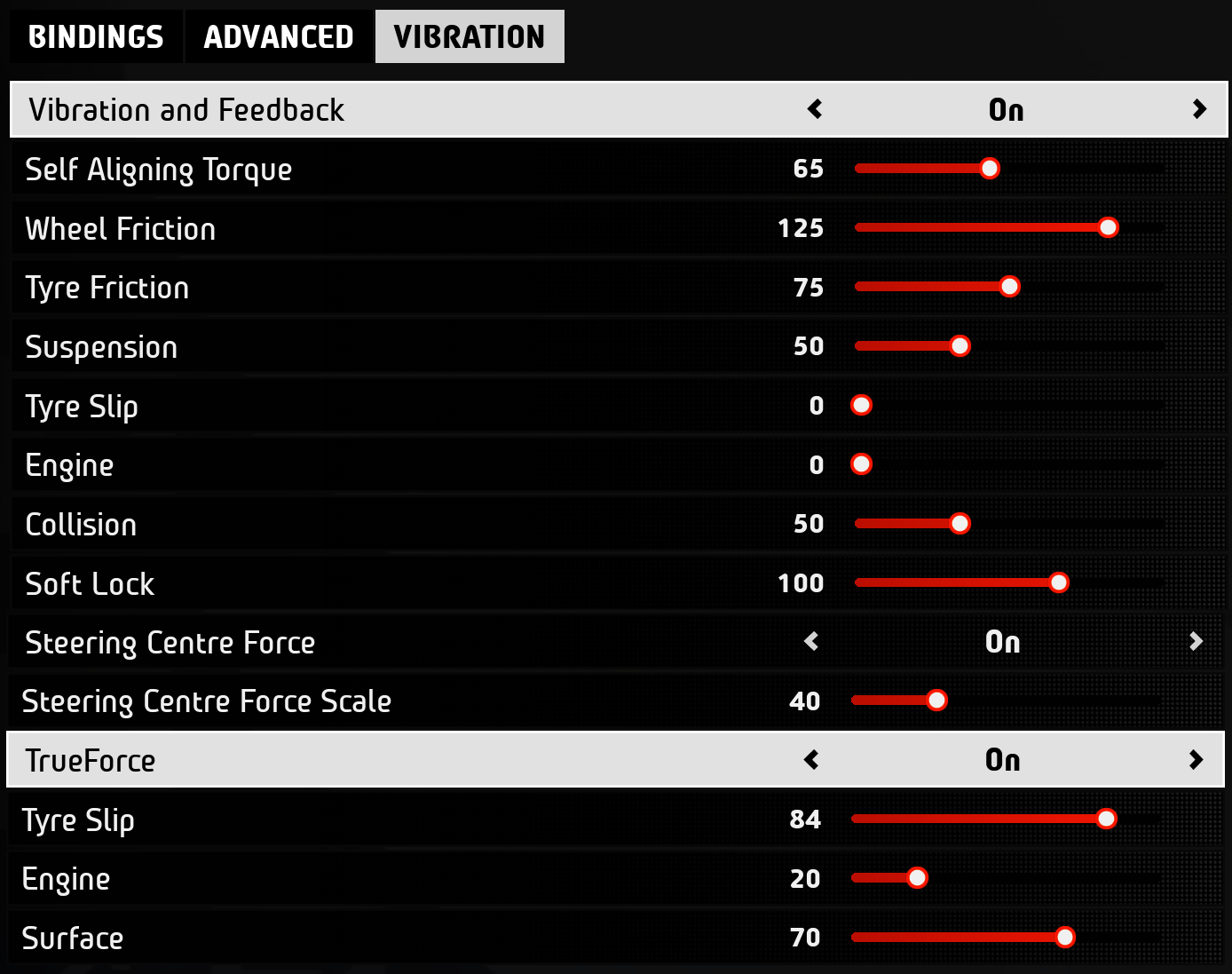
EA Sports WRC runs in RS mode on both consoles, but only the PS5 version has a TrueForce section in its Vibration tab, so TF Audio is 35 on PlayStation and N/A on Xbox. The rest of the RS50’s settings change between the consoles too, with the angle at 900 degrees on PS5 and 2700 on Xbox.
On the RS50, set these for EA WRC:
- On PS5:
- Compatibility Mode: RS
- FFB Filter: 4
- Dampener: 25
- TF Audio: 35
- Angle: 900°
- On Xbox:
- Compatibility Mode: RS
- FFB Filter: 6
- Dampener: 15
- TF Audio: N/A (no TrueForce in this game)
- Angle: 2700°
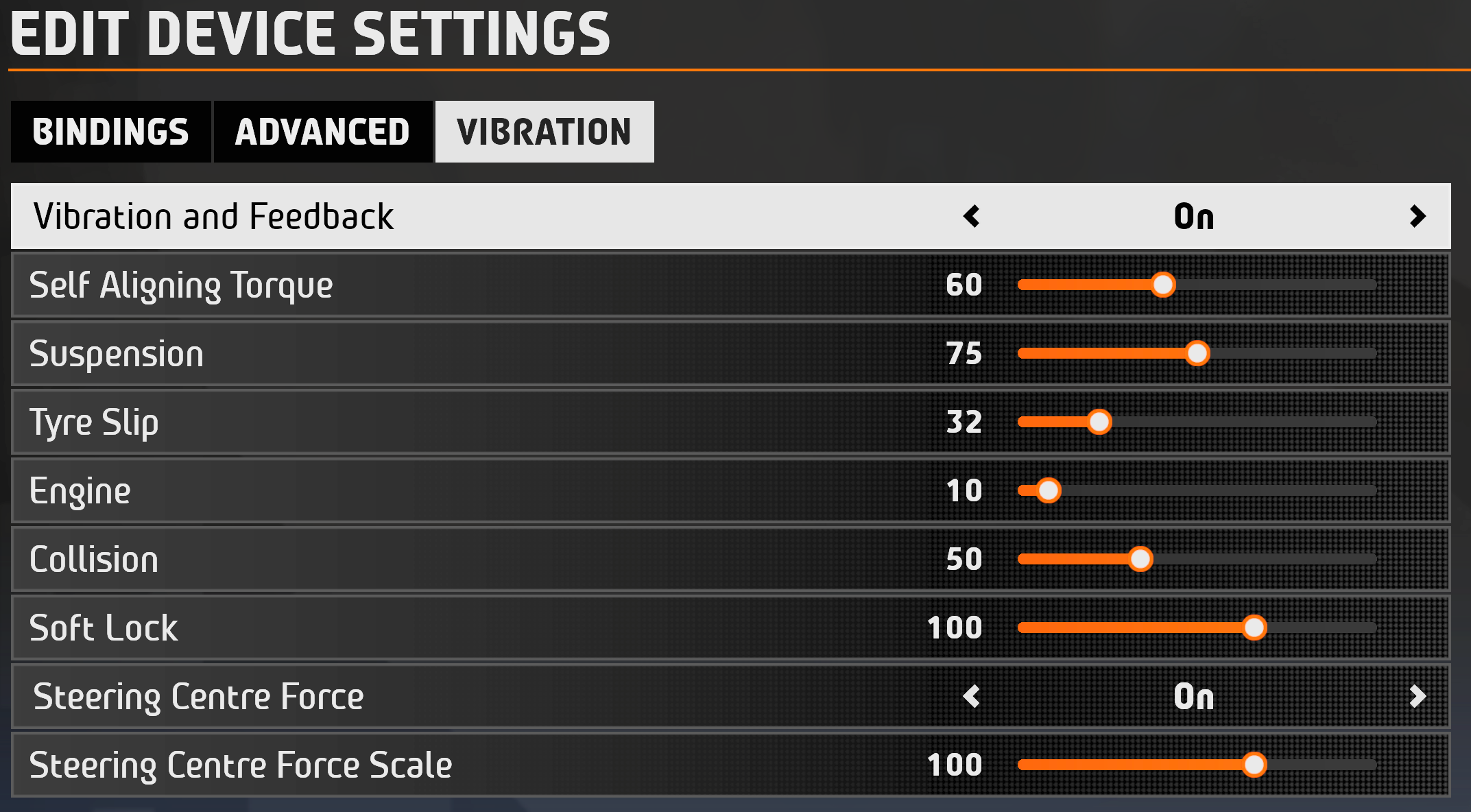
Then in EA WRC’s Vibration tab, set:
- On PS5:
- Vibration and Feedback: On
- Self Aligning Torque: 65
- Wheel Friction: 125
- Tyre Friction: 75
- Suspension: 50
- Tyre Slip: 0
- Engine: 0
- Collision: 50
- Soft Lock: 100
- Steering Centre Force: On
- Steering Centre Force Scale: 40
- TrueForce: On (Tyre Slip 84, Engine 20, Surface 70)
- On Xbox:
- Vibration and Feedback: On
- Self Aligning Torque: 60
- Suspension: 75
- Tyre Slip: 32
- Engine: 10
- Collision: 50
- Soft Lock: 100
- Steering Centre Force: On
- Steering Centre Force Scale: 100
RS50 compatible games on PS5 and Xbox
Logitech lists 19 PlayStation games and 25 Xbox games for the RS50, and they’re all in the tables below (GT7 gets two rows, one for road cars and one for Gr. cars). Logitech’s own page has the in-game screenshot for each one.
PlayStation 5
| Game | Mode | FFB Filter | Dampener | TF Audio | Angle |
|---|---|---|---|---|---|
| Assetto Corsa | RS | 9 | 70 | N/A | Set Per Car |
| Assetto Corsa Competizione | PRO (PS5 version only) | 7 | 25 | 50 | 1080° |
| CarX Drift Racing Online | RS | 7 | 15 | N/A | 1080° |
| Dakar Desert Rally | RS | 7 | Off | N/A | 900° |
| Dirt Rally 2.0 | RS | 4 | 25 | 25 | Set Per Car |
| EA Sports WRC | RS | 4 | 25 | 35 | 900° |
| F1 25 | RS | 1 | 70 | 20 | 360° |
| Forza Horizon 5 | RS | 9 | 30 | N/A | 900° |
| Gran Turismo 7 (Road Cars) | RS | 6 | 20 | 100 | Set by game per car automatically |
| Gran Turismo 7 (Gr.x cars) | RS | 6 | 20 | 100 | Set by game per car automatically |
| GRID (2019) | RS | 7 | 15 | 20 | N/A |
| GRID Legends | PRO | 13 | 30 | N/A | 900° |
| Monster Truck Championship | RS | 11 | 25 | 25 | N/A |
| NASCAR 25 | RS | 5 | 30 | N/A | 450° |
| Need For Speed: Heat | RS | 12 | 30 | N/A | 540° |
| Project Cars 2 | RS | 8 | 40 | N/A | 1080° |
| Project Motor Racing | RS | 1 | 20 | N/A | 900° |
| The Crew Motorfest | RS | 8 | Off | N/A | 1080° |
| World Of Outlaws | RS | 8 | 80 | N/A | 2700° |
| Wreckfest | RS | 5 | 50 | N/A | 900° |
Xbox
| Game | Mode | FFB Filter | Dampener | TF Audio | Angle |
|---|---|---|---|---|---|
| Assetto Corsa | RS | 4 | 100 | N/A | Set Per Car |
| Assetto Corsa Competizione | PRO | 8 | 70 | 30 | 1080° |
| Dakar Desert Rally | RS | 7 | Off | N/A | 900° |
| DIRT 5 | RS | 5 | 50 | N/A | 600° |
| Dirt Rally 2.0 | RS | 6 | 20 | 50 | Set Per Car |
| EA Sports WRC | RS | 6 | 15 | N/A | 2700° |
| F1 25 | RS | 5 | 70 | 20 | 2700° |
| Forza Horizon 4 | RS | 8 | 30 | N/A | 1080° |
| Forza Horizon 5 | RS | 6 | 30 | N/A | 900° |
| Forza Horizon 6 | RS | 5 | Off | N/A | 900° |
| Forza Motorsport (2023) | RS | 8 | 15 | 100 | 2700° |
| GRID (2019) | RS | 7 | 15 | 45 | Change Per Car |
| GRID Legends | PRO | 7 | 15 | N/A | Change Per Car |
| Monster Truck Championship | RS | 11 | 25 | 25 | 1080° |
| NASCAR 25 | RS | 5 | 30 | N/A | 2700° |
| NASCAR Heat 5 | RS | 4 | 50 | N/A | 2700° |
| Need For Speed: Heat | RS | 8 | 70 | N/A | 360° |
| Project Cars 2 | RS | 5 | 50 | N/A | 2700° |
| Project Cars 3 | RS | 5 | 50 | N/A | 900° |
| Project Motor Racing | RS | 1 | 20 | N/A | 2700° |
| Roadcraft | RS | 5 | 30 | 85 | 700° |
| Taxi Life | RS | 6 | 20 | N/A | 900° |
| The Crew Motorfest | RS | 5 | 50 | N/A | 2700° |
| World Of Outlaws | RS | 8 | 80 | N/A | 2700° |
| Wreckfest | RS | 8 | 90 | N/A | Set Per Car |
Fine-tuning
If something isn’t working the way it should, try these fixes, which all come from Logitech’s support pages:
- If the RS50 shakes left and right on its own in GT7, mostly in the Gr.3 to Gr.1 cars, turn Force Feedback Sensitivity down to 1 and then lower Max. Torque if it still oscillates – the Dampener on the RS50 helps a little too.
- In some games the RS50 will start oscillating left and right if you let go of it on a straight, so keep hold of it. If it does start, pause the game before you grab it again, so you don’t get hurt.
- If you run the RS50 below 8 Nm, set the Dampener lower than Logitech’s number.
- If the force feedback feels too raw, raise the FFB Filter.
- If a game doesn’t recognise the RS50 but supports Logitech’s PRO wheel, switch the RS50 to PRO mode before you start the game. A game older than the RS50 needs its controls set up by hand in its options menu.
- When it still won’t work, check the RS50 is the selected input device and the software is up to date, then contact the game’s support team.
- If you run the RS50 in PRO mode in Forza Horizon 4 or 5 and the pedals don’t work properly, reassign Accelerator, Brake and Clutch in the game’s Controls screen and save.
- The RS50’s aluminium casing can get warm after a long race at full strength, but Logitech designed the RS50 so the casing never goes above 60°C. Let it cool down before you take the wheel off or move the base, and a cooler room or a fan blowing across it helps.
If the RS50 still misbehaves, the Logitech wheel troubleshooting guide goes further, and the best PS5 racing games and best Xbox racing games lists have plenty to try it in. For other wheelbases, the direct drive wheel settings guide has the Settings Finder. I’ll see you out on track!
Related Articles

Best Pimax VR Settings for F1 25 in 2026: A Damage-Control Guide

Best Pimax VR Settings for Le Mans Ultimate in 2026

Best Pimax VR Settings for Automobilista 2 in 2026

Best Pimax VR Settings for Assetto Corsa in 2026

iRacing VR Settings (2026): Meta Quest 3, PSVR2, Pimax and Valve Index

Assetto Corsa VR Settings 2026: Pimax, Quest 3, PSVR2 & More
Topic: Direct Drive Wheel Settings