
I’m a sim racer and amateur racer with a passion for Motorsport, good racecraft and the technical and setup aspect of sim racing.
I run a Logitech G923 on the desk, and the first thing worth saying is that these wheels rarely go wrong – the G29, G920 and G923 are some of the most reliable kit in sim racing. But when one does play up, it is almost always the same short list of faults: it won’t show up in G HUB, it spins to full lock on startup, the force feedback goes dead, a pedal starts spiking, or the shifter refuses to register. Every fix that actually works is below, cheapest and quickest first.
Most of these are software, not hardware, which is the good news – you can usually fix them in a couple of minutes without a screwdriver. The fixes are model-agnostic unless stated: a G29 and a G920 are the same wheel bar the console it talks to, and the G923 adds Logitech’s TrueForce haptic layer on top of the same gear-drive. Where a fix genuinely differs by model – the registry codes, mostly – that’s flagged. My full G923 review covers what the wheel is actually like to drive; this page is purely about getting a broken one working again.
Rule this out first: don’t mix old and new Logitech software. A large share of “not detected” and “no force feedback” reports are a driver conflict, not a broken wheel. Logitech Gaming Software (LGS) is retired, doesn’t support the G923, and clashes with Windows 11. Run G HUB only – uninstall LGS if it’s still on the machine. And if you’ve ever used input-emulation tools (x360ce, vJoy, HID Guardian), they can deliberately hide the wheel from G HUB; uninstall those too.
Quick Navigation
Jump to the fix you need:
First, the 30-second checks |
Wheel not detected |
Won’t calibrate or spins to full lock |
No force feedback |
Pedals not working |
Shifter not working |
No power or a blinking light |
Wobble, grinding and the “belt” myth |
When it’s a warranty claim |
FAQ
First, the 30-second checks
Before anything else, run these. They resolve the majority of Logitech wheel faults and cost nothing:
- Plug straight into a rear motherboard USB port. No hubs, no front-panel ports, no unpowered extensions – those are behind a huge share of “not detected” and random-disconnect reports.
- Power-cycle in order. Unplug USB, unplug the power brick, wait 15 seconds, reconnect power then USB, and let the wheel do its full left-right calibration spin.
- Check the platform toggle. On a G29/G923 the hub switch has to match what you’re on (PS4/PS5 or PC). Flip it while plugged in and it needs a USB replug to re-register.
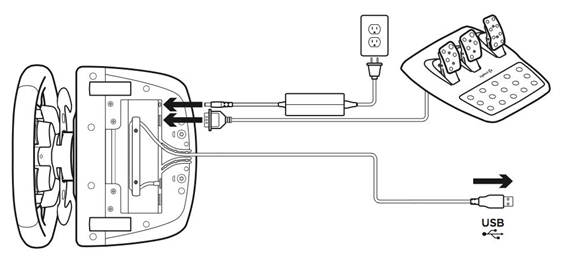
- Confirm the power light. No calibration spin on startup usually means the wheel has USB data but no motor power – that’s the barrel connector under the base, covered below.
Wheel not detected – how to fix it
This splits two ways, and it’s worth knowing which you’ve got. If Windows can see the wheel in the old Game Controllers panel (joy.cpl) but G HUB shows nothing, that’s a software cache problem. If nothing sees it at all – no connection chime, no light – it’s a cable or power problem instead.
Start with the cheap side. Move the wheel to a different rear motherboard USB port (a USB 2.0 port is genuinely more reliable here than a USB 3.0 one), off any hub. Reboot. That alone clears a surprising number of “vanished from G HUB” cases, because a flaky handshake on one port leaves a stale device entry behind.
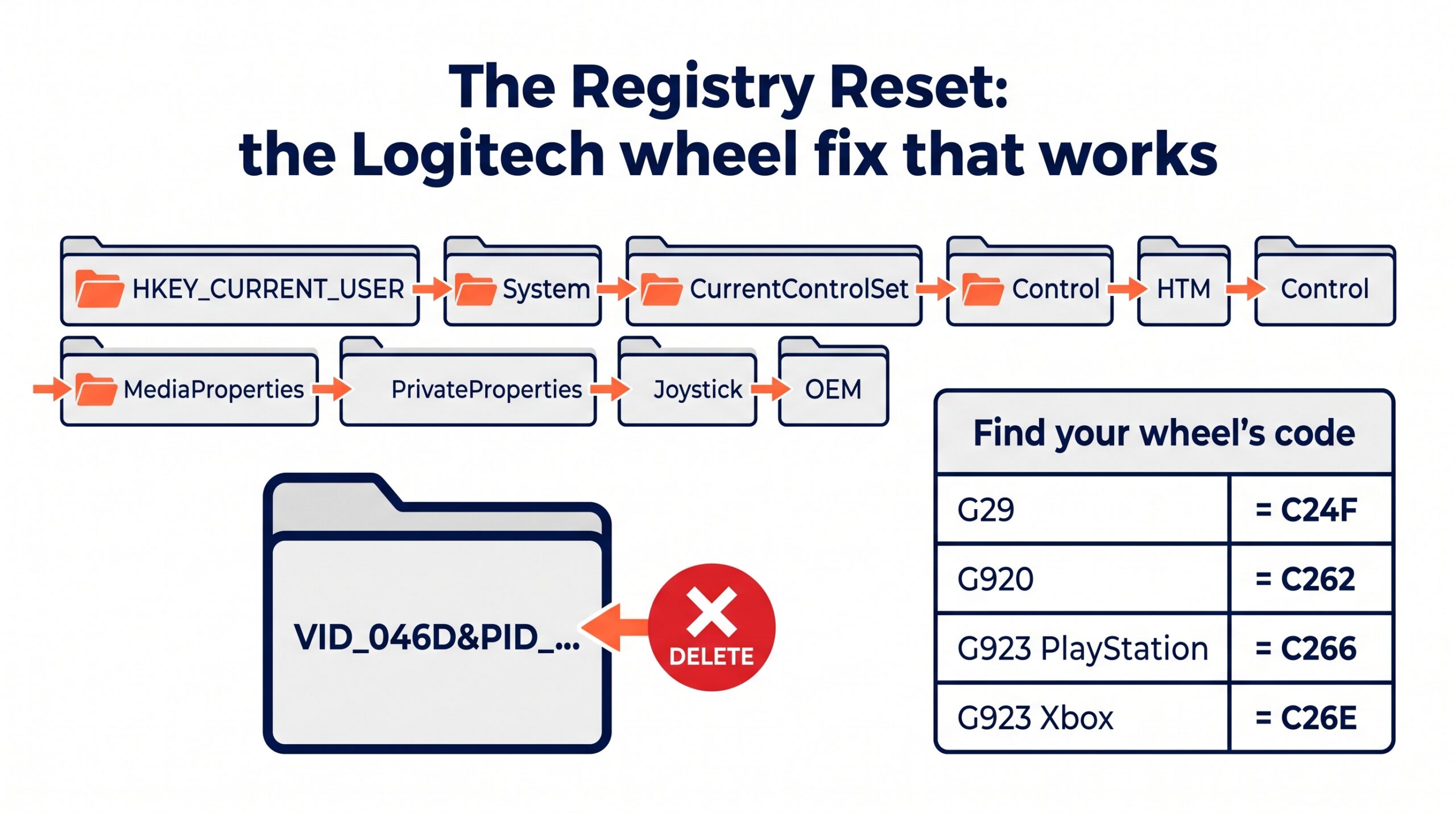
If the wheel shows in Windows but not in G HUB, the fix is the registry OEM cache – and this same reset is the workhorse for calibration and force-feedback faults too, so it’s worth learning once. Unplug the wheel. Press Win+R, type regedit, and open HKEY_CURRENT_USER\System\CurrentControlSet\Control\MediaProperties\PrivateProperties\Joystick\OEM. Delete the folder that matches your wheel, then replug to a rear USB port and let Windows rebuild it clean:
- G29:
VID_046D&PID_C24F - G920:
VID_046D&PID_C262 - G923 (PlayStation):
VID_046D&PID_C266 - G923 (Xbox):
VID_046D&PID_C26E
Delete the same VID/PID folder under the neighbouring DirectInput key if it’s there as well. This is the community-proven silver bullet for G HUB soft-bricks, and it’s safe – you’re clearing a cache, not editing anything Windows depends on. Don’t reinstall Windows over a detection fault; it’s almost never necessary.
Won’t calibrate, spins to full lock or drifts – how to fix it
A wheel that twitches on startup and then sits there, or spins hard into one end-stop, or won’t settle straight, is the most-reported Logitech fault of all. Work through it in this order, because the free fixes clear the large majority.
Power first. A wheel that barely twitches on startup, usually with the RPM light blinking steadily, is short of motor power. Check all three points: under the base, at the wall, and the figure-8 cable into the brick, which looks seated while pulled just loose. Plug straight to the wall and bypass any surge protector. If it only ever blinks and never spins, the brick is dead – replace it with a 24V supply (1.75A or higher). That resolves roughly 70% of “won’t calibrate” cases on its own.
Then the registry reset (the same one from the detection section) if power checks out but the wheel freezes mid-spin or G HUB hangs on “Connecting”. Delete your VID/PID folder from the Joystick\OEM key, and the matching one under DirectInput, then replug to a rear port so Windows writes fresh calibration data.
If it calibrates fine in Windows but goes mad the moment a game launches, that’s Steam Input fighting the wheel. In Steam, right-click the game, open Properties, then Controller, and set it to Disable Steam Input. This one catches a lot of people out because the wheel looks perfectly healthy right up until the green flag.
Only if all of that fails – the wheel slams end to end, or stops off-centre, and no software reset touches it – is it a hardware calibration fault: a dirty or dislodged magnet on the Hall sensor inside the base. That’s an open-the-base job that voids the warranty, so it’s a last resort, and one genuine warning attached to it: ignore any advice to fit a “brass optical encoder wheel”. That’s a fix for the much older G27. The G29, G920 and G923 use Hall-effect sensors, and the brass upgrade does nothing on them.
No force feedback – how to fix it
Force feedback that’s gone dead – the wheel feels loose and lifeless, or stiff with only a default centre spring and no road detail – almost always follows a Windows or G HUB update. The wheel still shows up and buttons still register; it’s just the motors that have stopped doing anything useful.
Visit Our Sponsors
Rule out power first (loose feels lifeless because the 5V data is present but the 24V motor supply isn’t), then run the registry reset – it’s the single most successful fix here, clearing the stuck centre-spring state after a bad update. On a G923 the codes differ by platform, so delete PID_C266 for the PlayStation edition or PID_C26E for the Xbox one.
If the feedback works in some titles but is dead in others – fine in Assetto Corsa, gone in an F1 game or Forza – that’s Steam Input again, or the game’s own telemetry switch. Disable Steam Input for the game, then check the in-game force-feedback slider is actually turned up. Still nothing after all that? Do a full G HUB clean install: uninstall it, delete the leftover LGHUB folders from %appdata%, %localappdata% and %programdata%, restart, then install the current G HUB. Whatever you do, don’t roll back to Logitech Gaming Software to chase this – LGS won’t even recognise a G923.
Pedals not working, spiky or dead – how to fix it
Logitech pedals use carbon-track potentiometers geared to each pedal arm, and they’re the part most likely to wear out on a well-used set. The symptom is a throttle or brake that flickers at the bottom of its travel, jumps around mid-range, or can’t quite hit 100%. There’s a clean escalation of fixes here, from free to a proper repair.
Software first. In G HUB, open the Pedals tab, pick the affected pedal, and set a bottom deadzone of 5-10% and a top deadzone of 90-95%. That masks the worn spots at each end. It’s a band-aid – it hides wear rather than fixing it, and it costs you a little resolution – but it’ll get you racing tonight. Console users have to set these deadzones inside each game (F1, ACC, Dirt Rally); G HUB’s settings don’t carry over to PlayStation or Xbox.
Then a contact-cleaner flush, which is the standard fix for jumpy inputs across the whole range. Unplug, remove the 14 silver screws on the underside (leave the black pedal-face screws), lift the shell carefully to avoid the thin wires, and spray a proper electrical contact cleaner – DeoxIT D5 is the usual choice – into the small gap on the side of each potentiometer. Work the pedal by hand 30-50 times straight away, let it dry for ten minutes, and reassemble. One hard rule: never use WD-40. It’s a penetrant, it melts the plastic, it attracts dust, and it will kill the sensor.
If the spiking comes back within days, the carbon track is physically worn through and cleaning won’t hold. The permanent fix is a drop-in Hall-effect sensor kit (around $25-40) – you unscrew the failing pot, unplug the 3-pin cable, and the magnetic sensor plugs straight into the same connector, no soldering. It’s frictionless, so it never wears or gets dirty again. That’s the one to reach for if you race enough to have worn a set out once already.
Driving Force Shifter not working – how to fix it
The Driving Force Shifter throws people because it runs through the wheelbase rather than connecting to the PC itself, so it never appears as its own device in G HUB. That’s not a fault. To see its mappings, click the wheel in G HUB, open the Assignments tab, and switch from View 1 (the wheel buttons) to View 2 (the shifter). If it shows there but won’t work in-game, reassign a gear to force the wheel to re-poll it.
If it’s genuinely unresponsive, power-cycle it in this exact order: unplug USB, unplug the power adapter, unplug the shifter from the base, wait 15 seconds, reconnect the shifter to the base first, then power, then USB, and let the wheel run its full calibration. Still dead out of the box or after moving the rig? Check the 9-pin connector – it sits in a tight recess and a pin bends easily; straighten any bent pin gently and reseat it.
One specific hardware failure is common enough to name: gears 1-6 all work but reverse is dead (pushing down and into 6th just registers as 6th). That’s a snapped internal wire near the push-down switch, from the repeated press for reverse. It’s an out-of-warranty solder job – open the housing, find the broken wire at the base of the shaft, and re-solder it with a little slack. And if gears bounce or skip – shift to 1st, the game reads 3rd – the X/Y potentiometers want a contact-cleaner flush, same as the pedals. Last thing to check is the game: Assetto Corsa needs “use H-shifter” ticked, and Forza needs shifting set to “Manual with Clutch”, or the H-pattern simply won’t register.
No power, no spin or a blinking light – how to fix it
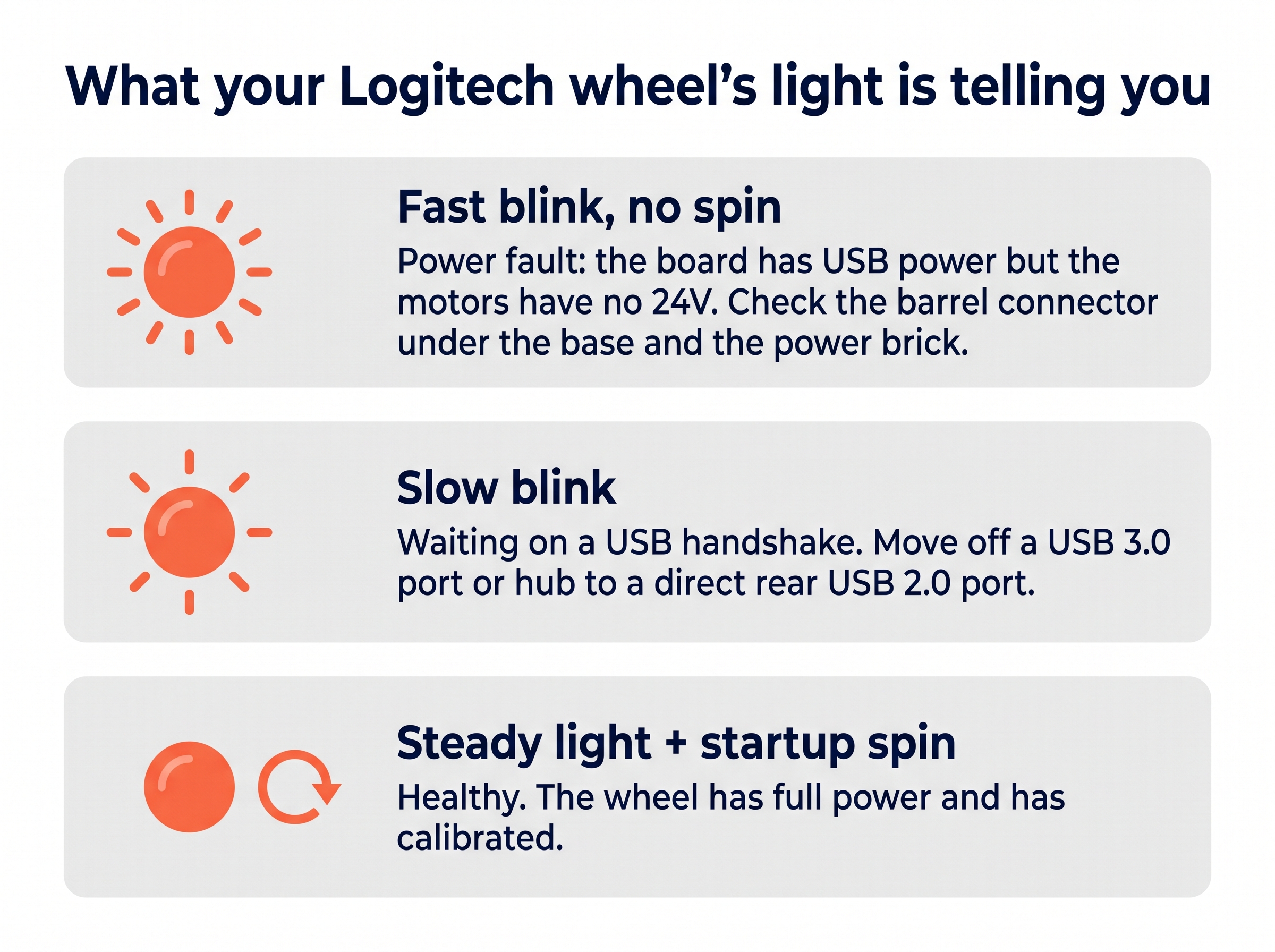
The light on the wheel is a genuinely useful diagnostic, so read it before you do anything. A fast-blinking white LED with no start-up spin is a power-delivery fault, right nine times out of ten: the logic board has its 5V from USB, but the motors have no 24V. Flip the base over – the barrel power connector sits in the cable channel and is notorious for pulling loose a millimetre during hard racing. Push it home firmly, check the figure-8 cord into the brick, and multimeter the brick itself: it should read 24V. If it reads zero or wanders, the brick’s dead and any 24V, 2.7A-or-higher replacement with the right barrel jack will do.
A slow-blinking white LED is different – that’s the wheel waiting on a USB handshake or a console assignment, and it clears by moving off a USB 3.0 port or hub onto a direct rear USB 2.0 port. If the wheel is completely dead with a new brick fitted and there’s a faint burnt-electronics smell, that’s a hardware failure: the mainboard MOSFETs have blown, usually from long sessions at 100% force feedback. The safe repair is a replacement OEM mainboard rather than any soldering, and here’s the one to take seriously – ignore every Reddit thread about “bridging” board connections or bypassing resistors. Those are the wheel’s fire-safety limits. Replace the board or the chips, never bypass them.
Wobble, grinding and the “belt” myth
Let’s clear up the big one first, because a lot of people go looking for the wrong part: there is no belt in a G29, G920 or G923. They use a helical dual-motor gear-drive. Any listing for a “Logitech replacement belt” is either a misunderstanding or a scam, and the queries that search for one are really describing one of two very fixable things.
The first is grinding or rattling during force feedback, on kerbs or off-road especially. That’s the helical gears meshing as the motors reverse direction quickly – it’s normal, not a fault, and there’s no mechanical repair. Turn down the road-effect, slip-effect or TrueForce audio sliders in-game and it settles. Do not spray WD-40 into the motor housing to quiet it; it dissolves the factory grease and wears the plastic gears out fast.
The second is a loose, wobbly wheel rim, and that one has a proper fix: three internal screws have backed out. Unplug, remove the six bolts around the centre horn cap, ease the cap off (mind the button-box wiring behind it), and tighten the three Phillips screws underneath. One caution – don’t use standard blue or red threadlocker on those screws. It attacks the polycarbonate and makes the plastic brittle enough to crack. If anything, a dab of CA glue or a plastic-safe threadlocker.
Worth separating this from the on-straight side-to-side shake some wheels do in Assetto Corsa or iRacing, which looks mechanical but isn’t – that’s gear backlash creating a feedback loop, and it’s a software fix (a small 2-5% centre deadzone, or a lower minimum-force setting so the motors stop fighting at dead centre). Never open the base and try to “tighten the gear rack” for it; that strips the gears for good.
When it’s a warranty claim, not a fix
Some faults aren’t a two-minute job, and it’s worth being honest about which. If the wheel dies mid-corner with a burning smell and a new power brick doesn’t revive it, that’s blown mainboard electronics. If the calibration is violent and loud and no software reset helps, a motor or sensor has failed. In warranty, stop and raise an RMA with Logitech – opening the base voids it, and the G29’s encoder is fragile enough that a DIY attempt can turn a warranty repair into a bin job. Out of warranty, a replacement OEM mainboard from eBay is the sensible path; micro-soldering blown MOSFETs is expert-only territory. The rule of thumb: software resets and the barrel-connector fix are safe for anyone, contact-cleaning and screw-tightening need a little care, and anything involving the motor, the encoder or the board is where you weigh a repair against the wheel’s replacement cost.
Frequently asked questions
Why is my Logitech G29 not working on PS5 or PS4?
Check the hub toggle on the wheel is set to the right platform (PS4/PS5, not PC). If you flipped it while the wheel was plugged in, unplug the USB and replug it so the wheel re-runs its calibration spin. Gran Turismo 7 also needs the wheel picked in its controller settings before it responds.
How do I reset a Logitech G29 or G923 wheel?
Power-cycle first: unplug USB, unplug the brick, wait 15 seconds, reconnect power then USB and let it do the full calibration spin. If the fault is software, the deeper reset is deleting your wheel’s VID/PID folder from the registry Joystick\OEM key, then replugging to a rear USB port so Windows rebuilds it clean.
Is there a belt in the Logitech G29?
No. The G29, G920 and G923 are helical gear-drive wheels, not belt-driven, so there’s no belt to replace. Grinding during force feedback is the gears meshing as the motors reverse, and it’s fixed in software by lowering the road-effect sliders, not by opening the base.
Can I fix Logitech pedals without opening them?
Try software first. In G HUB, open the Pedals tab and add a 5-10% bottom deadzone and a 90-95% top deadzone to mask the worn spots. It’s a band-aid rather than a cure, and on console you have to set the deadzones per game anyway, but it gets you racing. If the spiking runs across the whole travel, the potentiometers need a contact-cleaner flush, which does mean opening the unit.
Why won’t my G923 shifter work?
The Driving Force Shifter runs through the wheelbase, so it never shows as its own device in G HUB – open the wheel’s Assignments tab and switch to View 2 to find its mappings. In-game, tick “use H-shifter” in Assetto Corsa or set shifting to “Manual with Clutch” in Forza, or the H-pattern won’t register.
What does a fast-blinking white light mean?
A fast-blinking white LED with no start-up spin is a power fault, not software. The board has 5V USB power but the motors have no 24V. Check the wall socket, the figure-8 cable into the brick, and the loose barrel connector under the base; the brick should multimeter at 24V, and if it doesn’t, it’s dead.
Does Logitech Gaming Software still work in 2026?
Skip it. LGS is deprecated, doesn’t recognise the G923, and breaks with Windows 11 core isolation and current games. Use a clean G HUB install instead – and if G HUB has soft-bricked, uninstall it fully and reinstall a recent version rather than reverting to LGS.
Most Logitech faults are a two-minute software reset, not a dead wheel – which is a big part of why the G29, G920 and G923 have lasted as long as they have. Once yours is working again, my G923 iRacing settings guide and the wider F1 25 wheel settings page will get the feel dialled in, and the G29 mods guide covers the upgrades worth doing. If you’re weighing a repair against a replacement, the PS5 sim racing buyer’s guide is the place to start.
Pimax Troubleshooting: Every Fix That Works
Simagic Troubleshooting: Every Fix That Works

MOZA Troubleshooting: Every Fix for Pit House, Detection, Pedals and Wheel Shake
Fanatec Troubleshooting: Every Fix for Drifting, Detection, Firmware and Pedal Faults
Thrustmaster Troubleshooting: Every Fix for the Control Panel, Force Feedback and Detection Faults