I’m a sim racer and amateur racer with a passion for Motorsport, good racecraft and the technical and setup aspect of sim racing.
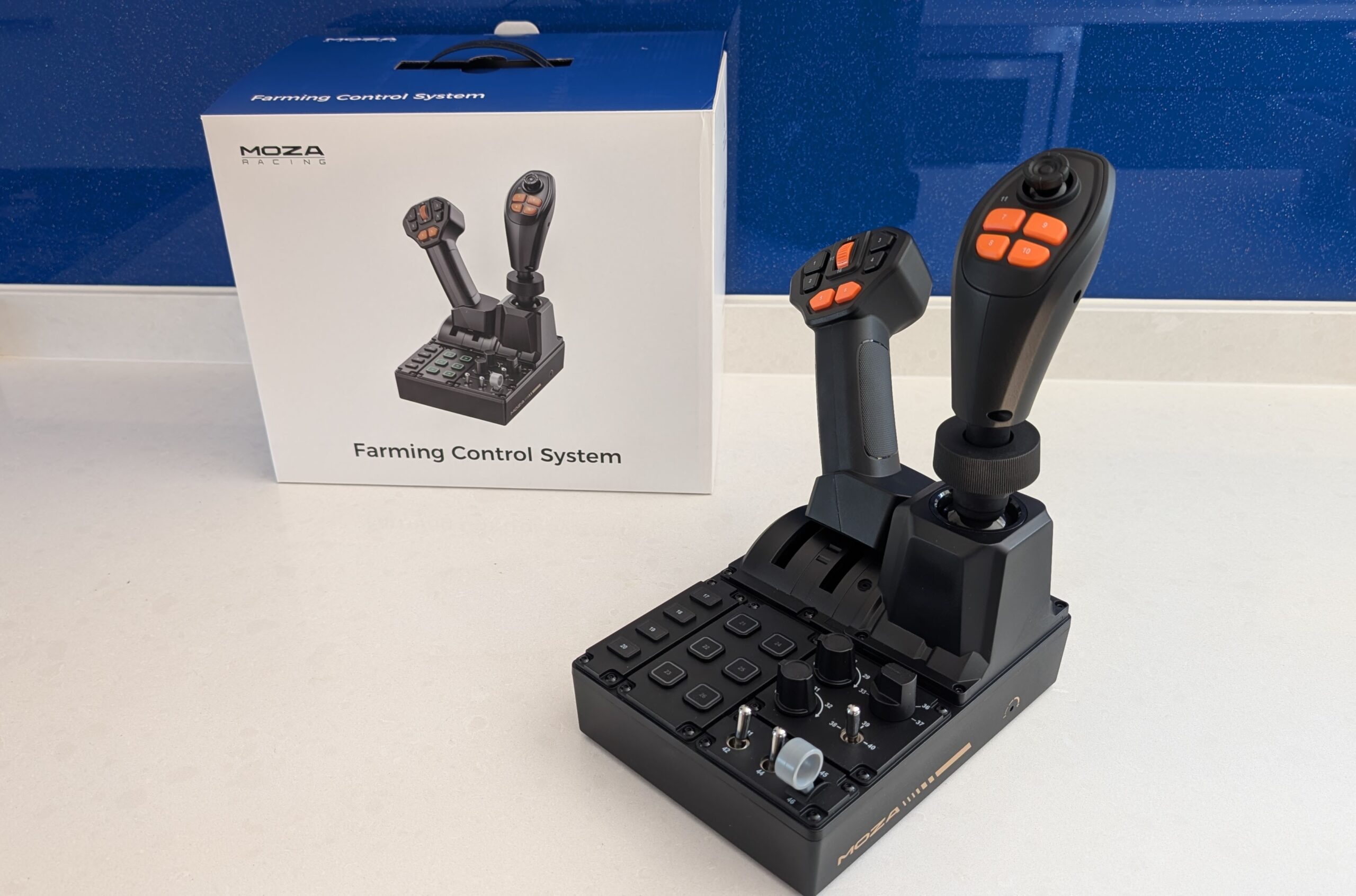
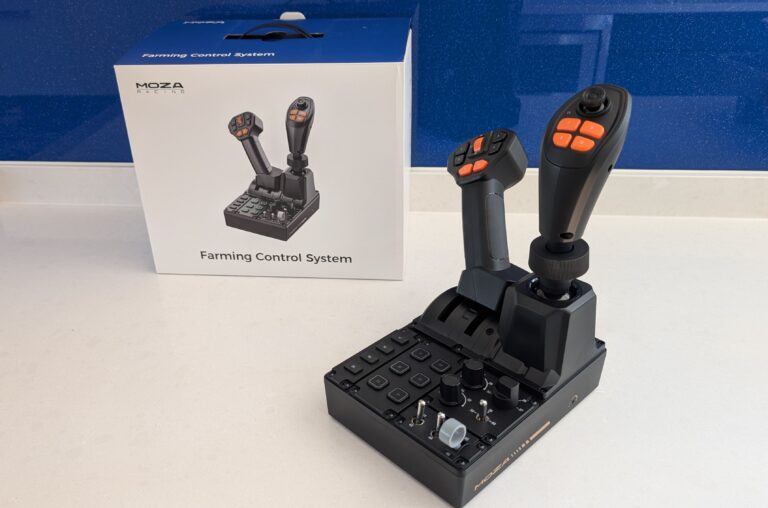
Right, this one is well off my usual patch of wheels, pedals and race seats. The MOZA FCS Farming Control System is a joystick, a throttle lever and a 46-input button panel bolted into one little unit, built for Farming Simulator, construction and heavy-machinery sims, and it costs $199. Firstly, the conclusion, because I already know it: for the money, this is an excellent bit of kit. And there’s a second trick to it that I’ll get to, because underneath the farming skin it’s really a flight-sim controller.
Use SIMRACINGCOCKPIT for 3% off at checkout on mozaracing.com. Prices on our tables above are live and updated daily, so trust those over any figure I quote here.
MOZA launched the FCS on 23 July 2026, and it sits in a corner of the hobby I don’t usually write about. I race for real and my rig is set up for cars, so a dedicated farming controller was never on my shopping list. But I was curious, the thing is cheap, and once you boot up Farming Simulator 25 for the first time you realise the genre runs a lot deeper than you’d guess. So here are my notes.
So what is the FCS, and why have I got one?
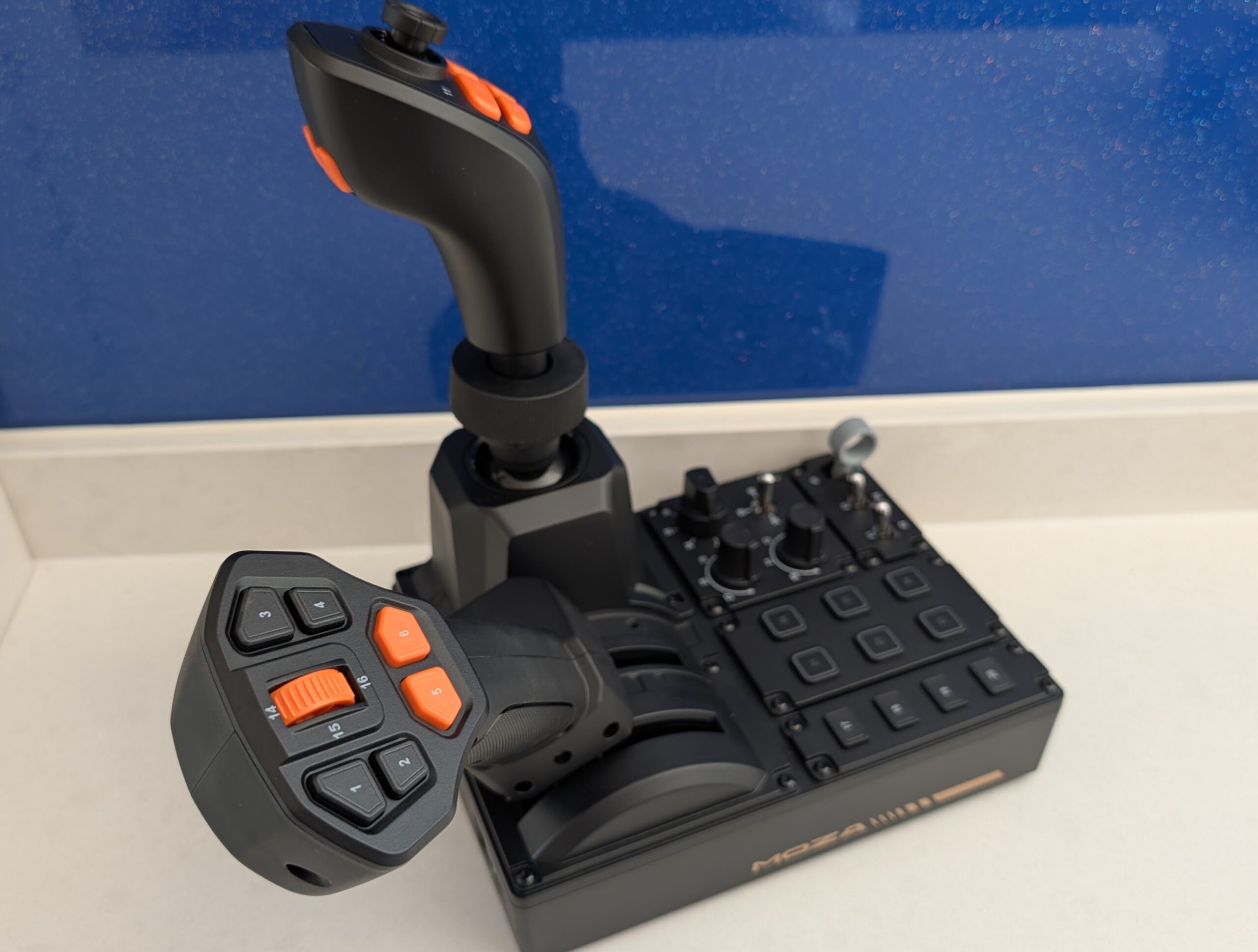
The idea is simple enough. Farming Simulator, Construction Simulator and the heavy-machinery sims have far more controls than a wheel and pedals can sensibly cover – loader arms, cranes, PTO, diff locks, lights, implements, the lot – and most people end up reaching for the keyboard for all of it. The FCS puts a proper joystick and a bank of switches under your hand so you can leave the keyboard alone. It’s a three-in-one: a 3-axis Hall-effect joystick on the right, a throttle-style lever on the left, and a control panel between them carrying most of the buttons.
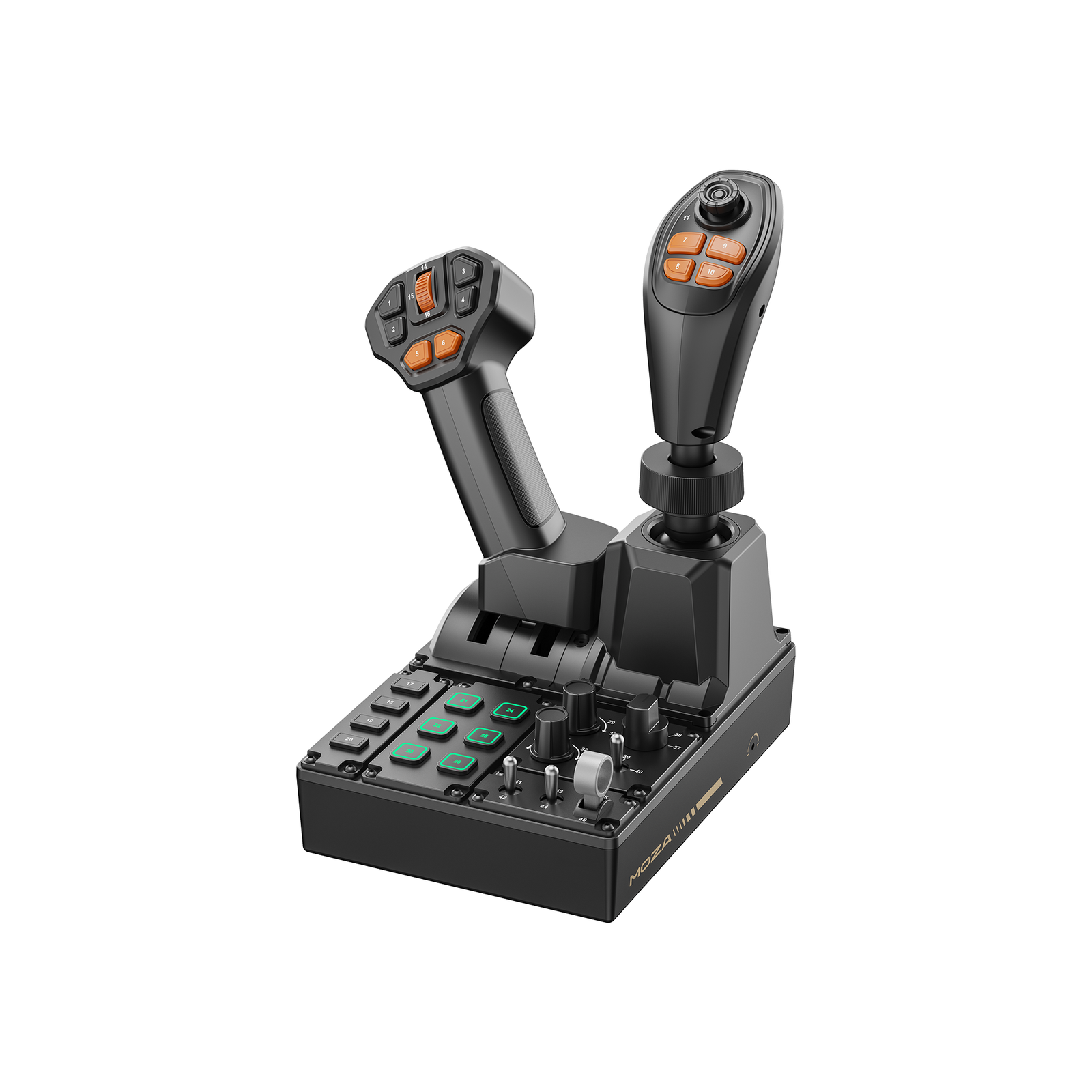
What surprised me, poking around the connectors, is that this isn’t really a farming product at heart. It’s been adapted from MOZA’s flight-sim range – amstudio spotted this in his teardown, and once he pointed it out it’s obvious: the base is basically MOZA’s MTQ throttle quadrant with the right-hand levers swapped out for that Hall joystick. That bit of parts-bin cleverness is the whole reason the flight-stick trick works later, so hold that thought.
Quick Navigation
Jump to the bit you’re after:
What the FCS is |
Getting it built |
What the 46 inputs are |
Build quality |
How it feels on the rig |
The cheap flight stick trick |
Mounting and connections |
Issues and what reviewers found |
How it compares |
Who should buy it |
Price and where to buy
Getting it out of the box and put together
The joystick and the throttle grip don’t come attached, so there’s a couple of minutes of assembly before you can do anything. Nothing tricky – push the two levers back, drop the left stick into its socket and there’s a small screw that goes in from the side to hold it. The 3-axis joystick lines up with its connector, plugs in, and you tighten a hand screw and it’s done.
One thing to take your time over. The joystick connector uses small alignment pins, the sort you used to get on old wired keyboard and mouse plugs, and if you bend one lining it up carelessly you could kill that stick. So go slowly and get it seated square – it’s thirty seconds of care that saves a very annoying RMA. Everything is numbered on the unit too, which sounds like a small thing but really helps: when the game shows you “press button 23”, you can look down and find button 23.
What the 46 inputs give you
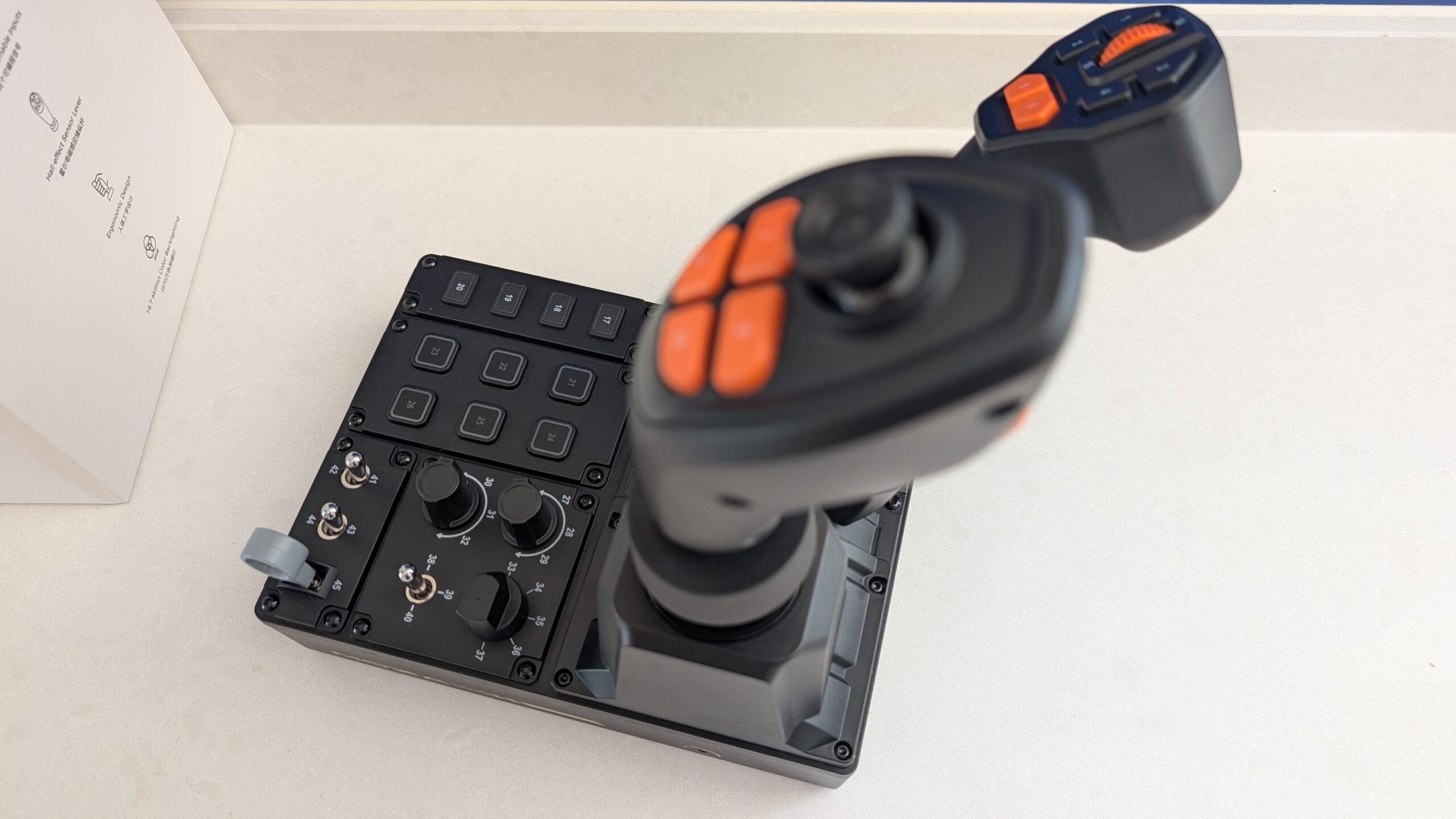
Forty-six programmable inputs is the headline number, and it’s real once you count everything up. The main joystick gives you three axes – up/down, side to side, and a twist – plus a thumbstick with a push, four buttons just below the head and a couple more on the front face. That twist axis is the clever part for machinery: it maps beautifully to slewing a crane or an articulated arm.
The left lever carries six buttons, a centre scroll dial with a push (good for cruise speed on a tractor), and the lever itself slides forward and back as an axis. One limitation here, and again this is amstudio’s find: there’s a single potentiometer inside, so the two levers on the left share just one throttle axis rather than giving you two. For farming it doesn’t matter; if you were dreaming of two independent throttles, temper that.
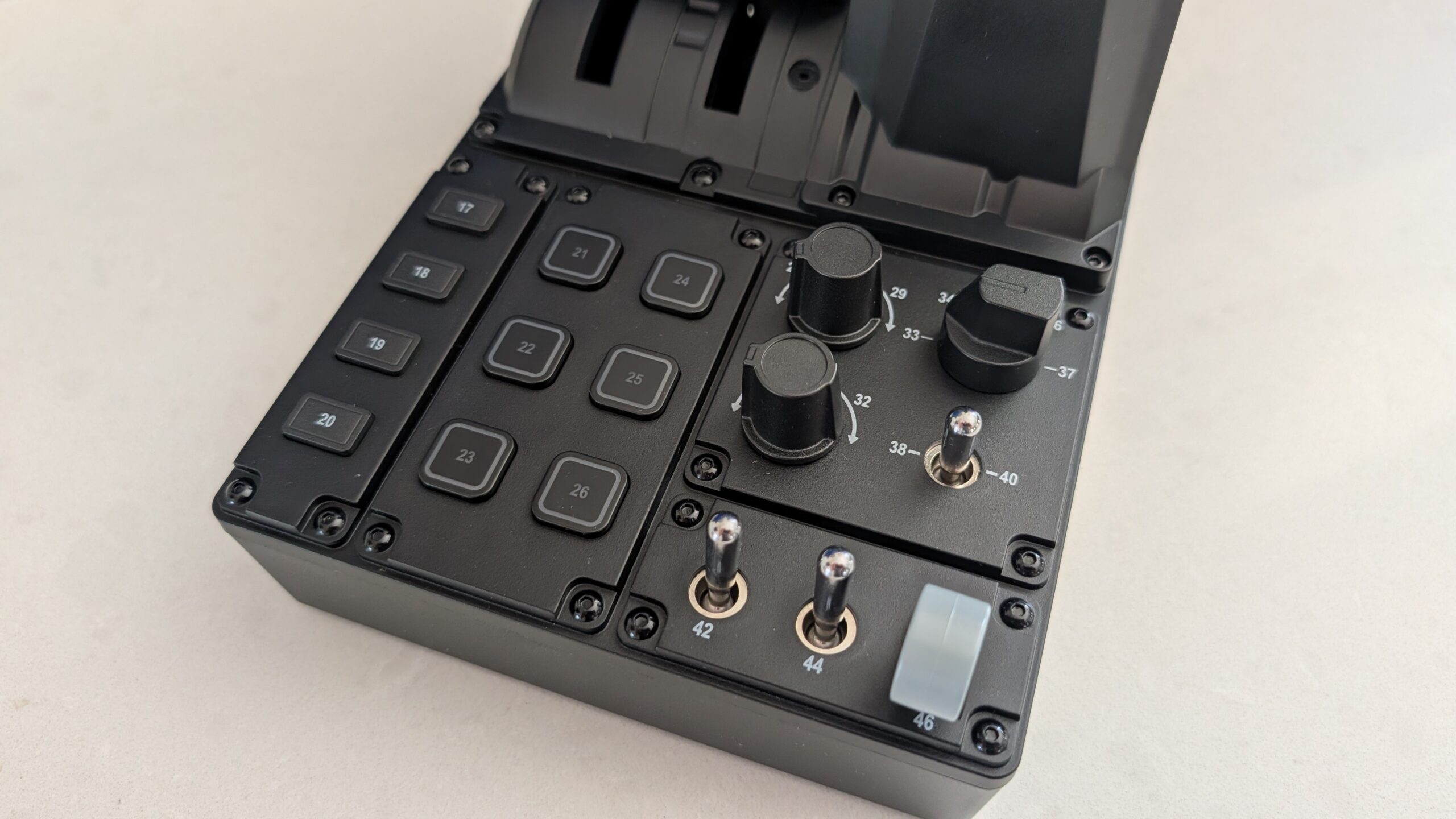
The panel between the two sticks is where the rest lives: ten push buttons (the four on the far left are plain, the next six are RGB-backlit so you can set colours in software), two rotary encoders with unlimited spin and a push, a five-position rotary selector, a small two-way rocker, and three latching on/off toggles along the front edge. In the game you can map button combinations on top of all that, so the real input count is higher than 46 once you get creative. It’s a lot of switchgear for the money.
Build quality and first impressions
Pick it up and the first thing you notice is how light it is – a shade under 1.3kg for the whole base. It’s all plastic. At $199 that’s the trade, and I don’t hold it against it; nothing about it feels cheap in the hand. The buttons on the sticks are tactile and click properly, and the toggles have that nice mechanical snap to them. BadMae, who’s put a lot more hours into farming sims than I have, called the feel and quality “top-notch”, and I’d agree from the bench.
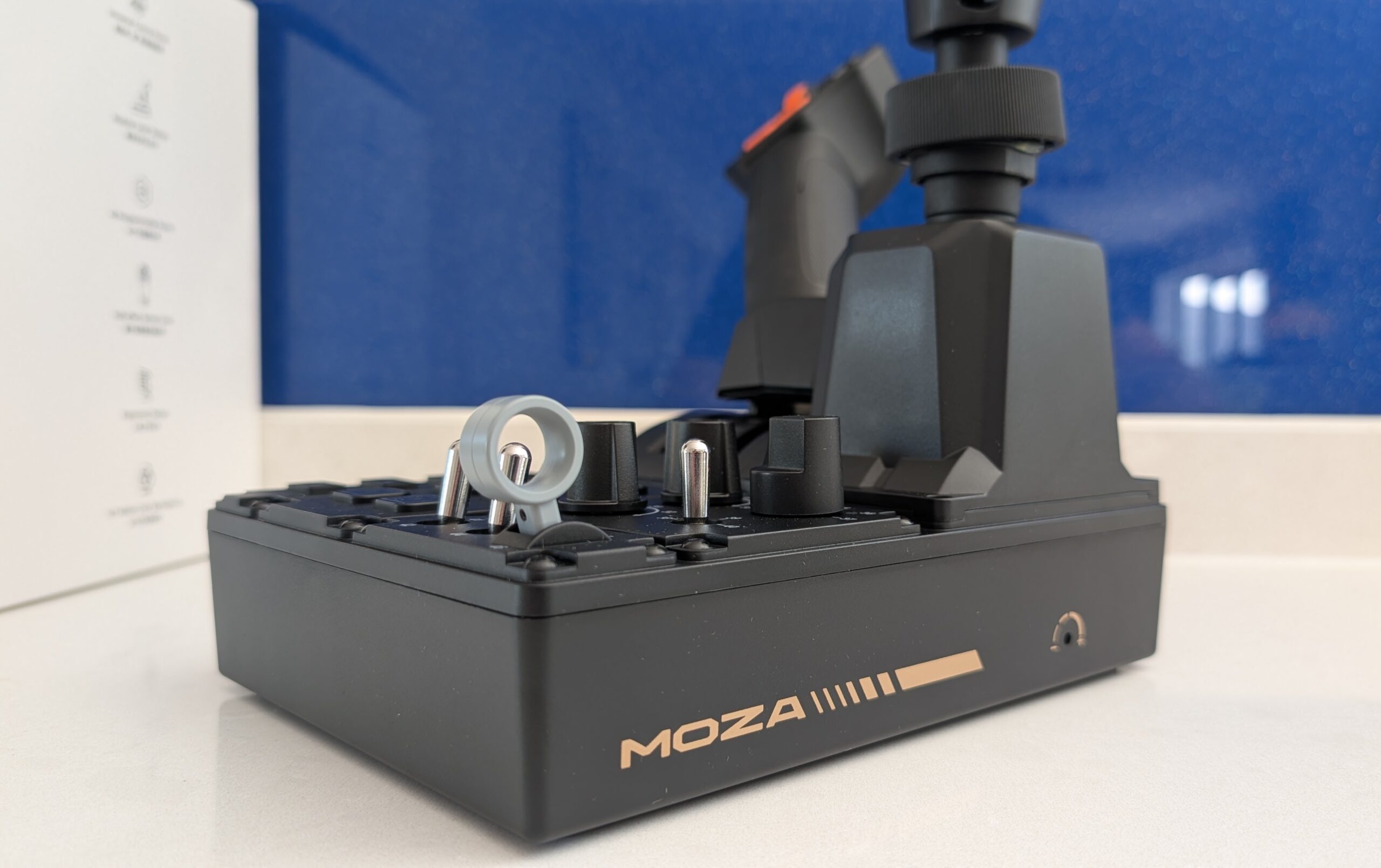
There’s one small inconsistency worth flagging. The six lit panel buttons feel great; the four unlit ones on the far left are a touch softer and mushier by comparison. It’s not a fault – none of them felt unreliable – it’s just a tactile difference you’ll notice once someone points it out. The left lever has a tension screw on the side so you can set it lighter or firmer, which is a lovely touch. The 3-axis joystick, though, has no tension adjustment – what it ships with is what you get, and amstudio and I are of the same mind that a slightly lighter spring on it would be nicer. Minor stuff.
How it feels once it’s on the rig
This is where a farming controller either earns its place or gathers dust, and the FCS earns it. Paired with a wheel – it’ll bolt in next to any MOZA base, and it’s just as happy beside pedals and a proper cockpit – the difference from keyboard-and-mouse is the immersion. You’ve got a real stick in your hand for the loader and a bank of switches within reach, and the whole thing stops feeling like a spreadsheet with tractors.
The neat bit is how the joystick handles complex jobs. Each of the buttons on the head acts like a shift key: hold one and the stick does one job, hold another and it does the next, so you can go from lifting to grabbing to rotating without ever letting go of the stick. BadMae described crane and log work as being “like playing one of those claw machine games”, which is exactly right, and he made the fair point that logging in particular feels far more natural with an actual joystick than on a pad. Where it’s best is single-stick machines – front loaders, telehandlers, articulating arms. amstudio noted that for a twin-stick excavator you’d really want a second joystick, which is worth knowing if that’s your main thing.
It’s plug and play in the sense that matters: connect the USB, MOZA’s Pit House software picks it up, and Farming Simulator 25 recognises it with presets already mapped, so you can drive within a minute. I’ll cover the “in the sense that matters” caveat properly further down, because it’s not the whole story.
It doubles as a very cheap flight stick
This is the bit I kept coming back to. The FCS isn’t really a farming product at heart – amstudio’s teardown showed the base is MOZA’s flight-sim throttle quadrant, and even the folk over on the farming-sim subreddit have clocked that its roots are in the flight range. So the flight-stick idea isn’t a stretch; it’s what the hardware started life as.
The clearest proof is the grip itself. The joystick sits on the same universal quick-release MOZA uses across its flight range, so you can pop the farming grip off and click on one of their proper flight sticks – the MA3X, the MHG or the MH16 – and turn the right half into a dedicated flight setup. On top of that it connects as a plain USB controller with a pile of axes and buttons, so in principle Elite Dangerous, Microsoft Flight Simulator or a blast round the galaxy in Star Wars: Squadrons should let you bind pitch, roll, yaw and thrust straight to it. I should flag that I haven’t seen a reviewer put the farming grip through a flight game yet – that last part is my read of what the kit is, not a tested claim – but the bones are all there. You’re not buying a one-trick box.
And the limits are worth naming, because it isn’t a HOTAS killer. The left lever is a straight push-pull slide built for a tractor, not the sweeping arc of an aircraft throttle, and the panel switches are laid out for implements rather than gear and flaps. So it’s a promising stand-in for casual flight and space games, not a replacement for a dedicated setup if flying is your main thing. But as a farming controller with a real flight-stick upgrade path built in, for $199? Happy days.
Mounting and connections
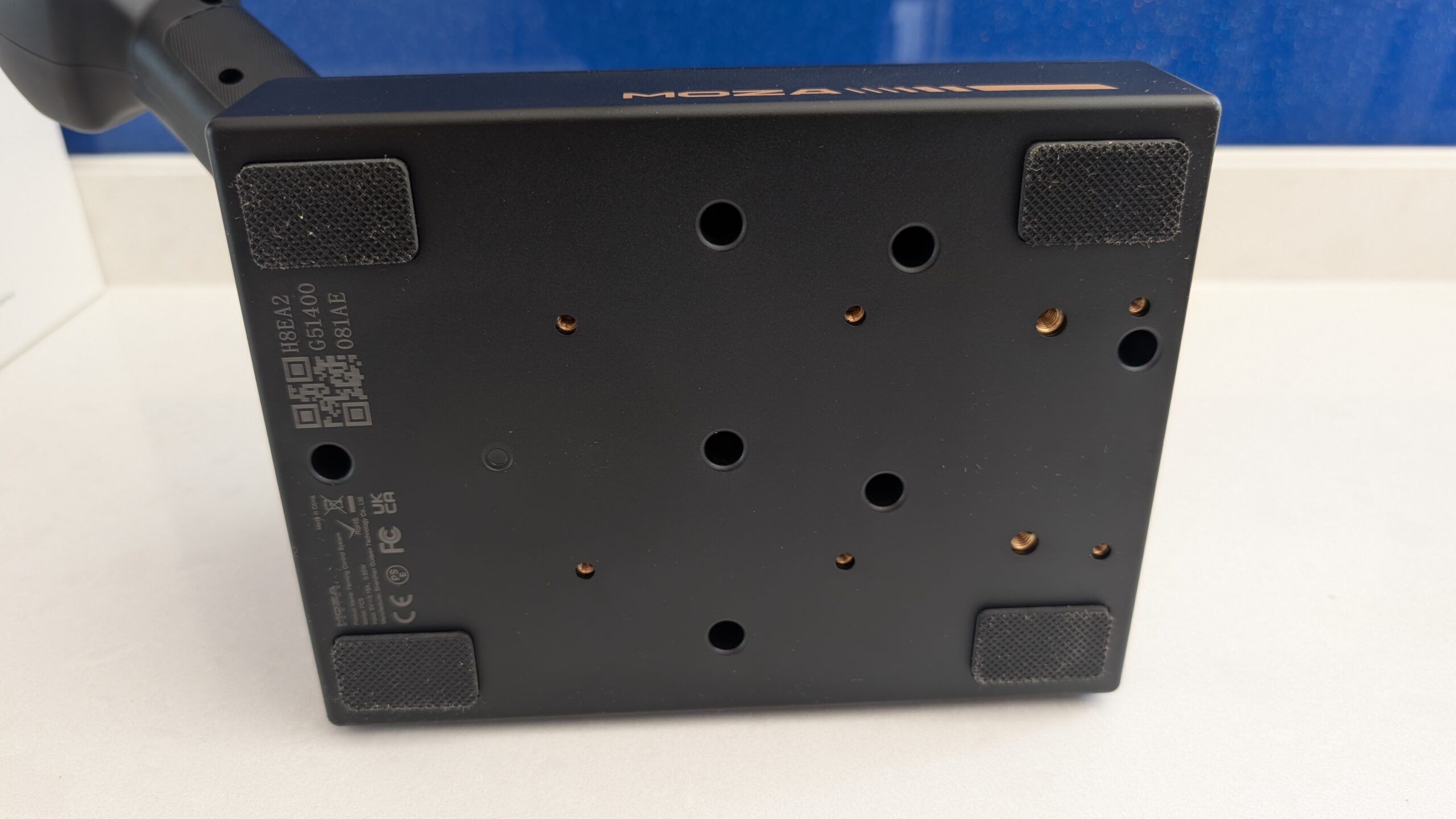
Turn it over and there are eight threaded holes underneath – six smaller ones and two larger – plus rubber feet on each corner so it won’t slide about on a desk. There’s an extension plate in the box to shift its position forward or back when you clamp it to something. It’ll sit flat on a desk, clamp to a table, or hard-mount to an aluminium-profile rig. BadMae ran his on a Next Level Racing stand with only one bolt in because of a gap, and it still didn’t budge – “a super light box, it’s not going anywhere”. That said, amstudio noticed the base can tip side to side a little if you grab the joystick high up and lean on it, so if you’re using it loose on a desk a table clamp is the better call.
Round the back there are two ports: a USB-B for the connection to your PC, and an RJ-style “TRANSIT” socket for the MOZA ecosystem. For a normal setup you just run the USB straight to the machine and you’re done. It’s PC only, by the way – there’s no Xbox or PlayStation support, which makes sense given the games it’s built for live on PC anyway.
Some issues, and what other reviewers found
Now that plug-and-play caveat. “Automatically mapped and ready out of the box” is true in that you can jump into almost any vehicle and drive. It is not true that every function on every vehicle arrives correctly mapped. Trinity Boyd at Inside Sim Racing found this cleanly: a harvester came in more or less sorted, but a Kubota tractor drove fine while its front-loader lift wouldn’t respond to any preset, and the steering came in reversed. Both were quick fixes in Pit House, but they were fixes you had to make.
That’s not really a flaw so much as physics – Farming Simulator has well over a hundred mappable functions across its vehicle types, and no single panel could preset all of them for every machine. BadMae reached the same conclusion from the other direction: the FCS shipped with presets, but he still recommends mapping the important stuff yourself so it lands where your muscle memory wants it. My advice, and Trinity’s, is the same: budget a couple of minutes with each new vehicle type to check your mappings before you rely on them. Do that once and it’s second nature.
The other small notes I’d flag: the four unlit buttons being softer than the rest, the joystick’s fixed spring being a fraction heavier than ideal, and the single throttle axis I mentioned earlier. None of them is a dealbreaker at this price – they’re the sort of things you only clock because you’re looking hard for them.
How it compares
The obvious rival is Thrustmaster’s Farmstick, which comes in cheaper at around $130. But the FCS isn’t really the same thing – for the extra outlay you get the throttle lever and a proper 46-input panel on top of the joystick, so you’re buying three devices in one rather than just a stick. If you want the fullest single-unit farming controller going, the MOZA is the more complete answer, and the flight-sim modularity is a bonus the Farmstick can’t touch.
Inside MOZA’s own range, the natural companions are a wheel base for the driving half – see our guide to direct drive wheels and our pick of the best MOZA wheels if you’re building the rig around it – and, for trucking, the MOZA R5 Pro Truck bundle if you’d rather buy the whole cab in one go.
Who should buy it
If you’re properly into Farming Simulator or Construction Simulator – running an actual virtual farm rather than just pottering – the FCS is a serious upgrade over keyboard and pad, and the immersion jump is worth the money on its own. It’s also a great shout if you’re farm-sim-curious the way I was, because it’s a cheap and enjoyable way to find out how far down that rabbit hole you want to go. And if you’ve one eye on the odd flight or space game, the fact it can moonlight as a flight stick tips it further in its favour. The one group I’d steer elsewhere is anyone whose main love is twin-stick excavator work, where you’d want a second joystick to do it justice.
Pros
- Three devices in one – Hall joystick, throttle lever and a 46-input panel – for $199.
- Tactile switchgear; numbered inputs make learning the layout easy.
- Built on MOZA flight-sim hardware – the grip swaps onto their real flight sticks (MA3X/MHG/MH16).
- Light, well-made, and mounts flat, on a clamp or hard to a rig.
Cons
- Presets don’t cover every vehicle – budget a few minutes of remapping per machine.
- The four unlit panel buttons feel softer than the rest.
- Only one throttle axis, and no tension adjustment on the main joystick.
Price and where to buy
The FCS is $199 (around €209) direct from MOZA, dispatching from late August at the time of writing. It’s a manufacturer-direct product, so MOZA is the place to get it, and you can knock a little off with our code. Use SIMRACINGCOCKPIT for 3% off at checkout on mozaracing.com. As always, the tables below carry live pricing updated daily, so check those rather than trusting my figure – including mine!
So there we are – a farming controller from someone who races cars, who wasn’t expecting to enjoy it and did. If you fancy a change of pace from your usual sim racing games, or you just want your Farming Simulator setup to stop leaning on the keyboard, this is an easy one to recommend. Have fun with it, and let me know in the comments what you end up hauling with it – bonus points if you go flying instead.
MOZA Mustang GTD Wheel Review: Ford’s Licensed Sim Wheel on the Bench
CONSPIT 280 FR Review: A Very Good All-Rounder for Formula and LMP2
CONSPIT 310 APEX Review: Getting Back to a 310mm Wheel
MOZA FCS Farming Control System Review
Fanatec CSL Steering Wheel GT3 Review: The McLaren V2 Replacement That Delivers