
I’m a sim racer and amateur racer with a passion for Motorsport, good racecraft and the technical and setup aspect of sim racing.
I run Pimax headsets on my main rig, and I’ve had the Crystal, Crystal Light, Crystal Super and Dream Air all detected, black-screened, drifting and dropping frames at one point or another. The good news: almost every Pimax fault is software, not a dead headset. If Pimax Play won’t see it, the screens are black, the view won’t hold centre, or the frame rate is on the floor, this page is the fix, worked through in the order I’d try them myself.
Quick Navigation
Jump to the fix you need:
First, the 30-second checks |
Pimax Play won’t detect the headset |
Black screen in the headset |
DisplayPort & USB errors |
Firmware update stuck |
View drifts or won’t hold centre |
Blurry image, sweet spot & halo |
Low frame rate & stutter |
Controllers, audio & eye tracking |
When it’s a warranty claim |
FAQ
First, the 30-second checks
Before anything else, run these. They clear most detection and black-screen reports on their own:
- Re-seat the DisplayPort cable at the headset end until it clicks. A millimetre of gap there is the single most common “not connected” cause.
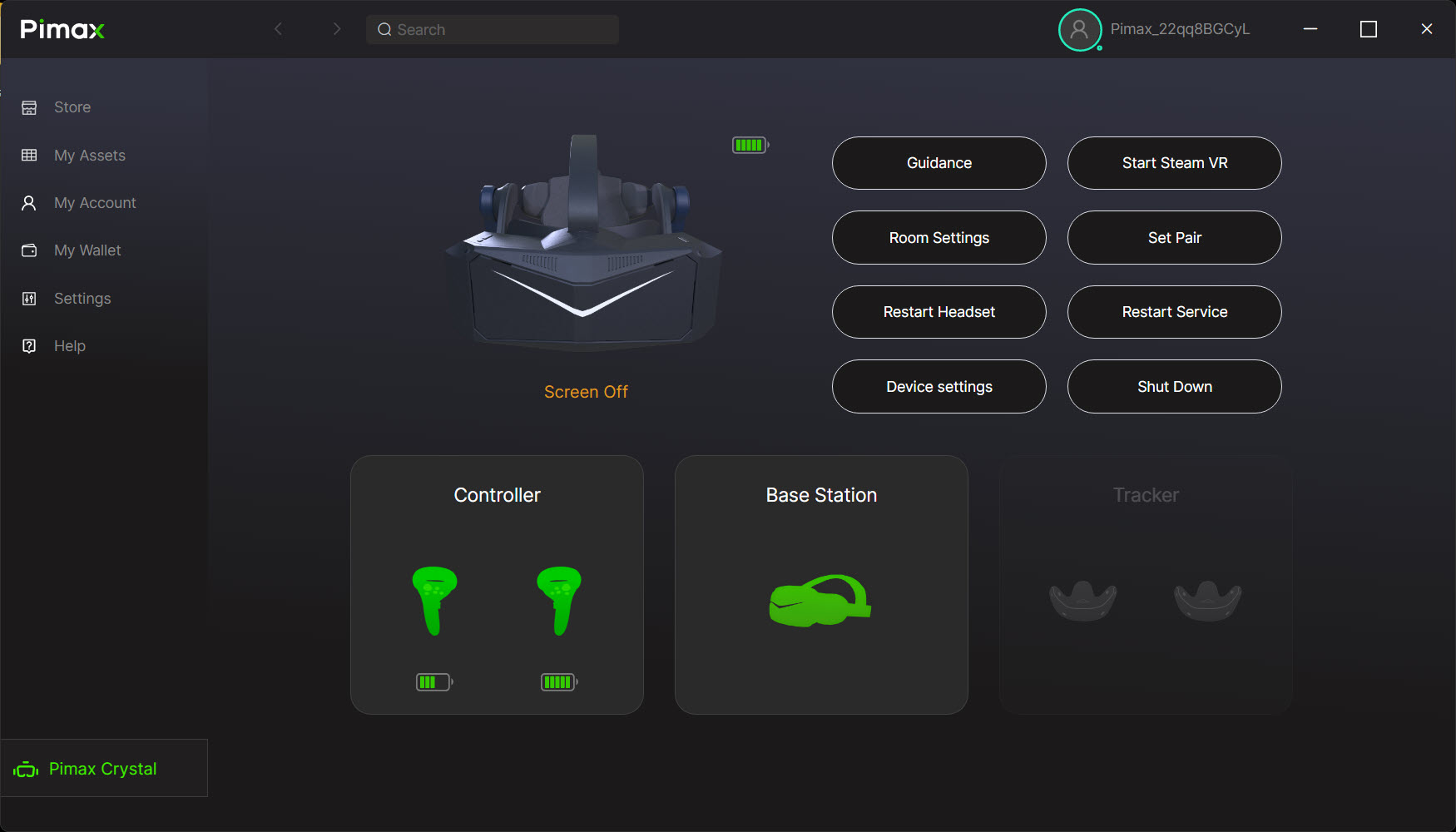
- Press Restart Service in Pimax Play. It restarts the background process that talks to the headset, and it fixes more than it has any right to.
- Plug the headset into a rear motherboard USB port on its own – not a hub, not a front-panel port, not sharing with your wheelbase.
- Check you’re on the current Pimax Play. A lot of “bugs” are already fixed in the latest build, and mixing an old client with new firmware causes its own problems.
- Update firmware before you troubleshoot hardware – but only with the headset awake and your wheelbase unplugged (more on that below).
One dated warning worth knowing right now: the Pimax Play 1.44.1 update (May 2026) broke 90Hz mode on the micro-OLED Crystal Super, giving a black screen on boot. If that’s you, update to the 1.44.2 hotfix or drop to 72Hz. The Dream Air’s wake-from-idle static was patched in firmware V1.0.2 through the same 1.44.2 build.
Pimax Play won’t detect the headset
When Pimax Play sits on a spinning loader or shows “headset not connected”, start with the cable and the service, then work back to USB. The DisplayPort plug at the headset end is the usual culprit – it can read as disconnected with only a hair of movement, even though the USB side is fine. Re-seat it firmly until it clicks. If that doesn’t do it, hit Restart Service, or end Pimax Play.exe, pi_server.exe and PiserviceLauncher in Task Manager and relaunch Pimax Play as administrator.
If it still won’t appear, the cause is often USB endpoint saturation, and it’s a sim-racer’s problem specifically. The Crystal and Super present as internal USB hubs, and a rig loaded with a wheelbase, pedals, handbrake and a button box can exhaust the USB endpoints Windows has to hand, so the headset silently drops off. Unplug the non-essential USB gear, run USBDeview as administrator to delete the greyed-out ghost devices cluttering the list, reboot, and plug the Pimax back into a dedicated rear port. That combination clears the majority of the stubborn ones.
Black screen in the headset (but Pimax Play sees it)
A black screen while Pimax Play shows a healthy green connection is almost never a broken panel. The most common cause is simply the screens going to sleep and not waking – the proximity sensor drops them and doesn’t bring them back, which the Dream Air and Crystal Super are both prone to. Set Screen Timeout to five minutes or Never in Device Settings and it stops.
The two software traps are worth knowing because they look like hardware failure. If you run Quad-Views foveated rendering alongside OpenXR Toolkit, you get an instant black screen – the Toolkit doesn’t support stereo Quad Views, so drop it and let Pimax Play handle foveation. And if Smart Smoothing is on while your GPU can’t quite hold half the refresh rate, the Crystal Light in particular will flicker to black. Turn Smart Smoothing off and cap your frame rate in the Nvidia Control Panel instead. Only once you’ve ruled all three out is it worth suspecting the panel itself.
DisplayPort and USB connection errors
“No DisplayPort signal” or a connection error usually comes down to how the headset is wired to the GPU. These headsets need a DisplayPort line straight to the discrete graphics card – HDMI won’t do, and neither will a DP port that’s routed oddly. On a desktop, plug directly into the graphics card, not a motherboard video output. On a laptop it’s almost always the graphics mux: the USB-C or DP port runs through the integrated Intel or AMD graphics, so you have to force “discrete GPU only” in the BIOS or the vendor control panel to give the headset a direct line.
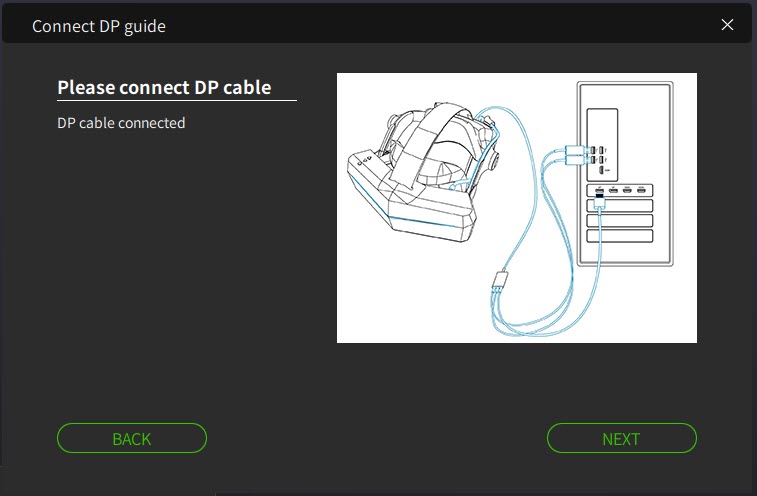
Two more to rule out. If you’re on one of Pimax’s fibre-optic cables, treat it as fragile: rolling a rig chair over one or pinching it in a moving cockpit snaps the internal strands and gives you intermittent dropouts. Swap in the shorter stock copper cable to test – if copper is rock solid, the fibre cable has died. And the Dream Air is its own case: it uses a proprietary split DisplayPort and USB tether to hit its low weight, and the connector is sensitive to being twisted. Run it without any extension, into the primary GPU DisplayPort, with the USB pigtail in a USB 3.2 port.
Firmware update stuck or failed
A firmware flash that hangs is usually one of two things, and both are avoidable. The updates take ten to fifteen minutes, and if the headset drops to sleep partway through, it interrupts the bootloader. Before you start an update, put a small piece of tape over the internal proximity sensor between the lenses so the headset thinks it’s being worn, and leave it there until Pimax Play explicitly says the update succeeded.
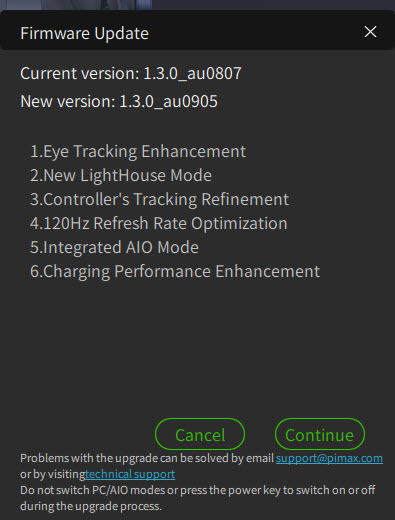
The second cause is pure sim-rig: a direct drive wheelbase spiking the USB bus mid-flash can interrupt the push. Physically unplug your wheelbase and active pedals before you hit Update Firmware. If a flash has genuinely failed and left the headset in recovery mode – a flashing multi-colour LED – that’s a manual DFU recovery with the exact firmware file from Pimax support, and it carries real risk: flashing the wrong model’s firmware permanently bricks the headset. If you’re not certain, that’s the point to raise a support ticket rather than push on.
View drifts, judders or won’t hold centre
Inside-out tracking – the Crystal Light, Super and Dream Air all use it – reads the room through the headset cameras, and it needs contrast and even light to work. The classic sim-racing failure is a pitch-black room lit only by the glow of a triple monitor, staring at blank walls: the cameras have nothing to lock onto, so the view drifts and judders. Turn on some even ambient lighting, give bare walls something to see (posters, or IR illuminators if you race in the dark), then open Room Settings, clear the environment data and run the setup again. Pimax Play’s Device Diagnostic will also flag and re-enable a camera feed that’s dropped out.
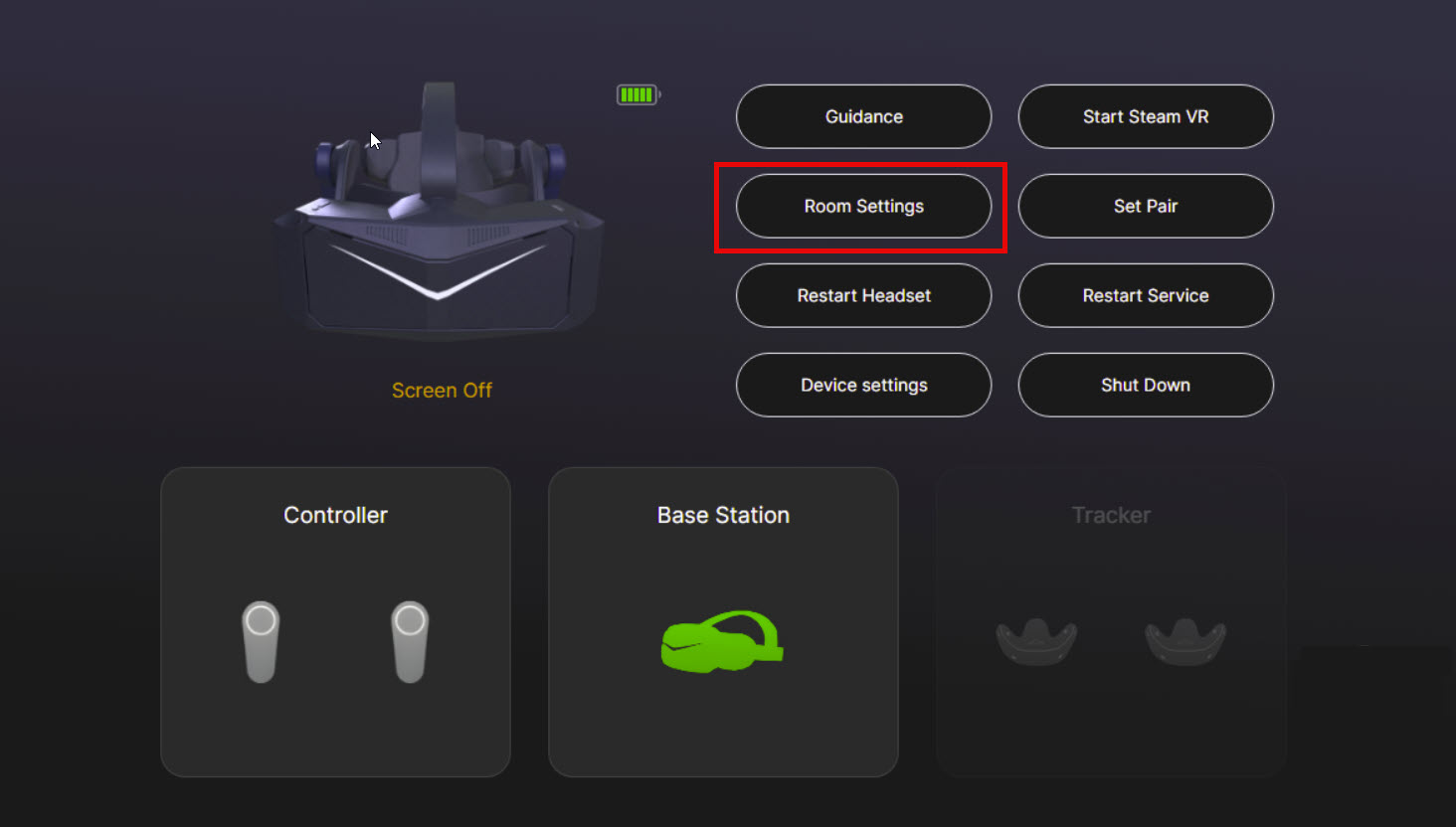
If you’re running the Crystal with the Lighthouse faceplate instead, drift is usually reflections: cover mirrors and windows so the base stations aren’t confused, and make sure the faceplate is screwed down tight for clean pogo-pin contact. Either way, some view drift over a two-hour stint is normal for any inside-out headset, so don’t fight it from the keyboard – bind the sim’s own re-centre (iRacing’s “Recenter HMD”, MSFS’s “Reset VR view”) to a button on your wheel and reset on the fly.
Blurry image, the sweet spot, and the night-time halo
If the picture is only sharp in a small area, that’s fit, not focus. The aspheric glass lenses on the Crystal, Light and Super are wonderfully clear but have a strict sweet spot, so you have to position the headset before you tighten it. Hold it against your face and move it up and down until the dashboard text snaps sharp, lock that height in with the top strap first, then tighten the back. On the Crystal Light you set IPD with the physical wheel; on the Crystal, Super and Dream Air it’s Auto-IPD, with a manual override in Pimax Play if the automatic reading fights your face.
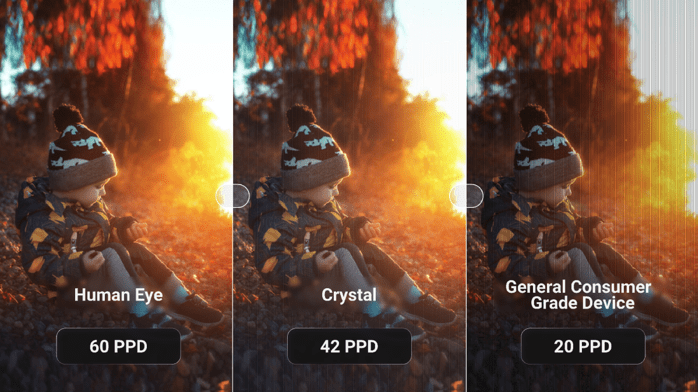
The other thing people report as a fault isn’t one. On the Crystal and the QLED Crystal Super, a glow or halo around bright objects on a dark background – headlights, lit dials at Le Mans at night – is mini-LED local dimming doing its job, not a defect. If it bothers you, set Local Dimming to Balanced or Off. The OLED panels on the Dream Air and the micro-OLED Crystal Super light per pixel and don’t show it at all. If you want the background on why these panels behave the way they do, our guide to how VR headsets work covers lenses and PPD properly.
Low frame rate and stutter
When a strong card is screaming and the frame rate is still awful, the fixes come in a clear order. First, get off SteamVR and onto Pimax’s own OpenXR runtime, which renders leaner without SteamVR’s compositor sitting in the middle of the pipeline. In current Pimax Play you set this in one place, with no separate app involved: open Pimax Play, go to the General tab, and set the OpenXR Runtime to Pimax OpenXR. iRacing, ACC, MSFS and DCS all run native OpenXR, so this is usually the single biggest gain. One catch worth knowing: a Pimax Play or SteamVR update can quietly flip the runtime back to SteamVR, so if a session suddenly feels heavier than it did last week, check here first.
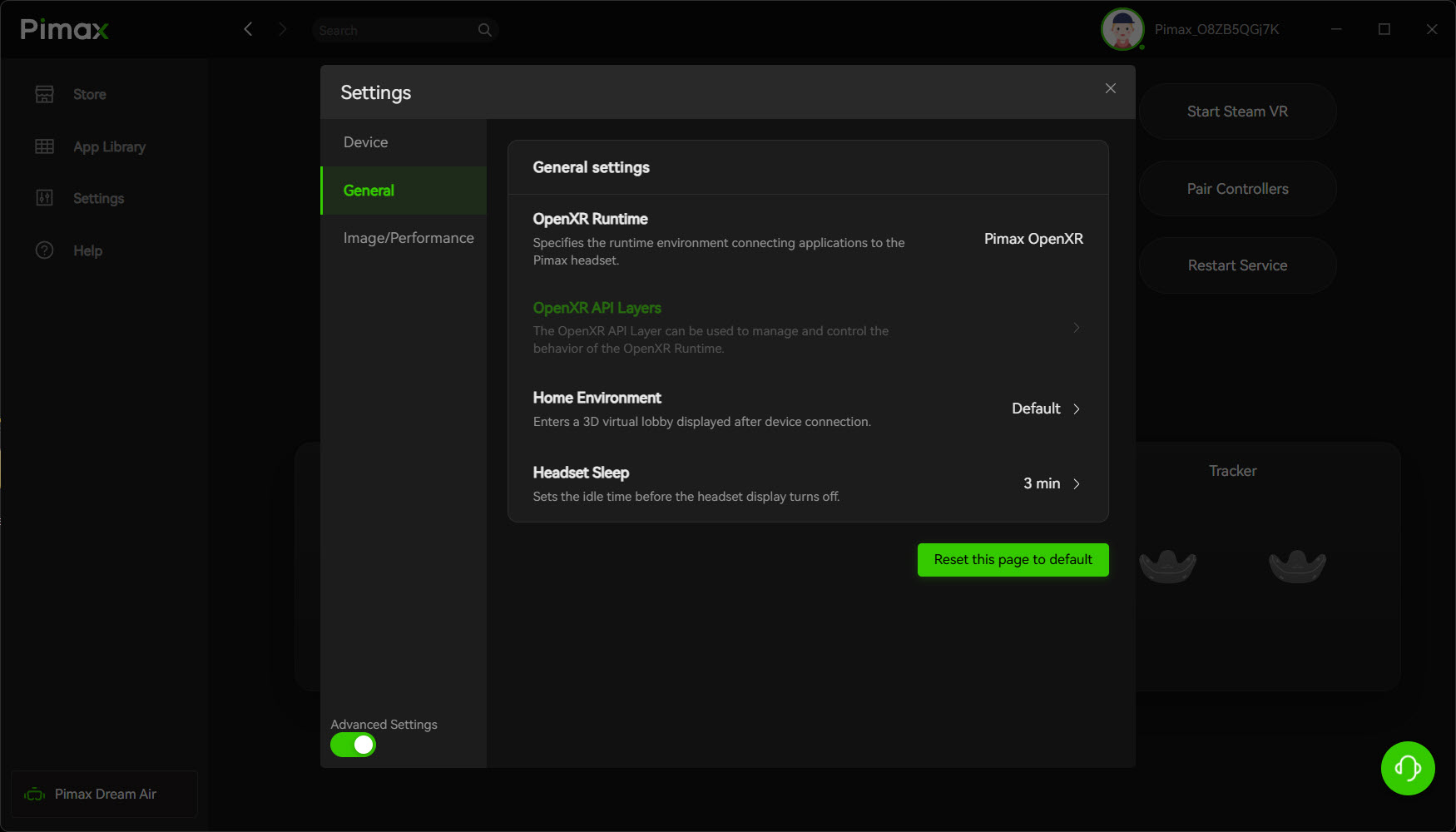
Next, use foveated rendering – it reclaims 20 to 40 per cent of your frames by only rendering full resolution where you’re looking, and it’s all set inside Pimax Play now, under the Games tab. The Crystal, Super and Dream Air do it dynamically off the Tobii eye tracking (enable that under Device Settings); the Crystal Light has no eye tracking, so you use fixed foveated rendering instead, which softens only the lens edges you’re not looking at anyway. Then turn Smart Smoothing off: its reprojection halves your frame rate and smears trackside fences, brake markers and other cars, which is the last thing you want when you’re judging a braking point. You’re better off dropping shadows or MSAA to hold a native 72 or 90Hz. Finally, set pixel density in one place only – if Pimax Play is at 1.5x and the game is also at 1.5x, they multiply into something no GPU can render. For tested per-sim numbers, our best Pimax VR settings for iRacing and the Pimax settings tool give you sane starting points by GPU.
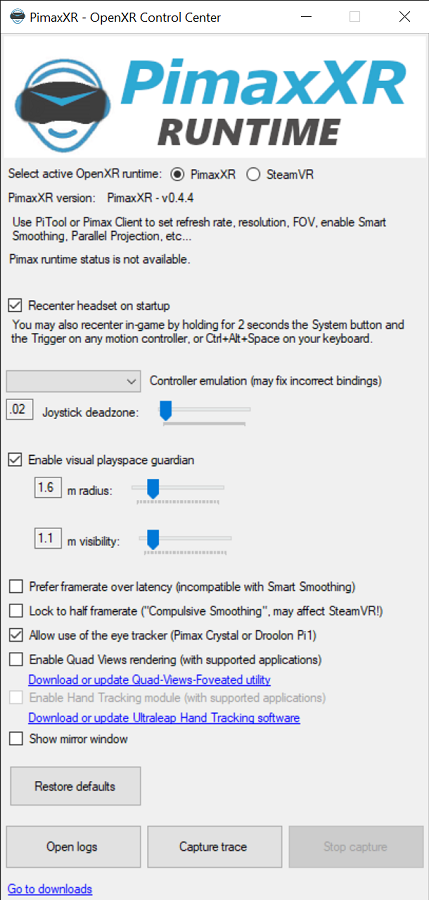
One bit of housekeeping if you’ve been in VR a while. There used to be a separate app called PimaxXR – the standalone “OpenXR Control Center” written by the community developer mbucchia – and a lot of older guides and setups (including some of ours in the past) still point at it. That project was retired in 2024 and folded straight into Pimax Play, its own page now tells you not to use it, and it won’t even recognise newer headsets like the Crystal Super. If you’ve still got it installed, uninstall the standalone PimaxXR app – and OpenXR Toolkit while you’re there – and set the runtime only through Pimax Play. Both tools write the same Windows setting, so running them side by side is a common reason the runtime keeps flipping around on you.
Controllers, audio and eye tracking
Eye tracking matters even if you never touch a motion controller, because dynamic foveated rendering depends on it – if it stops calibrating, your frame rate quietly tanks. It all lives in Pimax Play now (Device Settings, then Eye Tracking), so there’s no separate app to chase. When it fails it’s usually dirt: the IR sensors sit in the plastic rings around the lenses, so a wipe with a clean microfibre cloth and a restart, then a re-run of the calibration, brings it back. Keep the tape and sweat off those rings.
For audio dropping out, there are two causes. On the original Crystal’s DMAS off-ear strap the sound passes through pogo pins, so a loose strap screw cuts one side – tighten the two screws where the strap meets the body. More often it’s Windows: Pimax Play tends to reset the audio endpoint on boot, so click the speaker icon in your taskbar and set the output back to the Pimax audio device. Motion controllers that won’t pair for menu navigation usually just need Pair New Controller in Pimax Play, or a direct USB-C connection to force a firmware handshake if pairing fails.
When it’s a warranty claim, not a fix
Most Pimax problems are software, but a few aren’t. A failed DFU flash that’s left the headset unresponsive, a panel with genuine dead pixels or lines that survive a driver reinstall, or physical damage to the connector or cable that a known-good spare doesn’t fix – those are past a home repair. Don’t keep re-flashing a headset that’s genuinely stuck in recovery, and don’t force a manual firmware flash you’re unsure of, because the wrong file bricks it for good.
At that point, raise it with Pimax support with your order details and a short video of the fault – it gets you to a resolution faster than a written description. Keep the original box and cables; warranty returns go far more smoothly with them.
Frequently asked questions
Why won’t Pimax Play detect my headset?
Most often it is a slightly unseated DisplayPort cable at the headset end, a hung Pimax service, or USB endpoint saturation from a rig full of USB devices. Re-seat the DP cable, press Restart Service in Pimax Play, then plug the headset into a dedicated rear motherboard port.
Why is my Pimax screen black when Pimax Play says it’s connected?
The screens sleeping and not waking is the usual cause; set Screen Timeout to Never in Device Settings. Running OpenXR Toolkit with Quad Views, or Smart Smoothing when the GPU can’t hold half frame rate, also causes a black screen. Rule those out before assuming a panel fault.
Why does my Pimax view keep drifting off-centre?
Inside-out tracking needs contrast and even light. A pitch-black room lit only by monitor glare, or blank walls, starves the cameras. Add ambient light and wall texture, clear and re-run Room Settings, and bind the sim’s own re-centre to a wheel button for long stints.
My frame rate is terrible on a strong GPU. What do I change first?
Run games in native OpenXR through Pimax OpenXR (built into Pimax Play’s General tab) rather than SteamVR, turn on foveated rendering (dynamic on the Crystal, Super and Dream Air; fixed on the Crystal Light), and switch Smart Smoothing off. Then stop pixel density multiplying by only setting it in one place.
Should I use Pimax OpenXR, the old PimaxXR app, or SteamVR?
Use Pimax OpenXR, the runtime built into Pimax Play (General tab). It renders leaner than SteamVR for iRacing, ACC, MSFS and DCS. If you still have the old standalone PimaxXR app (mbucchia’s OpenXR Control Center) installed, uninstall it – it was retired in 2024 and folded into Pimax Play, and running both causes runtime conflicts. Only fall back to SteamVR for a title that genuinely needs it, such as Automobilista 2.
Is the glow around lights during a night race a fault?
No. On the Crystal and the QLED Crystal Super, a halo around bright objects on a dark background is mini-LED local dimming, not a defect. Set Local Dimming to Balanced or Off if it distracts you. The OLED panels on the Dream Air and micro-OLED Crystal Super don’t show it.
My firmware update froze. Is the headset bricked?
Usually not. Firmware flashes take ten minutes or more, and the headset sleeping mid-flash is the common cause. Tape over the internal proximity sensor so it stays awake, unplug your wheelbase to stop USB power spikes, and retry. A genuinely stuck flash needs Pimax support and the exact firmware file.
Why does my Crystal Super go black at 90Hz?
The Pimax Play 1.44.1 update in May 2026 broke 90Hz mode on the micro-OLED Crystal Super, giving a black screen on boot. Update to the 1.44.2 hotfix, or drop the refresh rate to 72Hz until you have. It is a software bug, not a panel failure.
Does the Crystal Light have eye tracking and dynamic foveated rendering?
No. The Crystal, Crystal Super and Dream Air have Tobii eye tracking and dynamic foveated rendering; the Crystal Light does not. On the Light you use fixed foveated rendering instead, which drops resolution at the lens edges you aren’t looking at.
Get the runtime and the cable right and Pimax hardware is superb for sim racing. If you’re still deciding which headset fits your rig, I’ve reviewed them all – the Crystal Super and the Dream Air in depth – and the 2026 VR headset comparison puts them side by side against the Quest 3 and the rest.
Pimax Troubleshooting: Every Fix That Works
Simagic Troubleshooting: Every Fix That Works

MOZA Troubleshooting: Every Fix for Pit House, Detection, Pedals and Wheel Shake
Fanatec Troubleshooting: Every Fix for Drifting, Detection, Firmware and Pedal Faults
Thrustmaster Troubleshooting: Every Fix for the Control Panel, Force Feedback and Detection Faults