

I’m a sim racer and amateur racer with a passion for Motorsport, good racecraft and the technical and setup aspect of sim racing.
AMS2 is the sim where foveated rendering basically doesn’t work, and you need to know that before you waste an evening fighting it. No eye-tracked DFR. No native foveation pass. No working Quad Views. If a guide has promised you can flip Quad Views on for the Crystal Super and claw back 30% on a full grid, that isn’t true. Matthieu Bucchianeri (mbucchia), who writes the foveation tools the whole community relies on, put it plainly on the AMS2 subreddit: “None of the tools out there can do DFR in AMS2.” So here’s what you can do, what you can’t, and the per-GPU settings that hold.
The other thing worth flagging upfront: a meaningful slice of the Pimax + AMS2 community runs AMS2 in Oculus rendering mode rather than through Pimax Play’s OpenXR runtime directly. AMS2 was heavily optimised for the Oculus API back in its early days, and on 4090 / 5090 hardware some users report sharper images and higher frame rates running Oculus mode than going straight OpenXR. That’s not the dominant recipe (most Pimax users go straight Pimax OpenXR), but it’s worth knowing if your default config feels softer than it should – more on how to actually switch it below, because the launch option people quote for this is usually wrong too. The current AMS2 build, as I write this in July 2026, is V1.6.9.9, and the V1.6.9 branch has shipped steady Madness-engine VR perf improvements across the year.

Quick Navigation
Jump directly to what you’re looking for:
Why foveation doesn’t work in AMS2 |
The Oculus mode community alternative |
In-game AMS2 settings (TJR Sim validated) |
Per-GPU tier recommendations |
Eye tracking and the Crystal Super |
Known 2026 gotchas – TAA, crashes, head tracking lock |
Sources
Why foveation doesn’t work in AMS2
Here’s the uncomfortable bit, and it’s worth getting straight because a lot of guides (this one included, until now) have muddled it. AMS2 has no native foveated rendering. There’s no FFR pass baked into the Madness engine, no hidden toggle, nothing Reiza tuned for you. And it has no working Quad Views either – the Madness engine doesn’t expose the OpenXR quad-views extension that headset foveation hooks into, and it can’t be injected after the fact. mbucchia, who wrote the Quad-Views-Foveated layer that DCS and MSFS users depend on, said it on the AMS2 subreddit when someone claimed otherwise: “None of the tools out there can do DFR in AMS2. There’s a recent article that claims that quad views can be used, but it’s just AI non-sense.” Take it from him over anyone, including me – he builds the tools.
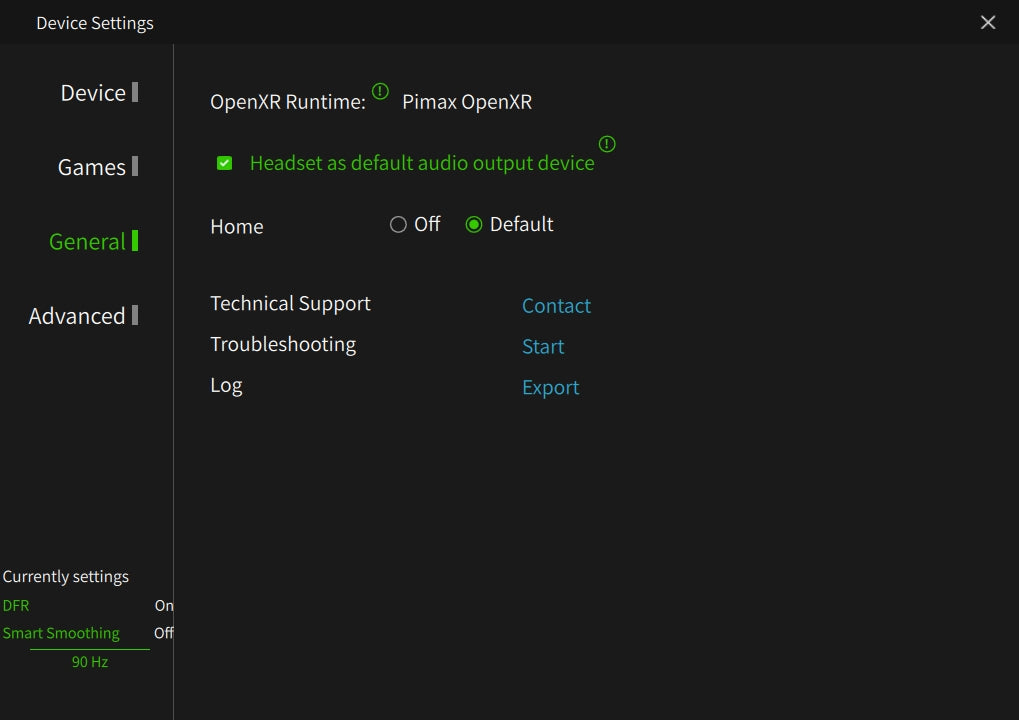
So what does that leave you? One route, and it’s fiddly. You can force fixed foveated rendering into AMS2 with OpenXR Toolkit, but only if you run the game through OpenComposite (native OpenXR) instead of SteamVR, since OpenXR Toolkit can’t hook SteamVR. Even then it fights the Madness renderer: the variable-rate shading pass clashes with the game’s anti-aliasing and culls trackside objects in your periphery – trees and shadows winking out at the edges is the classic tell. You turn TAA off, and either drop MSAA entirely (leaning on the Toolkit’s sharpening) or push the foveation rings wide enough that the culling happens outside where you’re looking. It’s a community workaround, not a feature, and plenty of people try it and give up. The honest default on AMS2 is no foveation at all – run native resolution per your GPU tier and let the in-game settings do the heavy lifting. One thing that is simple: leave the “Quad Views” checkbox in Pimax Play turned OFF for AMS2. It does nothing useful here and can conflict.
The Oculus mode community alternative
This is the AMS2-specific quirk worth knowing about even if you don’t end up using it. AMS2 can launch in its own Oculus (OVR) rendering mode rather than through OpenXR, and that was historically the Reiza-tuned pipeline back when Oculus was the default sim-racing VR platform. On Crystal Light and Crystal Super hardware paired with a 4090 or 5090, some community testers report Oculus mode produces noticeably sharper images and higher frame rates than running straight Pimax OpenXR. The mechanism is roughly that AMS2’s renderer was tuned harder against the Oculus API than against generic OpenXR, and even today that tuning shows up.
One thing to get right, because it’s the bit most guides fumble: the -vr launch option does not force Oculus mode. It forces SteamVR, which is the opposite of what you want here. To actually run Oculus mode, hit Play in the Steam library and pick “Launch in Oculus VR mode” from the prompt, or build a desktop shortcut against AMS2’s othervr launch target to skip the prompt each time. The honest assessment: it’s not the dominant recipe – most Pimax users go straight Pimax OpenXR for the simplicity, and the gap on Tier 1 hardware is modest. But if your default AMS2 config feels softer than iRacing or LMU at the same render resolution, it’s worth a try. One catch worth flagging: Oculus mode is a different pipeline from OpenXR, so if you were relying on the OpenXR Toolkit FFR workaround above, you lose it when you switch – you’re picking one or the other.
In-game AMS2 settings (TJR Sim validated)
TJR Sim (Larry Ray) has done the deepest Pimax + AMS2 benchmarking I trust – 57 PPD Crystal Super on a 4090, full benchmarks at 72Hz and 90Hz, and it still holds up against the current V1.6.9.9 build. The recipe below is the community-consensus version of his work, adjusted for the small 1.6.9 shifts. The cross-sim version of these per-tier numbers (iRacing, LMU, AC, ACC) lives in the Pimax Crystal settings sorted by GPU reference, which feeds the interactive Pimax Settings Tool on this site.
The universal AMS2 calls that hold across every GPU tier:
- Anti-Aliasing: MSAA 4x (not TAA). TAA looks broken in VR – severe ghosting whenever you move your head. MSAA is significantly sharper inside the Pimax lenses and avoids the temporal smearing TAA has on AMS2 specifically. Go High if your GPU has the headroom.
- Reflections: Low + Environment Map: Medium. High reflections tank rain frame times catastrophically on the Crystal Super.
- Shadow Detail: HIGH + Shadow Maps: Track Only. The 2026 update to the community recipe – previous guides recommended Medium shadows, but the V1.6.9 optimisations made High Shadows essentially free (1-2 FPS) for a big stereoscopic depth perception improvement. Track Only restricts shadow rendering to track geometry rather than every car and trackside object – the cost saving on a full grid is real.
- Particle Density: High + Particle Detail: Low or Medium. The split is the key: Particle Density at High gives you the visceral immersion of dirt spray and rain effects, but the underlying Particle Detail level is what costs CPU at race starts. Splitting them is how you get the look without the bottleneck.
- Detailed Grass: OFF. The single biggest FPS lever in the entire Madness engine VR pipeline. It looks worse, you stop noticing within ten minutes, and you get back 15-25% of your frame time. Always off for VR.
- Exposure Compensation: 0.6 (0.6-0.8 range). Crystal Light and Crystal Super displays are very bright. AMS2’s default exposure crushes the highlights and blows out the daytime skyboxes. Dialling Exposure Comp down to 0.6 brings it back to a natural-looking range.
Per-GPU tier recommendations
RTX 5090 / 5080 / 4090 (Tier 1)
Crystal Super 50 PPD at 90Hz, locked. With no foveation to lean on you’re doing this on raw GPU grunt, and on a 5090 / 5080 you’ve got it – the Crystal Super holds a stable 90 FPS at 50 PPD even on the Nordschleife in heavy rain with MSAA High, Shadows High, and the in-game settings above pushed to their high-quality variants. The Crystal Super at 50 PPD is the visual benchmark. If you’ve got the hardware, this is what AMS2 was waiting for – and notice the eye tracking sits idle, because AMS2 can’t use it (more on that below).
RTX 4080 / 4070 Ti (Tier 2)
Crystal Light at 90Hz, Pixel Density 1.0, MSAA 4x. To hold 90Hz lock on a full grid in wet conditions you need to turn off cockpit mirrors (virtual mirror only) and disable any optional Enhanced Effects. With no foveation safety net on AMS2, the Crystal Light’s lower 35 PPD is doing you a favour at this tier – there’s simply less to render than the Super. Crystal Super on a 4080 is feasible but it’s pushing the GPU into the dirt the first time you hit Nordschleife in the rain – Crystal Light is the sweeter recipe here.
RTX 4070 / 4060 Ti (Tier 3)
Crystal Light at 72Hz, capped at 69-72 FPS for frame pacing. Pixel Density drops to 0.75-0.85, Simple AA with Pimax Play sharpening claws back clarity. Detailed Grass off, all optional effects off, Particle Detail Low. The pattern that holds at this tier is the same as iRacing: a stable 72Hz feels better than a 90Hz that drops to 75 every other corner. Crystal Light is the only viable headset here – Crystal Super isn’t worth the pixel count at this GPU tier.

Eye tracking and the Crystal Super
This is the question I get most, so let me be blunt about it. The Crystal Super has real eye tracking. So does the Dream Air, with its Tobii 120Hz sensor. The hardware is genuinely capable of eye-tracked Dynamic Foveated Rendering – the thing that renders sharp only where your eyes are pointing and saves you 20-30% on a full grid. The problem is never the headset. It’s AMS2. The game has to expose its eye gaze to the runtime through the OpenXR XR_EXT_eye_gaze_interaction extension, and on the major sims only iRacing has done that work. AMS2 hasn’t. On top of that, the Madness engine renders the two eyes sequentially, which makes injecting foveation from outside extremely hard. So the eye tracker on your Crystal Super sits there doing nothing useful in AMS2, however much you wish it didn’t.
You’ll find the odd thread claiming they got it working – someone forces OpenXR Toolkit’s eye tracking on, flips the Pimax Quad Views checkbox, fiddles with Priority Rendering, and reports “eye tracking finally working in AMS2.” Read those threads to the end and the same person is reporting launch crashes when they change refresh rate and the dominant eye going pixelated. That isn’t DFR working – it’s a rendering conflict on a pipeline that was never built for it. mbucchia’s read is the same, and he wrote the tool. If you want genuine eye-tracked DFR today, it’s iRacing, MSFS 2024, and a handful of titles with native support – not AMS2. The fix here isn’t a setting; it’s Reiza shipping the extension, and there’s no sign of that yet.
Known 2026 gotchas – TAA, foveation crashes, head tracking lock
Three issues show up regularly in the AMS2 + Pimax community threads through 2026, and they’re all worth knowing about because the symptoms are spectacular and the root causes aren’t obvious.
TAA ghosting in VR. If your AMS2 image has motion smearing whenever you move your head – especially noticeable on trackside fences and pit-wall signage – the cause is almost always TAA being enabled. Switch to MSAA 4x and the smearing disappears. This isn’t a Pimax-specific issue; it affects every VR headset running AMS2 with TAA enabled, but it’s pronounced on the Crystal Super’s higher PPD because there’s more detail for the ghosting to muddy.
Foveation-injection crashes. If you’ve gone down the OpenXR Toolkit FFR route (or you’re one of the people trying to force eye tracking on through it), expect instability – launch crashes after a Pimax Play refresh-rate change, and a pixelated dominant eye are both reported regularly. That’s the cost of bolting foveation onto an engine that doesn’t support it. Workaround if you insist on running it: after every refresh-rate change, reboot the Pimax Play client and the headset before launching AMS2, and keep MSAA off. Honestly, though, the cleaner fix is to skip the foveation injection entirely on AMS2 and just run native res for your tier – far fewer ways for it to fall over.
Head tracking lock (the cockpit moves with your head). Periodic SteamVR updates have a habit of breaking AMS2’s camera mapping, with the symptom that the cockpit interior moves with your head while the world stays static – exactly the opposite of how it should be. Two fixes work: verify game files through Steam (forces AMS2 to re-pull its camera config), or switch to Oculus render mode as a workaround until the next AMS2 patch realigns with the SteamVR change. If you’re running straight OpenXR and this hits, file verification is the faster fix.
Pimax $25 discount: use code SIMRACINGCOCKPIT at checkout on pimax.com for $25 off any Crystal Light, Crystal Super or Dream Air.
Sources and credits
The settings numbers in this guide come from TJR Sim / Larry Ray’s AMS2 + Pimax benchmarking work (his 57 PPD Crystal Super on RTX 4090 / 72Hz benchmark series), cross-checked against the current V1.6.9.9 build through r/automobilista and OverTake.gg community testing. The “foveation doesn’t work in AMS2” call comes straight from Matthieu Bucchianeri (mbucchia), author of the Quad-Views-Foveated OpenXR layer, who stated it directly on the AMS2 subreddit; the instability reports come from the “eye tracking finally working in AMS2 (but unstable)” thread. The Oculus mode alternative is documented across Reiza’s own community guides and several long-running r/Pimax threads on the Crystal Light.
Wider SRC reference points worth pairing with this guide: my interactive Pimax Settings Tool generates the recommended settings for your exact headset + GPU + sim combination; the sister Pimax + iRacing, Pimax + LMU, and Pimax + AC guides cover the different Quad Views calls for each sim (AMS2 off, iRacing off, LMU on for DFR, AC on full-time); and the recently rebuilt Best VR Headsets for Sim Racing buyer’s guide is the place to start if you’re choosing between Crystal Light, Crystal Super, and the Dream Air. The AMS2 wheel-settings side is covered in my AMS2 wheel settings page.
V1.6.9.9 is the current AMS2 stable as I write this in July 2026 – V1.6.9.8 brought the Renault R25 and R26 and the Hungaroring, and .9 adds the Historical Endurance Pack. If Reiza ever ships native eye-gaze support the way iRacing has – the one thing that would make real DFR possible here – I’ll come straight back to this page and rewrite the foveation sections properly. Until then, this is the honest state of play.

Best Pimax VR Settings for F1 25 in 2026: A Damage-Control Guide

Best Pimax VR Settings for Le Mans Ultimate in 2026

Best Pimax VR Settings for Automobilista 2 in 2026

Best Pimax VR Settings for Assetto Corsa in 2026

iRacing VR Settings (2026): Meta Quest 3, PSVR2, Pimax and Valve Index

Assetto Corsa VR Settings 2026: Pimax, Quest 3, PSVR2 & More
Topic: VR Headsets