


I’m a sim racer and amateur racer with a passion for Motorsport, good racecraft and the technical and setup aspect of sim racing.
Featured image: two Caterhams racing in Automobilista 2 (Image: Reiza Studios)
You’ve got Automobilista 2 and a wheel, and you want a sane place to start the force feedback for your base. So today we’re pulling together Reiza Studios’ own FFB (force feedback) guide and whatever the wheel makers publish for AMS2 themselves, brand by brand, starting with your wheel’s own software and then the game.
Quick Navigation
Jump directly to what you’re looking for:
AMS2’s FFB menu |
Moza |
Fanatec |
Simucube |
Logitech |
Thrustmaster |
Alternative approach |
Fine-tuning
How AMS2’s force feedback settings work
AMS2 keeps its main force feedback settings under Options > Controls > Force Feedback, where you’ll find Type, Gain, Low Force Boost, FX, Damping and Menu Spring Strength. Low Force Boost amplifies the light forces close to zero, and the boost tapers off as the force rises. It doesn’t touch damping, friction or vibration. FX is the vibration part of the signal (tyres on heavy slip, drivetrain pulses), and it also scales the chassis effects in Default and Default+.
Type picks one of three profiles. Default gives you the steering torque plus damping, friction, some vibration and a little chassis feel, mainly yaw. Default+ adds some understeer drop-off and a bit more chassis feedback, so you feel more of the car’s weight transfer. It also adds drivetrain pulses when you’re slow or stationary. Custom, as it ships, is bare steering torque, and you can edit it through the ffb_custom_settings.txt file in your Documents folder. Community custom files are popular with some users and have their own thread on Reiza’s forum, but Reiza’s advice is to find something that works well enough for you and stick with it.
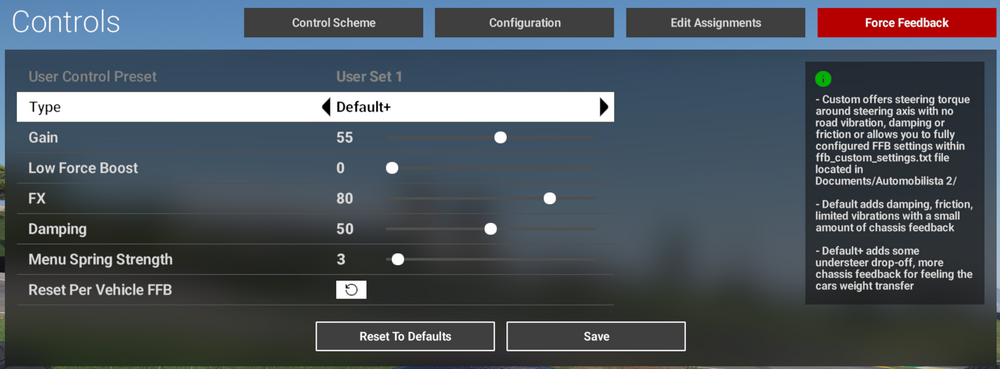
Gain scales everything the game sends, independent of the strength set on your base. Reiza calls a Damping of 50 a good starting point, and it only recommends zero for low-torque wheels with a lot of internal resistance, like the G25 or the DFP. Even a low-torque wheel with little internal resistance, such as the G923, benefits from some. Menu Spring Strength only acts in the menus.
The Fanatec, Simucube, G29/G923 and T-GT numbers below come from Reiza’s force feedback guide, written for V1.4 in September 2022. So do the in-game starting points in the Moza section. V1.6.8 in October 2025 brought extensive revisions to both Default and Default+, which Reiza says improved the detail under braking and mid-corner. Reiza hasn’t republished its per-wheel numbers since, but the sliders are the same six in the current build, V1.6.9.96 (18 September 2026). The only maker settings from after V1.6.8 are Logitech’s for its Pro wheels, from February 2026.
Moza settings
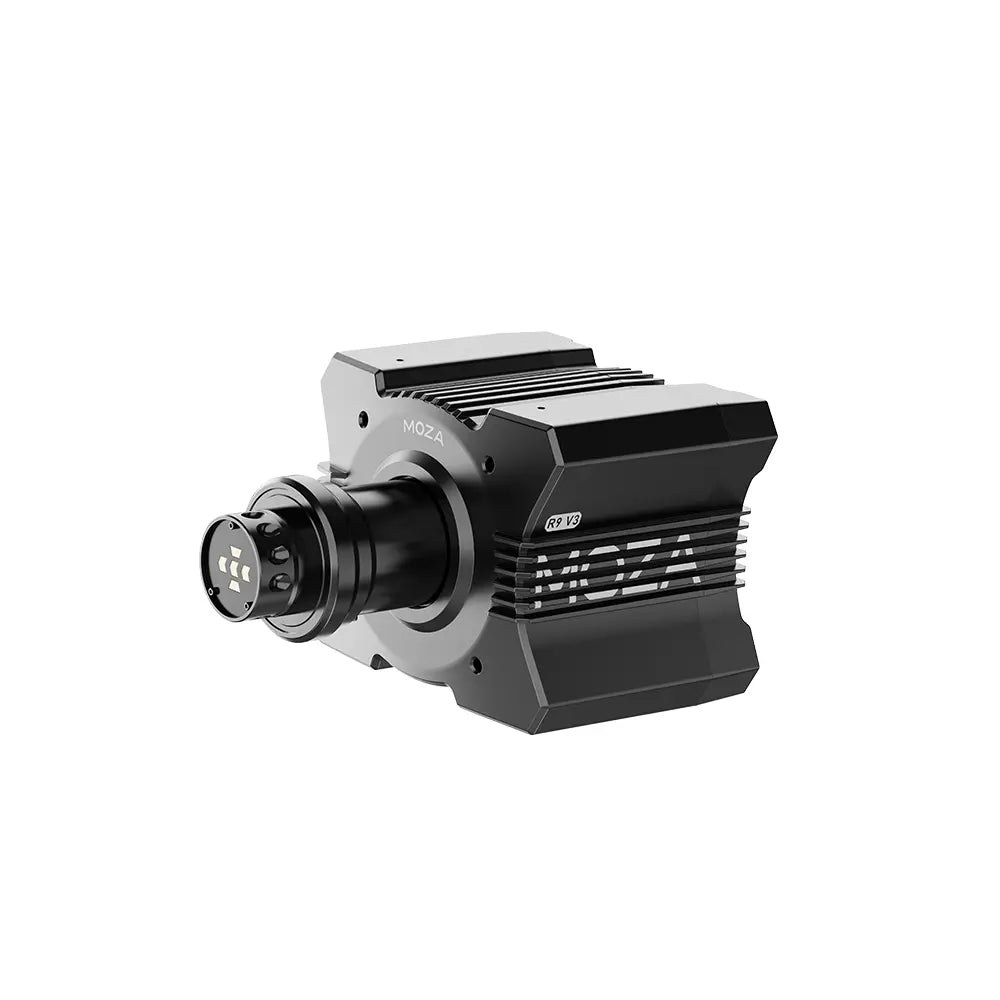
Moza publishes no AMS2 force feedback values, and Moza’s support page says only that the game’s force feedback “does not require configuration to support it”. Reiza’s guide has no Moza set either, so start with Moza’s general Pit House advice, then use Reiza’s in-game starting points. Neither one gives a Moza a Gain number, so that’s down to feel. If you run a dashboard, Pit House can sort the AMS2 telemetry out in one click from its game list, or you can set it by hand. There’s more on the bases themselves in our Moza guide.
Start with these settings in Pit House, from Moza’s general force feedback guide:
- Game Force Feedback Intensity: 100% on an R3, R5 or R9; 70-90% on an R16 or R21
- Maximum Output Torque Limit: 100% on an R3, R5 or R9; 70-80% on an R16 or R21
- Road Sensitivity: 8-10 for every track detail, 4-6 for a smoother feel
- Maximum Steering Angle: Synchronous mode (the wheel and the game rotate together)
Then set these in AMS2 under Options > Controls > Force Feedback, using Reiza’s general starting points:
- Damping: 50 (Reiza’s starting point)
- Low Force Boost: small amounts only, if you run your Moza at a fraction of its output
- Menu Spring Strength: under 10
- Gain: set by feel
To set the telemetry by hand, go to Options > System and change these:
- Shared Memory: Project CARS 2
- UDP Frequency: 1
- UDP Protocol Version: Project CARS 2
Moza discount code: use SIMRACINGCOCKPIT at checkout for 3% off at mozaracing.com.
Fanatec settings
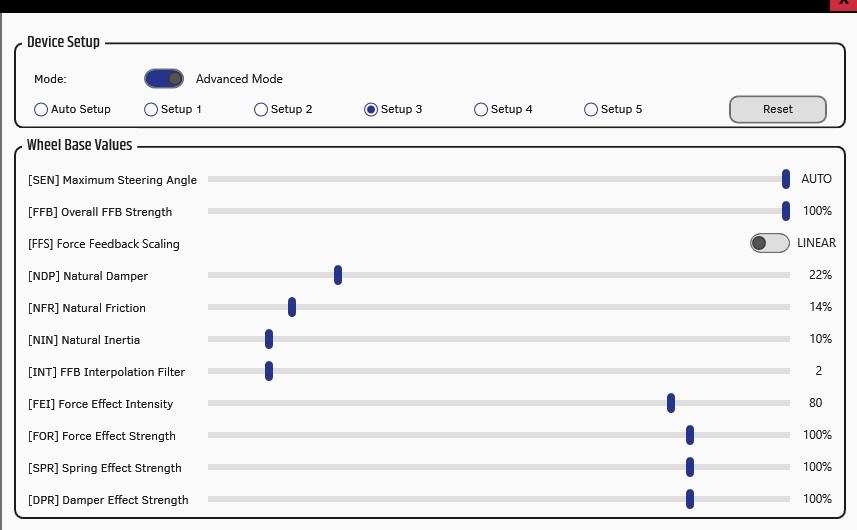
Reiza’s V1.4 guide has Fanatec App and in-game settings for two Fanatec bases, the CSL DD with the Boost Kit and the Podium DD1. Fanatec’s own AMS2 thread dates from July 2020, before the game had a Damping slider, so Reiza’s newer sets are the better place to start. Reiza found Linear force feedback scaling nicer on the CSL DD and saw little difference either way on the DD1. There’s no DRI setting on Fanatec’s direct drive bases, and Reiza treats Natural Damper as the equivalent of a negative DRI on the older belt-driven Fanatec bases. If you’re still choosing a base, start with our Fanatec guide.
Set these in the Fanatec App or the Tuning Menu for the CSL DD with the Boost Kit:
- Sensitivity (SEN): Auto
- Overall FFB Strength (FFB): 100%
- Force Feedback Scaling (FFS): Linear
- Natural Damper (NDP): 22%
- Natural Friction (NFR): 14%
- Natural Inertia (NIN): 10%
- FFB Interpolation Filter (INT): 2-4
- Force Effect Intensity (FEI): 80
- Force Effect Strength (FOR): 100%
Then set these in AMS2 for the CSL DD:
- Gain: 60
- Low Force Boost: 7
- FX: 50
- Damping: 50
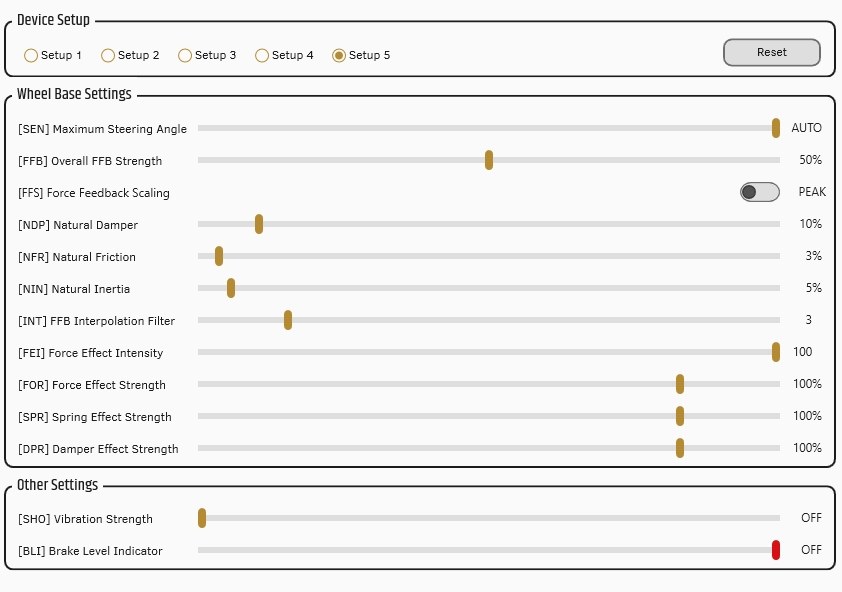
For the Podium DD1, set the Tuning Menu first and then the in-game values:
- Tuning Menu:
- SEN: Auto
- FFB: 50%
- FFS: Peak
- NDP: 10% (raise it if the wheel is too heavy in oversteer)
- NFR: 3%
- NIN: 5%
- INT: 3-4 (raise it if the force feedback feels grainy)
- FEI: 80-100 (lower it if there are too many jolts)
- FOR: 100%
- In AMS2:
- Gain: 30-40
- Low Force Boost: 0-10
- FX: 10-50
- Damping: 50-70
Simucube settings
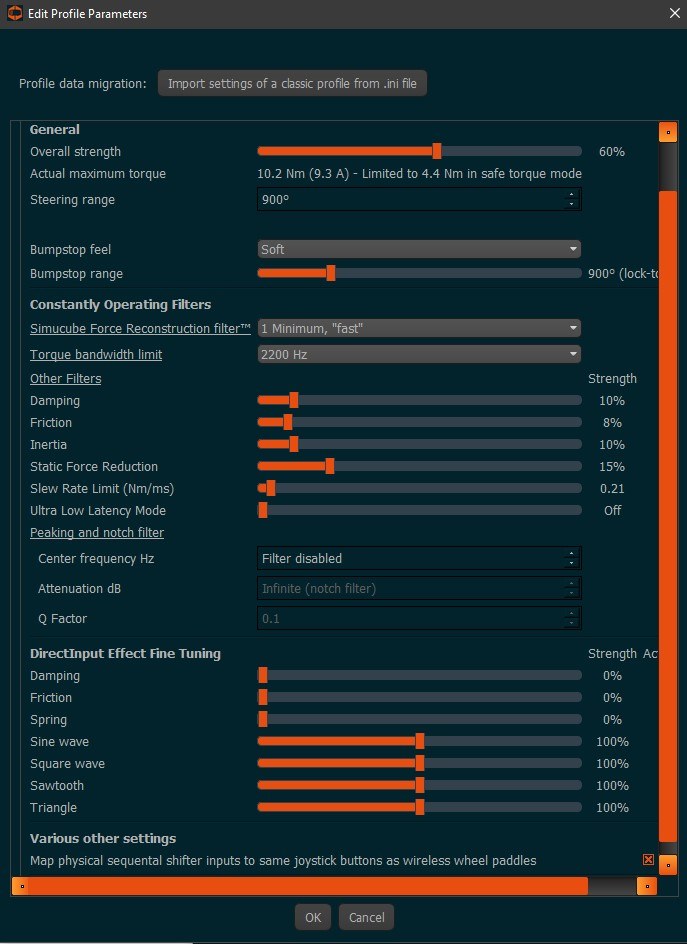
Simucube publishes no AMS2 force feedback values, but Reiza’s guide has a Simucube 2 Sport profile for True Drive with in-game values to go with it. Reiza has no set for the Simucube 2 Pro (my own base) or the Ultimate, so the numbers below are for the 17 Nm 2 Sport, exactly as written. Reiza singles out the Slew Rate Limit, set to 0.21, which it says helps reduce rattles over kerbs and sausage kerbs. The DirectInput effects (damping, friction and spring) all sit at 0%. For the hardware side, head to our direct drive wheels guide.
Set up the Simucube 2 Sport profile in True Drive like this:
- Overall strength: 40-60%
- Steering range: 900°
- Bumpstop feel: Soft
- Bumpstop range: 900°
- Reconstruction filter: 1
- Torque bandwidth limit: 2200 Hz
- Damping: 8-10%
- Friction: 2-8%
- Inertia: 0-10% (depending on the rim)
- Static force reduction: 0-15%
- Slew rate limit: 0.21
- Ultra low latency mode: Off
- Peaking and notch filter: Disabled
- DirectInput effect fine tuning: Damping 0%, Friction 0%, Spring 0%
Then set these in AMS2 for the Simucube 2 Sport:
- Gain: 40
- Low Force Boost: 2
- FX: 50
- Damping: 50
Logitech settings
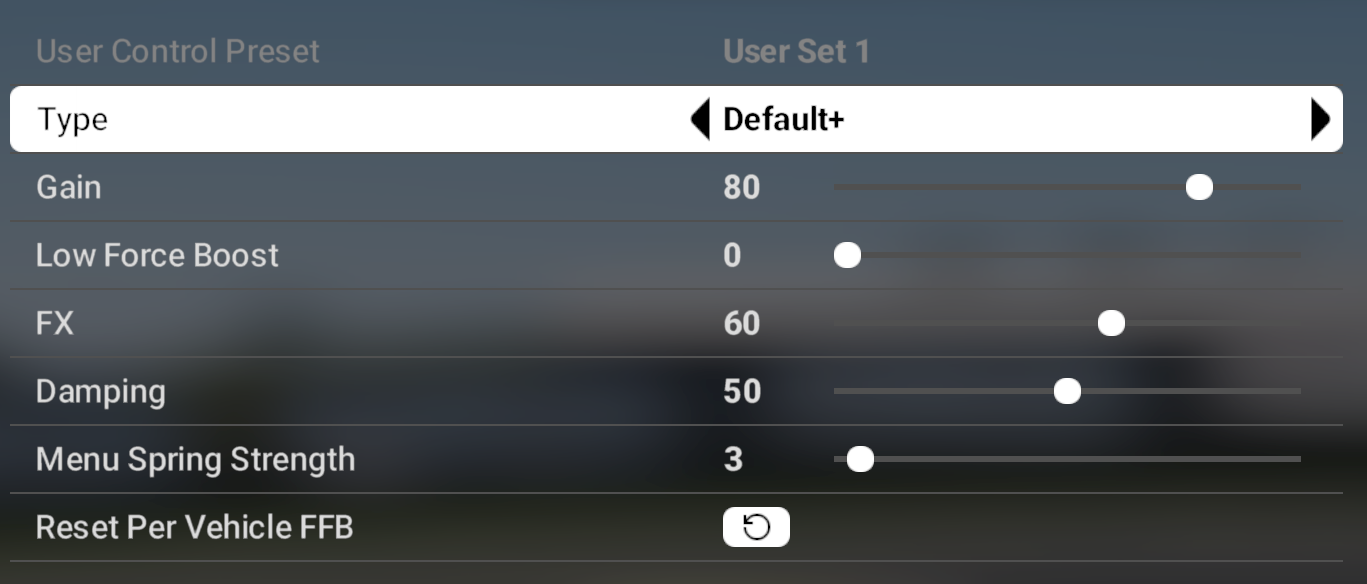
There are two AMS2 sets on Logitech’s support pages, one for the RS50, which assumes 8 Nm, and one for the Pro wheels, which assumes 11 Nm. Both use the Default+ type with Damping 50, Low Force Boost 0 and Menu Spring Strength 3, and both switch the dampener off on the wheel. They differ on Gain, FX, FFB Filter and TF Audio.
Set these on the Logitech RS50 and then in AMS2:
- On the wheel:
- Strength: 8 Nm (what Logitech’s numbers assume)
- Compatibility Mode: PRO
- FFB Filter: 1
- Dampener: Off
- TF Audio: 40
- Angle: 1080°
- In AMS2:
- Type: Default+
- Gain: 80
- Low Force Boost: 0
- FX: 60
- Damping: 50
- Menu Spring Strength: 3
For the Logitech Pro, it’s the wheel first and then the game again:
- On the wheel:
- Strength: 11 Nm (what Logitech’s numbers assume)
- Compatibility Mode: PRO
- FFB Filter: 4
- Dampener: Off
- TF Audio: 100
- Angle: 1080°
- In AMS2:
- Type: Default+
- Gain: 55
- Low Force Boost: 0
- FX: 80
- Damping: 50
- Menu Spring Strength: 3
Logitech G29 and G923
Reiza’s guide has its own set for the G29 and the G923. Low Force Boost is mainly meant for low-torque wheels like these, Reiza says, and at 50 it’s far higher here than on any of the direct drive bases, which run it at 10 or under. Set up G HUB the way Reiza’s screenshot has it, then the game:
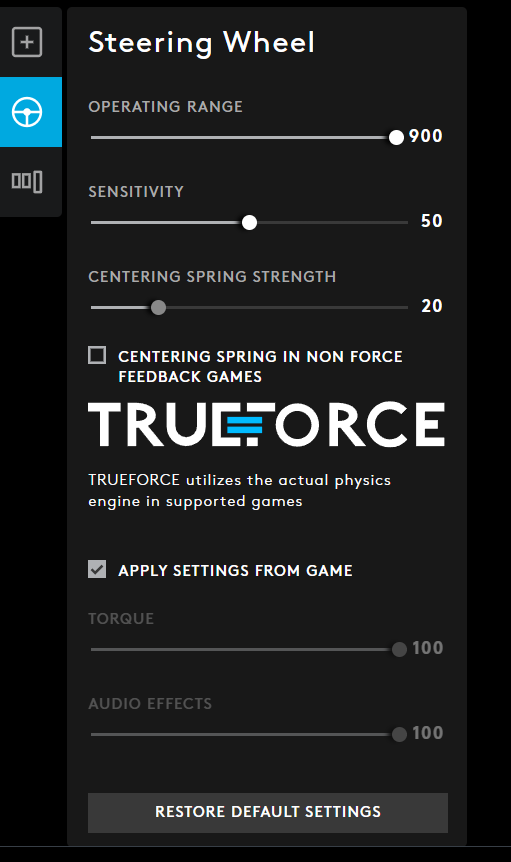
- In G HUB:
- Operating Range: 900
- Sensitivity: 50
- Centering Spring Strength: 20
- Centering Spring in Non Force Feedback Games: unticked
- TrueForce: Apply Settings From Game
- In AMS2:
- Gain: 80
- Low Force Boost: 50
- FX: 20
- Damping: 10
Thrustmaster settings
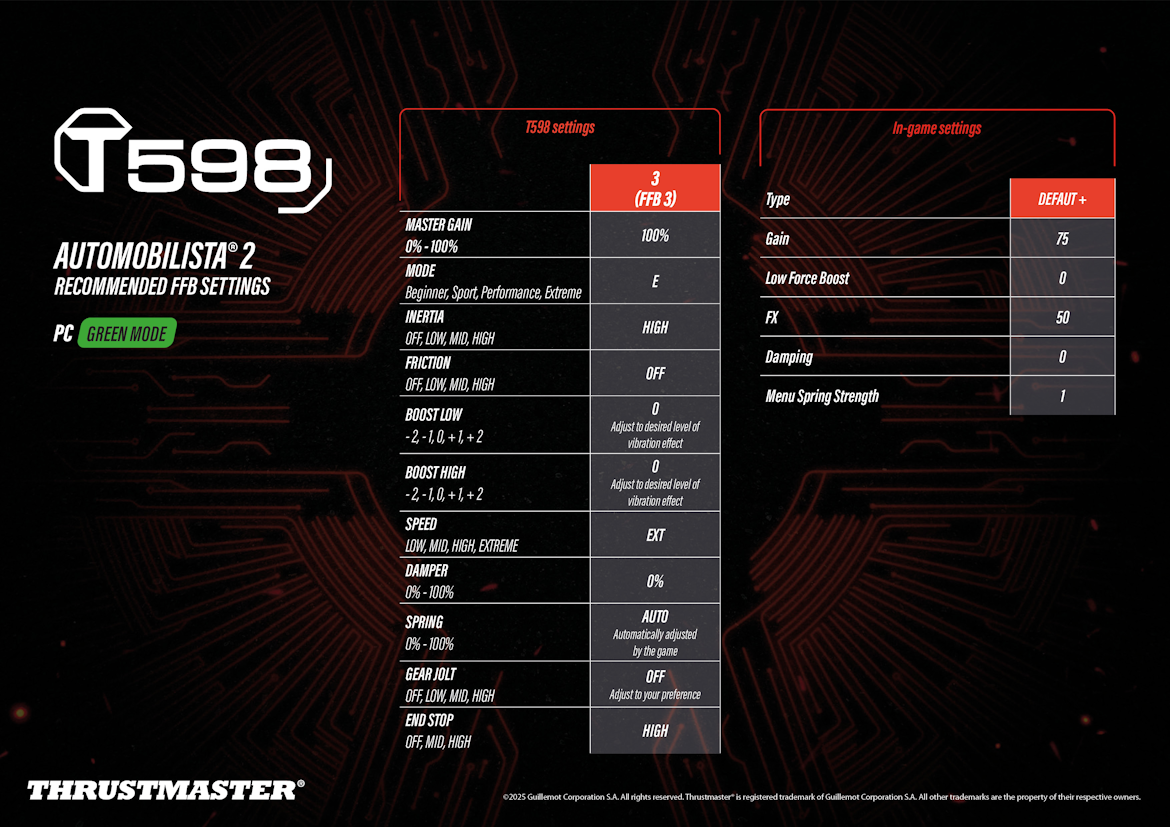
Thrustmaster publishes its own AMS2 sheets on Thrustmaster’s support pages, for the T598 (January 2025) and the T818 (February 2023, “recommended by the T818 beta testers community”). Both run the base at 100% with its damper at 0%, then set the strength in game with Damping at 0. The T598 sheet runs the Default+ type with Gain at 75, and the T818’s runs Default with Gain at 30-40%.
The T598 sheet uses PC Green Mode on the FFB 3 preset, set like this:
- On the base (PC Green Mode, FFB 3 preset):
- Master Gain: 100%
- Mode: E (Extreme)
- Inertia: High
- Friction: Off
- Boost Low: 0
- Boost High: 0
- Speed: EXT
- Damper: 0%
- Spring: Auto (set by the game)
- Gear Jolt: Off
- End Stop: High
- In AMS2:
- Type: Default+
- Gain: 75
- Low Force Boost: 0
- FX: 50
- Damping: 0
- Menu Spring Strength: 1
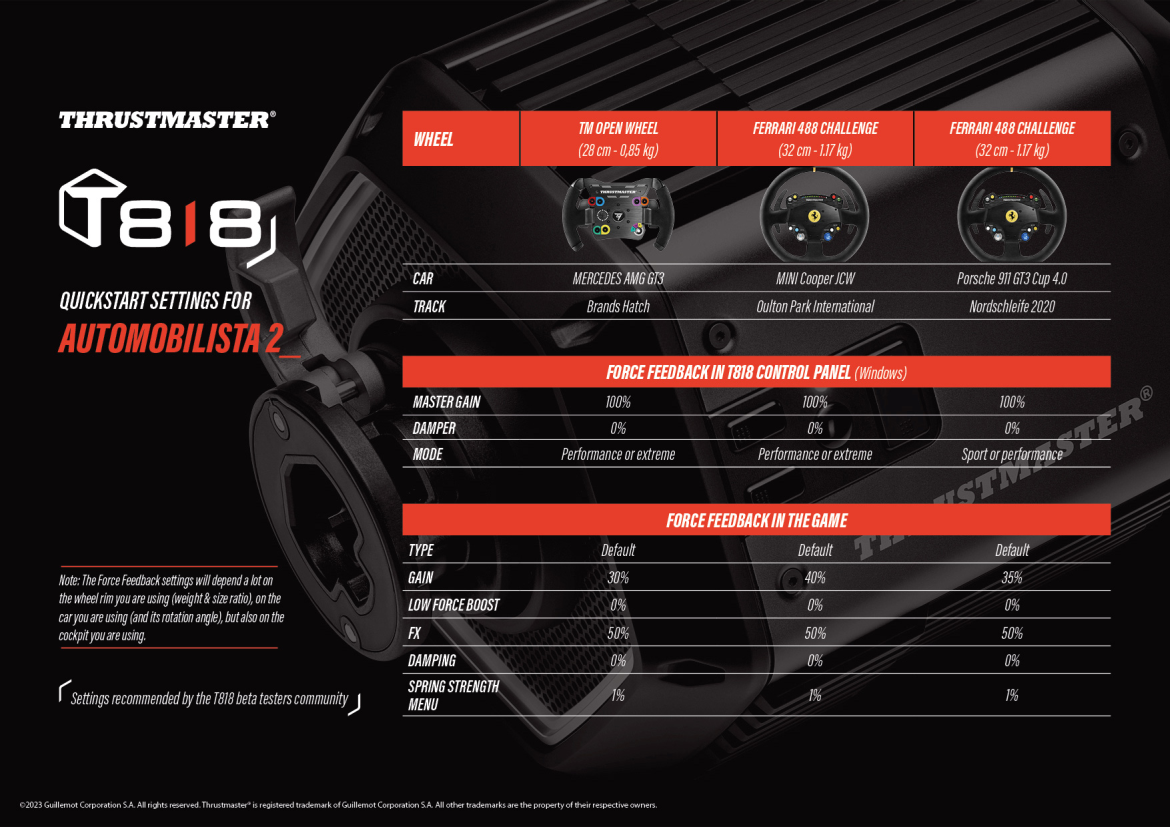
For the T818, set the T818 Control Panel first and then AMS2:
- In the T818 Control Panel:
- Master Gain: 100%
- Damper: 0%
- Mode: Performance or Extreme (Sport or Performance for the Porsche 911 GT3 Cup example)
- In AMS2:
- Type: Default
- Gain: 30-40% (depending on the rim, car and track)
- Low Force Boost: 0%
- FX: 50%
- Damping: 0%
- Menu Spring Strength: 1%
Thrustmaster notes on the T818 sheet that the numbers depend a lot on the rim you’re using (its weight and size), the car (and its rotation angle) and even your cockpit. Its three rim, car and track examples put Gain at 30%, 40% and 35%.
Alternative approach: damping on or off
Thrustmaster’s direct drive sheets run Damping 0 in game and 0% on the base. Every per-wheel set in Reiza’s guide runs some damping, from 10 on the G29 and the G923 to 50-70 on the Podium DD1. For the T-GT and similar 5-7 Nm belt-driven Thrustmaster bases, Reiza gives Damping 40, Low Force Boost 10 and 75% overall strength in the Thrustmaster Control Panel:
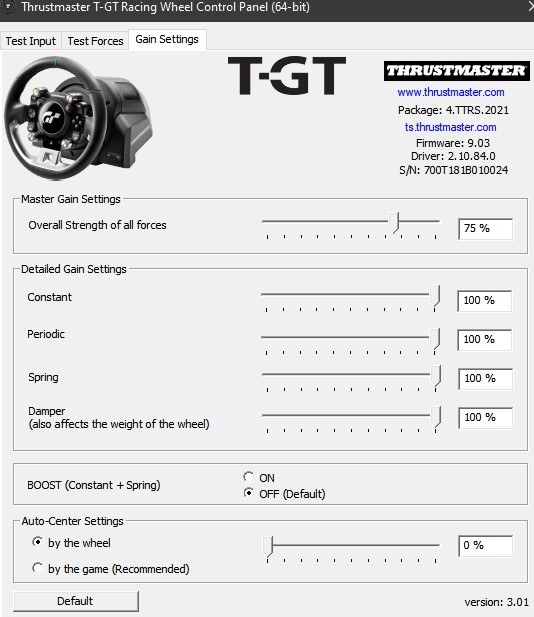
- In the Thrustmaster Control Panel:
- Overall Strength of all forces: 75%
- Constant: 100%
- Periodic: 100%
- Spring: 100%
- Damper: 100%
- Boost: Off
- In AMS2:
- Gain: 75
- Low Force Boost: 10
- FX: 50
- Damping: 40
Fine-tuning
If something still feels off once the numbers are in, these are the fixes Reiza and the wheel makers give:
- If the Podium DD1 is too heavy when the car oversteers, increase NDP in the Tuning Menu.
- When the force feedback on the Podium DD1 feels grainy, increase INT.
- If a Fanatec base gives you too many jolts, lower FEI, but don’t take it too low.
- If a Simucube rattles over kerbs and sausage kerbs, set the Slew Rate Limit to 0.21.
- If you run a direct drive base at only a fraction of its output, you can add a little Low Force Boost.
- When one car is too strong or too weak, change Vehicle FFB Gain in that car’s setup screen. It multiplies your main Gain, and you can map it to a button.
- If you use Menu Spring Strength on a direct drive base, keep it under 10.
- If a dashboard or telemetry app shows nothing, go to Options > System and set Shared Memory to Project CARS 2, UDP Frequency to 1 and UDP Protocol Version to Project CARS 2.
The brand-by-brand explainer is our direct drive wheel settings guide, and its Settings Finder covers AMS2 too. The rest of the game’s setup is in our AMS2 beginner’s setup guide. I’ll see you out on track!
Related Articles

Best Pimax VR Settings for F1 25 in 2026: A Damage-Control Guide

Best Pimax VR Settings for Le Mans Ultimate in 2026

Best Pimax VR Settings for Automobilista 2 in 2026

Best Pimax VR Settings for Assetto Corsa in 2026

iRacing VR Settings (2026): Meta Quest 3, PSVR2, Pimax and Valve Index

Assetto Corsa VR Settings 2026: Pimax, Quest 3, PSVR2 & More
Topic: Direct Drive Wheel Settings