

I’m a sim racer and amateur racer with a passion for Motorsport, good racecraft and the technical and setup aspect of sim racing.
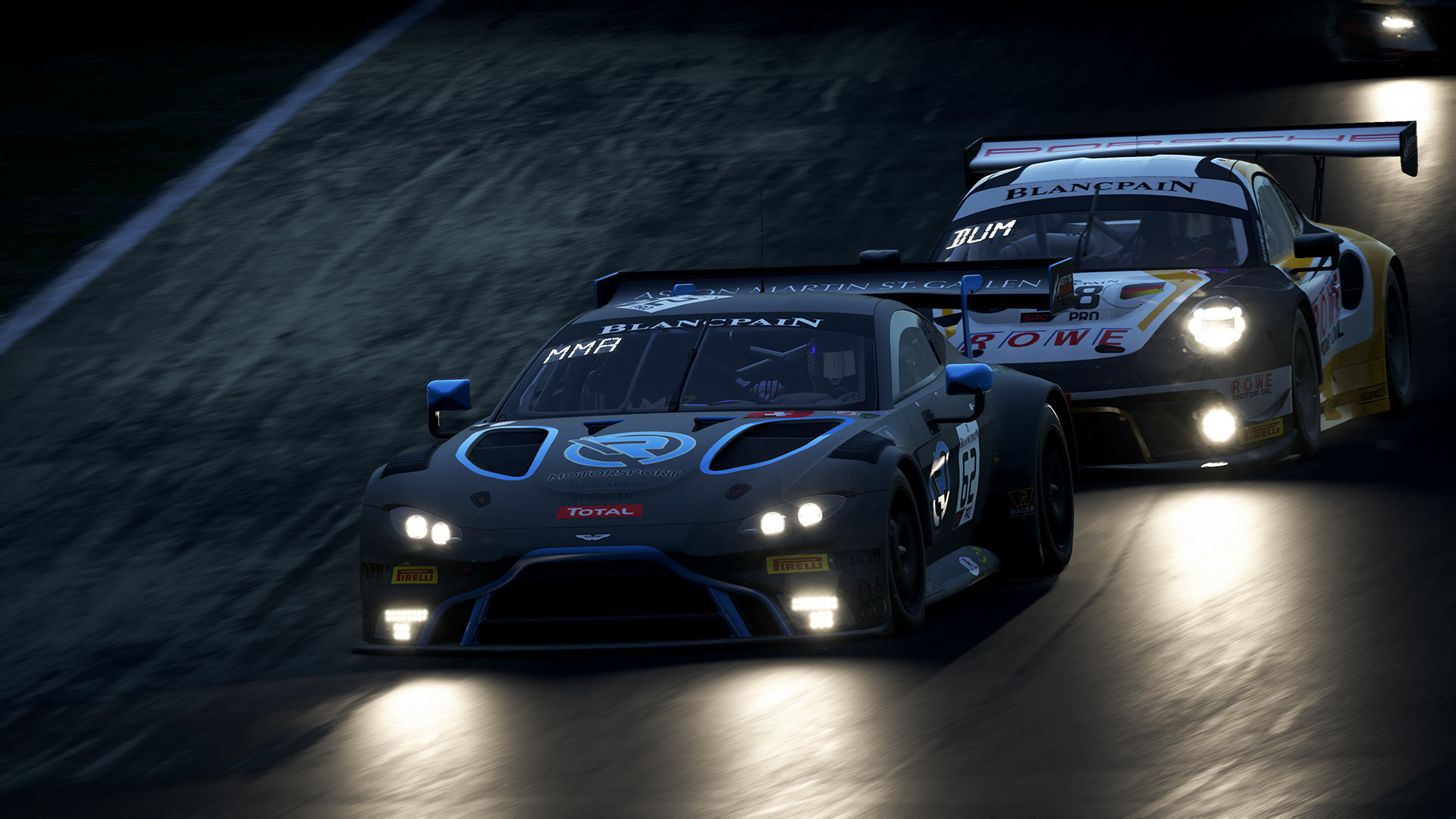
Featured image: an Aston Martin and a Porsche GT3 car racing at night in Assetto Corsa Competizione (Image: Kunos Simulazioni)
You’ve got Assetto Corsa Competizione (ACC) running on your wheel, and you want a sensible place to start the force feedback (FFB) for your base. Below are the settings the wheel makers publish for ACC, brand by brand. Each section goes from the wheel’s own software to ACC’s Controls menu, in the order you’ll click through them.
Quick Navigation
Jump directly to what you’re looking for:
ACC’s FFB menu |
Fanatec |
Moza |
Simagic |
Logitech |
Thrustmaster |
Asetek |
Alternative approach |
Fine-tuning
ACC’s force feedback settings
All of ACC’s FFB settings live in one place, under Options > Controls. The Force Feedback panel has Gain, Minimum Force, Damper, Dynamic Damping, Road Effects and Frequency, and under Advanced you’ll find Steer Lock, Steer Linearity and Brake Gamma.
Gain is how heavy the wheel feels, and Fanatec says it has the biggest effect on signal strength and clipping. Clipping is where the game asks for more force than the base can give, so the detail at the top of the range is lost. Asetek adds that Gain has a big effect on each car, and suggests putting it on a button or dial on the wheel so you can adjust it while you’re racing. Damper adds steering weight and smooths out small vibrations. Dynamic Damping defaults to 100, and Simagic explains that lowering it makes the FFB more direct on quick steering corrections.
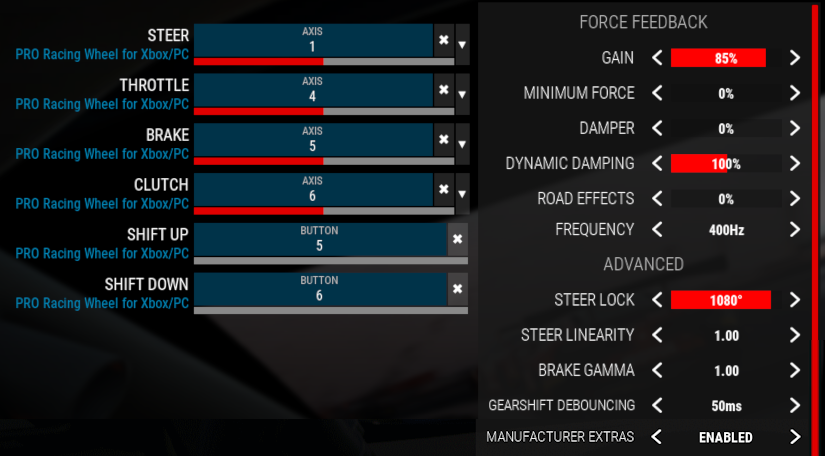
Where a maker gives them, Minimum Force is always 0, Frequency 400Hz and Steer Linearity 1.00. Gain, Damper, Dynamic Damping, Road Effects and Steer Lock are where they split, so start from your own maker’s numbers in the sections below.
ACC’s last gameplay update was v1.10.3 in August 2024, which added controller presets for the Moza R3, R12 and R21. The updates after it, up to v1.10.4 in December 2025, brought new liveries and updated driver and team info. None of them touched the controls or the FFB. Every maker’s settings below were written for the Force Feedback menu ACC has now, from Fanatec’s forum thread, first posted in 2019, to Asetek’s guide from August 2026. Simucube hasn’t published any ACC settings, so it doesn’t get a section of its own.
Fanatec settings
If you’re on a Fanatec base, start with our Fanatec settings for ACC, which goes through the full tuning menu base by base. The in-game values below come from Fanatec’s own recommended settings thread on its forum. The thread also says the tuning menu values and the in-game values are meant to be set together, and the Podium settings assume the Torque Key is in use.
Then set these in ACC’s Controls menu for your base:
- Gain: 70% on a CSL DD, 60% on a Podium DD1 or DD2
- Minimum Force: 0%
- Dynamic Damping: 100%
- Road Effects: 0%
- Steer Lock: 1080°
Moza settings
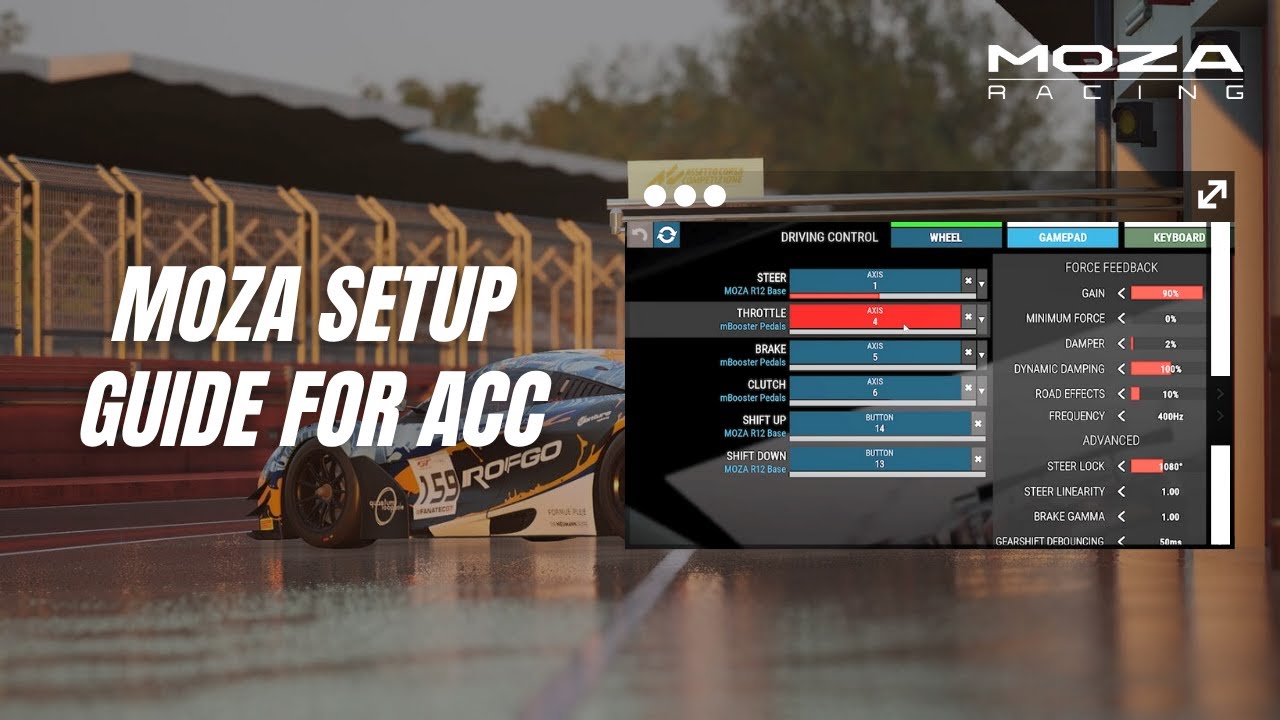
The Moza settings below come from MOZA Racing‘s own ACC setup video, posted on its YouTube channel in November 2025. In Pit House, open the Game Launcher, hover over ACC and click Configure, then pick the profile with the game’s name in it. Set Game Force Feedback Intensity to 100% and take the strength down in the game instead. If you have an R3, R12 or R21, ACC also has a controller preset for your base.
MOZA says to start Gain at 50% or less on an R12 or anything stronger and turn it up if it feels too light. The settings screen in its video shows 90% on the R12, though. There’s more on the bases themselves in our Moza guide. The ACC Moza settings page has Limit Line Studio’s September 2025 setup for the R12 V2, along with fine-tuning for Moza bases.
Start in Pit House with MOZA’s settings:
- Profile: the one with the game name in it (ACC)
- Game Force Feedback Intensity: 100%
Then head to Options > Controls in ACC and set these:
- Gain: 50% or less to start on an R12 or stronger, then up if it feels light (90% on the R12 in MOZA’s video)
- Minimum Force: 0%
- Damper: 2%
- Dynamic Damping: 100%
- Road Effects: 10%
- Frequency: 400Hz
- Steer Lock: 1080°
- Steer Linearity: 1.00
- Brake Gamma: 1.00
Moza discount code: use SIMRACINGCOCKPIT at checkout for 3% off at mozaracing.com.
Simagic settings
Simagic’s ACC guide is a June 2025 video on its YouTube channel, made for the Alpha EVO range and filmed on an Alpha EVO Pro (18 Nm). In SimPro Manager, go to Games > ACC > Devices Config, choose the “AC Competizione” base preset and switch on Auto Switch Preset, so it loads whenever ACC starts. Then set Force Feedback to 100% in SimPro Manager and keep the in-game Gain at 60% or below. Our Simagic guide goes further into the bases and SimPro Manager. The ACC Simagic settings page also has Alvin Wong’s own Alpha EVO Pro profile, which he shared on Simagic’s blog in May 2025 (he races for Simagic).
In SimPro Manager, the key lines of Simagic’s preset are:
- Base Preset: AC Competizione (with Auto Switch Preset on)
- Angle: 900°
- Hard Lock Angle: 900°
- Force Feedback: 100%
- Filter Level: 2
- Wheel Rotation Speed: 35
- Feedback Detail: 20
- Dynamic Prediction Level: 1
- Mechanical Damper: 18%
- Mechanical Friction: 15%
- Mechanical Inertia: 0%
- Slew Rate Control: 30%
Then in ACC’s Controls menu, Simagic gives these:
- Gain: 60% or below (49% on the Alpha EVO Pro in Simagic’s video)
- Minimum Force: 0%
- Damper: low or off (0% in the video)
- Dynamic Damping: 100% (the default)
- Road Effects: below 10% (0% in the video)
- Frequency: 400Hz
- Steer Lock: 900°
Logitech settings
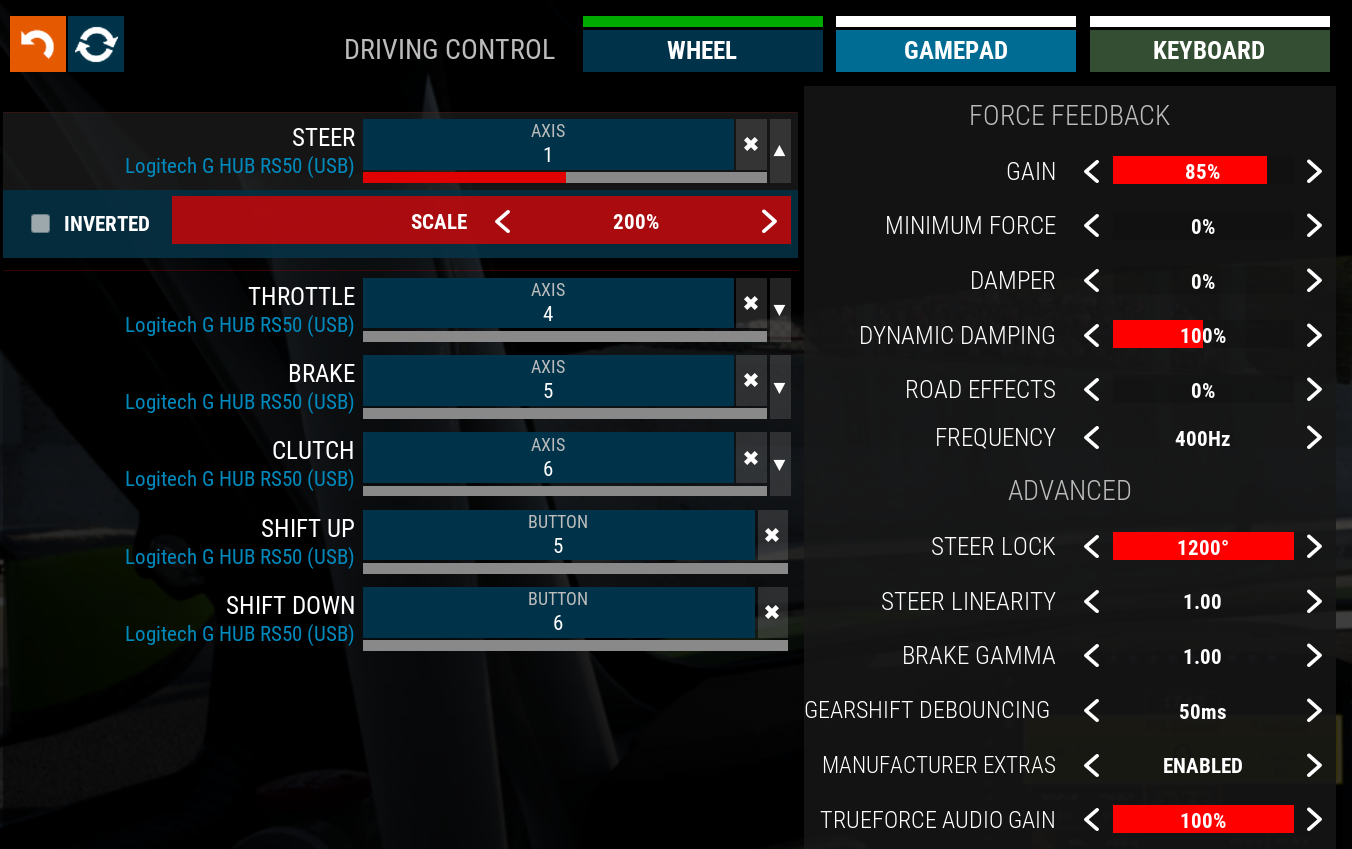
Logitech’s support pages cover two bases for ACC: the RS50, with settings that assume the wheel is set to 8 Nm, and the Pro wheels, which assume 11 Nm. Both say you can set the dampener lower if you run the wheel at less strength than that. The RS50 page gives the G HUB angle as “Set Per Car”, and its ACC screenshot shows 1200° of Steer Lock, where the Pro page uses 1080°. There’s nothing from Logitech for ACC on the G923, G29 or G920.
For the Logitech RS50, set these in G HUB and then in ACC:
- In G HUB:
- Compatibility Mode: RS
- FFB Filter: 3
- Dampener: Off
- TF Audio: 30
- Angle: Set Per Car
- In ACC:
- Gain: 85%
- Minimum Force: 0%
- Damper: 0%
- Dynamic Damping: 100%
- Road Effects: 0%
- Frequency: 400Hz
- Steer Lock: 1200°
- Steer Linearity: 1.00
- Brake Gamma: 1.00
- Manufacturer Extras: Enabled
- TrueForce Audio Gain: 100%
For the Logitech PRO Racing Wheel, set these in G HUB and then in ACC:
- In G HUB:
- Compatibility Mode: PRO/G923
- FFB Filter: 10
- Dampener: 30
- TF Audio: 25
- Angle: 1080°
- In ACC:
- Gain: 85%
- Minimum Force: 0%
- Damper: 0%
- Dynamic Damping: 100%
- Road Effects: 0%
- Frequency: 400Hz
- Steer Lock: 1080°
- Steer Linearity: 1.00
- Brake Gamma: 1.00
- Manufacturer Extras: Enabled
Thrustmaster settings
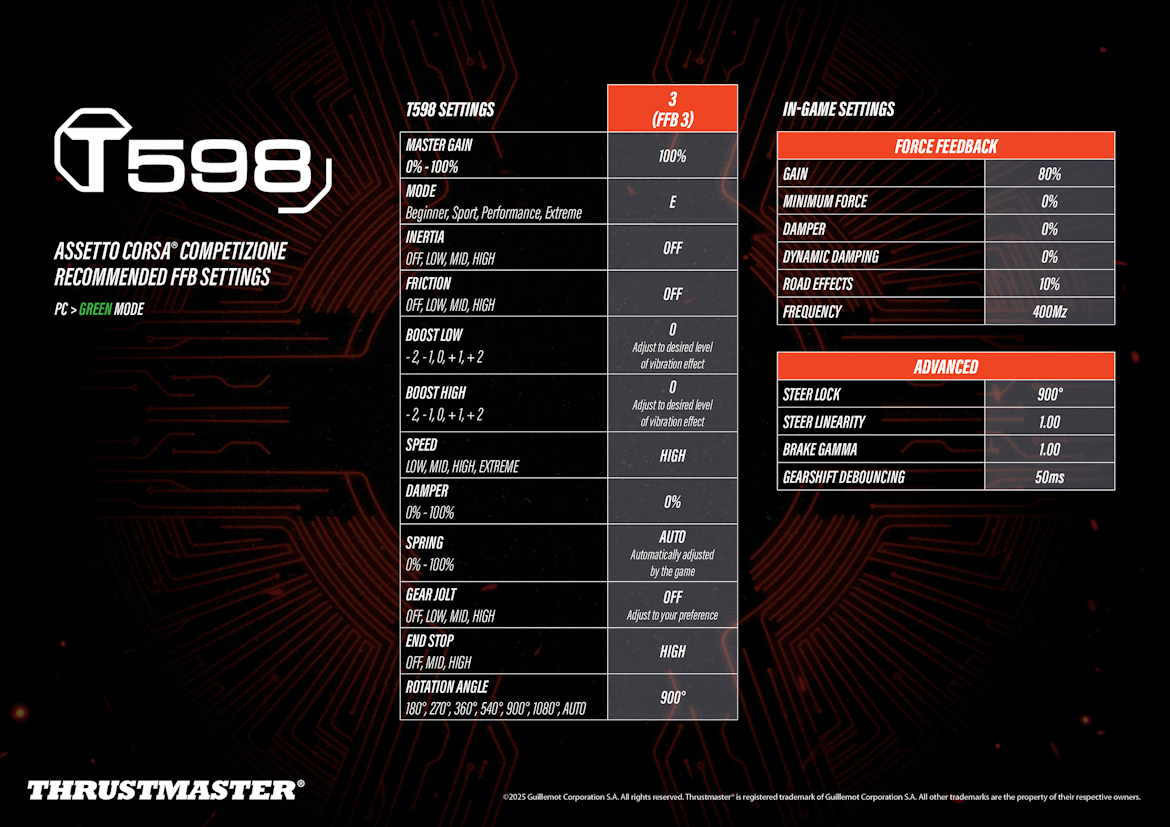
Thrustmaster’s support pages carry ACC settings sheets for two bases, the T598 (2025) and the T818 (2023). The T598 sheet runs the base at 100%, with ACC’s Damper and Dynamic Damping both at 0. The T818 sheet is three presets for different rims and cars, recommended by the T818 beta testers community. Its note says the right settings depend a lot on the rim (its weight and size), the car and its rotation angle, and the cockpit. The T300, T248, T-GT II and TX don’t get an ACC sheet, and the rest of the range is in our Thrustmaster guide.
For the T598 on PC in Green mode, set the base and then ACC:
- On the base (profile 3):
- Master Gain: 100%
- Mode: E (Extreme)
- Inertia: Off
- Friction: Off
- Boost Low: 0 (adjust for the vibration you want)
- Boost High: 0 (adjust for the vibration you want)
- Speed: High
- Damper: 0%
- Spring: Auto (set by the game)
- Gear Jolt: Off
- End Stop: High
- Rotation Angle: 900°
- In ACC:
- Gain: 80%
- Minimum Force: 0%
- Damper: 0%
- Dynamic Damping: 0%
- Road Effects: 10%
- Frequency: 400Hz
- Steer Lock: 900°
- Steer Linearity: 1.00
- Brake Gamma: 1.00
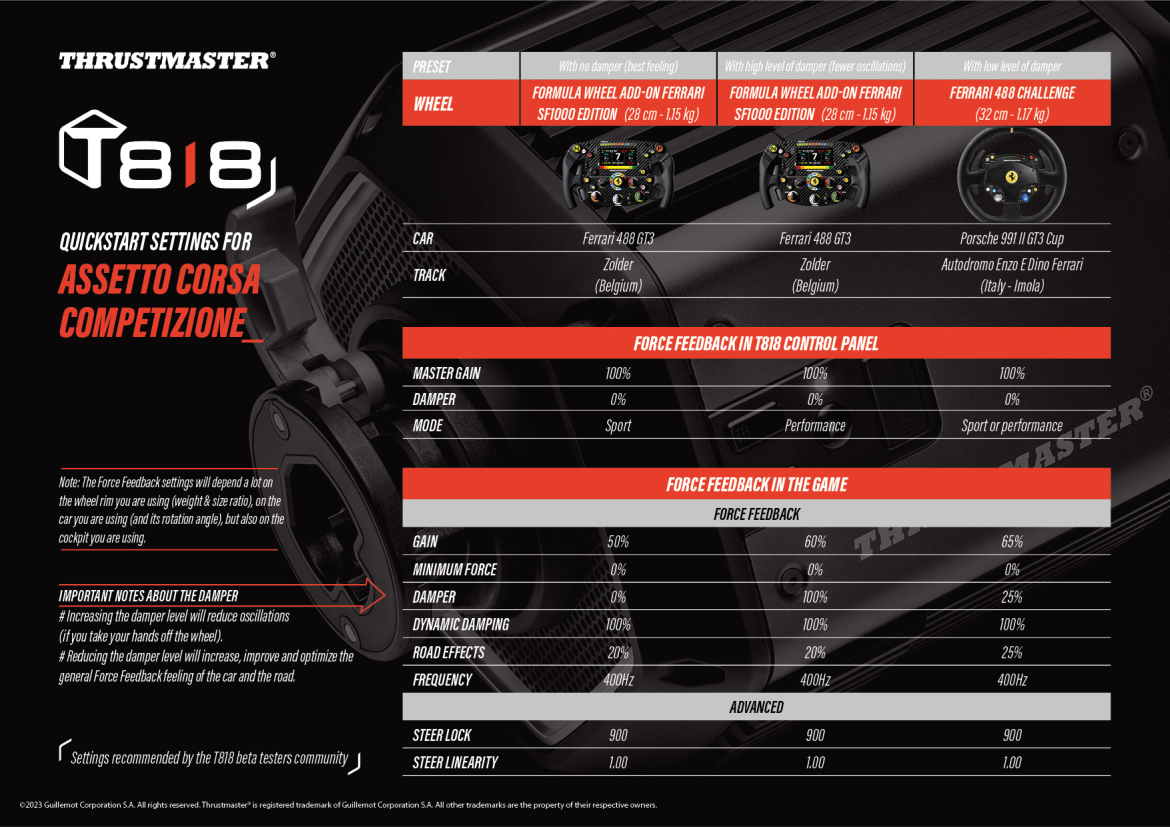
For the T818, pick the preset that matches your rim and car:
- In the T818 Control Panel, for all three:
- Master Gain: 100%
- Damper: 0%
- No damper (best feeling), Ferrari SF1000 formula rim, Ferrari 488 GT3:
- Mode (T818 Control Panel): Sport
- Gain: 50%
- Damper: 0%
- Dynamic Damping: 100%
- Road Effects: 20%
- High damper (fewer oscillations), same rim and car:
- Mode (T818 Control Panel): Performance
- Gain: 60%
- Damper: 100%
- Dynamic Damping: 100%
- Road Effects: 20%
- Low damper, Ferrari 488 Challenge rim, Porsche 991 II GT3 Cup:
- Mode (T818 Control Panel): Sport or Performance
- Gain: 65%
- Damper: 25%
- Dynamic Damping: 100%
- Road Effects: 25%
- In ACC, for all three:
- Minimum Force: 0%
- Frequency: 400Hz
- Steer Lock: 900°
- Steer Linearity: 1.00
The three T818 presets run ACC’s Damper anywhere from 0 to 100%. Thrustmaster’s note on the sheet says more Damper reduces oscillations when you take your hands off the wheel, and less improves the general feel of the car and the road.
Asetek settings
Asetek’s ACC guide was updated on 28 August 2026, and it starts with a preset. Download the ACC preset for your base from the guide, then in RaceHub go to Wheelbase > Force Feedback, click the three dots next to Preset, choose Import as new, pick the ACC preset and Save to wheelbase.
Then in ACC, set Gain for your base, and the rest is the same on all six:
- Gain:
- Invicta: 34%
- Forte: 36%
- La Prima+: 42%
- La Prima: 50%
- Initium+: 75%
- Initium: 75%
- Minimum Force: 0%
- Damper: 0%
- Dynamic Damping: 25%
- Road Effects: 0%
- Frequency: 400Hz
- Steer Lock: 800°
- Steer Linearity: 1.00
Alternative approach: Dynamic Damping turned down
Most makers leave Dynamic Damping at ACC’s default of 100, but Asetek and Thrustmaster’s T598 sheet both take it lower. If you’d like the FFB more direct on quick corrections, start from one of theirs:
- Dynamic Damping: 25% (Asetek, on every base)
- Dynamic Damping: 0% (Thrustmaster, on the T598)
Fine-tuning
Once you’re driving, these are the fixes the makers suggest for the usual complaints:
- If the wheel feels too heavy, leave the base’s own strength high and bring the in-game Gain down. Keep an eye on ACC’s FF meter in the HUD so you don’t clip too much.
- When Gain feels right in one car and wrong in the next, map Gain to a button or dial on the wheel.
- If the wheel oscillates when you take your hands off it, add some Damper.
- If you want more of the car and the road coming through the rim, take the Damper down.
- If the FFB feels slow on quick corrections, lower Dynamic Damping.
- On an Alpha EVO with a high-frequency buzz, keep Road Effects below 10%.
- If a T598 sends too much vibration through the rim, lower Boost Low and Boost High.
- When you run a Logitech PRO Racing Wheel below the 11 Nm its settings sheet assumes, set the Dampener in G HUB lower than 30.
- If a kerb sends a harsh spike through the wheel, a little Damper smooths it out.
Our direct drive wheel settings guide goes through each maker’s software brand by brand, and it’s also where you’ll find the Settings Finder. For the game itself, head to our Assetto Corsa Competizione guide. I’ll see you out on track!
Related Articles

Best Pimax VR Settings for F1 25 in 2026: A Damage-Control Guide

Best Pimax VR Settings for Le Mans Ultimate in 2026

Best Pimax VR Settings for Automobilista 2 in 2026

Best Pimax VR Settings for Assetto Corsa in 2026

iRacing VR Settings (2026): Meta Quest 3, PSVR2, Pimax and Valve Index

Assetto Corsa VR Settings 2026: Pimax, Quest 3, PSVR2 & More
Topic: Direct Drive Wheel Settings