

I’m a sim racer and amateur racer with a passion for Motorsport, good racecraft and the technical and setup aspect of sim racing.
Featured image: an Aston Martin and a Porsche GT3 car racing at night in Assetto Corsa Competizione (Image: Kunos Simulazioni)
If you’ve got a Simagic base and you’re racing in Assetto Corsa Competizione (ACC), you’ll want a sensible place to start with the force feedback. These are Simagic’s own ACC settings in the order you set them, starting with SimPro Manager’s ACC preset and then moving on to ACC’s Controls menu. After that there’s a second setup from Alvin Wong, who races for Simagic, and it’s the profile he runs on his own Alpha EVO Pro.
Quick Navigation
Jump directly to what you’re looking for:
ACC on a Simagic base |
SimPro Manager |
ACC in-game |
Alternative approach |
Fine-tuning
ACC’s force feedback on a Simagic base
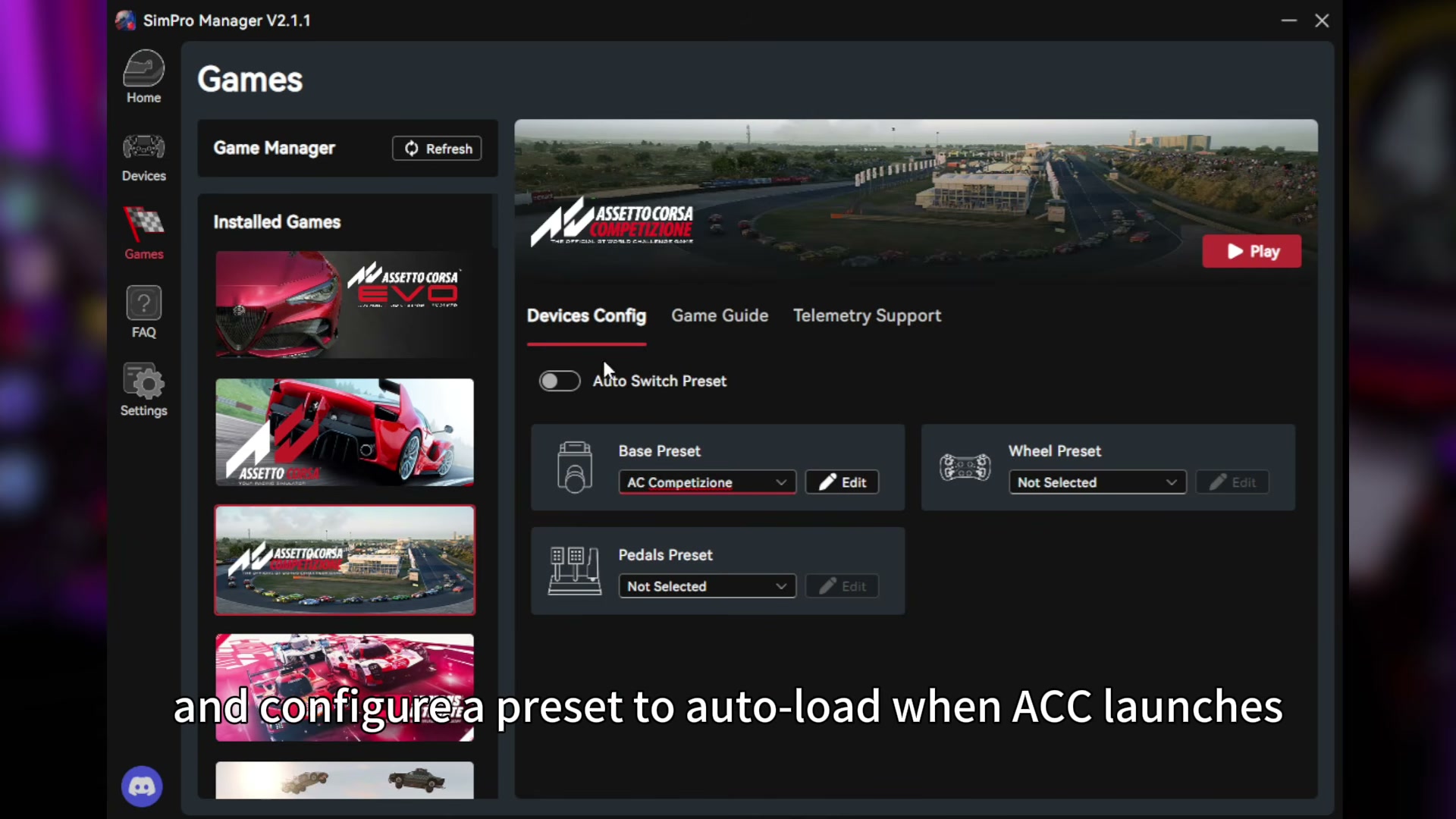
The main settings come from Simagic’s ACC guide, which it put out on its YouTube channel in June 2025 for the Alpha EVO range. SimPro Manager comes preloaded with game settings Simagic selected. Head to Games > Assetto Corsa Competizione > Devices Config, choose AC Competizione as the Base Preset and switch on Auto Switch Preset, which loads it whenever ACC starts.
You set the FFB (force feedback) strength to 100% in SimPro Manager and then turn it down with ACC’s Gain, and that way you keep as much detail as possible without clipping. Clipping is where the game asks for more force than the wheelbase can give, so the detail at the top of the range is lost. As Simagic puts it, ACC’s tyre model has a large usable slip angle and very pronounced deformation feedback. Simagic also developed the Alpha EVO range with direct feedback from top ACC drivers.
ACC’s last update with gameplay changes was v1.10.3 in August 2024, and v1.10.4 in December 2025 brought the 2025 season’s liveries and driver line-ups. None of the patch notes from then on mention the controls or FFB, so the v1.10 Controls screen in Simagic’s video is still the one you’ll see. Simagic hasn’t published ACC settings for the older Alpha, Alpha Mini or Alpha U, so these values are for the EVO range. If your wheelbase isn’t a Simagic, head to the ACC wheel settings page instead.
SimPro Manager settings
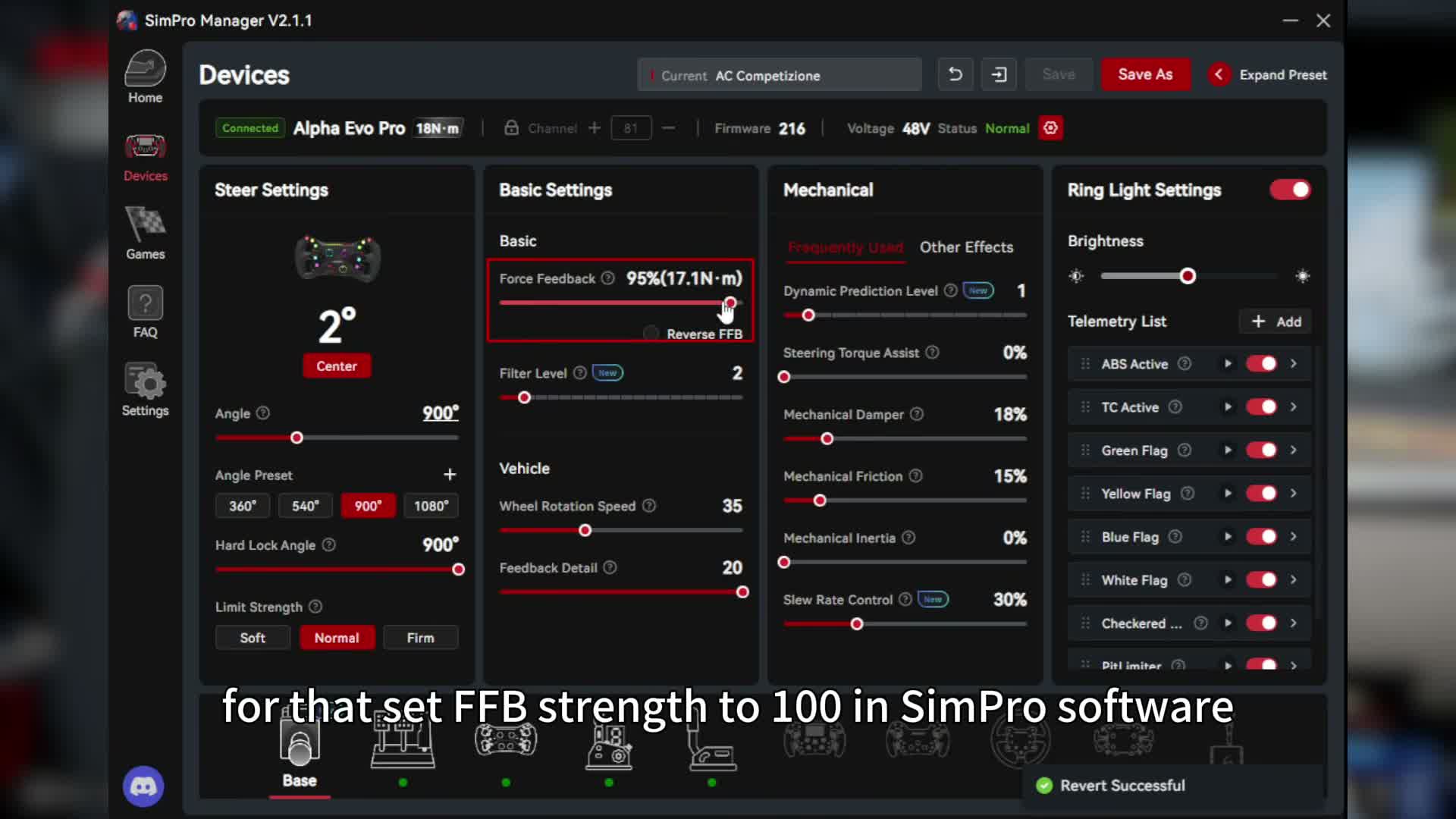
Start with these settings in SimPro Manager’s AC Competizione preset:
- Base Preset: AC Competizione (with Auto Switch Preset on)
- Angle: 900°
- Hard Lock Angle: 900°
- Limit Strength: Normal
- Force Feedback: 100%
- Filter Level: 2
- Wheel Rotation Speed: 35
- Feedback Detail: 20
- Mechanical, Frequently Used:
- Dynamic Prediction Level: 1
- Steering Torque Assist: 0%
- Mechanical Damper: 18%
- Mechanical Friction: 15%
- Mechanical Inertia: 0%
- Slew Rate Control: 30%
- Mechanical, Other Effects:
- Mechanical Centering: 0%
- Center Damper: 0%
- Game Inertia: 100
- Game Centering: 100
- Game Damper: 100
- Game Friction: 100
On the Alpha EVO Pro (18 Nm) in Simagic’s video, the preset loaded with Force Feedback at 95%, so check yours and take it up to 100%. ACC has its own Damper setting in the Controls menu, which adds steering weight and reduces subtle vibrations, and Simagic keeps it low or off. If you want less damping still, bring Game Damper down from 100 in SimPro Manager. The preset leaves Mechanical Inertia at 0%, though Simagic says adding a small amount can accentuate weight transfer, which gives you more of a sense of momentum.
Dynamic Prediction Level sits at 1, and a small amount like that gives a more linear force feedback output, with more of the damping feel from tyre deformation. Slew Rate Control changes how fast the force feedback corrects, so set it to suit the way you drive.
ACC in-game settings
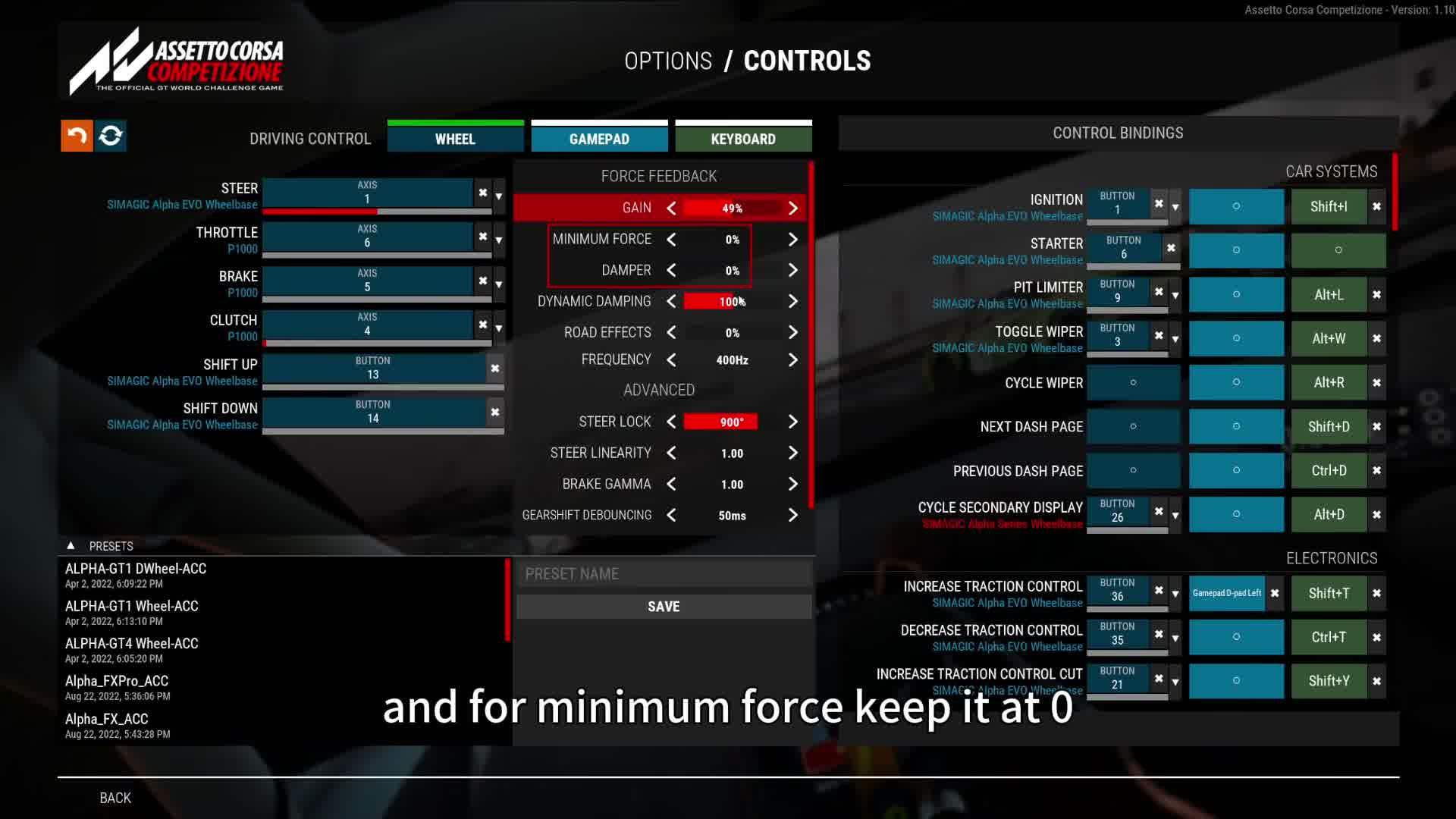
Then head to Options > Controls in ACC and set these:
- Gain: 60% or below (49% on the Alpha EVO Pro in the video)
- Minimum Force: 0%
- Damper: low or off (0% in the video)
- Dynamic Damping: 100% (the default)
- Road Effects: below 10% (0% in the video)
- Frequency: 400Hz
- Steer Lock: 900°
- Steer Linearity: 1.00
- Brake Gamma: 1.00
Dynamic Damping defaults to 100%, and lowering it makes the FFB more direct, which helps on quick steering corrections. Road Effects controls the vibration coming up from the road surface. On the Alpha EVO range Simagic keeps it below 10%, because anything more brings in an unwanted high-frequency buzz. For everything else, Simagic says leave the defaults alone.
Alternative approach: Alvin Wong’s EVO Pro profile
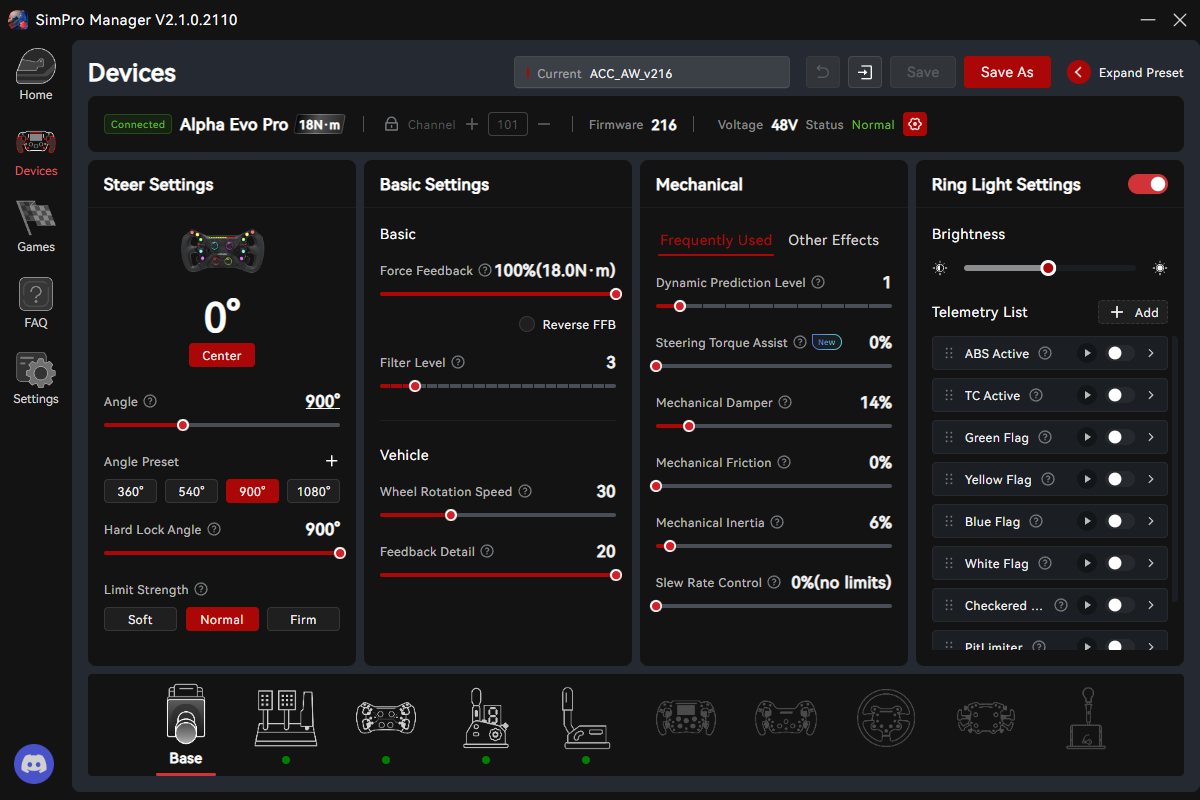
In May 2025, Alvin Wong, Simagic’s team racing driver, shared his own Alpha EVO Pro profile on Simagic’s blog. What he wants to feel is weight transfer, suspension travel and especially slip angle. In his words, “Most other settings I leave alone. Out of the box, the EVO Pro is in a pretty good place.”
Compared with Simagic’s preset, he adds 6% Mechanical Inertia for the feel of weight shift, and runs a lower Wheel Rotation Speed (30) with a moderate Mechanical Damper (14%) to “calm down the twitchiness of the base and improve consistency”. He runs no Mechanical Friction, and he has Slew Rate Control at 0%, which SimPro Manager shows as no limits. Here’s his SimPro Manager profile:
- Angle: 900°
- Hard Lock Angle: 900°
- Limit Strength: Normal
- Force Feedback: 100%
- Filter Level: 3
- Wheel Rotation Speed: 30
- Feedback Detail: 20
- Dynamic Prediction Level: 1
- Steering Torque Assist: 0%
- Mechanical Damper: 14%
- Mechanical Friction: 0%
- Mechanical Inertia: 6%
- Slew Rate Control: 0% (no limits)
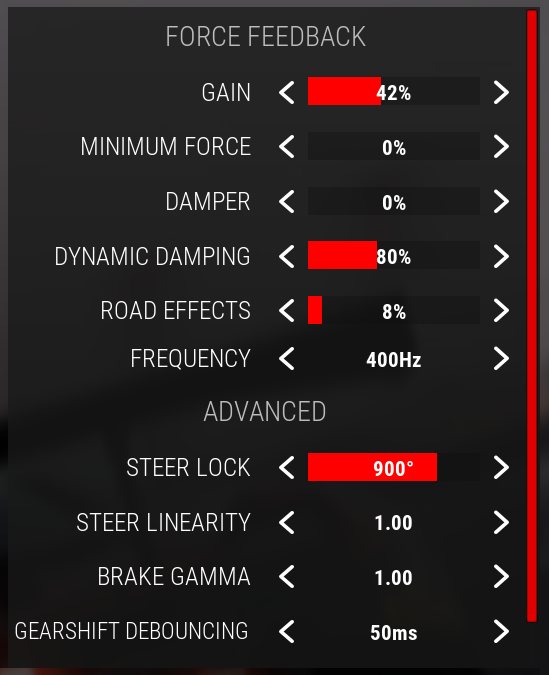
In ACC’s Controls menu, he runs less Gain and Dynamic Damping than Simagic’s video shows, plus a touch of Road Effects:
- Gain: 42%
- Minimum Force: 0%
- Damper: 0%
- Dynamic Damping: 80%
- Road Effects: 8%
- Frequency: 400Hz
- Steer Lock: 900°
- Steer Linearity: 1.00
- Brake Gamma: 1.00
Fine-tuning
If something still doesn’t feel right, start with these fixes:
- If the FFB is too strong or clipping, keep SimPro Manager’s Force Feedback at 100% and bring ACC’s Gain down to 60% or below, then watch the FF meter in ACC’s HUD.
- When an Alpha EVO range base gives you a high-frequency buzz, keep Road Effects below 10%.
- If the FFB feels slow on quick corrections, lower Dynamic Damping.
- If you want more sense of weight transfer and momentum, add a small amount of Mechanical Inertia (Alvin runs 6%).
- When you’re missing the tyre deformation and damping sensation, check Dynamic Prediction Level isn’t at 0, because both setups run it at 1.
- If the FFB corrects too quickly or too slowly for you, adjust Slew Rate Control.
- When your Alpha EVO range base feels twitchy, try Alvin’s lower Wheel Rotation Speed (30) and a moderate Mechanical Damper (he runs 14%).
- If the steering feels too heavy, turn ACC’s Damper down or off and bring Game Damper down in SimPro Manager.
The direct drive wheel settings guide takes you brand by brand through the other makers’ software, and there’s a Settings Finder in there as well. The Simagic guide covers the bases themselves and SimPro Manager in more depth. I’ll see you out on track!
Related Articles

Best Pimax VR Settings for F1 25 in 2026: A Damage-Control Guide

Best Pimax VR Settings for Le Mans Ultimate in 2026

Best Pimax VR Settings for Automobilista 2 in 2026

Best Pimax VR Settings for Assetto Corsa in 2026

iRacing VR Settings (2026): Meta Quest 3, PSVR2, Pimax and Valve Index

Assetto Corsa VR Settings 2026: Pimax, Quest 3, PSVR2 & More
Topic: Direct Drive Wheel Settings