

I’m a sim racer and amateur racer with a passion for Motorsport, good racecraft and the technical and setup aspect of sim racing.
Le Mans Ultimate looks like a native-OpenXR game from the user’s seat, but under the hood it’s still doing the OpenVR-to-OpenXR translation – Studio 397 just shipped the OpenComposite DLL embedded in the game files so you don’t have to install it yourself. That’s why LMU feels comparable to iRacing or AMS2 in pipeline simplicity even though it inherits the isiMotor 2.5 (rFactor 2) renderer that’s fundamentally OpenVR underneath. The V1.3 patch on 31 March 2026 was the inflection point: ELMS content and Logitech TrueForce got the headlines, but the quieter shipping change – vehicle occlusion culling for cars hidden in pit garages – is the one that matters most for Pimax owners running 44-car ELMS grids in VR. The CPU and GPU draw-call saving in dense traffic is genuinely meaningful.
The other thing that’s shifted since the V1.3 patch is the Pimax Play side. Pimax Play 2.0 Open Beta and the late 1.44.x branch have both produced widespread stutter and frame-time spike complaints on LMU specifically. The current community consensus is to roll back to Pimax Play 1.43.9 for endurance sessions until the 2.0 branch matures. There’s also a Windows 11 update conflict (KB5077181) that causes total headset disconnects on LMU – if you’ve been seeing black screens or random “headset not detected” errors, the Windows update is the likely culprit. Both of these are covered in the gotchas section below because they’re costing people race finishes.

Quick Navigation
Jump directly to what you’re looking for:
LMU’s embedded OpenComposite pipeline |
Pimax Play 2.0 vs 1.43.9 – which to run |
The V1.3 patch and what changed for VR |
In-game LMU settings by GPU tier |
Eye-tracked DFR on Crystal Super |
FPS cap and frame timing |
The KB5077181 and Alt-Tab gotchas |
Sources
LMU’s embedded OpenComposite pipeline
LMU inherited the isiMotor 2.5 engine from rFactor 2, which means at the renderer level it’s still an OpenVR title. What Studio 397 did to keep performance competitive on modern OpenXR runtimes – Pimax Play, Meta’s OpenXR, Varjo, etc. – was embed the OpenComposite DLL straight into the game install. From the user’s side you don’t see it: there’s no separate OpenComposite install step like there is for vanilla Assetto Corsa, and LMU “just runs” in your headset through Pimax Play 2.0’s OpenXR runtime. Under the hood the translation is still happening, but it’s invisible. That’s the right call by Studio 397 – it’s the difference between LMU being a one-click VR experience and a community-modding project the way vanilla AC still is.
The performance implication that matters: because the embedded OpenComposite shipped with Studio 397’s own tuning, the translation overhead is essentially negligible. You’re not paying the 10-15% SteamVR tax that vanilla AC + SteamVR users were. On a Crystal Light or Super, LMU behaves the way you’d expect a competently engineered OpenXR sim to behave, which is to say the bottleneck is the headset’s pixel count, not the API stack underneath it.
Pimax Play 2.0 vs 1.43.9 – which branch to run for LMU
This is the call most people are getting wrong on LMU in May 2026, and the symptom is identical to a thousand other problems so it’s hard to diagnose: stutter, frame-time spikes, mid-corner FPS drops that don’t track to anything you can see on the FPS counter. The Pimax Play 2.0 Open Beta and the late 1.44.x stable branch are both showing the same regression specifically on LMU. r/Pimax and the OpenMR forums have been collecting these reports through May, and the community consensus is now firm: roll back to Pimax Play 1.43.9 for LMU endurance sessions until 2.0 graduates from Open Beta.
The trade-off with running 1.43.9 stable: you lose the in-client Quad Views toggle that 2.0 added, so you can’t easily enable eye-tracked DFR on the Crystal Super at the Pimax-side runtime level. For most LMU users that’s an acceptable trade because the 2.0 stutter is more disruptive than the loss of headroom that DFR would buy you. If you’ve got a Crystal Super and DFR matters more to you than absolute frame consistency, stay on 2.0 and run the rest of the settings below conservatively to keep frame times in check. Most owners I see on the Pimax + LMU threads are choosing stability over DFR until 2.0 is fully baked.
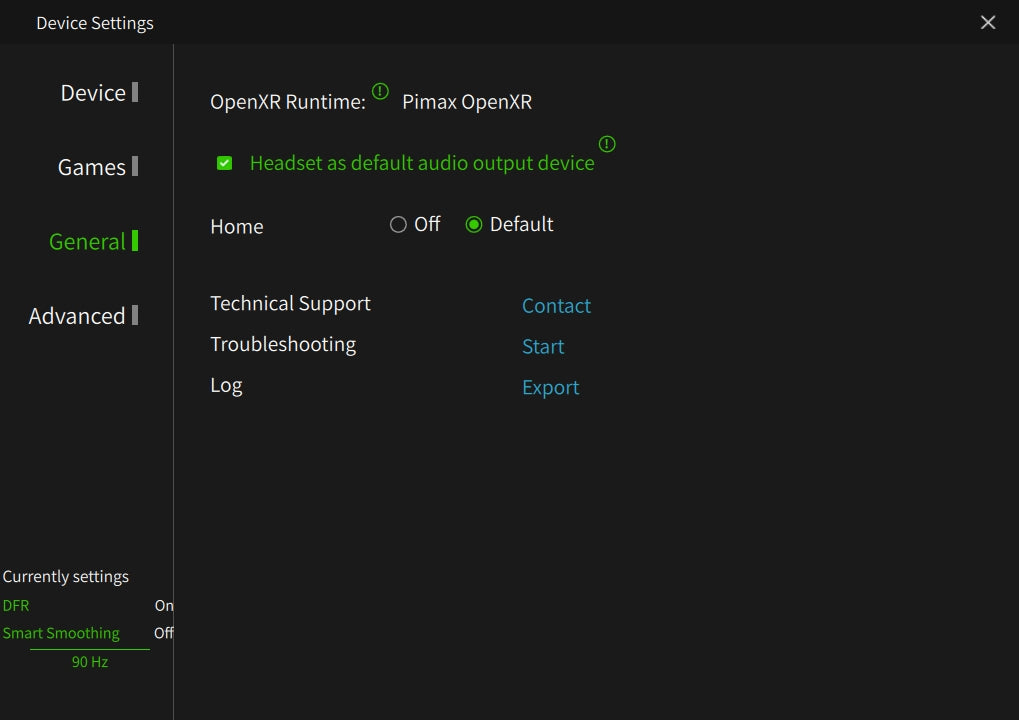
How to roll back: Pimax has a 1.43.9 installer still available through their support portal. Uninstall 2.0 cleanly through Windows Settings, install 1.43.9, set the OpenXR runtime to Pimax OpenXR in the General tab, and you’re back. Five-minute job. The runtime preference is the most common thing to miss after a downgrade – skip it and LMU will route through SteamVR and you’ll be wondering why you bothered downgrading.
The V1.3 patch and what actually changed for VR
Studio 397 dropped V1.3 on 31 March 2026, and the patch notes led with the ELMS content drop (Duqueine D09 LMP3 and Circuit de Barcelona-Catalunya) and the new Logitech TrueForce / haptic feedback integration for compatible wheels. Both are useful but neither is the change Pimax owners should care most about.
The shipping change that matters: V1.3 introduced vehicle occlusion culling. LMU now stops rendering cars when they’re physically hidden from view (most importantly, cars sitting in pit garages on a multi-class ELMS grid). The CPU and GPU draw-call saving on a 44-car grid at Le Mans or Spa is genuinely substantial – this is the kind of change that bridges the gap between “playable” and “stable lap-after-lap” on a Crystal Light + 4080 setup. It also explains why some community testers reported V1.3 felt smoother in VR without any settings change, despite the patch notes downplaying VR work.
The implication for the settings below: the per-GPU tiers I’m recommending assume you’re on V1.3 or newer. If you’re still on V1.2 because you skipped the update, expect frame-rate dips in heavy pit-stop sequences that won’t appear on V1.3 hardware running the same Pimax-side numbers.
In-game LMU settings by GPU tier
LMU’s in-game graphics settings sit under Settings → Graphics. The aim with these tiers is the same as my Pimax + iRacing and Pimax + AC guides: tune the centre of the image inside the headset, lean on Pimax Play 2.0’s foveation to handle the periphery, and never stack the same setting on both sides of the pipeline. For cross-sim recipes the Pimax Crystal settings sorted by GPU reference is the master list.
RTX 5090 / RTX 4090 (Tier 1)
90Hz, 100% render resolution in Pimax Play, MSAA 4x (8x is too heavy in LMU even on a 5090 – the older renderer’s MSAA path is less efficient than AMS2’s). Shadows High, Reflections Medium, Cubemap Resolution Medium. Virtual Mirror only – cockpit mirrors in the isiMotor engine use a picture-in-picture render path that absolutely tanks VR frame rates regardless of GPU tier. World Detail High, Particle Detail High. On a 5090 you’ve got headroom to enable High Shadows; on a 4090 leave Shadows at Medium for endurance-stint frame consistency.
RTX 5080 / 4080 / 4070 Ti (Tier 2)
This is where Pimax Play 2.0’s Quad Views in Balance or Performance mode earns its money. A 44-car ELMS grid at full pace at Le Mans or Sebring will push a 4080 over the 90Hz frame budget without foveation; Quad Views Balance mode buys back 15-25% headroom by reducing peripheral resolution. Shadows Medium, Reflections Low, Mirrors set to Virtual only. Pixel Density at 1.0. MSAA 4x. Crystal Light is the sweet spot here – a Crystal Super at 50 PPD on a 4080 will struggle in heavy pit-traffic sequences even with V1.3’s occlusion culling.
RTX 4070 / 4060 Ti (Tier 3)
72Hz at the Pimax-side, GPU Upscaling on. Pixel Density 0.75-0.85 in Pimax Play. In-game: MSAA 2x or Simple AA with Pimax Play sharpening, World Detail Low, Shadows Low, Reflections Off. Crystal Light only – the Crystal Super isn’t viable at this tier in LMU. The Quad Views in Performance mode is the difference between an unwatchable session and a holdable 72Hz at most tracks. Spa with heavy rain at the start of a full ELMS grid is the stress test, and that’s where a 4070 will show frame drops regardless of what you do.

Eye-tracked DFR on Crystal Super
Unlike iRacing, LMU does not implement the OpenXR XR_EXT_eye_gaze_interaction extension natively. Eye-tracked Dynamic Foveated Rendering on a Crystal Super for LMU is therefore runtime-only: Pimax Play 2.0’s Quad Views injects the eye-tracking data at the runtime layer, and LMU never needs to know about it. The performance gain is real on busy grids – usually 20-30% headroom on a 4090 or 5080 – but the catch is that the DFR pathway requires Pimax Play 2.0 Open Beta, which is the branch that’s been causing the stutter regression noted above.
The honest call for Crystal Super owners in May 2026: if eye-tracked DFR matters to you, stay on Pimax Play 2.0 and accept that you’ll need to tune more conservatively to mask the underlying stutter. If frame-time consistency matters more, roll back to 1.43.9 and accept that you’ll lose the DFR pathway. Most Crystal Super owners I’m seeing on the community threads are choosing 1.43.9 + no DFR for endurance work and reserving 2.0 + DFR for sprint sessions where the stutter window is shorter. Not ideal, but it’s where the branch sits in late May.
FPS cap and frame timing
LMU’s frame timing through the embedded OpenComposite is generally clean on V1.3, so the FPS cap follows the same rules as iRacing and AC:
- Cap at 87 FPS on a Crystal Light or Crystal Super running 90Hz on Tier 2 hardware – three frames below the headset refresh so the compositor has breathing room. This is the default for most owners.
- Cap at 90 FPS exactly on Tier 1 (5090 / 4090). Headroom means the GPU rarely dips below refresh anyway, so the safety margin matters less.
- Cap at 70 FPS on Tier 3 hardware running 72Hz. Same three-frame safety pattern.
- Uncapped: not advisable. The embedded OpenComposite translation layer adds enough variability that uncapped frame rates swing dramatically and the compositor reprojection starts kicking in unpredictably.
Set the cap in LMU’s graphics settings (FPS Limit). Some users prefer the Pimax Play 2.0 frame limiter for slightly more responsive behaviour, but either works.
The KB5077181 and Alt-Tab gotchas
Two issues are costing people race finishes in LMU + Pimax setups in May 2026 because the symptoms are spectacular and the causes are unrelated to anything in the game’s settings. Both worth knowing about as part of pre-session hygiene.
The Windows 11 KB5077181 conflict. A Windows 11 security update released on 10 February 2026 has a documented conflict with Pimax Play’s interactive services specifically when playing LMU. The symptoms are total headset disconnects, black screens, and sometimes a hard “headset not detected” error mid-session. If you’ve been seeing any of these on LMU in the last couple of weeks and they didn’t happen before, KB5077181 is the most likely cause. Mitigation: pause Windows Update, then either uninstall KB5077181 specifically (via Settings → Update & Security → Update History → Uninstall Updates) or wait for Pimax + Microsoft to ship a coordinated fix. Until they do, this is the single most common cause of inexplicable LMU + Pimax disconnects right now.
The Alt-Tab single-digit FPS bug. If you tab out of LMU while wearing your headset (or if a Windows notification pops up over the LMU window during a session), the game can sometimes lock into single-digit FPS – 1 to 9 FPS – and the only fix is to fully restart LMU and the Pimax service. This isn’t a new bug, it’s been around since LMU’s launch, and Studio 397 hasn’t pinned down a fix. The pre-emptive habit is to disable all Windows notifications and any third-party app pop-ups before a session. Discord overlays, Steam notifications, and OBS Studio pop-ups are the most common triggers I see in the community reports.
Pimax $25 discount: use code SIMRACINGCOCKPIT at checkout on pimax.com for $25 off any Crystal Light, Crystal Super or Dream Air.
Sources and credits
The numbers and Pimax Play branch guidance come from the Studio 397 V1.3 patch notes, the r/Pimax + r/lemansultimate community threads through May 2026 (where the Pimax Play 2.0 stutter regression got triangulated), the OpenMR forum reports on KB5077181, and Kireth’s LMU 1.0 launch coverage on YouTube which set the baseline for how the embedded OpenComposite was being received at launch. The vehicle occlusion culling claim is from the official Studio 397 V1.3 release notes; the in-game settings tiers are validated against multiple May 2026 community benchmarks.
Wider SRC reference points worth pairing with this guide: my interactive Pimax Settings Tool generates the recommended settings for your exact headset + GPU + sim combination; the Pimax + iRacing guide covers the native-OpenXR-from-the-start sister title; the Pimax + AC guide covers vanilla AC’s manual OpenComposite install (the contrast with LMU’s embedded approach is the editorial point); and the recently rebuilt Best VR Headsets for Sim Racing buyer’s guide is the place to start if you’re choosing between Crystal Light, Crystal Super, and the Dream Air. For the FFB side of LMU, my LMU FFB settings guide covers the wheelbase tuning that pairs with these graphics recipes.
The V1.3 patch landed in March 2026 and is the current stable build as of late May. When Studio 397 ships V1.4 – rumoured to include further VR optimisations and the long-awaited Bahrain night-race lighting overhaul – I’ll come back to this page and update.

Best Pimax VR Settings for F1 25 in 2026: A Damage-Control Guide

Best Pimax VR Settings for Le Mans Ultimate in 2026

Best Pimax VR Settings for Automobilista 2 in 2026

Best Pimax VR Settings for Assetto Corsa in 2026

iRacing VR Settings (2026): Meta Quest 3, PSVR2, Pimax and Valve Index

Assetto Corsa VR Settings 2026: Pimax, Quest 3, PSVR2 & More
Topic: VR Headsets