

I’m a sim racer and amateur racer with a passion for Motorsport, good racecraft and the technical and setup aspect of sim racing.
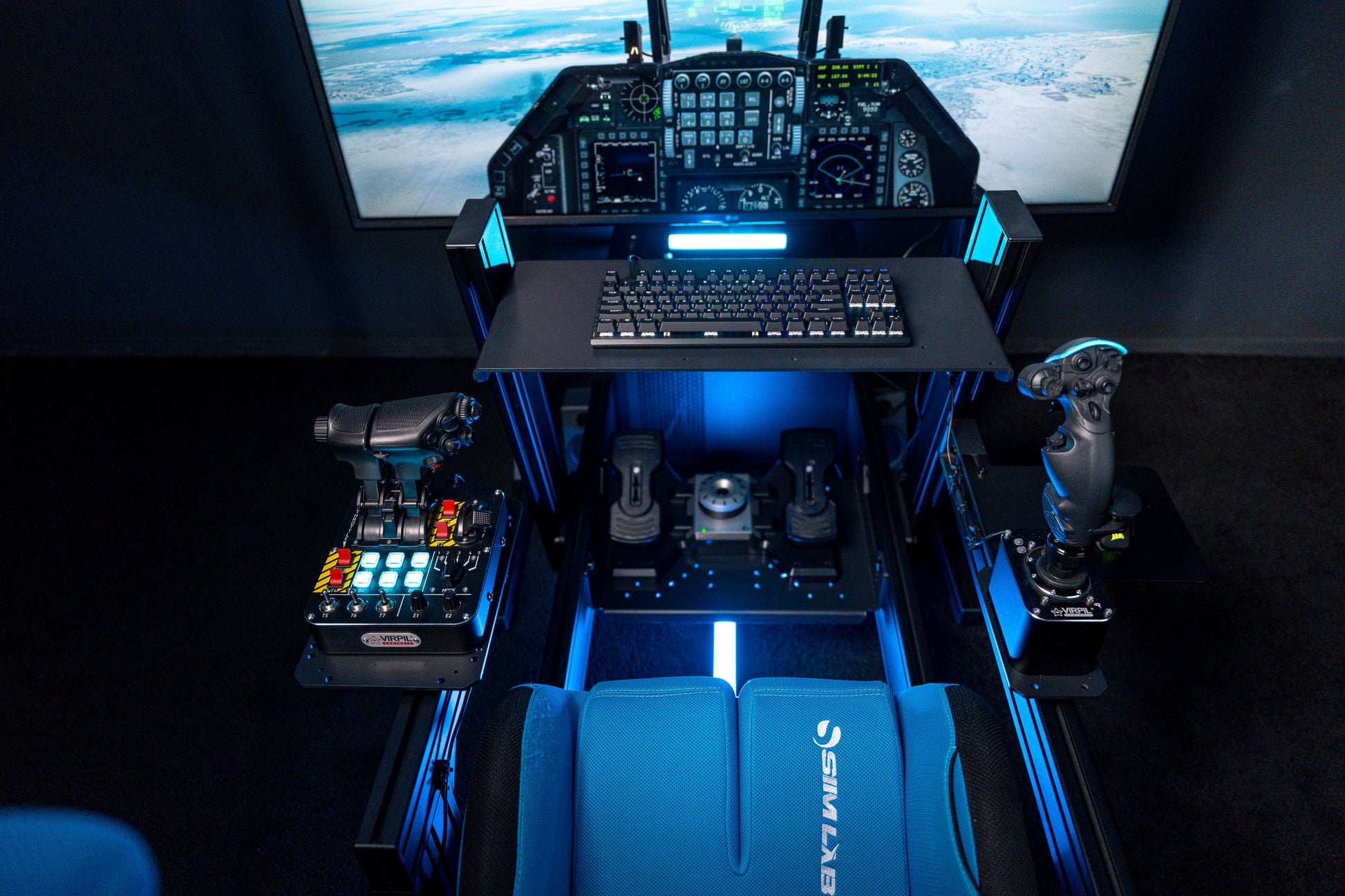
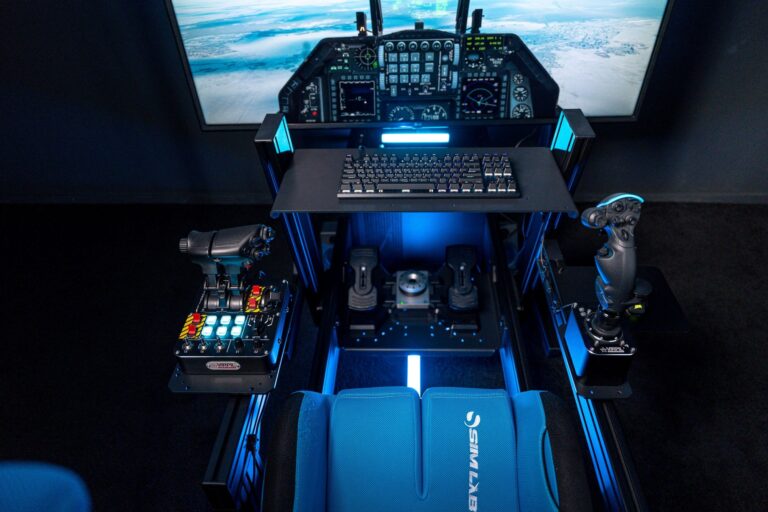
Featured image: Sim-Lab Flight Sim Collection
I spend most of my time in sim racing, but over the past year I’ve been bolting flight sim gear onto my rig and flying everything from DCS combat missions to long-haul MSFS 2024 routes. If you already own a sim racing cockpit, you’re closer to a proper flight sim setup than you probably think. Your PC, your VR headset, your seat, your 8020 rig – all of it transfers. You just need the right input devices and a way to mount them.
Budget HOTAS sets under £60 through to force feedback flight sticks that cost more than some direct drive wheelbases – this guide covers the lot. What each piece does, which brands are worth the money, and how to get it all mounted on your existing rig.
The flight sim hardware market has grown massively in the past couple of years. MOZA Racing – a brand most sim racers already know – has launched a full flight ecosystem. Winwing and VKB have pushed mid-range build quality to levels that would have cost twice as much five years ago. And force feedback flight sticks are now a real thing, not just a novelty. If you’ve ever wondered what it’d be like to feel turbulence through your stick the way you feel kerbs through your wheel, the technology exists.
Quick Navigation
Jump directly to what you’re looking for:
How to Choose Flight Sim Gear |
What is a Gimbal? |
Force Feedback Flight Sticks |
Mounting to Your Sim Rig |
HOTAS vs Yoke |
MOZA AB9 |
VKB Gladiator NXT EVO |
Winwing Orion 2 |
Winwing Ursa Minor |
Honeycomb Alpha & Bravo |
MOZA Flight Ecosystem |
Thrustmaster Entry Level |
Rudder Pedals |
Flight Sim Gear Compared
The good news for sim racers is that you already understand the fundamentals. Sensor types, force feedback, build materials, diminishing returns – it all maps across. The gimbal in a flight stick is the equivalent of the motor in your wheelbase. Hall effect sensors matter here just as much as they do in pedals. And the upgrade path follows the same logic: start affordable, find out what you actually use, then spend where it counts.
How Do I Choose Flight Sim Gear?
Start with one question: what do you fly? Military combat sims like DCS World and IL-2 Sturmovik need a flight stick and throttle (called a HOTAS – Hands On Throttle And Stick). Civil aviation in Microsoft Flight Simulator 2024 or X-Plane 12 works better with a yoke and throttle quadrant. Space sims like Star Citizen often use dual sticks (one in each hand). Your software dictates your hardware.
The second question is budget. Under £60 gets you a Thrustmaster T-Flight HOTAS X, and that’s a perfectly reasonable starting point. I’d argue it’s the smart move – buy cheap, find out if flight sim grabs you the way racing does, then upgrade with purpose. One of the best pieces of advice I picked up from the flight sim community: dumb purchases are worse than seemingly dumb questions. Ask first, spend later.
MOZA Racing Flight Gear
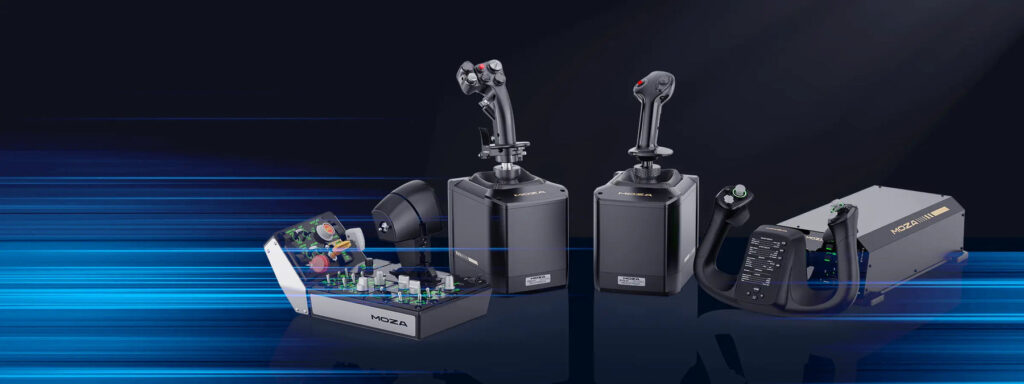
If you’re already running MOZA on your sim racing rig, their flight ecosystem makes the crossover straightforward. They cover yokes, throttle modules, rudder pedals, and panels – and the AB9 force feedback stick base is genuinely impressive. Prices start at £39 for basic throttle modules.
Thrustmaster Flight Range
Thrustmaster covers the full range from entry-level to proper enthusiast kit. The TCA Airbus and Boeing lines do well with MSFS players, and their TPR rudder pedals are the real deal. Budget HOTAS sets from Thrustmaster are the standard “test the waters” recommendation for good reason.
Cheapest Flight Sim Gear Sorted by Price
What is a Gimbal and Why Does it Matter?
The gimbal is the mechanism inside a flight stick that translates your hand movements into pitch and roll inputs. It’s the single most important component in determining how a stick feels, and it’s the first thing experienced flight simmers look at. Think of it as the equivalent of the motor type in a sim racing wheelbase – it defines the fundamental character of everything you feel through your hands.
There are four main types, and the progression maps neatly to what sim racers already understand:
Ball-and-cup is the cheapest. A plastic ball sits in a cup with springs pulling it to centre. The problem – and this is the bit that surprised me – is that it creates the strongest centering force right in the middle of the stick’s travel. That’s the opposite of what you want. Fine movements around neutral become a fight against the spring, and the edges of travel feel loose. Think of it as the flight stick equivalent of a notchy gear-driven wheelbase. Logitech’s Extreme 3D Pro and the Thrustmaster T-Flight range both use this design.
Pincer gimbals use two opposing arms gripping the stick shaft, with spring tension adjustable separately for each axis. Much smoother centre feel, more consistent force across the full range of travel. VKB’s Gladiator NXT EVO uses a precision pincer gimbal with ball bearings – it’s a big step up. Winwing’s Ursa Minor copies this approach at a lower price point.
Cam-and-spring is the premium mechanical option. Precisely machined cams control the force curve as you move the stick, with interchangeable cam profiles for different aircraft types. This is what the VKB Gunfighter IV and Winwing Orion 2 use. The Orion 2’s cam system is, as one reviewer put it, “buttery smooth and wildly customisable.” Metal construction throughout. Think of it as the direct-drive equivalent for flight – precision and customisation at a level below don’t match.
Force feedback is the newest category. Motors actively push back against your inputs, simulating turbulence, control surface loading, stall buffet, and trim forces. The MOZA AB9 and Winwing Cyber Taurus are the current options. If you’ve ever felt the difference between a belt-driven wheelbase and a direct-drive unit, the jump to a force feedback stick is that same leap of immersion.
Force Feedback Flight Sticks – The Direct Drive of Flight Sim
This is where flight sim hardware gets properly interesting for sim racers, because the engineering parallels are almost exact. A force feedback flight stick uses a motor to create active resistance and vibration through the stick – just like a direct-drive wheelbase creates active forces through your steering wheel. The MOZA AB9 produces 9Nm peak torque (7Nm continuous), which is in the same ballpark as their lighter wheelbases. The Winwing Cyber Taurus produces around 10Nm peak torque – less raw force than a high-end sim racing wheelbase, but the feedback character is tuned specifically for flight physics.
In practice, that means: In DCS World, control surface loading builds through your hand as airspeed increases. In MSFS 2024, turbulence is something you physically resist rather than just watch happen on screen. Stall buffet vibrates through your hand before the aircraft drops. Same principle as feeling kerbs and tyre slip through a wheel – the physics engine feeds directly into your hand rather than just your eyes and ears.
The trade-off, just like in sim racing, is cost. The MOZA AB9 base alone runs £479-588, and you still need a grip on top of that – MOZA uses their own proprietary quick-release system, so you’ll be choosing from MOZA’s own grip options. The Winwing Cyber Taurus ecosystem is newer and still expanding. For most people starting out, a quality cam-and-spring gimbal gives 80% of the experience for 40% of the cost. But if you already own a direct-drive wheelbase and you know what force feedback does for immersion, you’ll understand exactly why these exist.
Mounting Flight Sim Gear to Your Sim Racing Cockpit
This is the section that most flight sim guides skip entirely, and it’s the one that matters most to sim racers. You’ve got a rig. The problem is getting flight controls onto it without needing a second room.
The mounting challenge depends on what you’re attaching. A HOTAS (stick + throttle) needs two side mounts at armrest height. A yoke bolts up front, replacing your wheelbase mount. Rudder pedals either replace your racing pedals or need their own dedicated plate. The practical question is how fast you need to swap between racing and flying.
8020 aluminium rig owners (Sim-Lab, Trak Racer, Next Level Racing GT Track): You’re in the best position. Sim-Lab makes dedicated flight sim accessory plates for the P1-X and GT1 Evo. Trak Racer has similar options. T-slot aluminium is endlessly configurable – you can bolt MonsterTech joystick mounts directly to your rig’s side profiles. Budget around £80-150 per mount for MonsterTech aluminium brackets, or look at Predator Mounts for rig-specific options.
For desk-mounted rigs or quick solutions: J-PEIN and Hikig desk clamps on Amazon run £30-60 for a pair and work well enough for lighter HOTAS sets. They clamp to your desk or rig frame. One thing to plan for – heavy sticks like the Winwing Orion 2 with suction cup mounting on a smooth desk is a terrible experience. The stick shifts mid-flight and ruins any precision inputs. Proper clamps or bolted mounts are non-negotiable once you step above budget tier.
Rudder pedals: If your sim racing pedals are on a quick-release plate, swapping rudder pedals in and out is straightforward. Otherwise, VKB’s T-Rudder Mk.IV is compact enough to sit beside your racing pedals without interfering. Some sim racers mount rudder pedals on a sliding tray beneath their normal pedals.
HOTAS vs Yoke – Which Setup Do You Need?
This comes down to what you fly. Quality doesn’t come into it – both can be excellent or rubbish depending on the product. It’s purely a form factor question, driven by what software you’re actually running.
HOTAS (Hands On Throttle And Stick) is the format for military flight, space sims, and arcade flying. DCS World, IL-2 Sturmovik, Star Citizen, Elite Dangerous – these all want a stick in your right hand and a throttle in your left. You need lots of buttons, hats, and switches accessible without letting go of either hand. The stick handles pitch and roll, the throttle handles speed and weapon systems.
Yoke and throttle quadrant is for civil aviation. Microsoft Flight Simulator 2024, X-Plane 12, and anything involving airliners or general aviation. The yoke mimics the control column in a real Cessna or Boeing. Push/pull for pitch, rotate for roll. The throttle quadrant sits beside it with multiple levers for engines, mixtures, prop pitch, and flaps. It’s a very different hand feel to a HOTAS – more deliberate, less twitchy.
Plenty of people fly MSFS with a HOTAS and it works perfectly well. But if you’re into airliner flying and procedures, a yoke and quadrant gets you much closer to the real thing. My advice: start with whichever matches your primary sim, then add the other setup later if you branch out.
Factors That Matter When Choosing Flight Sim Hardware
Sensor type: Hall effect sensors are contactless and don’t wear out. Potentiometers are cheaper but degrade over time and develop dead zones. The interesting detail – and this is worth checking before you buy – is that some mid-range sticks advertise Hall effect on their main axes but quietly use potentiometers on secondary axes like twist rudder. The Thrustmaster T16000M is actually a good example here – it uses Hall effect sensors on all three main axes including twist, which is better than many rivals at the price. The lesson: check the spec sheet rather than assuming. Not all sticks are as thorough.
Button and hat count: More important than most people expect, especially in DCS. Military sims bind dozens of functions to the HOTAS so you never lift your eyes to the keyboard. That 12-button count sounds fine until you’re juggling radar, countermeasures, weapons selection, and radios at the same time. More buttons on your stick and throttle means fewer moments fumbling for keyboard bindings mid-combat.
Build material: Plastic gimbals flex under load and develop play over time. Metal gimbals (aluminium or steel) hold tolerances and last for years. The price difference between plastic and metal construction is usually where the jump from “budget” to “mid-range” happens – and it’s the single best upgrade you can make for longevity.
Axis count: Budget sticks have 3 axes (pitch, roll, twist for rudder). Premium setups separate rudder to dedicated pedals and add analogue ministicks, rotary dials, and slider axes. More axes means more direct control without modifier buttons. For space sims especially, dual sticks give you 6 analogue axes across two hands – full six-degrees-of-freedom control.
MOZA AB9 Force Feedback Base
The MOZA AB9 is significant because it brings force feedback to flight sticks from a brand that sim racers already know. If you’re running MOZA wheels and pedals, the AB9 fits into the same ecosystem and software. It produces 9Nm peak torque (7Nm continuous) – enough to feel every detail of the flight model without tiring your arm. Aluminium construction keeps the form factor compact, and there’s no active cooling required.
Grip compatibility is worth noting: MOZA uses their own proprietary quick-release system, so you’ll be selecting from MOZA’s own grip lineup rather than mixing brands. Community consensus from what I’ve read: impressive quality for a first-generation product. The price – £479-588 depending on retailer – puts it squarely in enthusiast territory, but sim racers who’ve already gone direct-drive know what force feedback is worth.
VKB Gladiator NXT EVO
Ask the flight sim community what to buy as a long-term base and the VKB Gladiator NXT EVO comes up every time. At £167-204, it’s mid-range money that delivers well above mid-range performance. The precision pincer gimbal with ball bearings gives a smooth, precise centre feel that makes the budget sticks feel like toys. All axes use contactless Hall effect sensors. It’s modular, so you can upgrade grips and add accessories as you go.
The caveat for UK buyers: VKB sells through their FSC Europe store, and you’ll need to factor in shipping and potential import duty. The listed EU price looks competitive, but by the time it lands in the UK you might be paying 20-30% more than the sticker price. My view: worth it – the build quality and gimbal feel put it in a different league from anything near this price. But budget accordingly.
Winwing Orion 2 HOTAS
The Winwing Orion 2 is where flight sim hardware starts feeling properly serious. The metal dual-cam gimbal with ball bearings is, from everything I’ve watched and read, buttery smooth and wildly customisable. Swap cam profiles for different resistance curves – F-16 feel versus transport aircraft feel are genuinely different. Grip options include the Viper Ace for DCS and the F-15EX for twin-engine military work.
At around £270-383 depending on configuration, this is the point where flight sim HOTAS quality catches up with what sim racers are used to in wheel hardware. One reviewer described the stick as feeling “like it’s been ripped out of an actual airplane” – which is probably the highest compliment you can pay a flight stick. The only practical consideration: the included suction cup mounting is rubbish. Plan on desk clamps or rig mounts from day one.
Winwing Ursa Minor
The Winwing Ursa Minor has earned its place as the go-to budget recommendation, and the reasons are obvious once you use one. At roughly £105, it uses a pincer gimbal with contactless sensors and lockable twist – the same fundamental technology as sticks costing twice as much. The value at this price is genuinely hard to beat. It genuinely blows everything else out of the water at this price point.
There’s a clever budget trick that the HOTAS community uses: buy the Ursa Minor Fighter stick and then buy a second Ursa Minor as a throttle (the Space Stick variant works well in the left hand). For about £210 total you get 34 buttons, 8 hats, 2 ministicks, and 6 analogue axes – a dual-stick setup that covers military flight, space sims, and most other configurations. That’s extraordinary value for what you get.
Honeycomb Alpha Yoke and Bravo Throttle Quadrant
If you’re flying civil aviation, the Honeycomb Alpha and Bravo are the combination that everything else gets measured against. The Alpha yoke uses Hall effect sensors on a metal shaft with 90 degrees of rotation (45° each side) and an integrated switch panel with ignition, avionics, lights, and gear controls. The Bravo throttle quadrant has 6 configurable axes with swappable lever handles, an autopilot panel, and a gear lever.
What makes the Bravo special is the aftermarket. ProDeskSim makes over 40 different aircraft-specific lever sets – Boeing 737, 747, 777, 787, Airbus A320, A380, and plenty more obscure types. The throttle quadrant can be reconfigured to match whichever aircraft you’re in. It’s the best option hands down for anyone into procedures and realism.
At roughly £200-250 each, both units offer strong value for what you get. Real pilots use these for home cockpit practice. Mounting is straightforward – the Alpha clamps to a desk or cockpit crossbar, and the Bravo sits beside it.
MOZA Flight Ecosystem
MOZA’s flight range is worth highlighting as a complete ecosystem, especially for sim racers who already know the brand. They offer the MFY yoke from £149 (a solid budget alternative to the Honeycomb Alpha), throttle modules starting at just £39 for the TQB and TQA units, the MTQ throttle quadrant at £199, and the MRP rudder pedals at £329. There’s also the MTLP takeoff and landing panel at £149 for the full procedure experience.
The standout in the MOZA range is the AY210 force feedback yoke at £699-798 – a premium piece of kit that brings the same force feedback concept from the AB9 stick to yoke-style inputs. For MSFS 2024 enthusiasts who want to feel the flight model through their controls, this is currently one of very few FF yoke options on the market.
Thrustmaster Entry Level and TCA Range
Thrustmaster’s flight range breaks cleanly into two tiers. The budget T-Flight series (HOTAS X, HOTAS One) runs under £60-90 and uses ball-and-cup gimbals with basic sensors. They’re fine for testing whether flight sim is your thing. Don’t expect the stick feel to impress you – it won’t. But the throttle unit on the T-Flight HOTAS X is surprisingly usable, and the package gets you in the air.
The TCA (Thrustmaster Civil Aviation) line is more interesting. The TCA Quadrant Airbus at £170-180 is a proper throttle quadrant with detachable engine levers and an add-on panel. The TCA Boeing at £200 mirrors the 787 Dreamliner throttle. These pair well with any yoke or stick and add genuine procedure depth to MSFS flying. Worth noting that the TWCS throttle at £200 is actually excellent as a separate throttle for HOTAS setups – the paddle throttle axis is smooth and the slider works well.
Rudder Pedals
Rudder pedals are the piece that many flight simmers add last, but they make more difference than you’d expect. Without them, you’re using a twist axis on your stick for yaw control, which means your right hand is doing pitch, roll, and yaw simultaneously. Dedicated rudder pedals free up your stick to handle just pitch and roll, which is noticeably more precise. They also give you differential toe brakes for ground handling and formation flying.
The Thrustmaster TFRP at £190 is the standard entry point. The S.M.A.R.T. sliding rail mechanism works well enough, though it’s not the most precise option out there. MOZA’s MRP at £329 uses Hall effect sensors and is the mid-range pick. The Thrustmaster TPR at around £430-470 uses a pendular mechanism (PENDUL_R) with H.E.A.R.T. Hall effect sensors – it’s genuinely premium, but that’s still a significant outlay for pedals.
On an 8020 rig with limited space, the VKB T-Rudder Mk.IV (£150-200) is worth a look. It’s compact, has no toe brakes (uses a rocker design instead), and fits beside your sim racing pedals without interfering. The MFG Crosswinds (£300-400) have a strong reputation in enthusiast circles for both precision and long-term durability.
Flight Sim Gear Compared – My Recommendations
Sim racer trying flight sim for the first time? Start with a Thrustmaster T-Flight HOTAS X – under £60 from Amazon. Fly for a month. If it grabs you, your second purchase should be the Winwing Ursa Minor at £105 – the value jump is enormous and you’ll immediately feel the difference a proper gimbal makes. From there, the path depends on what you fly: civil aviation pushes you towards a Honeycomb Alpha and Bravo, military simmers will want a Winwing Orion 2 or VKB Gladiator NXT EVO.
Don’t overlook mounting. A £400 stick bolted to a MonsterTech mount on your 8020 rig will feel better than a £600 stick suction-cupped to a smooth desk. Your sim racing cockpit is a genuine advantage here – use it. And add rudder pedals earlier than you think you need them. The precision improvement is immediate.
For force feedback enthusiasts who’ve already gone direct-drive on the racing side, the MOZA AB9 represents the same philosophy applied to flight. The FFB flight stick market is still young, but the technology works and the immersion gain is real. If you’re the type who went from a Logitech G29 to a Simucube and never looked back, you already know whether this is for you.
Related Articles
Looking for more guides? Check out our direct drive wheels buyer’s guide, VR headsets for sim racing, best sim rigs on the market, or the MOZA Racing buyer’s guide for more on their ecosystem.

Racing Cockpits Buyer’s Guide

Best VR Headsets for Flight Simulation
Fanatec ClubSport Steering Wheel GT3 for Xbox Review
Simagic Sim Racing: The Complete Buyer’s Guide (2026)
Corsair for Sim Racers: Ecosystem Buyers Guide 2026
Flight Sim Gear for Sim Racers: The Complete Buyer’s Guide (2026)
One thought on “Flight Sim Gear for Sim Racers: The Complete Buyer’s Guide (2026)”
Comments are closed.
As a sim racer who is looking to dip my toes into the flight sim world this was very helpful, thank you.
Is there any quick release plates you could recommend to be able to swap the pedals without minimal fuss?