

I’m a sim racer and amateur racer with a passion for Motorsport, good racecraft and the technical and setup aspect of sim racing.
Featured image: a Red Bull and a Racing Bulls car side by side in F1 25 (Image: EA Sports)
You’ve got EA SPORTS F1 25 and a wheel on the rig, and you want a sensible place to start the force feedback for your base. Below are the settings the wheel makers publish for the game, brand by brand, with one racing driver’s own setup standing in for Moza. They’re in the order you’ll click through them, with the wheel’s own software first and the game after it.
Quick Navigation
Jump directly to what you’re looking for:
F1 25’s FFB menu |
Fanatec |
Moza |
Logitech |
Thrustmaster |
Asetek |
Fine-tuning
F1 25’s force feedback settings
To find F1 25’s force feedback (FFB) settings, head to Settings > Controls, Vibration and Force Feedback, choose your control scheme, press Edit and then open Vibration and Force Feedback. In there you’ve got the overall strength, which the game calls Vibration & Force Feedback Strength, along with On Track, Rumble Strip, Off Track and Pit Stop Effects, the Wheel Damper and Maximum Wheel Rotation. If you’d like to know what those effects are, our force feedback guide explains how a sim turns the car’s physics into forces at the wheel.
Every setup below sets Maximum Wheel Rotation to 360° in the game. Fanatec, Logitech and Kyoto MSR’s Moza setup have 360° in the wheel’s own software too, apart from Logitech’s Xbox row for the RS50, which puts it at 2700° in G HUB. Fanatec’s reason is that “360° rotation matches real F1 wheel range – for fast, sharp inputs.”
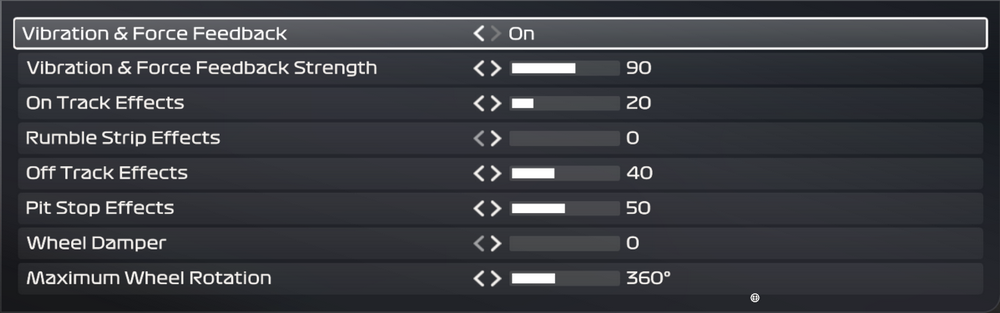
The Wheel Damper is the game’s own damping slider, and it’s where the setups split. Logitech, Thrustmaster and Asetek set it to 0, Fanatec runs it between 2 and 5 depending on the base and platform, and Kyoto MSR has it at 15 on his Moza setup. Simucube and Simagic haven’t published F1 25 values (Simucube’s F1 page covers telemetry only), and there are no maker values for Thrustmaster’s belt and gear wheels or for Logitech’s G923, G29 and G920.
The current build is v1.25, released on 7 September 2026. There isn’t an F1 26 – the 2026 season arrived on 3 June 2026 as a paid pack for F1 25, the 2026 Season Pack. For wheel users, v1.25 brought “a better match of control inputs to physics output during rapid input range changes”, along with two fixes that are in the Fine-tuning list at the bottom. Most of the makers’ numbers date from summer 2025 to early 2026, and Asetek’s guide, from 28 August 2026, is the newest of them.
Fanatec settings
Fanatec’s F1 25 settings page (July 2025) covers three groups of bases. The CSL DD and GT DD Pro share one set, with a few changes on Xbox. The ClubSport DD, ClubSport DD+, Podium DD1 and Podium DD2 each have numbers of their own, and those stay the same whichever platform you’re on.
On the CSL DD, Fanatec runs FFB 100 on the base and 80 in game on PC/PS5. The ClubSport bases come down on the base instead (75 and 65) and run 100 in game, and the Podium bases come down on both. Our Fanatec guide has more on the brand, including the CSL DD and the Podium DD2, both of which I’ve owned.
For the CSL DD and GT DD Pro, set the tuning menu first and then the game (the Xbox values are in brackets):
- In the tuning menu:
- SEN (Sensitivity): 360°
- FFB (Force Feedback): 100
- FFS (Force Feedback Scaling): Peak
- NDP (Natural Damper): 35 (45 on Xbox)
- NFR (Natural Friction): Off
- NIN (Natural Inertia): Off
- INT (Interpolation Filter): 3
- FEI (Force Effect Intensity): 100
- FOR (Force): 100 (not on Xbox)
- SPR (Spring): 100 (not on Xbox)
- DPR (Damper): 100 (not on Xbox)
- In F1 25:
- Vibration & Force Feedback: On
- Vibration & Force Feedback Strength: 80 (70 on Xbox)
- On Track Effects: 30
- Rumble Strip Effects: 30
- Off Track Effects: 15
- Wheel Damper: 3 (5 on Xbox)
- Maximum Wheel Rotation: 360°
The ClubSport DD and ClubSport DD+ share one list, and I’ve given both figures wherever the two differ:
- In the tuning menu:
- SEN (Sensitivity): 360°
- FFB (Force Feedback): 75 on the ClubSport DD, 65 on the ClubSport DD+
- FFS (Force Feedback Scaling): 50%
- NDP (Natural Damper): 55 on the ClubSport DD, 45 on the ClubSport DD+
- NFR (Natural Friction): Off
- NIN (Natural Inertia): Off
- INT (Interpolation Filter): 10
- FEI (Force Effect Intensity): 100
- FOR (Force): 100
- SPR (Spring): 100
- DPR (Damper): 100
- In F1 25:
- Vibration & Force Feedback: On
- Vibration & Force Feedback Strength: 100
- On Track Effects: 20
- Rumble Strip Effects: 10
- Off Track Effects: 5
- Wheel Damper: 2
- Maximum Wheel Rotation: 360°
And the Podium DD1 and Podium DD2 run these:
- In the tuning menu:
- SEN (Sensitivity): 360°
- FFB (Force Feedback): 55 on the DD1, 50 on the DD2
- FFS (Force Feedback Scaling): Peak
- NDP (Natural Damper): 15
- NFR (Natural Friction): Off
- NIN (Natural Inertia): Off
- INT (Interpolation Filter): 3 on the DD1, 2 on the DD2
- FEI (Force Effect Intensity): 100
- FOR (Force): 100
- SPR (Spring): 100
- DPR (Damper): 100
- In F1 25:
- Vibration & Force Feedback: On
- Vibration & Force Feedback Strength: 60 on the DD1, 50 on the DD2
- On Track Effects: 25 on the DD1, 20 on the DD2
- Rumble Strip Effects: 30
- Off Track Effects: 10 on the DD1, 5 on the DD2
- Wheel Damper: 3 on the DD1, 2 on the DD2
- Maximum Wheel Rotation: 360°
Fanatec says NDP (the natural damper) “adds smoothness and stability without muting road detail”, and that INT at 3 “filters digital noise but keeps the wheel responsive”. Fanatec wants the strength changed in game, where it controls the overall weight, although its own tip for a base that’s clipping is to reduce FFB on the tuning menu instead. Clipping is where the game asks for more force than the base is set to give, so the force flattens out at the top.
Moza settings
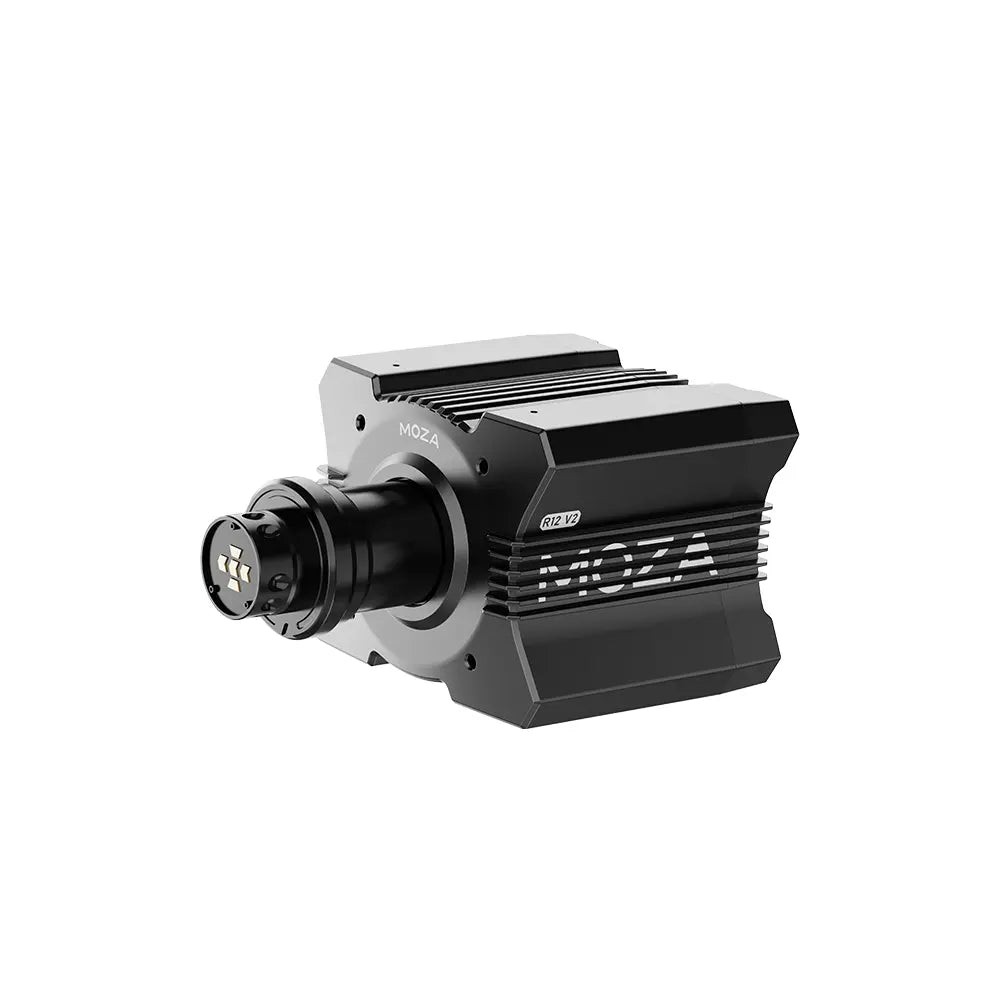
Moza doesn’t publish F1 25 force feedback values. Its F1 support page says the F1 games’ force feedback doesn’t need configuring.
So the settings below are Kyoto MSR‘s own setup on his Moza R12, from his August 2025 video. Kyoto MSR is Alexander Wiener, the founder of Kyoto Motorsport, and he describes himself as a professional racing driver and driver coach. I haven’t included values for the Moza R9. I’ve owned a Moza R21 and an R25 Ultra, and the rest of Moza’s line-up is in our Moza wheel guide.
His Pit House setup for the Moza R12 comes in two parts, the Basic settings and the Advanced ones:
- Basic:
- Steering Angle: 360°
- Soft Limit Stiffness: 5
- Soft Limit Strength: Hard
- Game Force Feedback Intensity: 70%
- Maximum Output Torque: 100%
- Force Feedback Reversal: Off
- Hands-off Protection: Off
- Steering Wheel Inertia: 1100
- Maximum Wheel Speed: 40%
- Advanced:
- Force Feedback Interpolation: 10
- Natural Damping: 10%
- Natural Friction: 70%
- Natural Inertia: 200%
- Wheel Spring: 0%
- Speed-dependent Damping: 15%, starting at 80 km/h
- Temperature Control Strategy: Radical
- Force Feedback Equalizer: flat, 100% on every band
- Force Feedback Curve: a straight line
Then in F1 25, he sets Vibration and Force Feedback to these:
- Vibration & Force Feedback: On
- Vibration & Force Feedback Strength: 85
- On Track Effects: 30
- Rumble Strip Effects: 35
- Off Track Effects: 25
- Pit Stop Effects: 20
- Wheel Damper: 15
- Maximum Wheel Rotation: 360°
If you feel clipping, “where the wheel feels maxed out”, Kyoto MSR says to adjust the strength inside the game and leave Pit House alone, which keeps the Moza R12 running at full detail. He also says the damping and inertia “stabilize the wheel at high speeds without muting any detail”.
Moza discount code: use SIMRACINGCOCKPIT at checkout for 3% off at mozaracing.com.
Logitech settings
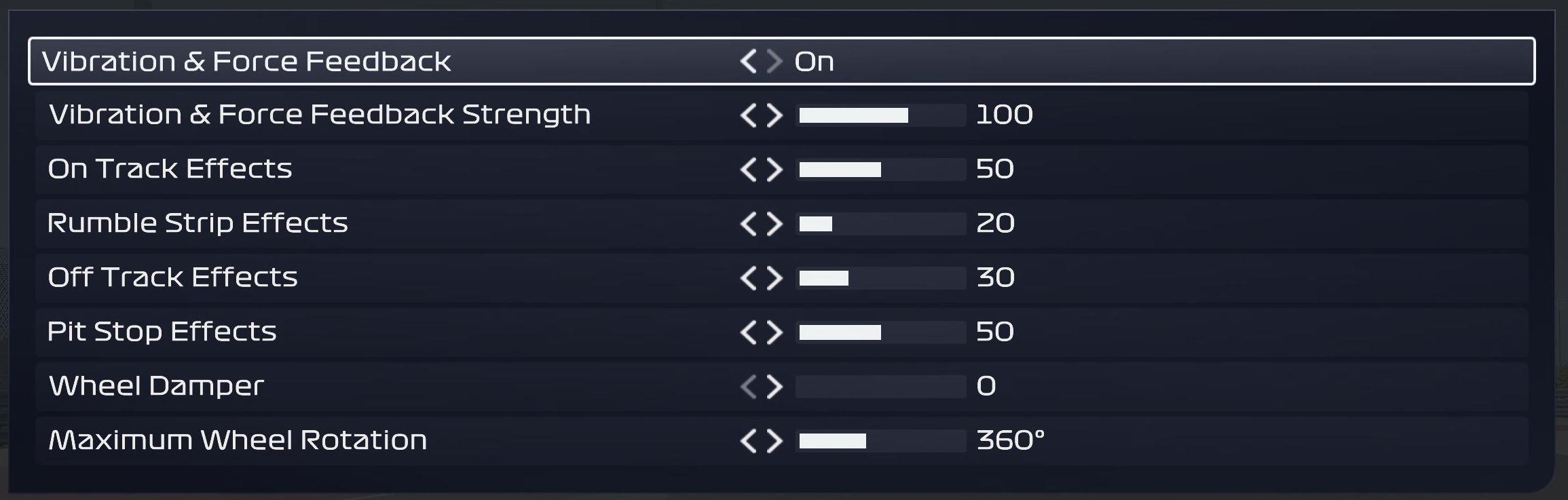
Logitech’s support pages cover two of its wheels for F1 25. The RS50’s page assumes the RS50 is set to 8 Nm, and the page for the Pro wheels assumes 11 Nm. Each has an F1 25 row for G HUB and a screenshot of the game’s menu. The RS50’s settings change by platform (the FFB Filter drops to 1 on PlayStation and the Angle goes to 2700° on Xbox), while the PRO Racing Wheel uses the same row everywhere. Both screenshots postdate EA’s v1.03 patch in June 2025, which refined Logitech’s force feedback around wheel dampening, aligning torque and TrueForce.
For the Logitech RS50, start in G HUB and then set the game:
- In G HUB:
- Compatibility Mode: RS
- Strength: 8 Nm
- FFB Filter: 5 (1 on PlayStation)
- Dampener: 70
- TF Audio: 20
- Angle: 360° (2700° on Xbox)
- In F1 25:
- Vibration & Force Feedback: On
- Vibration & Force Feedback Strength: 100
- On Track Effects: 50
- Rumble Strip Effects: 20
- Off Track Effects: 30
- Pit Stop Effects: 50
- Wheel Damper: 0
- Maximum Wheel Rotation: 360°
The Logitech PRO Racing Wheel takes these in G HUB and then in the game:
- In G HUB:
- Compatibility Mode: PRO
- Strength: 11 Nm
- FFB Filter: 7
- Dampener: Off
- TF Audio: 20
- Angle: 360°
- In F1 25:
- Vibration & Force Feedback: On
- Vibration & Force Feedback Strength: 90
- On Track Effects: 20
- Rumble Strip Effects: 0
- Off Track Effects: 40
- Pit Stop Effects: 50
- Wheel Damper: 0
- Maximum Wheel Rotation: 360°
Thrustmaster settings
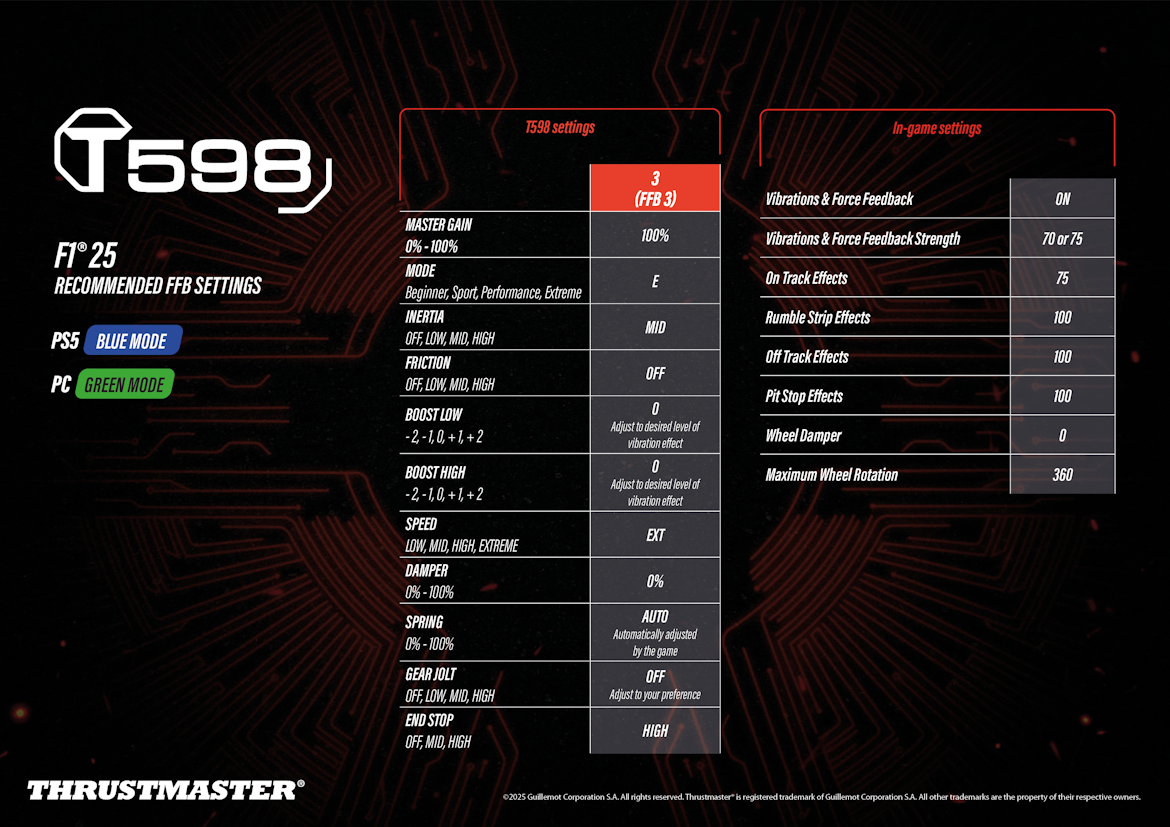
Thrustmaster’s support page for the T598 carries an F1 25 preset sheet (June 2025), for PC in Green mode and PS5 in Blue mode. Thrustmaster keeps Master Gain at 100% on the T598 and takes the strength down in the game instead. It hasn’t published an F1 25 preset for the T818 or its belt and gear wheels, and our Thrustmaster wheels guide covers the wider range.
Start on the T598 itself, then move on to the game:
- On the base (profile 3, FFB 3):
- Master Gain: 100%
- Mode: E (Extreme)
- Inertia: Mid
- Friction: Off
- Boost Low: 0 (sets the vibration effect)
- Boost High: 0 (sets the vibration effect)
- Speed: EXT
- Damper: 0%
- Spring: Auto (set by the game)
- Gear Jolt: Off
- End Stop: High
- In F1 25:
- Vibrations & Force Feedback: On
- Vibrations & Force Feedback Strength: 70 or 75
- On Track Effects: 75
- Rumble Strip Effects: 100
- Off Track Effects: 100
- Pit Stop Effects: 100
- Wheel Damper: 0
- Maximum Wheel Rotation: 360
Asetek settings
Asetek’s F1 25 guide was updated after the 2026 Season Pack came out, and Asetek says the setup is the same on the pack. Start in RaceHub by downloading Asetek’s F1 25 preset for your base. Then go to Wheelbase > Force Feedback Settings, click the three dots next to Preset, choose Import as new, pick the F1 25 preset and click Save to wheelbase.
In F1 25, Asetek sets the strength and On Track Effects by base, and the rest are the same for every base:
- Vibration & Force Feedback Strength:
- Invicta (27 Nm): 36%
- Forte (18 Nm): 44%
- La Prima+ (16 Nm): 46%
- La Prima (12 Nm): 56%
- Initium+ (8 Nm): 80%
- Initium (5.5 Nm): 80%
- On Track Effects:
- Invicta: 25%
- Forte: 30%
- La Prima+: 32%
- La Prima: 34%
- Initium+: 36%
- Initium: 36%
- Rumble Strip Effects: 40%
- Off Track Effects: 0%
- Pit Stop Effects: 0%
- Wheel Damper: 0%
- Maximum Wheel Rotation: 360°
Fine-tuning
Once you’re out on track, these are the changes the makers and EA’s patch notes point to when something isn’t right:
- If the wheel clips and goes flat at the top of a load, turn the in-game strength down and keep the base high, or, on a Fanatec base, lower FFB on the tuning menu.
- When a Fanatec base’s effects feel too sharp or harsh, lower FEI to 90 or 80%.
- If there’s too much vibration through a T598, set Boost Low and Boost High on the base to taste.
- If you’re running a Logitech RS50 below the 8 Nm that Logitech’s settings assume, set the Dampener lower than 70.
- When the steering ratio feels wrong, check the lock is 360° in both the base’s software and the game.
- If a wheel on Xbox won’t use its full rotation, update the game. Version 1.20 removed the rotation restriction for Fanatec, Moza, Turtle Beach and Logitech PRO/RS50 wheels, and v1.24 fixed the same problem on spring-loaded wheels such as the T90, Ferrari 458 Spider and Hori Overdrive.
- Where the frame rate seems held back with a wheel connected, update to v1.25, which fixed force feedback calls that could stop some hardware reaching higher frame rates.
- If you run a Moza and a Simucube device together, check you’re on v1.25, as it fixed a stability issue with that combination.
For the other sims, our direct drive wheel settings guide goes brand by brand, and its Settings Finder has a list of games, although F1 25 isn’t on it at the moment. If you race F1 25 in VR, our Pimax VR settings for F1 25 are the next stop. I’ll see you out on track!
Related Articles

Best Pimax VR Settings for F1 25 in 2026: A Damage-Control Guide

Best Pimax VR Settings for Le Mans Ultimate in 2026

Best Pimax VR Settings for Automobilista 2 in 2026

Best Pimax VR Settings for Assetto Corsa in 2026

iRacing VR Settings (2026): Meta Quest 3, PSVR2, Pimax and Valve Index

Assetto Corsa VR Settings 2026: Pimax, Quest 3, PSVR2 & More
Topic: Direct Drive Wheel Settings