

I’m a sim racer and amateur racer with a passion for Motorsport, good racecraft and the technical and setup aspect of sim racing.
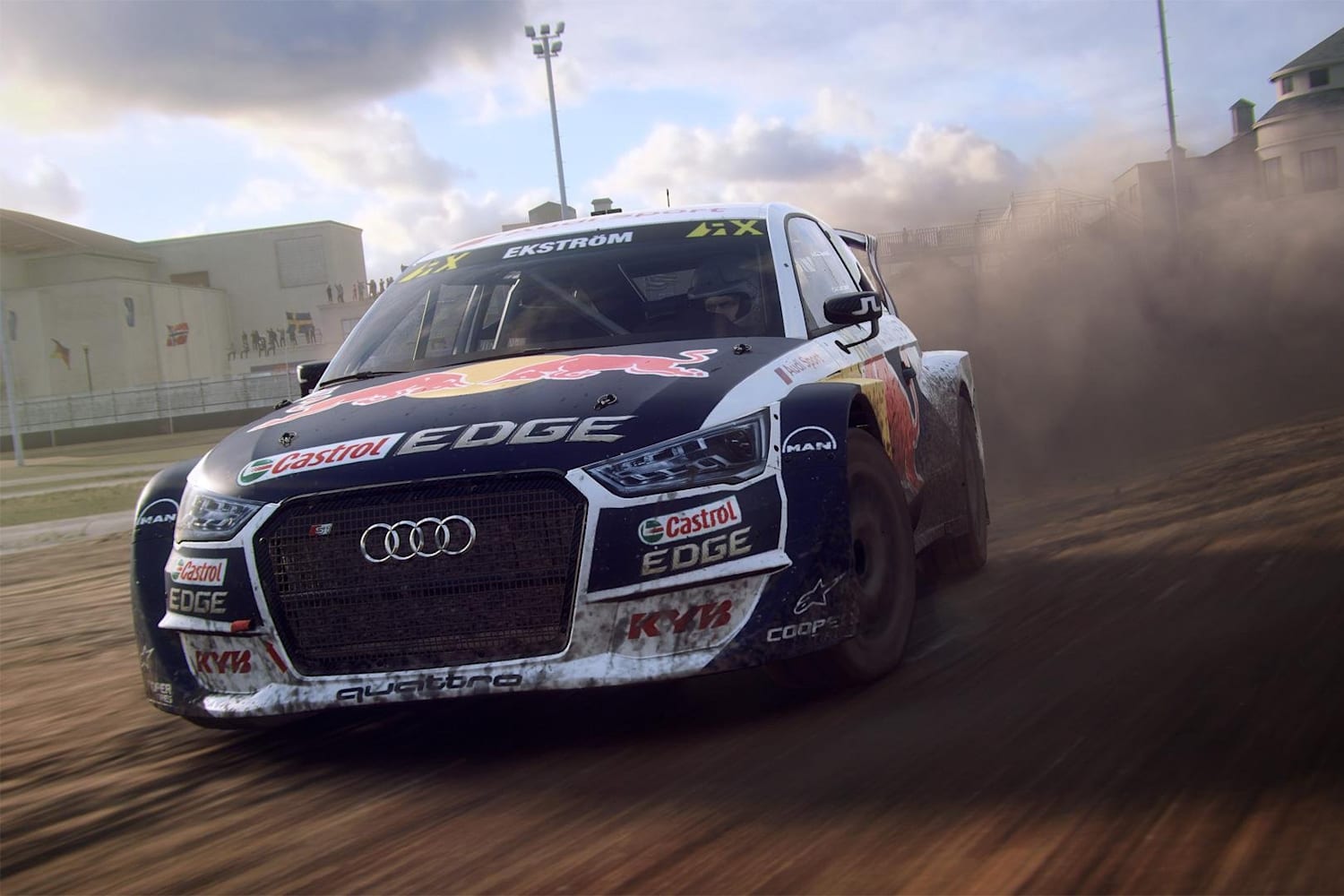
Featured image: an Audi S1 rallycross car in DiRT Rally 2.0 (Image: Codemasters)
So you’ve got DiRT Rally 2.0 running with a wheel, and you’d like a sane place to start the FFB (force feedback) for your base. Fanatec, Logitech, Thrustmaster and Moza each publish settings for the game, so I’ve grouped them by brand. Within each brand the wheel’s own software comes first and then the game, because that’s the order you’ll click through them. And if your base came out after DR2, I’ve covered getting it recognised too.
Quick Navigation
Jump directly to what you’re looking for:
DR2’s FFB menu |
Fanatec |
Logitech |
Thrustmaster |
Moza |
Newer wheelbases |
Fine-tuning
DiRT Rally 2.0’s force feedback settings
To find DR2’s force feedback sliders, head to Options & Extras > Input, pick your wheel and open the Vibration & Feedback tab. According to Codemasters’ own input guide, every slider there runs from 0 to 150%. Before you touch any of them, calibrate the wheel with the in-game Calibration Wizard, because Soft Lock won’t work until you have. Then turn Soft Lock on under Advanced Settings, and it’ll match the wheel’s rotation to the steering lock of whichever car you’re in. Fanatec says you can leave a Podium or CSL Elite base at 1080 degrees, and a modern rally car will usually give you a 540 degree lock, while a vintage one can have 900 degrees or more.
The Suspension slider changed with the v1.4.1 force feedback update in May 2019. The slider takes its information straight from the car’s suspension, and you use it to emphasise the road noise. It defaults to 100 on every device, and if you’d rather have the feel from before that update, set it to 0.
Codemasters says Steering Centre Force pulls the wheel back to centre when the car’s reset to the track, which helps straighten the wheels before you move off. Every maker turns it on, but Logitech sets it at 30, Fanatec at 40 to 50 and Thrustmaster’s T818 sheet at 100. Moza’s own video goes further, to 120-150%, and says that cuts the wheel’s free-running in the centre. The other sliders vary just as much from one maker to the next, so stick with your own brand’s numbers below.
Codemasters’ final update for the game was v1.18, on 8 April 2021. The makers’ settings date from anywhere between 2019 and 2025, and no game patch has overtaken any of them since. You can still buy the game on Steam. EA shut the game’s website on 8 July 2026 and Racenet Clubs went with it, but EA says the rest of the online features still work.
This is what Codemasters says each slider in the Vibration & Feedback tab does:
- Force Feedback Override: Enabled, or Device Driver (the driver decides whether force feedback is on)
- Vibration & Feedback: On or Off
- Self Aligning Torque: the torque from the tyre and suspension geometry
- Wheel Friction: the constant friction, or weight, of the steering
- Tyre Friction: the tyre’s resistance to turning
- Suspension: road noise, taken from the car’s suspension (100 by default)
- Tyre Slip and Engine: greyed out on a wheel (no effect)
- Collision: how hard a crash hits
- Soft Lock: the force that tells you you’ve gone past the car’s lock
- Steering Centre Force Enabled and Steering Centre Force: the pull back to centre after the car is reset to the track
Fanatec settings
Fanatec’s recommended settings for DR2 went up on its own forum in March 2019, and when the v1.4.1 update landed that May, Fanatec’s community manager said they’d stay the same for now. Set the Tuning Menu values and the in-game values together. On the Podium bases, Fanatec assumes you’re using the Torque Key.
Fanatec’s list covers the Podium DD1 and DD2, the ClubSport Wheel Base V2 and V2.5 and the CSL Elite, which were its bases in 2019. Both Podium bases are set up in V2.5 compatibility mode. Back then the game gave the Podium DD1 a large dead zone in PC mode before it registered any input, and Fanatec said there’s no performance difference between the two modes anyway. Fanatec hasn’t published DR2 values for the CSL DD, GT DD Pro, ClubSport DD or DD+, or the current Podium DD.
For the Podium DD1 and Podium DD2, set these in Fanatec’s Tuning Menu first, then in the game:
- In the Tuning Menu (V2.5 compatibility mode):
- Sensitivity (SEN): 1080 (shown as 108 on some displays)
- Force Feedback (FF): 40
- SHO: 100
- Force Effect Strength (FOR): 100
- Spring Effect Strength (SPR): 100 (no effect in DR2)
- Damper Effect Strength (DPR): 100 (tied to the in-game Wheel Friction)
- Natural Damper (NDP): 25
- Natural Friction (NFR): 3
- Force Effect Intensity (FEI): 100
- ABS and BRF: your preference
- In DR2:
- Vibration & Feedback: On
- Self Aligning Torque: 65
- Wheel Friction: 15
- Tyre Friction: 30
- Suspension: 65
- Collision: 40
- Soft Lock: 40
- Steering Centre Force Enabled: On
- Steering Centre Force: 40
The ClubSport Wheel Base V2 and V2.5 and the CSL Elite each get their own Tuning Menu and in-game values:
- ClubSport Wheel Base V2.5:
- Tuning Menu:
- Sensitivity (SEN): 900
- Force Feedback (FF): 100
- SHO: 100
- DRI: -02
- Force Effect Strength (FOR): 100
- Spring Effect Strength (SPR): 100 (no effect in DR2)
- Damper Effect Strength (DPR): 100 (tied to the in-game Wheel Friction)
- Force Effect Intensity (FEI): 100
- ABS and BRF: your preference
- In DR2:
- Vibration & Feedback: On
- Self Aligning Torque: 65
- Wheel Friction: 15
- Tyre Friction: 30
- Suspension: 65
- Collision: 45
- Soft Lock: 45
- Steering Centre Force Enabled: On
- Steering Centre Force: 50
- Tuning Menu:
- ClubSport Wheel Base V2:
- Tuning Menu:
- Sensitivity (SEN): 900
- Force Feedback (FF): 100
- SHO: 100
- DRI: 002
- Force Effect Strength (FOR): 100
- Spring Effect Strength (SPR): 100 (no effect in DR2)
- Damper Effect Strength (DPR): 100 (tied to the in-game Wheel Friction)
- ABS and BRF: your preference
- In DR2:
- Vibration & Feedback: On
- Self Aligning Torque: 65
- Wheel Friction: 0
- Tyre Friction: 20
- Suspension: 65
- Collision: 45
- Soft Lock: 45
- Steering Centre Force Enabled: On
- Steering Centre Force: 50
- Tuning Menu:
- CSL Elite Wheel Base V1.1, CSL Elite+ and CSL Elite PS4:
- Tuning Menu:
- Sensitivity (SEN): 1080
- Force Feedback (FF): 100
- SHO: 100
- DRI: -03
- Force Effect Strength (FOR): 100
- Spring Effect Strength (SPR): 100 (no effect in DR2)
- Damper Effect Strength (DPR): 100 (tied to the in-game Wheel Friction)
- Force Effect Intensity (FEI): 070
- ABS and BRF: your preference
- In DR2:
- Vibration & Feedback: On
- Self Aligning Torque: 70
- Wheel Friction: 15
- Tyre Friction: 30
- Suspension: 70
- Collision: 50
- Soft Lock: 50
- Steering Centre Force Enabled: On
- Steering Centre Force: 50
- Tuning Menu:
- CSL Elite Wheel Base (original):
- Tuning Menu:
- Sensitivity (SEN): 1080
- Force Feedback (FF): 100
- SHO: 100
- DRI: 003
- Force Effect Strength (FOR): 100
- Spring Effect Strength (SPR): 100 (no effect in DR2)
- Damper Effect Strength (DPR): 100 (tied to the in-game Wheel Friction)
- Force Effect Intensity (FEI): 100
- ABS and BRF: your preference
- In DR2:
- Vibration & Feedback: On
- Self Aligning Torque: 70
- Wheel Friction: 0
- Tyre Friction: 20
- Suspension: 70
- Collision: 50
- Soft Lock: 50
- Steering Centre Force Enabled: On
- Steering Centre Force: 50
- Tuning Menu:
A Fanatec guide to its tuning menu says a little Natural Inertia (NIN) can make a rally car feel more grounded, though too much can slow your countersteering. A touch of Natural Friction (NFR) helps control overcorrections.
Fanatec discount code: use SIMRACINGCOCKPIT5 at checkout for 5% off at fanatec.com.
Logitech settings
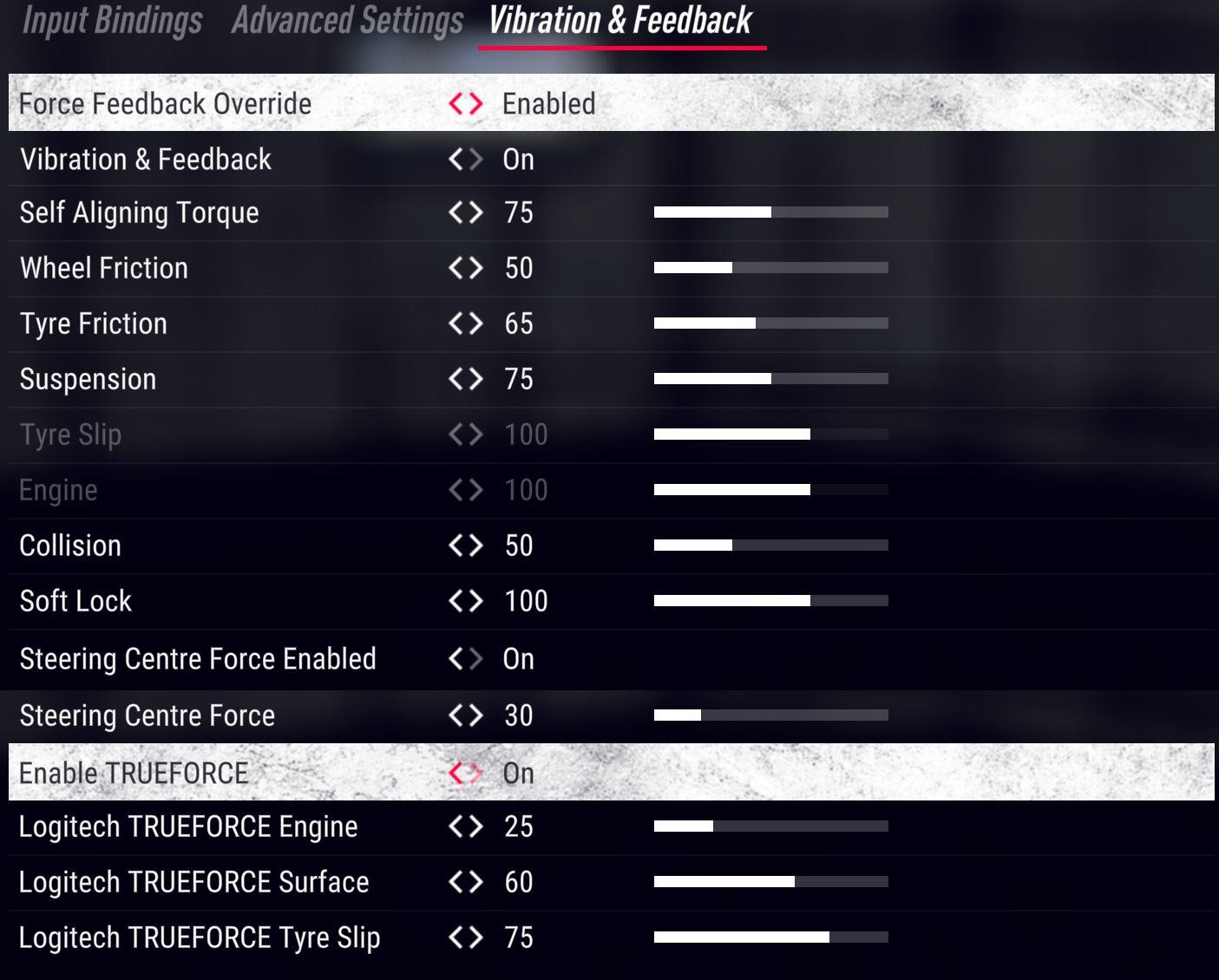
Logitech’s support pages carry DR2 settings for two of its wheels, the Logitech RS50 set at 8 Nm and the Logitech PRO wheel (the PRO Racing Wheel, to give it its full name) set at 11 Nm. On PC, Logitech puts the PRO wheel in G923 compatibility mode for DR2. If you run either wheel below that 8 or 11 Nm, Logitech says to set the dampener lower.
The TRUEFORCE rows at the bottom of the menu only appear on TRUEFORCE wheels, and the game added support for them in v1.18. Logitech lists DR2 as compatible with the G923, G29 and G920 but publishes no values for them.
Start with these settings for the Logitech RS50 in G HUB, then in the game:
- In G HUB (PC):
- Compatibility Mode: RS
- FFB Filter: 5
- Dampener: 60
- TF Audio: 30
- Angle: set per car
- On PlayStation: FFB Filter 4, Dampener 25, TF Audio 25
- On Xbox: FFB Filter 6, Dampener 20, TF Audio 50
- In DR2 (PC):
- Force Feedback Override: Enabled
- Vibration & Feedback: On
- Self Aligning Torque: 75
- Wheel Friction: 50
- Tyre Friction: 65
- Suspension: 75
- Collision: 50
- Soft Lock: 100
- Steering Centre Force Enabled: On
- Steering Centre Force: 30
- Enable TRUEFORCE: On
- Logitech TRUEFORCE Engine: 25
- Logitech TRUEFORCE Surface: 60
- Logitech TRUEFORCE Tyre Slip: 75
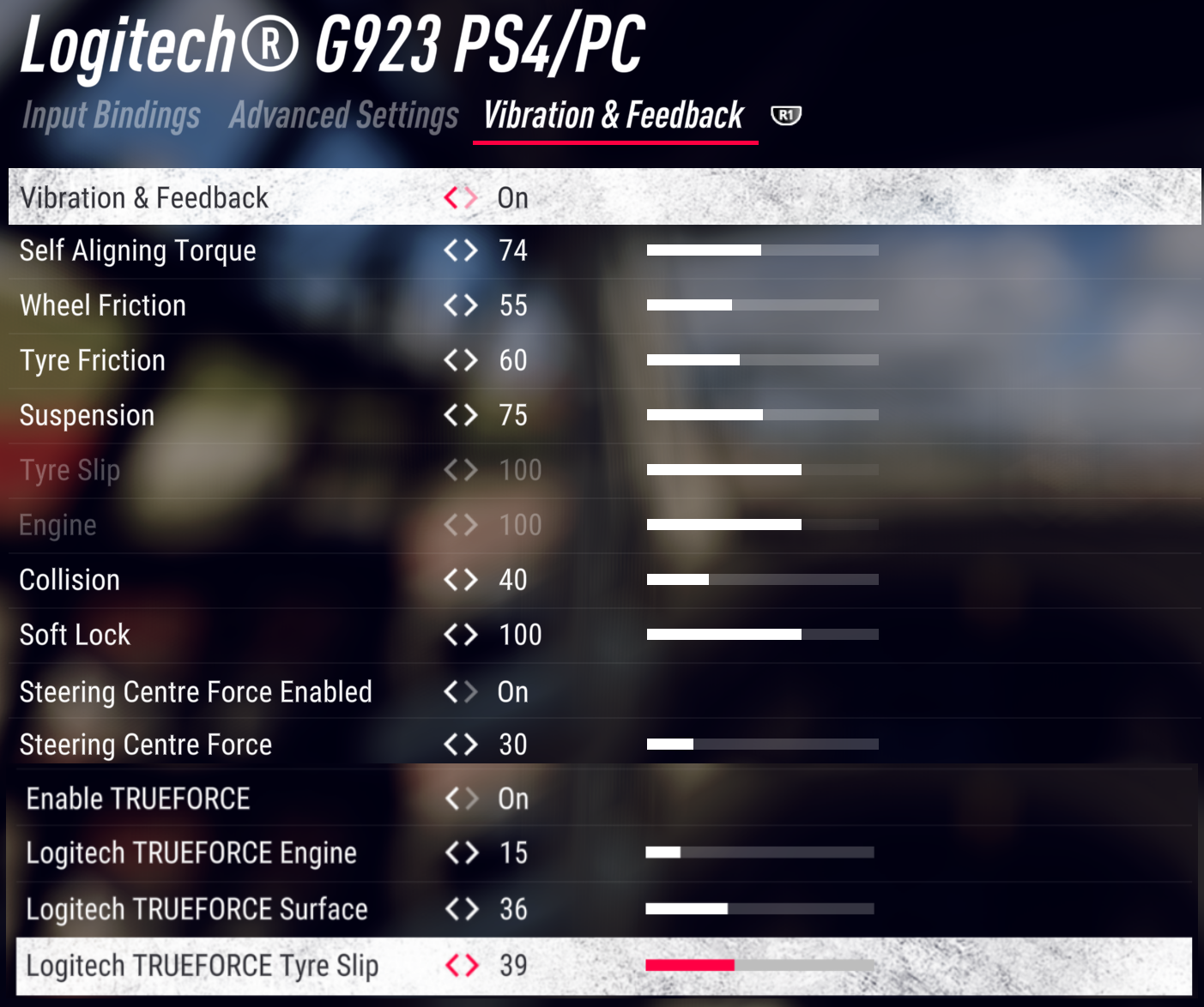
For the Logitech PRO wheel, set these in G HUB and then in the game:
- In G HUB (PC):
- Compatibility Mode: G923
- FFB Filter: Auto
- Dampener: 20
- TF Audio: 100
- Angle: 900°
- On PlayStation: Compatibility Mode PRO, FFB Filter 8, Dampener 15, TF Audio 25, Angle 900°
- On Xbox: Compatibility Mode PRO, FFB Filter 6, Dampener 20, TF Audio 15, Angle 1080°
- In DR2:
- Vibration & Feedback: On
- Self Aligning Torque: 74
- Wheel Friction: 55
- Tyre Friction: 60
- Suspension: 75
- Collision: 40
- Soft Lock: 100
- Steering Centre Force Enabled: On
- Steering Centre Force: 30
- Enable TRUEFORCE: On
- Logitech TRUEFORCE Engine: 15
- Logitech TRUEFORCE Surface: 36
- Logitech TRUEFORCE Tyre Slip: 39
Brian Koponen’s settings cover the G29 and G920. He published them on his site in May 2021, after what he calls a lot of research and his own testing, and they’re his values rather than Logitech’s. He found the game’s default force feedback too strong on the G29 and G920, which he says leaves you fighting to turn the wheel on every corner. He turns Wheel Friction off because he finds it simply makes them heavier, and Tyre Friction off because it makes them feel less responsive than they really are. He sets the Operating Range to 900° in G HUB and calibrates the G29 or G920 in the game, which lets DR2’s Soft Lock set the right steering angle for each car. He hasn’t published DR2 settings for the G923, so that wheel still has no values from him or from Logitech.
He starts in G HUB and then moves on to the game’s Advanced Settings and Vibration & Feedback tabs:
- In G HUB:
- Operating Range: 900°
- Sensitivity: 50
- Centering Spring: Off
- Options & Extras > Input > Connected Devices: calibrate the wheel first (highlight it, then Device Options)
- In DR2, Advanced Settings:
- Steering Linearity: -4 to 0 (a negative value makes the steering more sensitive around the centre, which can help older cars with more rotation; 0 for modern cars)
- Steering Deadzone: 0
- Steering Saturation: 100
- Soft Lock: On
- In DR2, Vibration & Feedback:
- Vibration & Feedback: On
- Self Aligning Torque: 65
- Wheel Friction: 0
- Tyre Friction: 0
- Suspension: 65
- Collision: 90
- Soft Lock: 150
- Steering Centre Force Enabled: On
- Steering Centre Force: 100
Thrustmaster settings
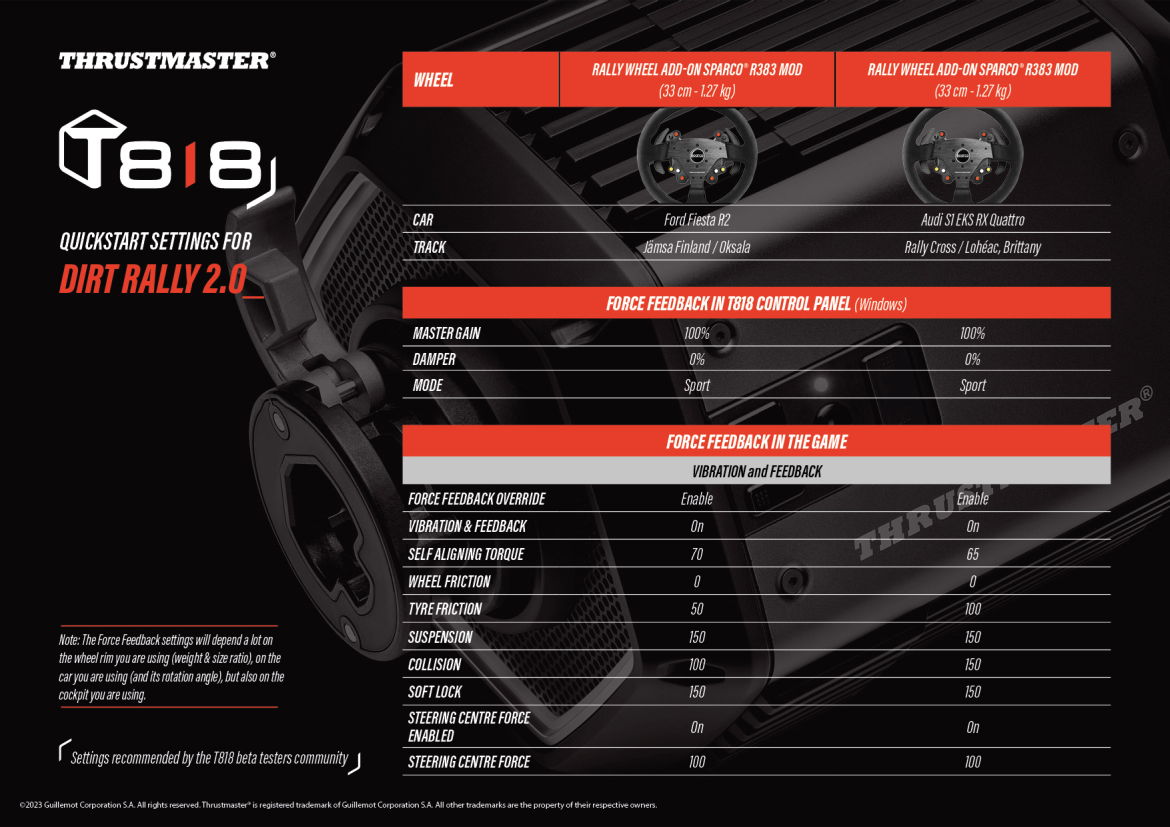
Thrustmaster’s DR2 sheet is for the T818 only, and you’ll find it on the T818 support page. Published in 2023, it carries “settings recommended by the T818 beta testers community” for two cars, both on the Sparco R383 Mod rally rim. Thrustmaster notes the settings depend a lot on the rim’s weight and size, on the car and its rotation angle, and on your cockpit. The support pages for the T598, T248, T300 RS, T-GT II and T128 list DR2 as compatible, but none of them carries a preset for it.
Set the T818 Control Panel first, then the in-game values for the Ford Fiesta R2 or the Audi S1, whichever you’re driving:
- In the T818 Control Panel:
- Master Gain: 100%
- Damper: 0%
- Mode: Sport
- In DR2, Ford Fiesta R2 (Jämsä, Finland):
- Force Feedback Override: Enable
- Vibration & Feedback: On
- Self Aligning Torque: 70
- Wheel Friction: 0
- Tyre Friction: 50
- Suspension: 150
- Collision: 100
- Soft Lock: 150
- Steering Centre Force Enabled: On
- Steering Centre Force: 100
- In DR2, Audi S1 EKS RX Quattro (Lohéac rallycross):
- Force Feedback Override: Enable
- Vibration & Feedback: On
- Self Aligning Torque: 65
- Wheel Friction: 0
- Tyre Friction: 100
- Suspension: 150
- Collision: 150
- Soft Lock: 150
- Steering Centre Force Enabled: On
- Steering Centre Force: 100
For the TMX and T150, the TX and T300 and the T248, the lists below are Brian Koponen’s settings, not Thrustmaster’s, from the DR2 pages he published between March 2020 and July 2022.
He says BOOST in the Control Panel should always be off. He also says DR2 doesn’t use the Spring setting at all, and that the Damper setting is what drives Wheel Friction and Tyre Friction in the game. He keeps Wheel Friction at 0 on the TMX, T150, TX and T300, and at 10 on the T248, where he finds a little of it is nice. On the T248 he sets FORCE to 4 bars and FFB to 1 on the wheel itself, which he says gives a linear force feedback response with no clipping. He notes that the T248R renames those two settings on the wheel, so FFB is now Boost and Force shows a percentage. The T248 came out after the game, so he binds its buttons and pedals by hand, which you only have to do once.
On PC he sets each wheel up in the Thrustmaster Control Panel before going into the game:
- Thrustmaster TMX and T150 (Brian Koponen, March 2020):
- In the Thrustmaster Control Panel:
- Rotation: 900° (TMX), 1080° (T150)
- Overall Strength of all forces: 100%
- Constant: 100%
- Periodic: 100%
- Spring: 100% (not used by DR2)
- Damper: 100% (DR2 uses it for Wheel Friction and Tyre Friction)
- BOOST: Off
- Auto-Center: by the game
- Options & Extras > Input > Connected Devices: calibrate the wheel first (highlight it, then Device Options)
- In DR2, Advanced Settings:
- Steering Linearity: -4 to 0 (a negative value makes the steering more sensitive around the centre, which can help older cars with more rotation; 0 for modern cars)
- Steering Deadzone: 0
- Steering Saturation: 100
- Soft Lock: On
- In DR2, Vibration & Feedback:
- Vibration & Feedback: On
- Self Aligning Torque: 45
- Wheel Friction: 0
- Tyre Friction: 0
- Suspension: 60
- Collision: 100
- Soft Lock: 150
- Steering Centre Force Enabled: On
- Steering Centre Force: 100
- In the Thrustmaster Control Panel:
- Thrustmaster TX and T300 (Brian Koponen, July 2021):
- In the Thrustmaster Control Panel:
- Rotation: 900° (TX), 1080° (T300)
- Overall Strength of all forces: 75%
- Constant: 100%
- Periodic: 100%
- Spring: 100% (not used by DR2)
- Damper: 100% (DR2 uses it for Wheel Friction and Tyre Friction)
- BOOST: Off
- Auto-Center: by the game
- Options & Extras > Input > Connected Devices: calibrate the wheel first (highlight it, then Device Options)
- In DR2, Advanced Settings:
- Steering Linearity: -4 to 0 (a negative value makes the steering more sensitive around the centre, which can help older cars with more rotation; 0 for modern cars)
- Steering Deadzone: 0
- Steering Saturation: 100
- Soft Lock: On
- In DR2, Vibration & Feedback:
- Vibration & Feedback: On
- Self Aligning Torque: 85
- Wheel Friction: 0
- Tyre Friction: 70
- Suspension: 105
- Collision: 100
- Soft Lock: 150
- Steering Centre Force Enabled: On
- Steering Centre Force: 100
- In the Thrustmaster Control Panel:
- Thrustmaster T248 (Brian Koponen, July 2022):
- On the wheel:
- ROT: Auto
- FORCE: 4 bars (on the T248R, Force: 65%)
- FFB: 1 (on the T248R, Boost: 0)
- In the Thrustmaster Control Panel (Rotation and Overall Strength are the same settings as ROT and FORCE):
- Rotation: 900°
- Overall Strength of all forces: 65%
- Constant: 100%
- Periodic: 100%
- Spring: 100% (not used by DR2)
- Damper: 100% (DR2 uses it for Wheel Friction and Tyre Friction)
- BOOST: Off
- Auto-Center: by the game
- Options & Extras > Input > Connected Devices: calibrate the wheel first (highlight it, then Device Options)
- In DR2, Input Bindings: bind the buttons and pedals by hand (once)
- In DR2, Advanced Settings:
- Steering Linearity: 0
- Steering Deadzone: 0
- Steering Saturation: 100
- Throttle Deadzone: 0
- Throttle Saturation: 100
- Brake Deadzone: 0
- Brake Saturation: 100
- Clutch Deadzone: 20
- Clutch Saturation: 100
- Soft Lock: On
- In DR2, Vibration & Feedback:
- Vibration & Feedback: On
- Self Aligning Torque: 50-60 (per car)
- Wheel Friction: 10
- Tyre Friction: 60
- Suspension: 35
- Collision: 80
- Soft Lock: 150
- Steering Centre Force Enabled: On
- Steering Centre Force: 100
- On the wheel:
Moza settings
Moza’s support page covers the setup, and with Pit House v1.2.0.23 or later it’s a one-click job. Find DR2 in Pit House and click Configure. Most of the settings come from the MOZA Racing channel’s own DR2 video, which uses a Moza R9 and went up in July 2022.
In Pit House the video picks the Rally mode, which sets the force feedback strength to 80 by default, and you raise or lower that to taste. More Wheel Friction and Tyre Friction add weight and stability, and more Suspension adds road detail. The video’s other in-game numbers are only shown on screen, so pause the video when they come up. Moza’s FAQ also says to set the Steering Deadzone to 0 in Advanced Settings. There’s more on the bases themselves in our Moza guide.
Start in Pit House, then move on to the game:
- In Pit House:
- DiRT Rally 2.0: Configure (Pit House v1.2.0.23 or later)
- Mode: Rally (force feedback strength 80 by default, then to taste)
- Natural Inertia: 100 with an RS wheel (a little more with a smaller GS wheel)
- In DR2:
- Force Feedback Override: Device Driver
- Vibration & Feedback: On
- Steering Centre Force Enabled: On
- Steering Centre Force: 120-150%
- Steering Deadzone (Advanced Settings): 0
Simucube, Asetek and other newer wheelbases
DR2 recognises a wheel from a file called device_defines.xml, which sits in the game’s input\devices folder. A base released after the game, or one it doesn’t know, needs a line adding there. Codemasters documents how, and the entry has to be marked official=”false” so you can set the base up in the menus.
Simucube and Asetek publish setup steps for DR2 (Simucube’s docs and Asetek’s input guide) but no force feedback values. On those bases, start from the game’s defaults and use Codemasters’ definitions above to decide which Vibration & Feedback slider to move. The device_defines.xml line Simucube publishes is written for the Simucube 3.
Telemetry uses a separate file, hardware_settings_config.xml in Documents\My Games\DiRT Rally 2.0\hardwaresettings, and it’s the UDP line in there you change. Simucube’s Tuner listens on port 20777 and Moza’s Pit House on 10790. Only one app can listen on a port at a time, so if SimHub needs the data too, Simucube says to forward it on from SimHub. For getting DR2 to recognise a base in the first place, each maker keeps its fix somewhere different:
- Moza: Pit House > DiRT Rally 2.0 > Configure
- Simucube 3: the device_defines.xml line on Simucube’s DiRT Rally page
- Asetek: RaceHub > Game Setup > point it at the game folder > the FFB button
- Cammus: the device_defines.xml line in Cammus’s FAQ
- Any other base: a line in device_defines.xml, marked official=”false”, as Codemasters’ guide sets out
Fine-tuning
If something still feels off, this is what to change, going by Codemasters and the makers:
- If the steering turns more or less than the car’s wheel, run the in-game Calibration Wizard, then turn Soft Lock on.
- When the road noise is too much, lower Suspension, and take it all the way to 0 if you want the feel from before the v1.4.1 update in 2019.
- For more weight and stability through the wheel, raise Wheel Friction and Tyre Friction (on a Fanatec base, DPR in the Tuning Menu is tied to Wheel Friction as well).
- If the wheel doesn’t straighten after a reset, check Steering Centre Force Enabled is on and raise Steering Centre Force.
- When crashes feel too violent, lower Collision.
- If the Tyre Slip and Engine sliders are greyed out, leave them alone, because your wheel doesn’t support them.
- If an unlisted wheelbase has no FFB, set Force Feedback Override to Enabled and turn Vibration & Feedback on manually, or add the base to device_defines.xml.
- When the wheel ignores the first part of its travel, set the Steering Deadzone to 0 in Advanced Settings. On a Podium DD1 in 2019, Fanatec’s fix was V2.5 mode.
- If a telemetry app is stuck on “waiting for telemetry”, enable the UDP line in hardware_settings_config.xml, and if SimHub is running as well, forward the data on from SimHub.
- On a Fanatec base, add a bit of NFR if you keep overcorrecting, or a little NIN if a rally car feels floaty.
- If your Logitech wheel runs below the strength Logitech assumes (8 Nm on the RS50, 11 Nm on the PRO wheel), lower the dampener.
If you want to know what each setting does on your base, our direct drive wheel settings guide goes through them for each brand, and the Settings Finder lives there too. For what else to drive, there’s our best rally games guide. I’ll see you out on track!
Related Articles

Best Pimax VR Settings for F1 25 in 2026: A Damage-Control Guide

Best Pimax VR Settings for Le Mans Ultimate in 2026

Best Pimax VR Settings for Automobilista 2 in 2026

Best Pimax VR Settings for Assetto Corsa in 2026

iRacing VR Settings (2026): Meta Quest 3, PSVR2, Pimax and Valve Index

Assetto Corsa VR Settings 2026: Pimax, Quest 3, PSVR2 & More
Topic: Direct Drive Wheel Settings