


I’m a sim racer and amateur racer with a passion for Motorsport, good racecraft and the technical and setup aspect of sim racing.
Featured image: a classic rally car on an asphalt mountain stage in EA SPORTS WRC (Image: EA SPORTS)
If you’re running a CSL DD or a ClubSport DD+ on PC with EA SPORTS WRC, you’ll want a starting point for the force feedback (FFB). Fanatec hasn’t published values for this game, so these are the settings owners have posted on Fanatec’s own forum for those two bases, the tuning menu first and then the game.
Quick Navigation
Jump directly to what you’re looking for:
EA WRC with Fanatec |
CSL DD |
ClubSport DD+ |
Fine-tuning
EA WRC with a Fanatec base
Fanatec’s forum does have a staff baseline for rally, but it was written for WRC Generations, not EA WRC. In the game, press F1 from the main menu and go to Options and Extras > Controls > Edit Device on your wheelbase. Before you do anything else, set Device Type to Wheel on the Advanced tab (RALLY Technical calls this step very important).
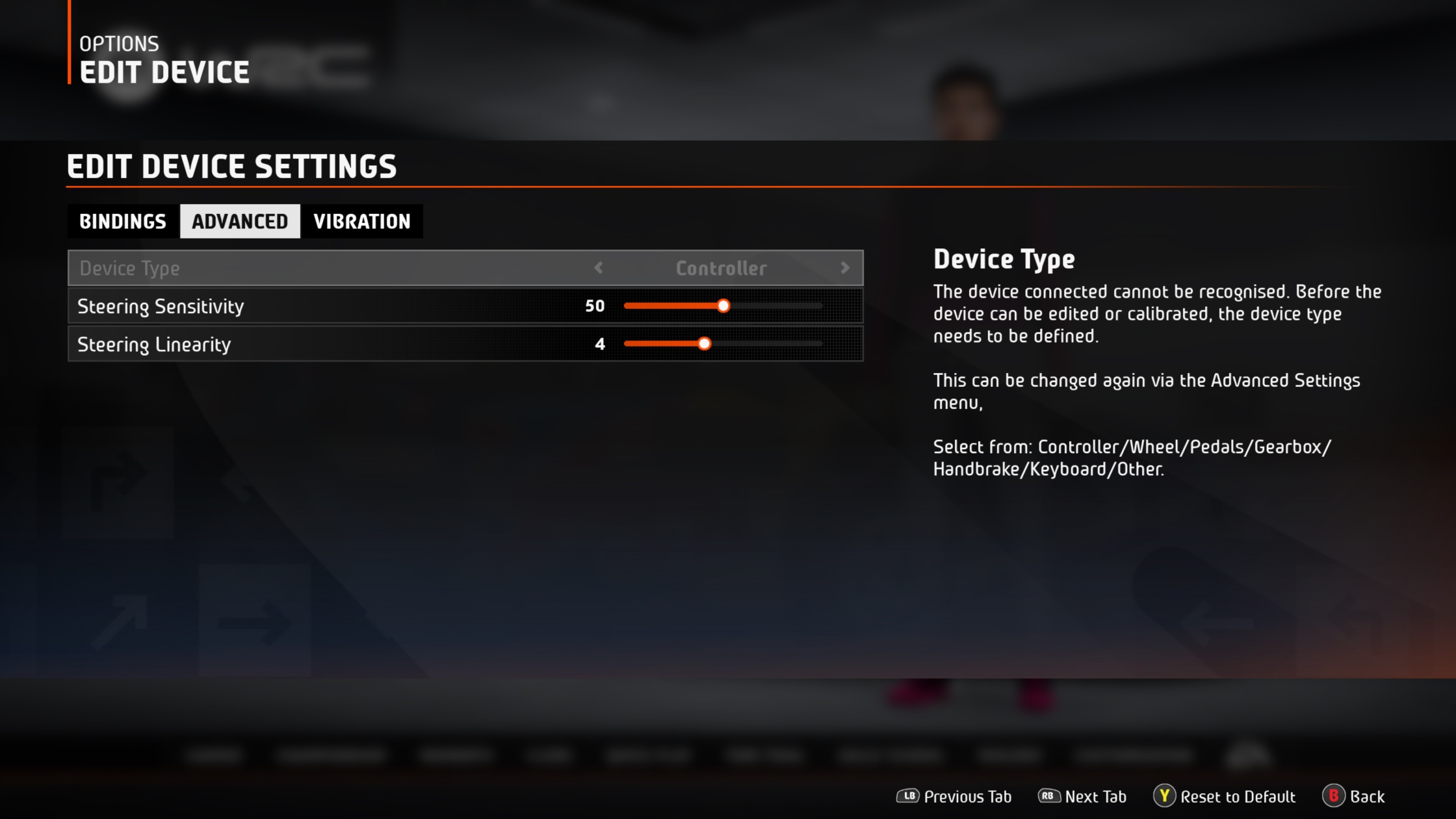
The FFB sliders are on the Vibration tab, and there’s no master strength slider on PC. Self Aligning Torque sets the overall force, so that’s the slider to reach for when you want more or less torque. The two friction sliders work in tandem, with Wheel Friction controlling the weight of the wheel and Tyre Friction changing the understeer effect. Soft Lock is a switch on the Advanced tab as well as a slider on the Vibration tab. With it on and the wheel calibrated, the game sets the steering lock for each car.
EA WRC’s last update was v2.3.1, on 25 March 2025. Codemasters said a month later that the 2024 season content was its last expansion, and no patch has moved these values since. The two CSL DD profiles are PC values, too; the Xbox version doesn’t have the Wheel Friction or Tyre Friction sliders.
CSL DD settings
Gregg Domain’s CSL DD 8 Nm settings are the final version he posted in November 2023, after trying cars from the H2 Mini all the way up to the Toyota GR Yaris on gravel and tarmac (no snow, though). He runs SEN 480 because he uses a McLaren GT3 V2 rim, and 360 felt a bit too twitchy to him. With a round rim he’d be inclined to use SEN Auto and let Soft Lock set the lock.
In the Fanatec tuning menu, Gregg runs:
- Sensitivity (SEN): 480 (for his McLaren GT3 V2 rim)
- Force Feedback Strength (FFB): 100
- FFS: Peak (the CSL DD’s Peak/Linear switch)
- Natural Damper (NDP): Off
- Natural Friction (NFR): Off
- Natural Inertia (NIN): Off
- FFB Interpolation Filter (INT): 1
- Force Effect Intensity (FEI): 80
- Force Effect Strength (FOR): 100
- Spring Effect Strength (SPR): Off
- Damper Effect Strength (DPR): 100
And on the Vibration tab in EA WRC:
- Self Aligning Torque: 62
- Wheel Friction: 38
- Tyre Friction: 18
- Suspension: 100
- Tyre Slip: 95
- Engine: 100
- Collision: 50
- Soft Lock: 65
- Steering Centre Force: On
- Steering Centre Force Scale: 40
Alternative approach: a round rim on the CSL DD
Stefan Mortimer, posting in the same thread, swapped from his McLaren V2 to a round rim (a BMW / P1 V2) for rally on his CSL DD 8 Nm, and runs SEN 900. He prefers not to add any filtering or much extra damping in the base. His Wheel Friction is much lower than Gregg’s, at 20 against 38, though his Tyre Friction is a touch higher at 25. He said his settings “felt much better on tarmac”. When he came back to it later, the only thing he changed was lowering Steering Centre Force Scale, so these are his settings with that change:
- In the Fanatec tuning menu:
- Sensitivity (SEN): 900 (round rim)
- Force Feedback Strength (FFB): 100
- FFS: Peak
- Natural Friction (NFR): Off
- Natural Inertia (NIN): Off
- FFB Interpolation Filter (INT): Off
- Force Effect Intensity (FEI): 100
- Force Effect Strength (FOR): 100
- Spring Effect Strength (SPR): 100
- Damper Effect Strength (DPR): 100
- In EA WRC (Vibration tab):
- Self Aligning Torque: 65
- Wheel Friction: 20
- Tyre Friction: 25
- Suspension: 90
- Tyre Slip: 85
- Engine: 100
- Collision: 60
- Soft Lock: 100
- Steering Centre Force: On
- Steering Centre Force Scale: 50 (he started at 100)
ClubSport DD+ settings
mikeus m’s ClubSport DD+ settings date from April 2025. The ClubSport DD+ doesn’t have the Peak/Linear (FFS) setting you’ll find on the CSL DD. He runs far less Self Aligning Torque than either CSL DD profile (25, against 62 and 65), and far more of both friction sliders, with Wheel Friction at 95 and Tyre Friction at 63.
In the tuning menu, mikeus m runs:
- Sensitivity (SEN): 560 (he says “for new cars”)
- Force Feedback Strength (FFB): 100
- Natural Damper (NDP): 14
- Natural Friction (NFR): 23
- Natural Inertia (NIN): 5
- FFB Interpolation Filter (INT): 3
- Force Effect Intensity (FEI): 100
- Force Effect Strength (FOR): 100
- Spring Effect Strength (SPR): 30
- Damper Effect Strength (DPR): Off
Then on the Vibration tab in the game:
- Self Aligning Torque: 25
- Wheel Friction: 95
- Tyre Friction: 63
- Suspension: 40
- Tyre Slip: 58
- Engine: 65
- Collision: 60
- Soft Lock: 52
- Steering Centre Force Scale: 20
In the note with his settings, mikeus m says Suspension acts like the master gain for almost all of the vibration, so bring it down if you want less.
Fanatec discount code: use SIMRACINGCOCKPIT5 at checkout for 5% off at fanatec.com.
Fine-tuning
If the wheel doesn’t feel right, change one thing at a time:
- If the wheel feels heavy and overdamped on tarmac, lower Tyre Friction.
- When there’s too much or too little force overall, adjust Self Aligning Torque.
- If there’s too much vibration, bring Suspension down.
- When the wheel snaps back to centre as you reset the car, lower Steering Centre Force Scale, which only acts on a reset (Alessandro Gortan, in Gregg’s thread, recommends 50 or below on an 8 Nm base).
- If the steering lock is wrong for the car, turn Soft Lock on in the Advanced tab and make sure the wheel is calibrated.
- If the wheel oscillates violently on the start line after a recalibration, calibrate it again and follow the on-screen steps exactly (full lock, then 90°, not back to centre).
If you’re on a Moza, Logitech or Asetek base, head to the EA WRC wheel settings page. The direct drive wheel settings guide also has a Settings Finder that includes EA WRC. If your CSL DD or ClubSport DD+ itself misbehaves, start with our Fanatec troubleshooting page, or read our Fanatec guide if you’re weighing up another base. I’ll see you out on track!
Related Articles

Best Pimax VR Settings for F1 25 in 2026: A Damage-Control Guide

Best Pimax VR Settings for Le Mans Ultimate in 2026

Best Pimax VR Settings for Automobilista 2 in 2026

Best Pimax VR Settings for Assetto Corsa in 2026

iRacing VR Settings (2026): Meta Quest 3, PSVR2, Pimax and Valve Index

Assetto Corsa VR Settings 2026: Pimax, Quest 3, PSVR2 & More
Topic: Direct Drive Wheel Settings