

I’m a sim racer and amateur racer with a passion for Motorsport, good racecraft and the technical and setup aspect of sim racing.
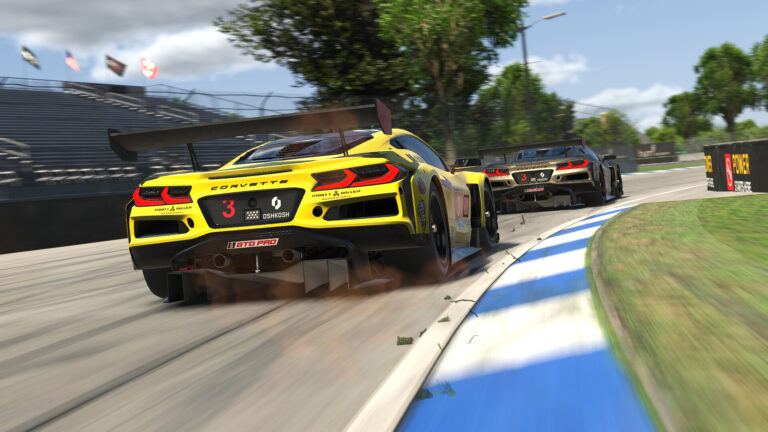
Featured image: a pair of Corvettes racing in iRacing (Image: iRacing)
If you’re running iRacing on a Simucube, sorting out the FFB (force feedback) means working in two pieces of software, Simucube Tuner and iRacing itself. I’ve owned a Simucube 2 Pro for years, so I’ll take you through Simucube’s own method in Tuner first, then iRacing’s side, with the profile I published for mine back in 2021.
Quick Navigation
Jump directly to what you’re looking for:
iRacing FFB |
Tuner |
In iRacing |
My 2021 profile |
Alternative approach |
Fine-tuning
How iRacing’s force feedback works with a Simucube
Simucube doesn’t publish a list of iRacing values, just a three-step method for setting up the force feedback, and the Tuner section below follows it. For the general iRacing FFB settings on any other wheel, there’s a separate guide.
iRacing’s own setup guide explains how Wheel Force, Strength and Intensity work together. It says to set Wheel Force to your wheelbase’s rated torque and never lower, to prevent injury. Strength sets how strong the force feedback is, and the Auto button in the F9 black box sets it for you after a few laps, although iRacing says Auto is often too strong on a powerful direct drive base like a Simucube. Intensity only changes what Auto does, and Use Linear Mode goes on for direct drive, which covers every Simucube.

360 Hz is iRacing’s high data rate mode, which packs more of its physics samples into each update it sends to the wheelbase. iRacing switched it on for Simucube in March 2024 (it needed True Drive 2024.3), and from True Drive 2024.5 the software restarts 360 Hz mode by itself whenever the game sends data for it.
The current build is iRacing 2026 Season 4 (9 September 2026), and it changed nothing for Simucube. iRacing’s June 2026 update moved the advanced force feedback settings onto an FFB tab and added control profiles per car. On Simucube’s side, Simucube Tuner (3.1.6, 14 September 2026) has replaced True Drive, and True Drive’s Paddock profiles moved across to it in June 2026.
Simucube Tuner settings
Simucube’s own documentation lays the method out in three steps. First, set Max Strength in Tuner to the most you’d want to feel suddenly in a crash. Simucube calls this critical for safety, and points out that iRacing already cuts the force right down when the car hits a wall. Second, tune the strength in iRacing so you aren’t sitting at the maximum through the corners.
Clipping is when the sim asks for more force than your Simucube is set to give, so the detail above that point is lost (Simucube calls it torque saturation). A bit of clipping on a particular kerb is fine, Simucube says. Third, add some damping and friction, which are realistic and stop the wheel oscillating if you let go of it, then use the smoothness filters to set how the detail feels.
Here are the eight settings in Tuner to look at for iRacing, from Simucube’s own documentation and release notes:
- Max Strength: the most you’d want to feel suddenly in a crash (it caps the torque any force feedback signal can ask for)
- Reconstruction Filter: low with iRacing’s 360 Hz (it’s Simucube’s smoothing filter, which fills in between the updates iRacing sends)
- Damping and Friction: a little (it stops the wheel oscillating with your hands off)
- Torque Bandwidth: lower it if kerb vibration is too much (it removes detail, and Simucube pairs it with the Reconstruction Filter for kerbs)
- Game Effects: 100% (they do nothing unless the sim uses them)
- Additional torque clipping notification: On
- Automatic Profile Switch: the middle position, so your iRacing profile loads whenever iRacing starts (the bottom position loads one for each car)
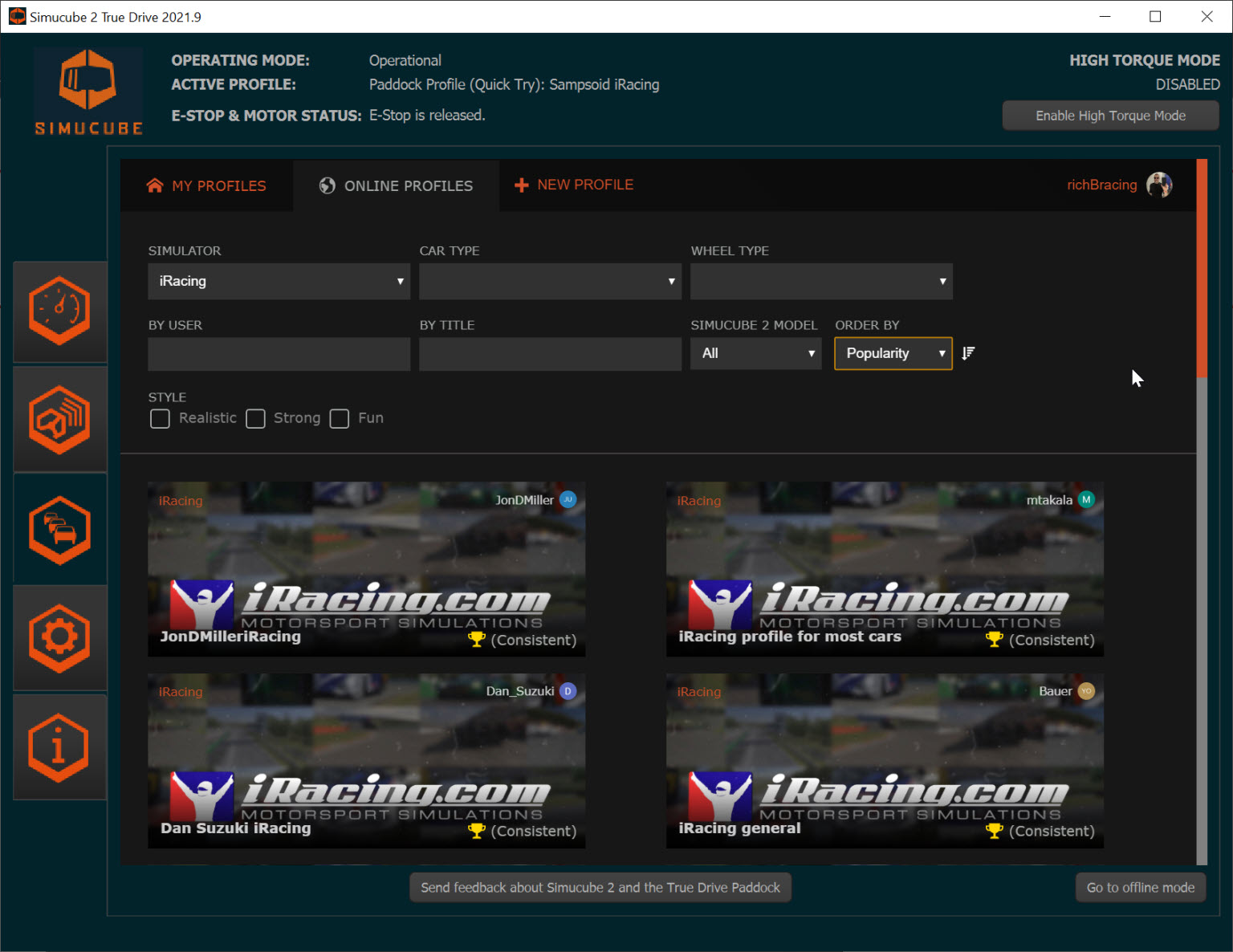
Since Tuner 3.1.0, Simucube Presets (driver, car-type and game profiles) come through Tuner’s online profiles, alongside the Paddock profiles. Simucube calls Paddock community-based profile sharing. People put their Simucube 2 profiles online there, and anyone can download one to try.
iRacing in-game settings
In iRacing, the settings are on the FFB tab, with the basics repeated on the Driving tab:
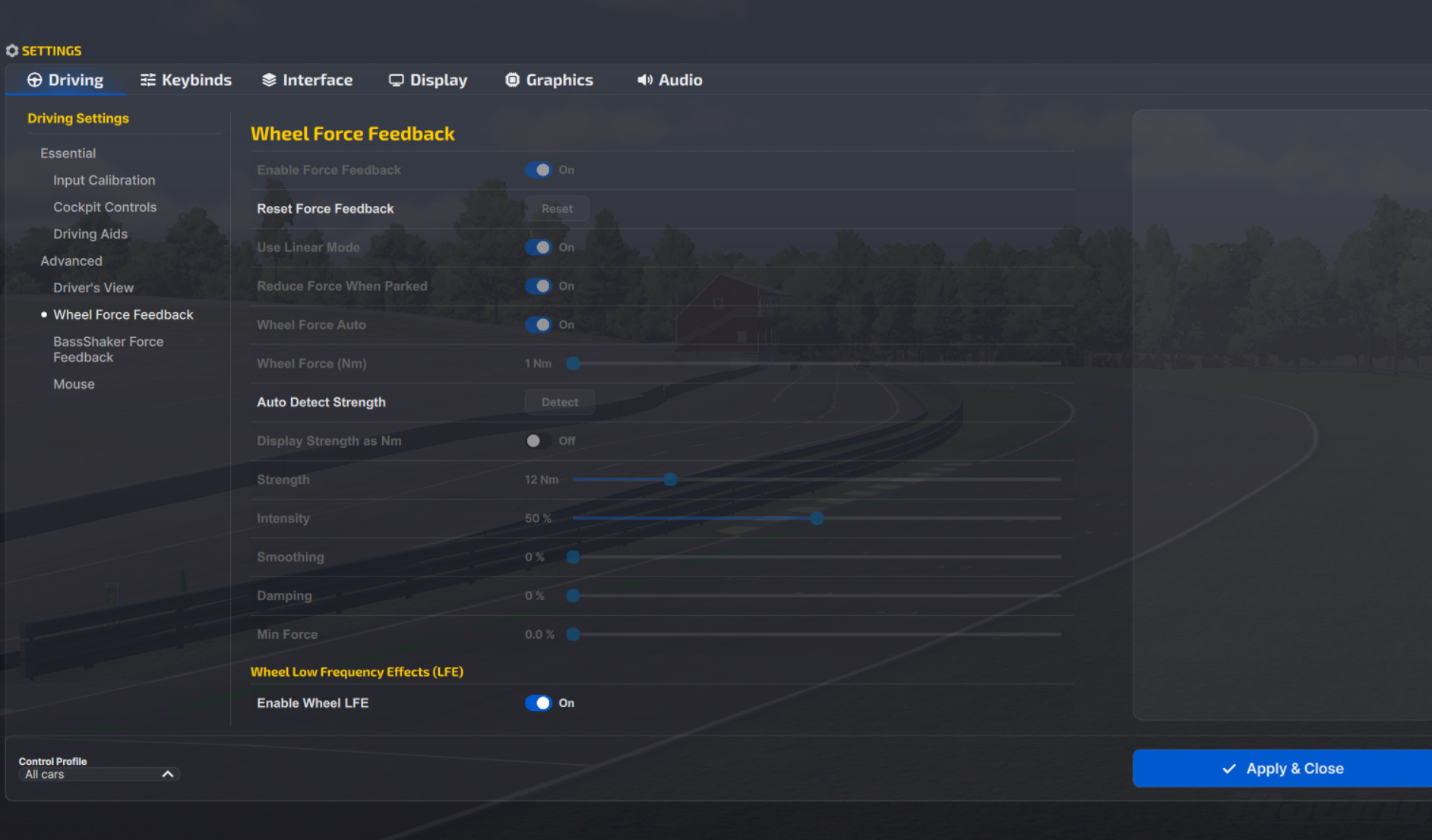
- Enable Force Feedback: On
- Use Linear Mode: On
- Display Strength as Nm: On
- Wheel Force (Nm): your Simucube’s rated torque, with Wheel Force Auto switched off (iRacing says never lower)
- Simucube 2 Sport: 17 Nm
- Simucube 2 Pro: 25 Nm
- Simucube 3 Sport: 15 Nm
- Simucube 3 Pro: 25 Nm
- Simucube 3 Ultimate: 35 Nm
- Strength: so you’re not at the maximum through corners (a bigger Nm number is lighter)
- Intensity: no effect unless you use Auto
- Smoothing: 0% (use Tuner’s filters instead)
- Damping: 0% (damping and friction live in Tuner)
- Min Force: 0.0%
Mika from the Simucube team explained on Simucube’s own forum that Wheel Force only limits iRacing’s Auto function, so if you don’t use Auto, it doesn’t do anything at all. When a Simucube 2 Pro owner running at 50% (12.5 Nm) asked whether to set Wheel Force to 12, he said yes, which is lower than iRacing’s guide allows.
Simucube has a nice feature when peak torque is causing a clipping event, an audible beep, which is super useful when you’re setting up the correct torque settings in your sim software FFB. Turn on the additional torque clipping notification in Tuner and it beeps whenever maximum torque is requested.
My Simucube 2 Pro profile from 2021
Here are my settings, which I thought worked really well with the GT3 class cars, from my Simucube 2 Pro review back in 2021 (True Drive 2021.1). At the time I was running torque at around 18 Nm (70%), which is Simucube 2 Sport territory. Full FFB is much too much for most drivers. Those settings predate iRacing’s 360 Hz mode for Simucube (March 2024) and Simucube’s Reconstruction Filter V2 (July 2024), so the filter at 5 comes from the 60 Hz days. On the Reconstruction Filter, low values follow the sim closely, and high values are smoother but slightly less accurate. Simucube’s own 2024 advice for 360 Hz was 1 or even off, written for the original filter.
My DirectInput effects sat at 0%, whereas Simucube’s docs say the Game Effects are best left at 100%.
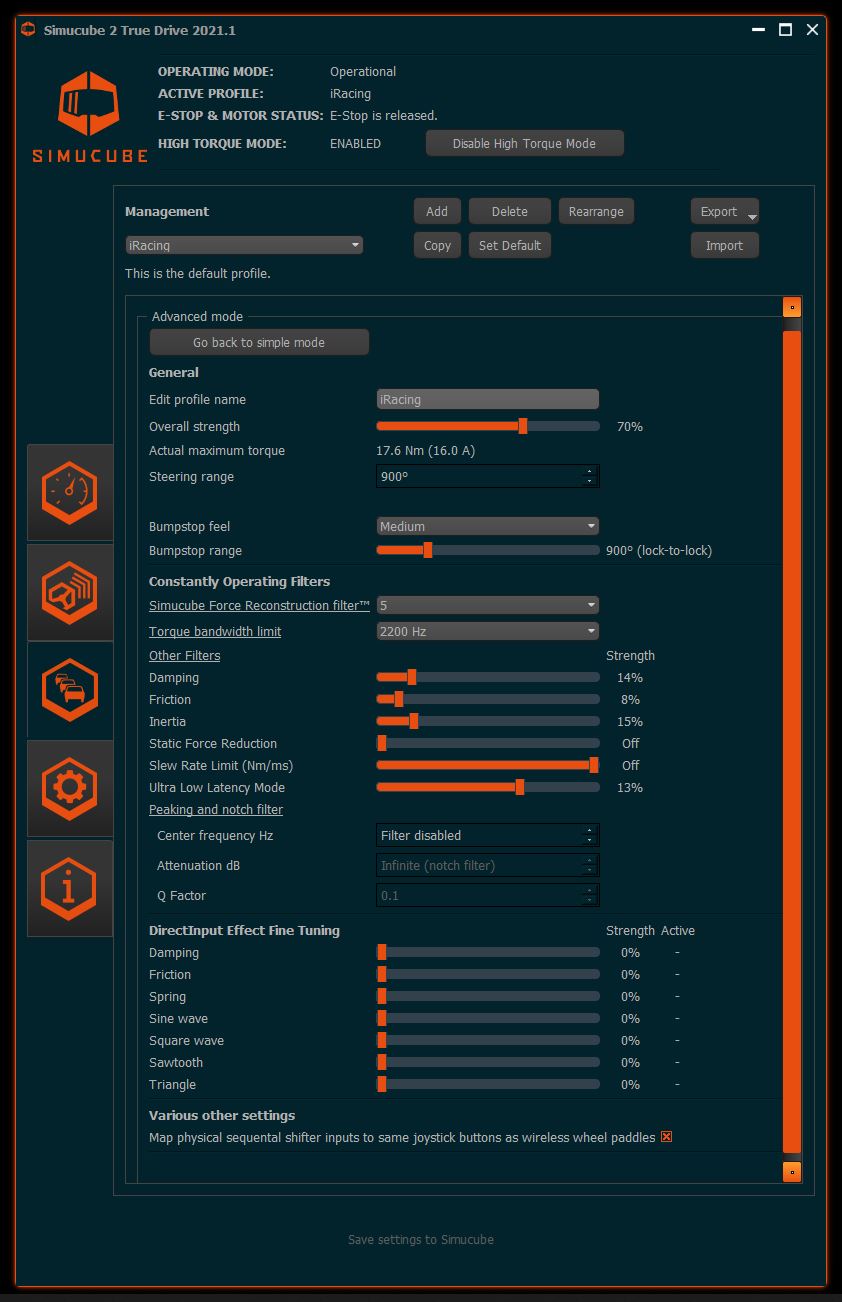
The profile was called “iRacing”, and it was set like this:
- Overall strength: 70% (17.6 Nm)
- High Torque Mode: Enabled
- Steering range: 900°
- Bumpstop feel: Medium
- Simucube Force Reconstruction filter: 5
- Torque bandwidth limit: 2200 Hz
- Damping: 14%
- Friction: 8%
- Inertia: 15%
- Static Force Reduction: Off
- Slew Rate Limit: Off
- Ultra Low Latency Mode: 13%
- DirectInput Effect Fine Tuning: 0% on every effect
Alternative approach: a fixed Strength in Nm
Mika skips the Auto button altogether and sets iRacing’s Strength, shown in Nm, to around 30-32 Nm, so none of the most popular cars clip. Anything the physics asks for above that figure is clipping. Then he sets the overall strength in Tuner to get the feel he wants, and fine-adjusts in iRacing for each car. Set up his way, the settings look like this:
- Strength (shown in Nm): around 30-32 Nm
- Max Strength in Tuner: set to the overall feel you want
- Per car: fine-adjust Strength in iRacing (a control profile per car keeps it)
- Wheel Force (Nm): no effect, as he doesn’t use Auto
Fine-tuning
Once you’ve driven a few laps, here’s what to change if something doesn’t feel right:
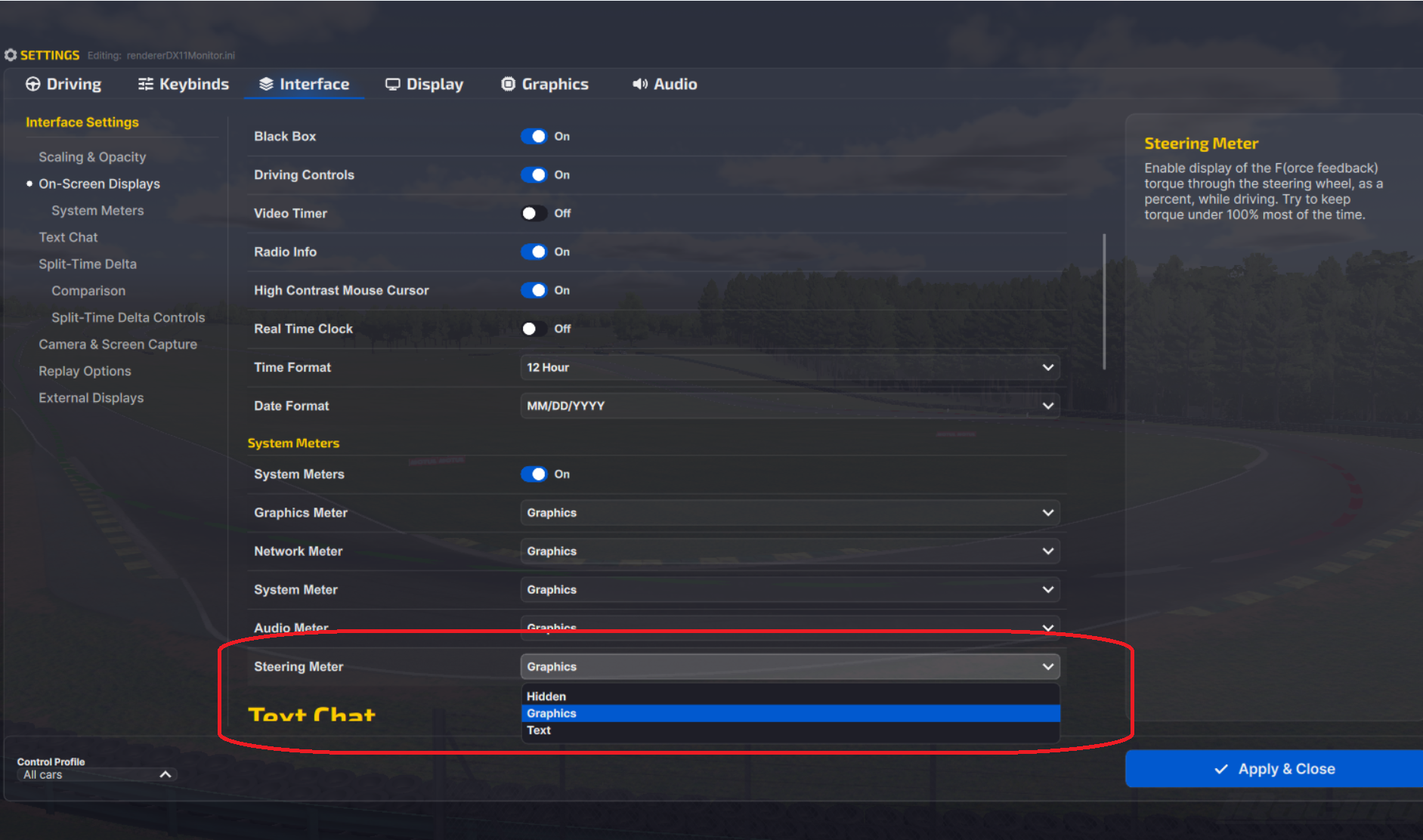
- If the F meter sits full for long stretches, or the clipping beep goes off in every corner, lower the strength in iRacing and raise Max Strength in Tuner (the F meter is the Steering Meter, under Settings > Interface > On-Screen Displays > System Meters).
- When the wheel feels weak and clips at the same time, raise the strength in Tuner and lower it in iRacing.
- If the clipping beep only goes off on one particular kerb, leave it.
- If the wheel oscillates when you let go of it, add a little Damping and Friction in Tuner.
- When kerb vibration is too harsh, Simucube’s answer is to lower Torque Bandwidth in Tuner alongside the Reconstruction Filter, and leave iRacing’s Smoothing at 0%. iRacing’s release notes suggest 25-50% Smoothing instead, if kerb and wall jolts are why you’re turning the force feedback down.
- On a Simucube 3 where the iRacing 360 Hz indicator isn’t showing, update Tuner (3.1.2 fixed it and improved iRacing’s 360 Hz handling).
- If Auto is greyed out, drive a few more laps, and if it comes out too strong, turn Strength down by hand or set it in Nm the way Mika does.
The direct drive wheel settings guide has the settings for every other brand, and its Settings Finder takes you straight to your base and game. If you’re still choosing a wheelbase, the direct drive wheels guide is the place to start. I’ll see you out on track!
Related Articles
Best Pimax VR Settings for F1 25 in 2026: A Damage-Control Guide
Best Pimax VR Settings for Le Mans Ultimate in 2026
Best Pimax VR Settings for Automobilista 2 in 2026
Best Pimax VR Settings for Assetto Corsa in 2026
iRacing VR Settings (2026): Meta Quest 3, PSVR2, Pimax and Valve Index
Assetto Corsa VR Settings 2026: Pimax, Quest 3, PSVR2 & More
Topic: Direct Drive Wheel Settings