

I’m a sim racer and amateur racer with a passion for Motorsport, good racecraft and the technical and setup aspect of sim racing.
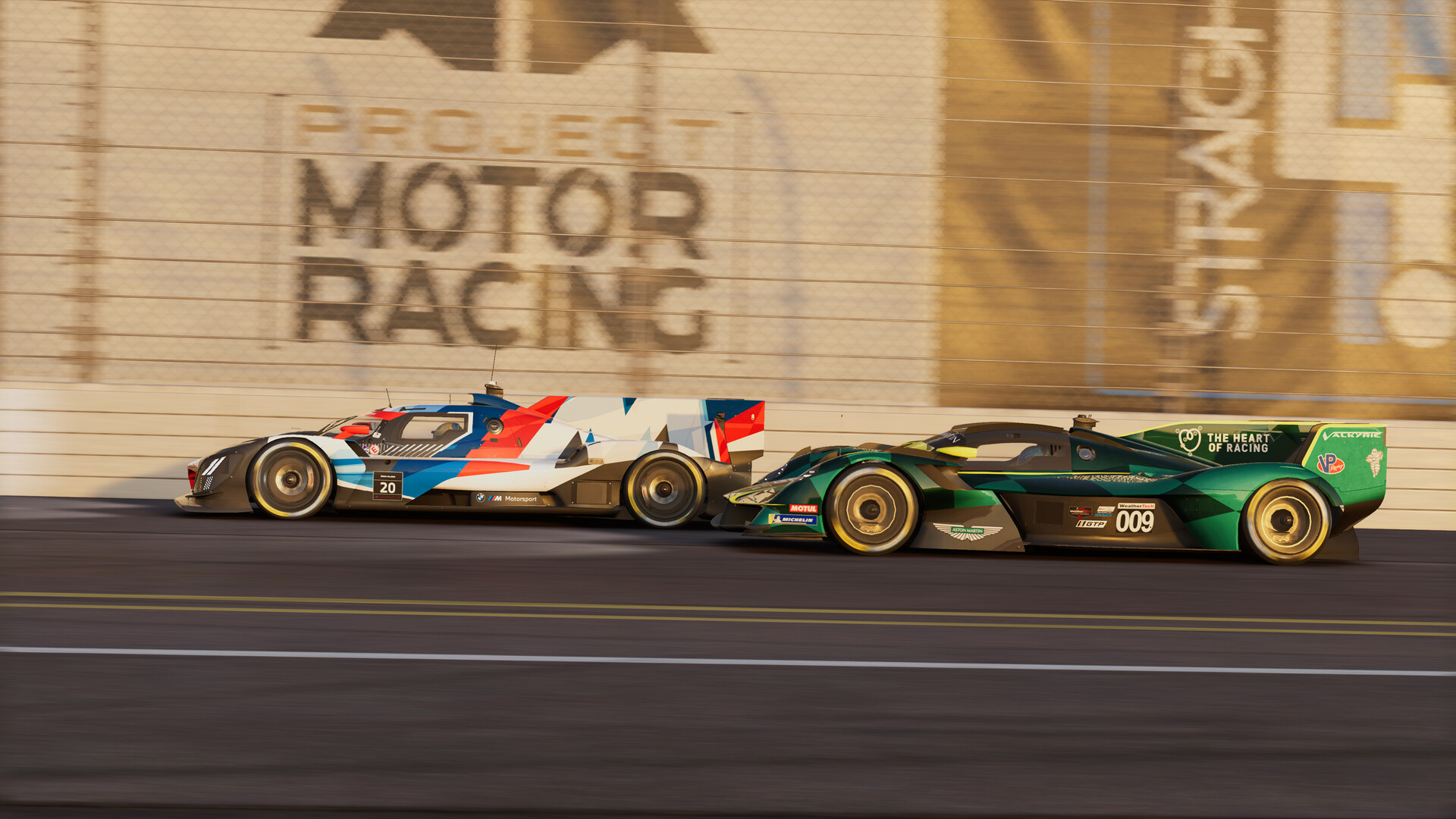
Featured image: a BMW and an Aston Martin Valkyrie prototype in Project Motor Racing (Image: Straight4 Studios)
You’ve got Project Motor Racing (PMR), a wheel on the rig and a force feedback (FFB) menu full of sliders, and you want somewhere sensible to start. Today we’re taking a look at what the developer Straight4’s own guide says each of those sliders does, and the settings from the two wheel makers that publish values for PMR, Asetek and Logitech. No maker gives values for the Logitech G29 and G920 or for any Thrustmaster wheel, so for those two and five of the Thrustmasters there are the settings Brian Koponen puts up on his own site. That’s everything the developer and the wheel makers have published so far.
Quick Navigation
Jump directly to what you’re looking for:
PMR’s FFB menus |
Asetek |
Logitech |
Thrustmaster (Koponen) |
Fanatec, Moza and others |
Fine-tuning
Project Motor Racing’s force feedback settings
Project Motor Racing is Straight4 Studios’ sim, published by GIANTS Software. It came out on PC on 25 November 2025, and it’s on PS5 and Xbox Series X|S too. The current build is v2.3 (23 September 2026). Every in-game value on this page was first published before two patches that changed the force feedback. v2.0 (25 March 2026) improved it in the GT class, and v2.0.0.2 (9 April 2026) lowered the default gain to stop the signal clipping. Clipping is when the game asks for more force than the wheel can give, so the detail at the top is lost. None of the patches since then has renamed or removed any of the sliders these values are for.
Straight4’s Force Feedback & Input Settings Guide explains every slider, but the only number it gives is the default gain. PMR’s force feedback is rack-based, which means it comes from the steering rack rather than canned effects. The developer’s launch advice was to set your wheelbase driver to 900 degrees globally for 1:1 steering across every car class, then fine-tune the steering to your liking in each car’s setup.
Head to Settings > Controls > (your wheel) > Input Device Settings for the global sliders, and you’ll find the per-car ones in each car’s setup under Tyres & Chassis, in the Steering and Force Feedback panels. The per-car force feedback is saved with the setup, so a downloaded setup can change it too (v2.0.0.2 fixed a bug where loading a file could overwrite the force feedback value the patch notes call “detail/boost”).
v2.0 also added an FFB Widget you can switch on in the HUD settings, and its rightmost bar shows force saturation, or in plain terms, clipping. Then in June 2026, v2.0.0.6 lowered the default force feedback for the LMDh class.
These are the global sliders, with what Straight4’s guide says each one does:
- Global Force Feedback Gain: the overall strength of the wheel’s feedback
- Low Force Boost: adds weight and detail to the small forces near the centre (useful on lower-end wheels that can feel dead around centre)
- Brake Feel Boost: how much of the braking forces you feel through the front tyres (too high feels jittery)
- Force Feedback Smoothing: a low-pass filter (too much feels dull and vague)
- Force Feedback Headroom: the extra force range kept back for sudden impacts (more headroom, harder hits)
- Rumble Strength: how strong the rumble cues are for grip loss, kerbs and impacts
The per-car sliders sit in Tyres & Chassis, and the guide describes them like this:
- Steering Rack Rate: the steering ratio (higher is quicker, for modern prototypes; lower is slower and more stable, for older GT cars)
- Steering Stiffness: how tight or loose the steering feels (too stiff gets noisy and spiky, too soft gets vague)
- Steering Damping: calms oscillations (too much feels heavy and lifeless)
- Strength: the per-car gain
- Rack Feel: how much of the raw steering rack movement you feel (below 1 it limits the force, as a safety measure)
- Alignment Boost: how much you feel the front tyres self-aligning (higher gives more feel for understeer)
- Load Boost: force feedback from the lateral g forces
- Friction: artificial resistance, like mechanical steering friction (too high feels sticky)
- EQ Low, EQ Mid, EQ High: the EQ (equaliser), which splits the signal three ways, with Low for heavy forces and weight transfer, Mid for bumps, slides and load, and High for texture and kerbs (set all three to the same number and it’s no different from changing Strength)
Asetek settings
Asetek’s PMR guide was first published on launch day and updated on 31 August 2026. That update brought new RaceHub preset files, but the in-game numbers are the same as they were at launch. Asetek sets Global Force Feedback Gain by base, and the stronger the base, the lower the number.
Asetek’s guide calls two of the sliders by different names from the game’s menu, Force Feedback Detail for Brake Feel Boost and Haptic Strength for Rumble Strength.
Getting Asetek’s preset onto your wheelbase takes four steps:
- Download Asetek’s PMR preset for your base
- RaceHub > Wheelbase > Force Feedback Settings
- The three dots next to Preset > Import as new > the PMR preset
- Save to wheelbase
Then set these in Settings > Controls > (your Asetek wheelbase) > Input Device Settings:
- Global Force Feedback Gain:
- Invicta (27 Nm): 42%
- Forte (18 Nm): 60%
- La Prima+ (16 Nm): 64%
- La Prima (12 Nm): 77%
- Initium+ (8 Nm): 85%
- Initium (5.5 Nm): 90%
- Low Force Boost: 0%
- Brake Feel Boost: 50% (Force Feedback Detail in Asetek’s guide)
- Force Feedback Smoothing: 10% (15% on the Initium+ and Initium)
- Force Feedback Headroom: 200%
- Rumble Strength: 40% (Haptic Strength in Asetek’s guide)
Logitech settings
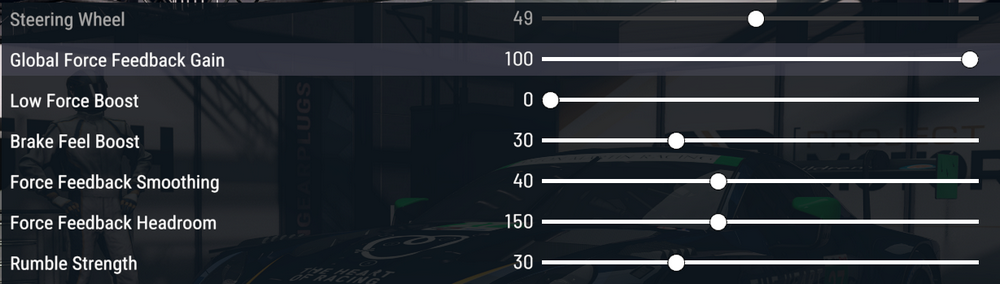
Logitech’s support pages cover two wheels for PMR, the PRO Racing Wheel and the RS50, each with G HUB settings and screenshots of the in-game menus. Both run Global Force Feedback Gain at 100 and Low Force Boost at 0, but the smoothing, headroom and per-car EQ are very different between the two, so set each wheel from its own numbers below.
Logitech’s steering angles don’t always match the developer’s 900 degrees. The RS50 runs 900 on PC and PlayStation but 2700 on Xbox, and the PRO Racing Wheel runs 1080 on every platform. Both list TF Audio (TrueForce) as N/A, which fits with v1.6.0.1 turning TrueForce off by default on PC. Logitech doesn’t list any PMR settings for the G923, G29 or G920.
For the Logitech PRO Racing Wheel, set G HUB and then the game like this:
- In G HUB (PC):
- Compatibility Mode: PRO
- FFB Filter: 10
- Dampener: 20
- TF Audio: N/A
- Angle: 1080°
- On PlayStation and Xbox: FFB Filter 4, Dampener Off, Angle 1080°
- In PMR, Input Device Settings:
- Global Force Feedback Gain: 100
- Low Force Boost: 0
- Brake Feel Boost: 30
- Force Feedback Smoothing: 40
- Force Feedback Headroom: 150
- Rumble Strength: 30
- In the car setup, Tyres & Chassis:
- Steering Rack Rate: 1.0
- Steering Stiffness: 9
- Steering Damping: 2
- Strength: 1.20
- Rack Feel: 1.00
- Alignment Boost: 0
- Load Boost: 0.34
- Friction: 0.000
- EQ Low: 1.2
- EQ Mid: 1.0
- EQ High: 0.7
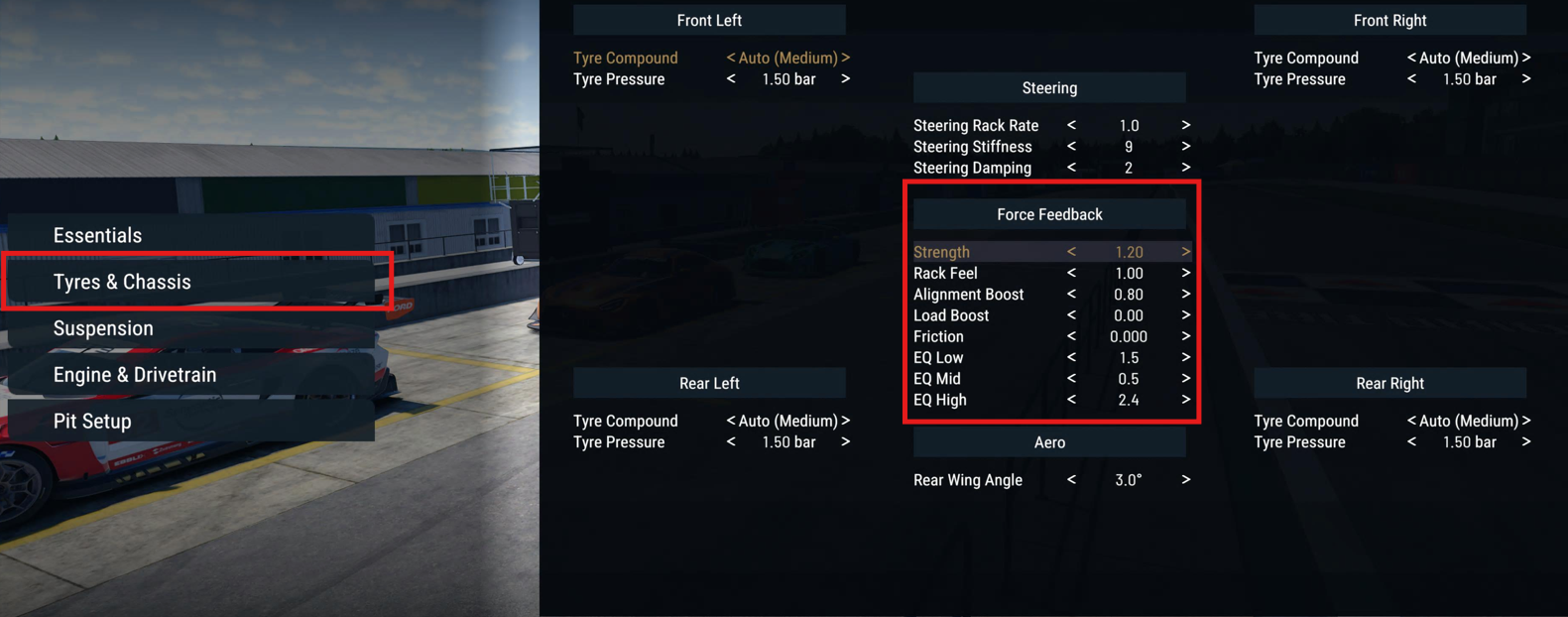
The Logitech RS50’s G HUB filter and angle change with your platform, but its in-game values are the same on all of them:
- In G HUB (PC):
- Compatibility Mode: RS
- FFB Filter: 11
- Dampener: 20
- TF Audio: N/A
- Angle: 900°
- On PlayStation: FFB Filter 1, Dampener 20, Angle 900°
- On Xbox: FFB Filter 1, Dampener 20, Angle 2700°
- In PMR, Input Device Settings:
- Global Force Feedback Gain: 100
- Low Force Boost: 0
- Brake Feel Boost: 30
- Force Feedback Smoothing: 10
- Force Feedback Headroom: 300
- Rumble Strength: 30
- In the car setup, Tyres & Chassis:
- Steering Rack Rate: 1.0
- Steering Stiffness: 9
- Steering Damping: 2
- Strength: 1.20
- Rack Feel: 1.00
- Alignment Boost: 0.80
- Load Boost: 0.00
- Friction: 0.000
- EQ Low: 1.5
- EQ Mid: 0.5
- EQ High: 2.4
Logitech has nothing for the G29 and G920, so these are Brian Koponen’s settings, the ones he uses on those two wheels. He updated them for patch 2.0.0.8 in July 2026, which makes them newer than Logitech’s own numbers above. He sets 900 degrees in G HUB, which matches the developer’s advice, and adds Low Force Boost so the lightest forces can be felt on these wheels. He keeps Brake Feel Boost fairly low because he finds more of it makes him overcorrect, though he says that’s personal preference. He has no PMR page for the G923.
Koponen’s G29 and G920 values go in three places, and the per-car ones go back to the defaults when you change cars, so he saves a preset:
- In G HUB (a new PMR profile):
- Operating Range: 900°
- Sensitivity: 50
- Centering Spring: Off
- In PMR, Input Device Settings:
- Global Force Feedback Gain: 100
- Low Force Boost: 15
- Brake Feel Boost: 30
- Force Feedback Smoothing: 0
- Force Feedback Headroom: 150 (no effect with the gain at 100)
- Rumble Strength: 80
- Per car (his menu: Vehicle Setup > Steering Wheel, in the pit lane):
- Steering Rack Rate: 1.2
- Steering Stiffness: the car’s default
- Steering Damping: the car’s default
- Strength: 1.00
- Rack Feel: 0.92
- Alignment Boost: 0.40
- Load Boost: 0.80
- Friction: 0.00
- EQ Low: 0.8
- EQ Medium: 1.00
- EQ High: 1.00
Brian Koponen’s Thrustmaster settings
Thrustmaster lists PMR for telemetry and hasn’t published any force feedback values for it. Brian Koponen has, for the TMX and T150, the TX and T300 and the T248. As with his G29 and G920 values, they’re the settings he uses himself, from the same July 2026 update for patch 2.0.0.8. Neither he nor Thrustmaster covers the T818 or T598.
He sets every one of them to 900 degrees, which he says lines your inputs up with the in-game wheel, and turns BOOST off. He also says PMR doesn’t use Spring or Damper, so those can be left at any value. On the TMX, T150, TX and T300 he raises EQ High, because he finds high-frequency vibration fairly muted on those wheels. The TX and T300 get a Friction range instead of one number, because on some cars the wheel shakes so much on a straight that he raises Friction to control it. On the T248 he sets FORCE and FFB on the wheel itself, FORCE at 4 bars and FFB at 1, which he says gives a linear response with no clipping. On the T248R, FFB is called Boost and Force shows a percentage, so there it’s Boost at 0 and Force at 65%.
For each one, he starts in the Thrustmaster Control Panel, or on the wheel for the T248, and finishes on the car’s Steering Wheel page:
- Thrustmaster TMX and T150 (Brian Koponen):
- In the Thrustmaster Control Panel:
- Rotation: 900°
- Overall Strength of all forces: 100%
- Constant: 100%
- Periodic: 100%
- Spring: 100% (not used by PMR)
- Damper: 100% (not used by PMR)
- BOOST: Off
- Auto-Center: by the game
- In PMR, Input Device Settings:
- Global Force Feedback Gain: 100
- Low Force Boost: 5
- Brake Feel Boost: 20
- Force Feedback Smoothing: 0
- Force Feedback Headroom: 150 (no effect with the gain at 100)
- Rumble Strength: 100
- Per car (his menu: Vehicle Setup > Steering Wheel, in the pit lane):
- Steering Rack Rate: 1.2
- Steering Stiffness: the car’s default
- Steering Damping: the car’s default
- Strength: 1.00
- Rack Feel: 0.92
- Alignment Boost: 0.40
- Load Boost: 0.80
- Friction: -0.032 (just low enough to stop the wheel oscillating)
- EQ Low: 0.6
- EQ Medium: 1.0
- EQ High: 2.0
- In the Thrustmaster Control Panel:
- Thrustmaster TX and T300 (Brian Koponen):
- In the Thrustmaster Control Panel:
- Rotation: 900°
- Overall Strength of all forces: 75%
- Constant: 100%
- Periodic: 100%
- Spring: 100% (not used by PMR)
- Damper: 100% (not used by PMR)
- BOOST: Off
- Auto-Center: by the game
- In PMR, Input Device Settings:
- Global Force Feedback Gain: 100
- Low Force Boost: 5
- Brake Feel Boost: 20
- Force Feedback Smoothing: 0
- Force Feedback Headroom: 150 (no effect with the gain at 100)
- Rumble Strength: 100
- Per car (his menu: Vehicle Setup > Steering Wheel, in the pit lane):
- Steering Rack Rate: 1.2
- Steering Stiffness: the car’s default
- Steering Damping: the car’s default
- Strength: 1.00
- Rack Feel: 0.92
- Alignment Boost: 0.40
- Load Boost: 0.80
- Friction: -0.25 to +0.25 (higher on cars that oscillate)
- EQ Low: 0.9
- EQ Medium: 1.00
- EQ High: 2.00
- In the Thrustmaster Control Panel:
- Thrustmaster T248 (Brian Koponen):
- On the wheel:
- ROT: 900°
- FORCE: 4 bars (on the T248R, Force: 65%)
- FFB: 1 (on the T248R, Boost: 0)
- In the Thrustmaster Control Panel (Rotation and Overall Strength are the same settings as ROT and FORCE):
- Rotation: 900°
- Overall Strength of all forces: 65%
- Constant: 100%
- Periodic: 100%
- Spring: 100% (not used by PMR)
- Damper: 100% (not used by PMR)
- BOOST: Off
- Auto-Center: by the game
- In PMR, Input Device Settings:
- Global Force Feedback Gain: 100
- Low Force Boost: 0
- Brake Feel Boost: 20
- Force Feedback Smoothing: 0
- Force Feedback Headroom: 150 (no effect with the gain at 100)
- Rumble Strength: 100
- Per car (his menu: Vehicle Setup > Steering Wheel, in the pit lane):
- Steering Rack Rate: 1.2
- Steering Stiffness: the car’s default
- Steering Damping: the car’s default
- Strength: 1.00
- Rack Feel: 0.92
- Alignment Boost: 0.40
- Load Boost: 0.80
- Friction: 0.00
- EQ Low: 1.0
- EQ Medium: 0.9
- EQ High: 0.9
- On the wheel:
Fanatec, Moza, Simucube and other wheelbases
Fanatec was PMR’s launch hardware partner and the partnership announcement talked about optimised settings at launch, but Fanatec hasn’t published any PMR values. Moza, Simucube, Simagic and Thrustmaster haven’t either, although Moza lists PMR as force feedback compatible, and Simucube lists it for telemetry.
If you’re on one of those bases, apart from the Thrustmaster wheels covered above, start from the game’s defaults with your wheelbase driver at 900 degrees, then work through the slider guide above and the fine-tuning below. There’s more on each brand’s wheelbases in our Fanatec guide and Moza guide.
Fanatec discount code: use SIMRACINGCOCKPIT5 at checkout for 5% off at fanatec.com.
Fine-tuning
If something doesn’t feel right, these are the fixes Straight4 itself points to:
- If the steering doesn’t match the car’s wheel animation, set your wheelbase driver to 900 degrees globally and tune the rotation per car in the setup.
- When the wheel clips and big hits feel flat, watch the rightmost bar on the FFB Widget and bring Global Force Feedback Gain down (v2.0.0.2 lowered the default gain for the same reason).
- If the wheel oscillates, raise Steering Damping in the car’s setup.
- When the wheel feels dead around the centre, add some Low Force Boost, which the guide says is there for lower-end wheels (Asetek and Logitech run it at 0 on their direct drive bases).
- If the force feedback feels harsh or noisy, raise Force Feedback Smoothing or lower EQ Mid.
- If impacts hit too hard, reduce Force Feedback Headroom, and be careful changing it on a direct drive wheel, where the guide warns the results can be violent.
- If you can’t feel the understeer building, raise Alignment Boost, though too much can hide the sensation of load changes.
- When the feel is thick or syrupy, lower EQ Low, or raise it if you want to feel more of the weight transfer.
- For a more seat-of-pants feel at the low end, add Load Boost and reduce EQ Low.
- If you want more kerb and road feel, raise EQ High, although on some lower-end devices it may not do much.
- When the braking loads aren’t coming through, raise Brake Feel Boost.
- If the steering is too quick or too slow for the car, change Steering Rack Rate, higher for modern prototypes and lower for older GT cars.
Our direct drive wheel settings guide goes brand by brand through each maker’s wheelbase software, and its Settings Finder has our settings for the other sims we cover. I’ll see you out on track!
Related Articles
Best Pimax VR Settings for F1 25 in 2026: A Damage-Control Guide
Best Pimax VR Settings for Le Mans Ultimate in 2026
Best Pimax VR Settings for Automobilista 2 in 2026
Best Pimax VR Settings for Assetto Corsa in 2026
iRacing VR Settings (2026): Meta Quest 3, PSVR2, Pimax and Valve Index
Assetto Corsa VR Settings 2026: Pimax, Quest 3, PSVR2 & More
Topic: Direct Drive Wheel Settings