

I’m a sim racer and amateur racer with a passion for Motorsport, good racecraft and the technical and setup aspect of sim racing.
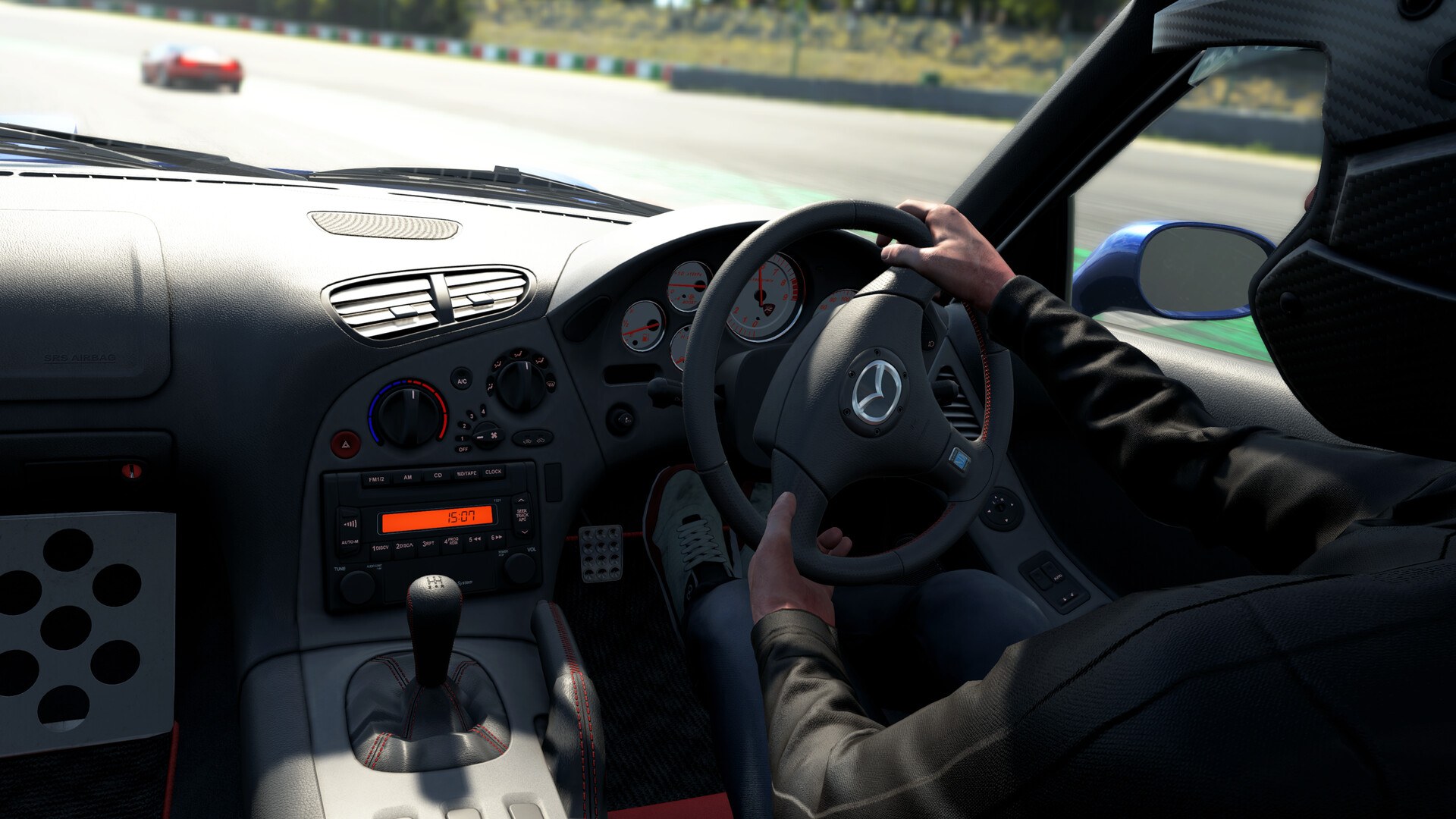
Featured image: a Mazda RX-7 cockpit in Assetto Corsa EVO (Image: Kunos Simulazioni)
So you’ve got Assetto Corsa EVO running on your wheel and you want a sensible place to start with the force feedback, base by base. These are the settings from Kunos’s own wheel setup guide and from the wheel makers that publish their own for AC Evo, set out in the order you’ll click through them, with the wheel’s own software first and then the game.
Quick Navigation
Jump directly to what you’re looking for:
AC Evo’s FFB menu |
Fanatec |
Moza |
Simucube |
Simagic |
Logitech |
Thrustmaster |
Asetek |
Alternative approach |
Fine-tuning
AC Evo’s force feedback settings
In AC Evo the FFB (force feedback) settings live under Settings > Controls > Wheel, in two panels called “Controls” and “FFB Enhancements”. Kunos reworked the controls page in v0.6 (April 2026), and it’s now organised by input type. Kunos’s wheel setup guide has you set the force high in the wheel’s own software (80-100%) and bring the strength down in the game with FFB Gain. Steering Lock matches the base, and the game shows its own hint to say so.
FFB Gain is the overall strength. Kunos says raising Dynamic Damping changes how quickly the wheel reacts, and Damper Gain is the wheel’s static damping. Audio-based FFB Effects is the slider that switches on Fanatec’s FullForce, and it’s where Logitech’s TrueForce is set in game too. Curbs, Road, Tyre Slips and ABS Effects sit under FFB Enhancements.
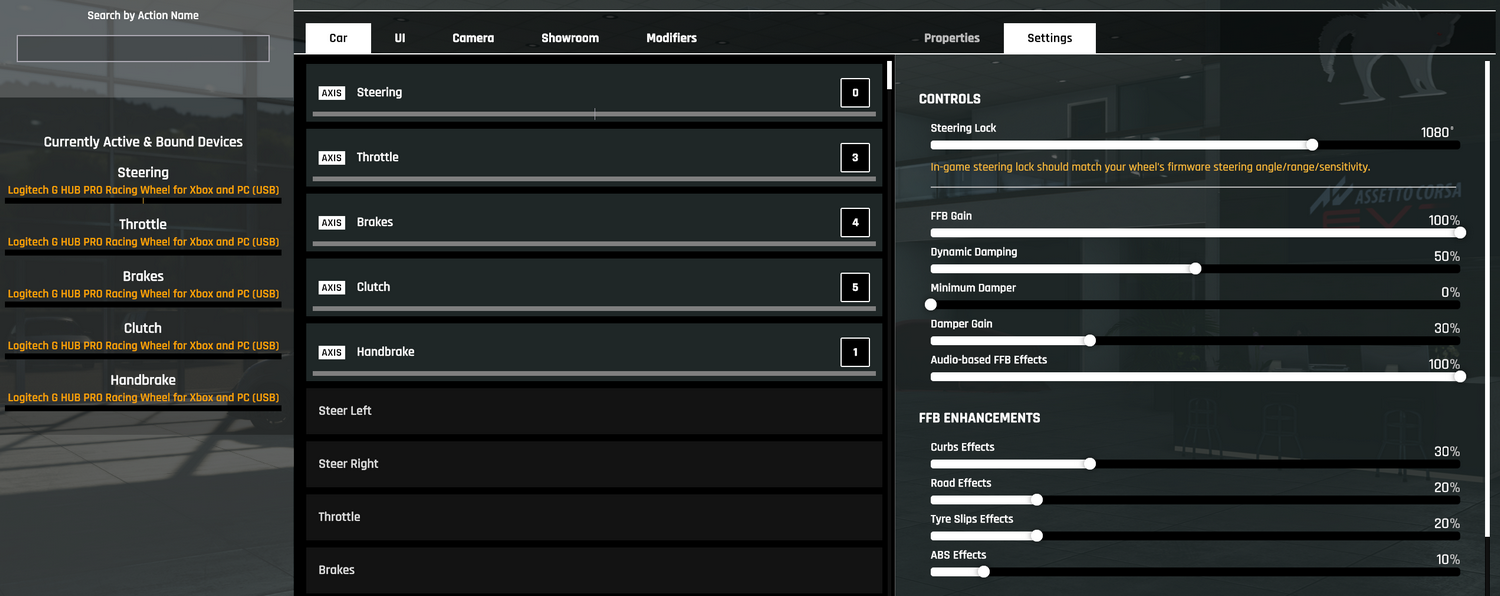
The makers don’t agree on the damping, though. Kunos, Fanatec and Moza’s own video put Dynamic Damping at 40% and Damper Gain at 20%, and Logitech runs both higher. Thrustmaster and Asetek set all three of the game’s dampers to zero.
AC Evo is still in early access, and v0.9.1 (1 September 2026) followed v0.9 on 26 August. Since v0.9, the force feedback should come back by itself within about a second of an alt-tab, a USB replug or a base power-cycle. The same update put TrueForce behind a 350 Hz low-pass filter, gave FullForce a filtered signal and added an ffb.lut file for shaping the force curve. None of the sliders changed name in v0.9 and no maker has withdrawn its values, so the makers’ numbers are still the place to start. Most of them date from January 2025 to early 2026, Logitech’s AC Evo screenshots included. Asetek’s guide is the newest, updated two days after v0.9.
Fanatec settings
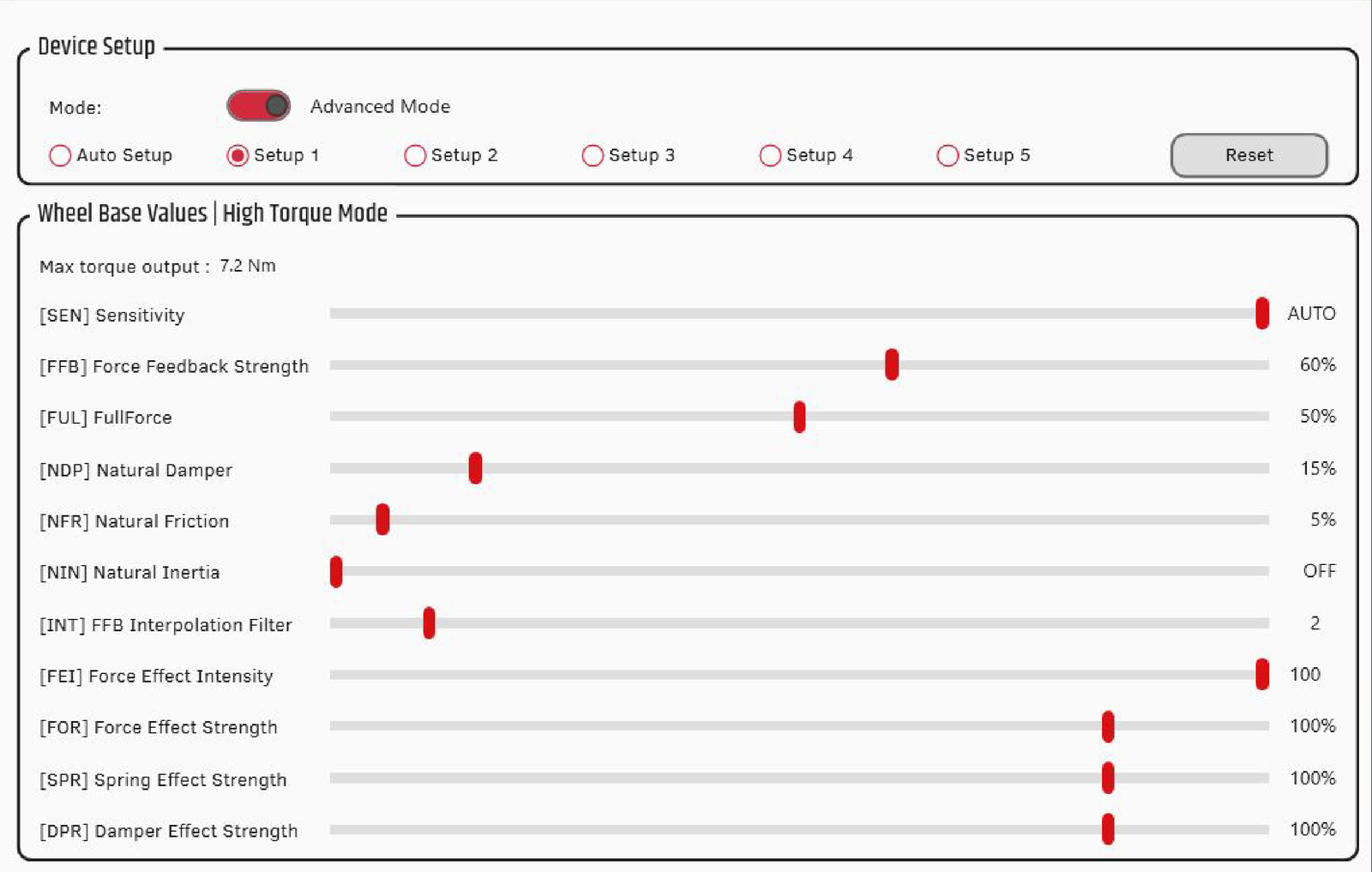
Fanatec’s AC Evo force feedback guide runs a CSL DD (5-8 Nm) at 100% in the Fanatec App and brings a ClubSport DD or Podium DD (12-25 Nm) down to 40-70%. Kunos’s own Fanatec page aims for about 7 Nm at the base, with FFB Gain at 80% in game. FullForce has its own setting on the base (FUL), and in game it’s switched on with the Audio-based FFB Effects slider, where Fanatec doesn’t suggest a value. Fanatec listed the ClubSport DD, ClubSport DD+ and Podium DD for FullForce when it came to AC Evo in v0.4, and the current CSL DD is sold with FullForce too. I’ve reviewed the CSL DD and the Podium DD, and my Fanatec guide covers the range.
Start with these settings in the Fanatec App (or the base’s own tuning menu):
- Sensitivity (SEN): Auto
- Force Feedback Strength (FFB): 100% on a CSL DD, 40-70% on a ClubSport DD or Podium DD (or about 7 Nm at the base, as Kunos has it)
- FullForce (FUL): 50% (on a base with FullForce)
- Natural Damper (NDP): 15-25%
- Natural Friction (NFR): 0-5%
- Natural Inertia (NIN): Off
- FFB Interpolation Filter (INT): 2-6
- Force Effect Intensity (FEI): 100
- Force Effect Strength (FOR): 100%
- Spring Effect Strength (SPR): 100%
- Damper Effect Strength (DPR): 100%
Then set these in AC Evo:
- Steering Lock: the same as the base
- FFB Gain: 80%, then adjust to taste
- Dynamic Damping: 40%
- Minimum Damper: 0%
- Damper Gain: 20%
As a general rule, Fanatec says to avoid high NDP, NFR, NIN and INT values. Clipping is when the game asks for more force than the base will give, so the detail at the top of the range is lost, and when it happens Fanatec’s advice is to turn the in-game FFB Gain down and keep the base up.
Fanatec discount code: use SIMRACINGCOCKPIT5 at checkout for 5% off at fanatec.com.
Moza settings
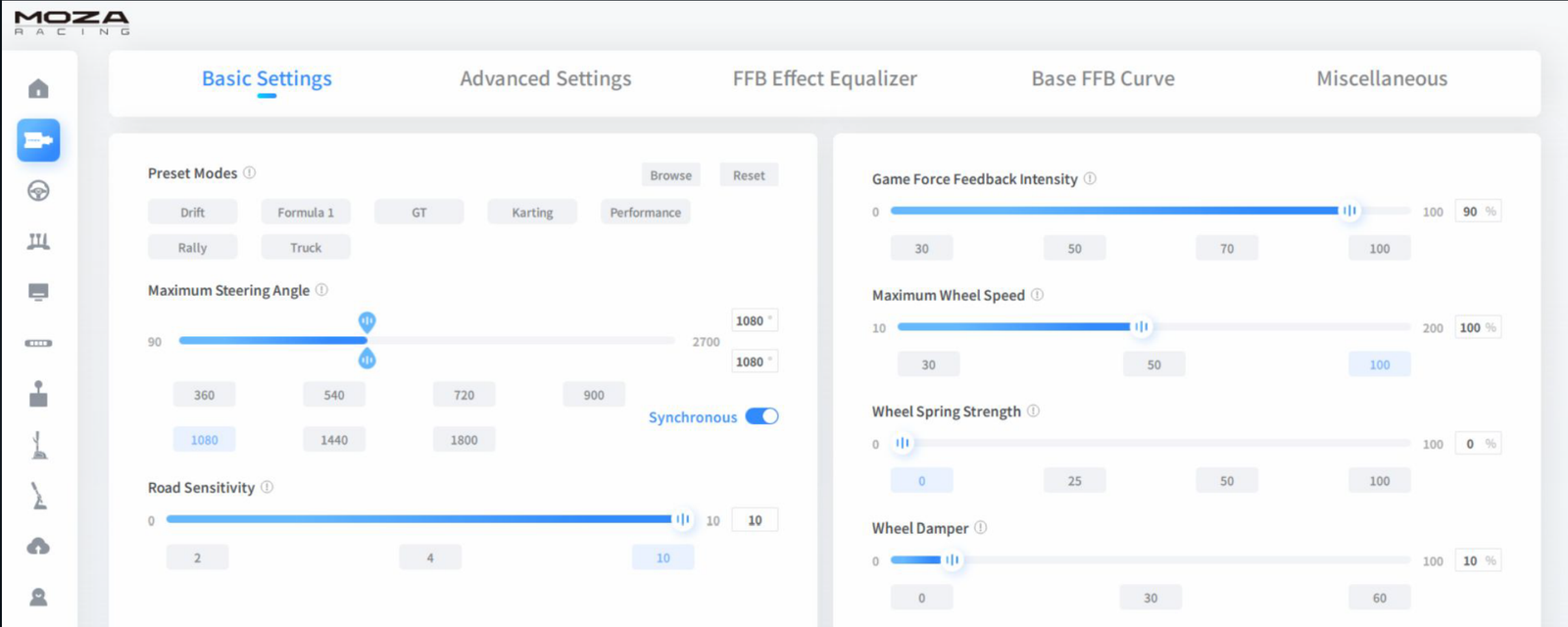
Kunos’s wheel setup guide has a Moza page with Pit House screenshots, set up for about 8 Nm at the base and 80% FFB Gain in game. MOZA Racing‘s own AC Evo video for the Moza R5 (made by SimRacingPal, March 2025) uses the same in-game numbers. Kunos’s guide doesn’t agree with itself on the Wheel Damper, which is 0 in its text and 10% in its screenshot. Moza’s video also runs Game Force Feedback Intensity at 100%, where Kunos has 90%. There’s no TrueForce on a Moza base, so the video leaves the Audio-based FFB Effects slider at zero. I’ve covered the bases themselves in the Moza guide.
In Pit House, work through Basic Settings first, then Advanced Settings:
- Basic Settings:
- Maximum Steering Angle: 1080°
- Road Sensitivity: 10
- Game Force Feedback Intensity: 90-100% (90% in Kunos’s screenshot, 100% on the R5 in Moza’s video)
- Maximum Wheel Speed: 100%
- Wheel Spring Strength: 0%
- Wheel Damper: 0-10% (0 in Kunos’s text, 10% in its screenshot)
- Advanced Settings:
- Maximum Output Torque Limit: enough for about 8 Nm (90% in Kunos’s screenshot, 100% on the R5 in Moza’s video)
- Hands-Off Protection: On
- Steering Wheel Inertia: 2600 (the CS/RS rim preset)
- Natural Inertia: 100%
- Wheel Friction: 10%
- Speed-dependent Damping: 0%
Then set these in the game:
- Steering Lock: the same as the base
- FFB Gain: 80%, then adjust to taste
- Dynamic Damping: 40%
- Minimum Damper: 0%
- Damper Gain: 20%
- Audio-based FFB Effects: 0% (no TrueForce on Moza bases)
Simucube settings
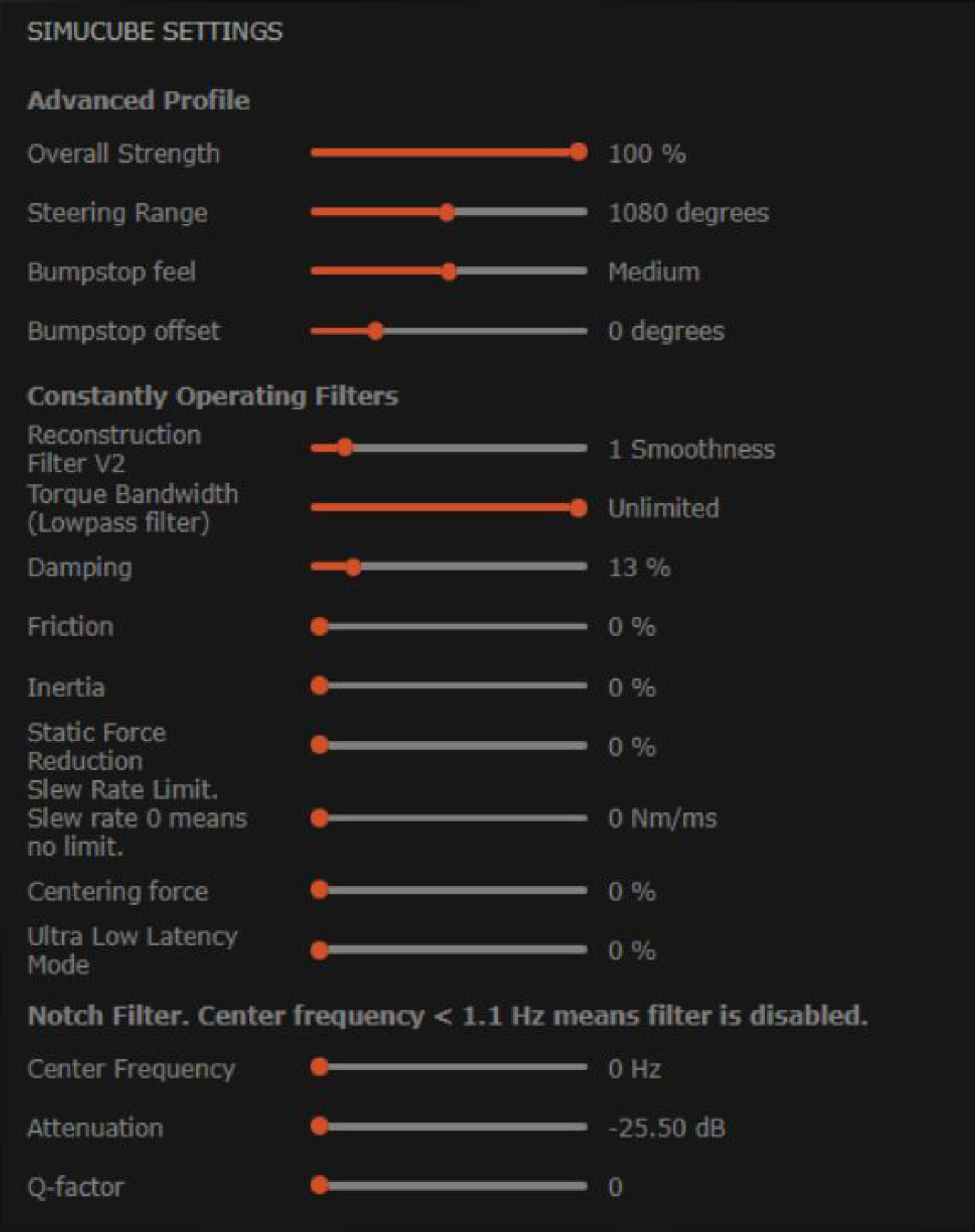
Simucube hasn’t published AC Evo values of its own, so these come from Kunos’s wheel setup guide. Kunos’s Simucube page uses the same 8 Nm at the base and 80% FFB Gain in game as its Moza page, with the DirectInput Effects Fine Tuning all at 100%. The profile Kunos pictures is in Simucube’s True Drive. My own base is a Simucube 2 Pro, and you’ll find it in the direct drive wheels guide alongside the other bases.
Set these in True Drive:
- Torque: about 8 Nm at the base
- Overall Strength: 100%
- Steering Range: 1080°
- Bumpstop feel: Medium
- Reconstruction Filter V2: 1
- Torque Bandwidth (Lowpass filter): Unlimited
- Damping: 13%
- Friction: 0%
- Inertia: 0%
- Static Force Reduction: 0%
- Slew Rate Limit: 0 (no limit)
- Centering force: 0%
- Ultra Low Latency Mode: 0%
- Notch Filter: off (Center Frequency 0 Hz)
- DirectInput Effects Fine Tuning: all 100%
Then set up AC Evo itself:
- Steering Lock: the same as the base
- FFB Gain: 80%, then adjust to taste
- Dynamic Damping: 40%
- Minimum Damper: 0%
- Damper Gain: 20%
Simagic settings
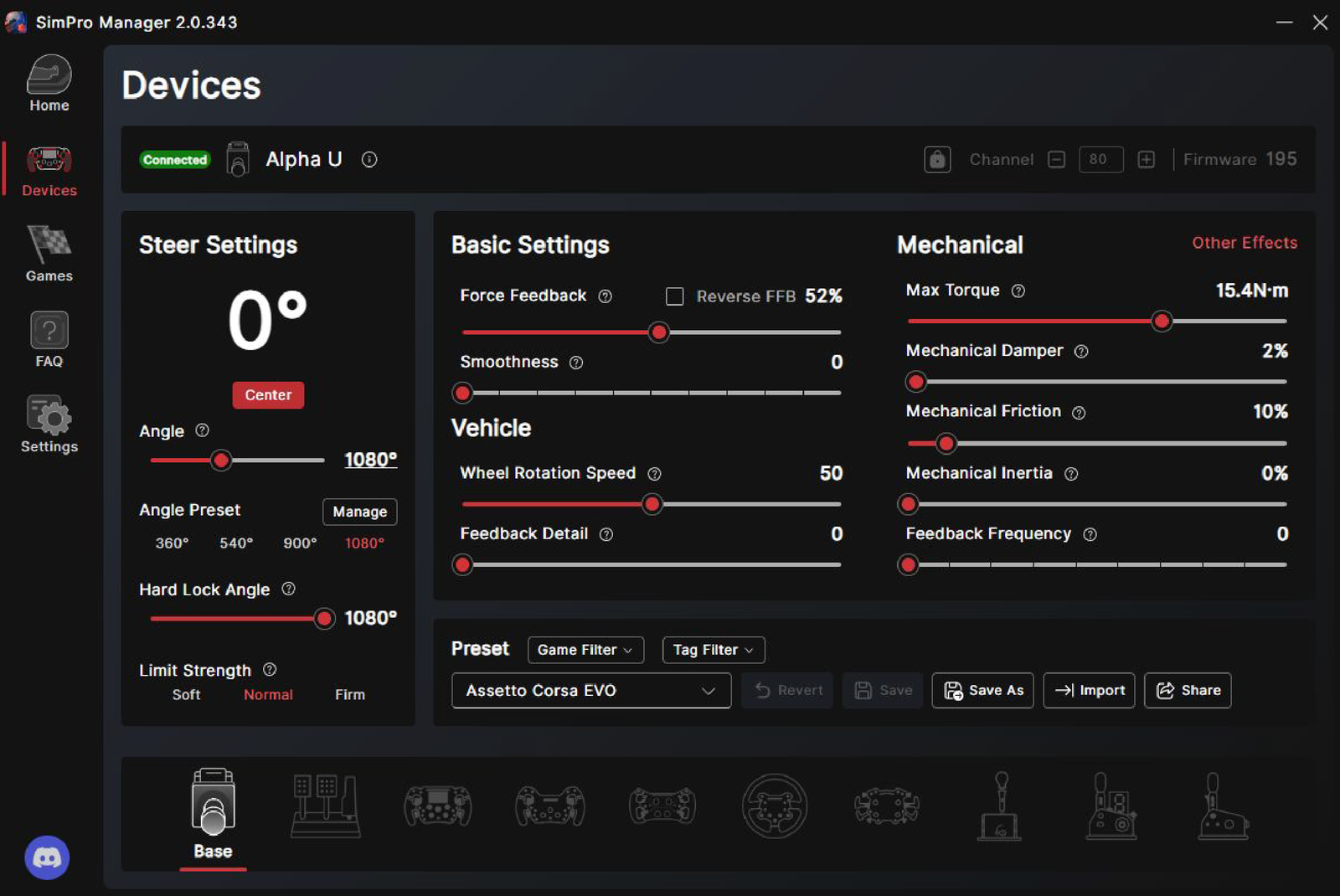
The Simagic settings come from Kunos’s wheel setup guide too. SimPro Manager has its own “Assetto Corsa EVO” game preset, and that’s what Kunos’s screenshot has loaded on a Simagic Alpha U. Kunos aims for about 8 Nm at the base, which on the Alpha U (15.4 Nm) means Force Feedback at 52%. There’s more on the bases in the Simagic guide.
Load the Assetto Corsa EVO preset in SimPro Manager and check it against these:
- Preset: Assetto Corsa EVO
- Force Feedback: enough for about 8 Nm (52% on an Alpha U)
- Angle: 1080°
- Hard Lock Angle: 1080°
- Limit Strength: Normal
- Smoothness: 0
- Wheel Rotation Speed: 50
- Feedback Detail: 0
- Mechanical Damper: 2%
- Mechanical Friction: 10%
- Mechanical Inertia: 0%
- Feedback Frequency: 0
And in AC Evo, it’s Kunos’s usual in-game setup:
- Steering Lock: the same as the base
- FFB Gain: 80%, then adjust to taste
- Dynamic Damping: 40%
- Minimum Damper: 0%
- Damper Gain: 20%
Logitech settings
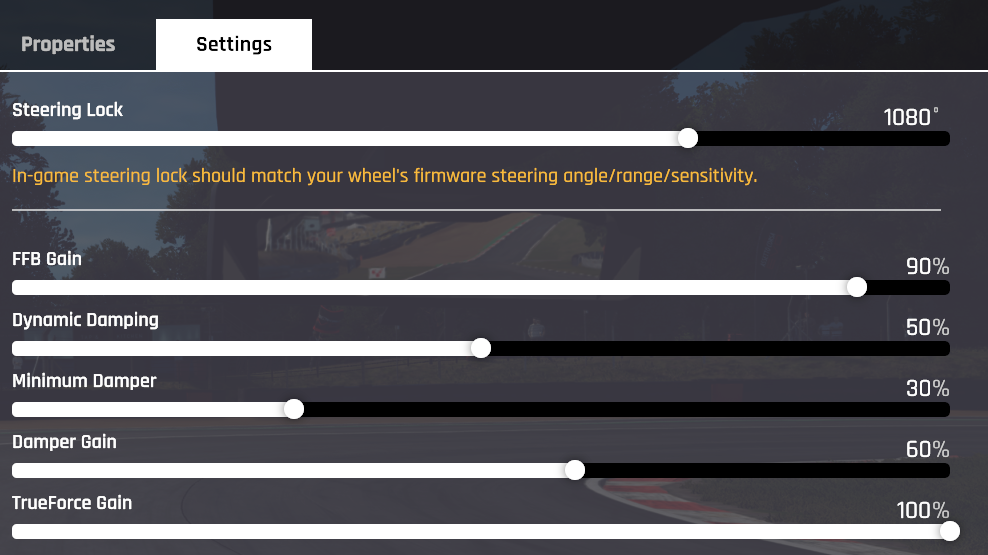
Logitech’s support pages have one AC Evo page for the Logitech RS50 (assuming 8 Nm) and one for the Pro wheels (assuming 11 Nm), both last edited in June 2026. Kunos’s guide says TrueForce is supported, and it’s set with TF Audio in G HUB. In game it shares the Audio-based FFB Effects slider with Fanatec’s FullForce, and older builds labelled that slider TrueForce Gain. There are no AC Evo values for the G923, G29 or G920 in Kunos’s guide or on Logitech’s support pages.
For the Logitech RS50, start in G HUB and then set the game:
- In G HUB:
- Compatibility Mode: RS
- Strength: 8 Nm
- FFB Filter: 5
- Dampener: Off
- TF Audio: 85
- Angle: 1080°
- In AC Evo:
- Steering Lock: 1080°
- FFB Gain: 90%
- Dynamic Damping: 50%
- Minimum Damper: 30%
- Damper Gain: 60%
- Audio-based FFB Effects: 100% (TrueForce Gain in older builds)
For the Logitech G Pro (Logitech calls it the PRO Racing Wheel), set these in G HUB and in game:
- In G HUB:
- Compatibility Mode: PRO
- Strength: 11 Nm
- FFB Filter: 5
- Dampener: Off
- TF Audio: 50
- Angle: 1080°
- In AC Evo:
- Steering Lock: 1080°
- FFB Gain: 100%
- Dynamic Damping: 50%
- Minimum Damper: 0%
- Damper Gain: 30%
- Audio-based FFB Effects: 100%
- Curbs Effects: 30%
- Road Effects: 20%
- Tyre Slips Effects: 20%
- ABS Effects: 10%
Alternative approach for the Logitech Pro
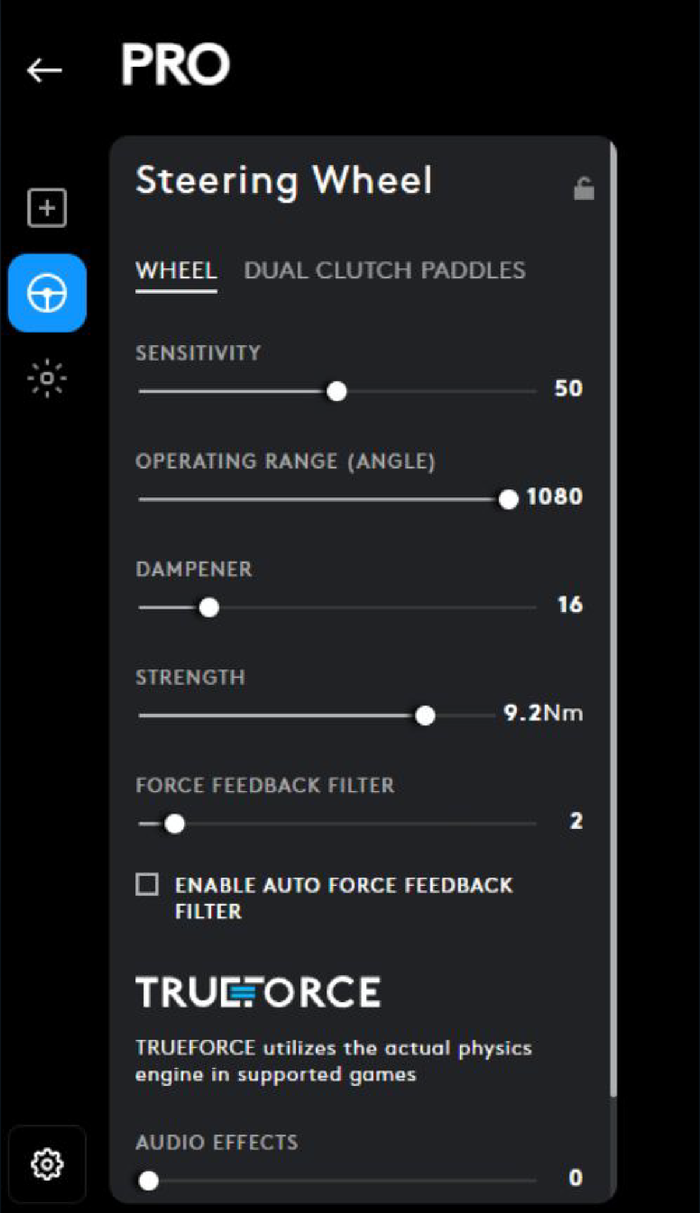
Kunos’s own Logitech Pro page is a different setup altogether. It runs the Pro at 9.2 Nm in G HUB where Logitech runs 11, and puts the dampener at 16 where Logitech leaves it off, so there’s less torque and more damping at the base. The force feedback filter is at 2 against Logitech’s 5, and TrueForce audio is at 0. These are Kunos’s Pro values, G HUB and then the game:
- In G HUB:
- Sensitivity: 50
- Operating Range: 1080°
- Dampener: 16
- Strength: 9.2 Nm
- Force Feedback Filter: 2
- Enable Auto Force Feedback Filter: Off
- TrueForce Audio Effects: 0
- In AC Evo:
- Steering Lock: 1080° (the same as G HUB)
- FFB Gain: 80%
- Dynamic Damping: 40%
- Minimum Damper: 0%
- Damper Gain: 20%
Thrustmaster settings
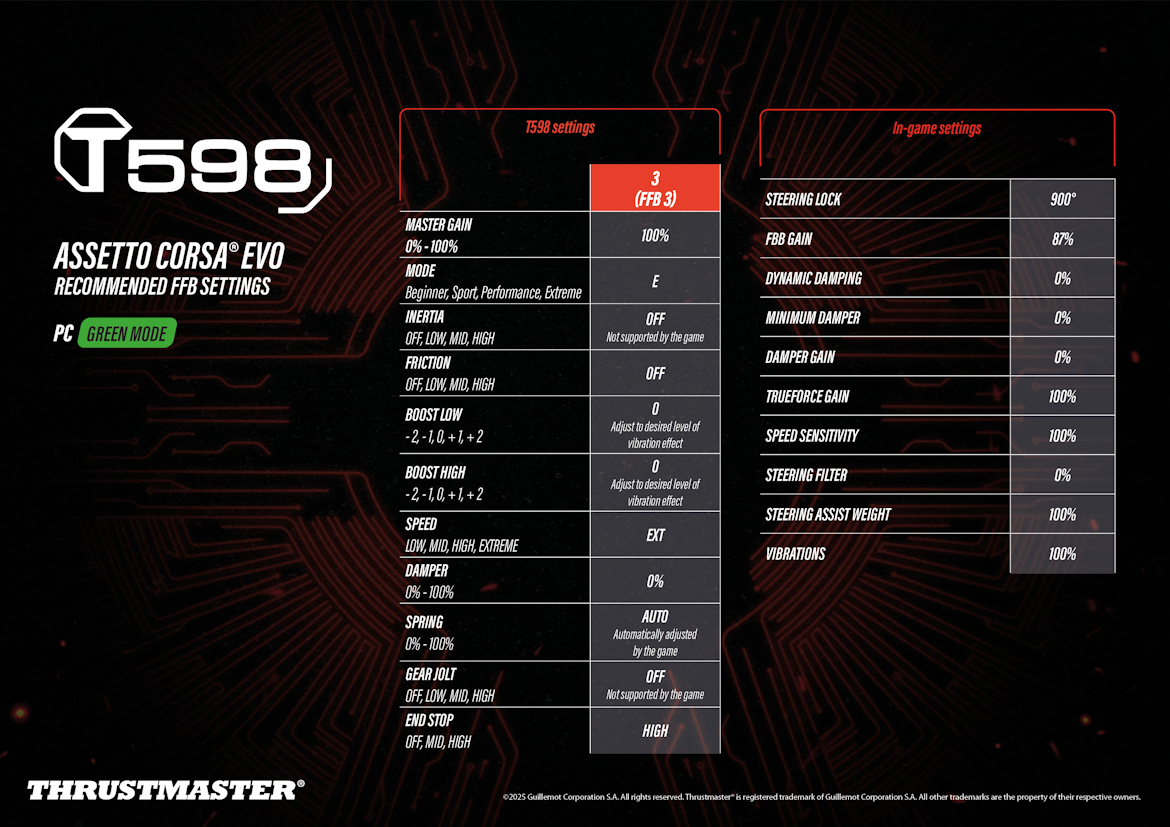
Kunos’s guide has no Thrustmaster page, but Thrustmaster’s support pages carry AC Evo preset sheets for the T598 and the T818, both from January 2025. The T818 sheet credits its settings to the T818 beta testers community. Both run the base at 100% and set the strength only in game, with the lock at 900° and all three of the game’s dampers at zero. Thrustmaster’s support pages don’t have an AC Evo preset for the belt wheels (T300, T248, T150, TX or T-GT II).
On the T598, set the base like this, then the game:
- On the base (profile 3, FFB 3):
- Master Gain: 100%
- Mode: E (Extreme)
- Inertia: Off (not supported by the game)
- Friction: Off
- Boost Low: 0
- Boost High: 0
- Speed: EXT
- Damper: 0%
- Spring: Auto (set by the game)
- Gear Jolt: Off (not supported by the game)
- End Stop: High
- In AC Evo:
- Steering Lock: 900°
- FFB Gain: 87%
- Dynamic Damping: 0%
- Minimum Damper: 0%
- Damper Gain: 0%
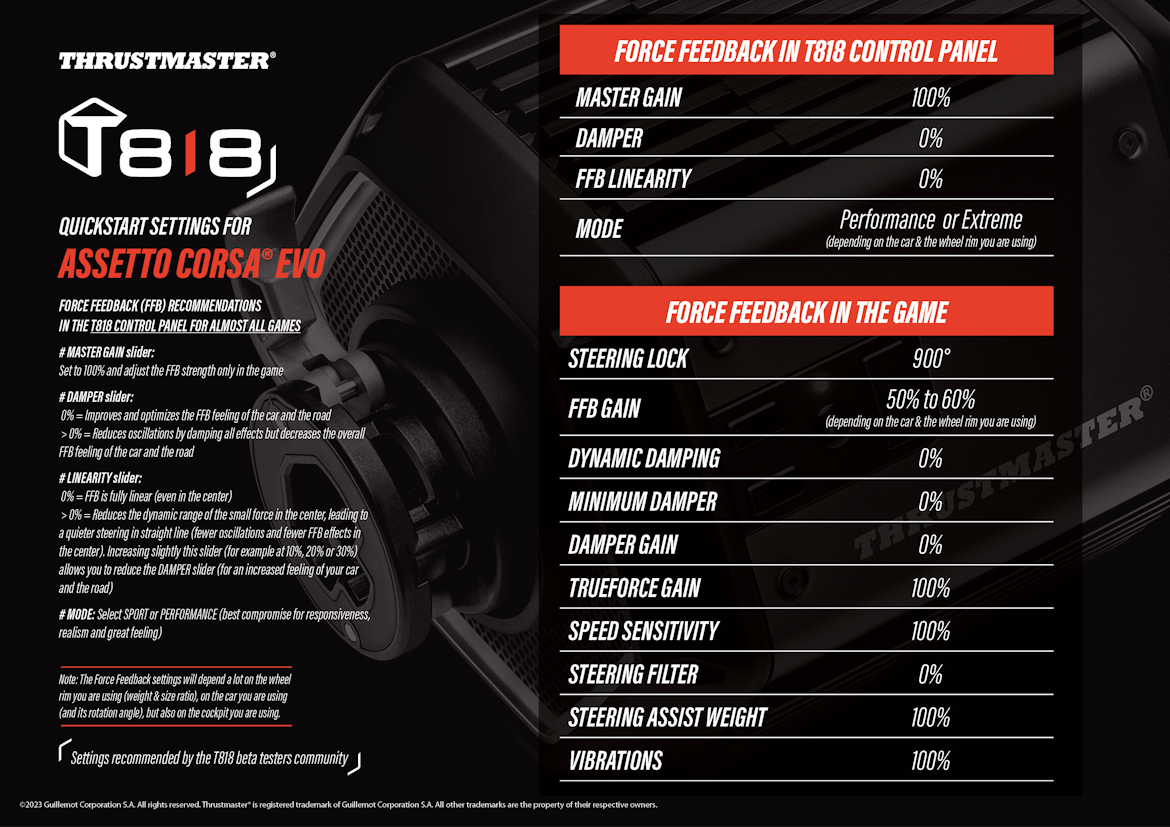
The T818 is set in its Control Panel first, then in game:
- In the T818 Control Panel:
- Master Gain: 100% (the strength is set only in the game)
- Damper: 0%
- FFB Linearity: 0%
- Mode: Performance or Extreme (depending on the car and the rim)
- In AC Evo:
- Steering Lock: 900°
- FFB Gain: 50-60% (depending on the car and the rim)
- Dynamic Damping: 0%
- Minimum Damper: 0%
- Damper Gain: 0%
The T818 sheet leaves the Damper at 0% on the base, which it says gives the best feel of the car and the road. Anything above 0% calms oscillations by damping every effect, and that dulls the overall feel too. A little FFB Linearity, somewhere around 10-30%, quietens the centre on the straights and lets you bring the Damper back down. On the T598, Boost Low and Boost High set how much vibration comes through.
Asetek settings
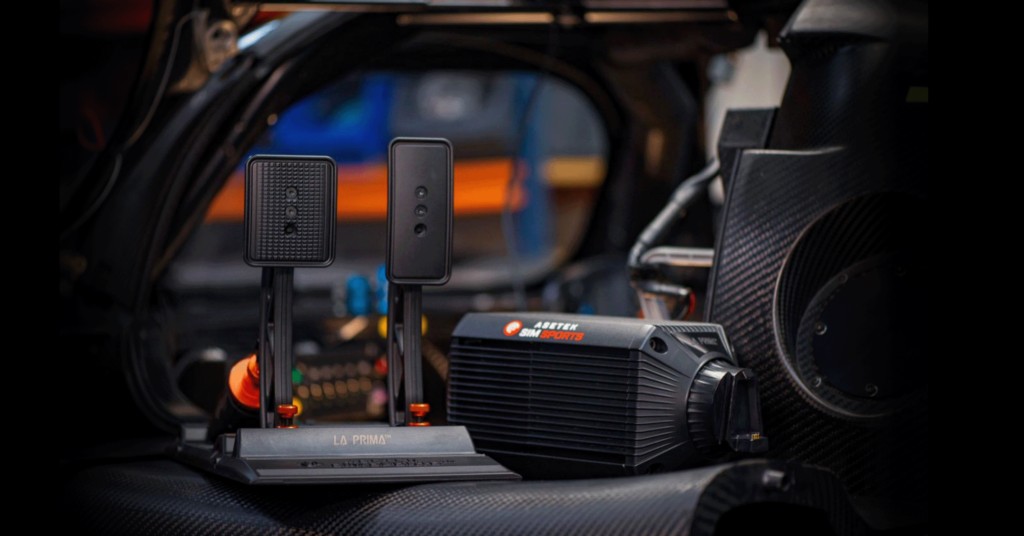
Asetek’s AC Evo guide was updated on 28 August 2026. Download Asetek’s AC Evo preset for your base from the guide, then in RaceHub go to Wheelbase > Force Feedback Settings, click the three dots next to Preset, choose Import as new and Save to wheelbase. In game, only the FFB Gain changes from one Asetek base to the next.
Then set AC Evo for your base:
- Steering Lock: 1500° on every base
- FFB Gain:
- Invicta (27 Nm): 38%
- Forte (18 Nm): 47%
- La Prima+ (16 Nm): 55%
- La Prima (12 Nm): 70%
- Initium+ (8 Nm): 70%
- Initium (5.5 Nm): 70%
- Dynamic Damping: 0%
- Minimum Damper: 0%
- Damper Gain: 0%
Alternative approach: the dampers at zero
If you’re on a Fanatec, Moza, Simucube or Simagic base, the other complete setup is the one Thrustmaster and Asetek publish. With the game’s dampers at zero, any damping left comes from the base’s own software. Set AC Evo like this:
- Dynamic Damping: 0%
- Minimum Damper: 0%
- Damper Gain: 0%
- FFB Gain: set the strength here, with the base high
Fine-tuning
If something still doesn’t feel right, work through these one change at a time:
- If the wheel clips, lower the in-game FFB Gain and keep the base high.
- When the wheel feels slow to react, move Dynamic Damping a step up or down, since that’s the slider Kunos ties to reaction speed.
- If a T818 oscillates on the straights, try 10-30% of FFB Linearity in the T818 Control Panel, which lets you keep the Damper low.
- When there’s too much vibration through a T598, lower Boost Low and Boost High.
- If the FFB drops out after an alt-tab or a USB replug, give it a second, because since v0.9 it should come back by itself.
- If you want a different force curve, v0.9 reads a linearisation table from ffb.lut in the game’s SavedGame folder, with one input|output pair per line.
- When the wheel turns more or less than the car’s steering wheel on screen, set Steering Lock to match the base’s angle.
The direct drive wheel settings guide goes through each brand’s software in more depth, and its Settings Finder has values for the other sims it covers, though not AC Evo. For the game itself, the Assetto Corsa EVO guide is the place to go. I’ll see you out on track!
Related Articles

Best Pimax VR Settings for F1 25 in 2026: A Damage-Control Guide

Best Pimax VR Settings for Le Mans Ultimate in 2026

Best Pimax VR Settings for Automobilista 2 in 2026

Best Pimax VR Settings for Assetto Corsa in 2026

iRacing VR Settings (2026): Meta Quest 3, PSVR2, Pimax and Valve Index

Assetto Corsa VR Settings 2026: Pimax, Quest 3, PSVR2 & More
Topic: Direct Drive Wheel Settings