

I’m a sim racer and amateur racer with a passion for Motorsport, good racecraft and the technical and setup aspect of sim racing.
The thing that sells the MOZA AY210 + MFY yoke setup to airline-sim pilots is a feature almost no other consumer yoke delivers: when autopilot is engaged in cruise, the yoke physically moves with the aeroplane. Trim up, the yoke moves back. Trim down, it moves forward. Autopilot banks into a turn, the yoke turns with it. Real commercial yokes do exactly this because they’re mechanically connected to the control surfaces. Home-cockpit yokes – Honeycomb Alpha, Thrustmaster TCA, Turtle Beach VelocityOne – don’t, because they’re spring-centred and have no motor pushing them. The AY210’s belt-driven force feedback motor does, and the moment you watch a 737 trim up on autopilot at flight level 380 and the yoke gently follows, the £848 setup cost (or $848 USD) starts to make sense. It’s the single biggest piece of yoke immersion any consumer hardware delivers in 2026.
That’s the headline. The rest of this review is the full picture: what the base and yoke cost individually, what the build quality is like, what the MOZA Cockpit software does on the airline-pilot side, how the AY210 compares to the MOZA AB9 (which is the stick base, not the yoke base – they’re different products solving different problems), and what an actual working airline pilot’s preset library does for the experience on day one.
Quick Navigation
What you get and what it costs |
The autopilot trim move – the killer feature |
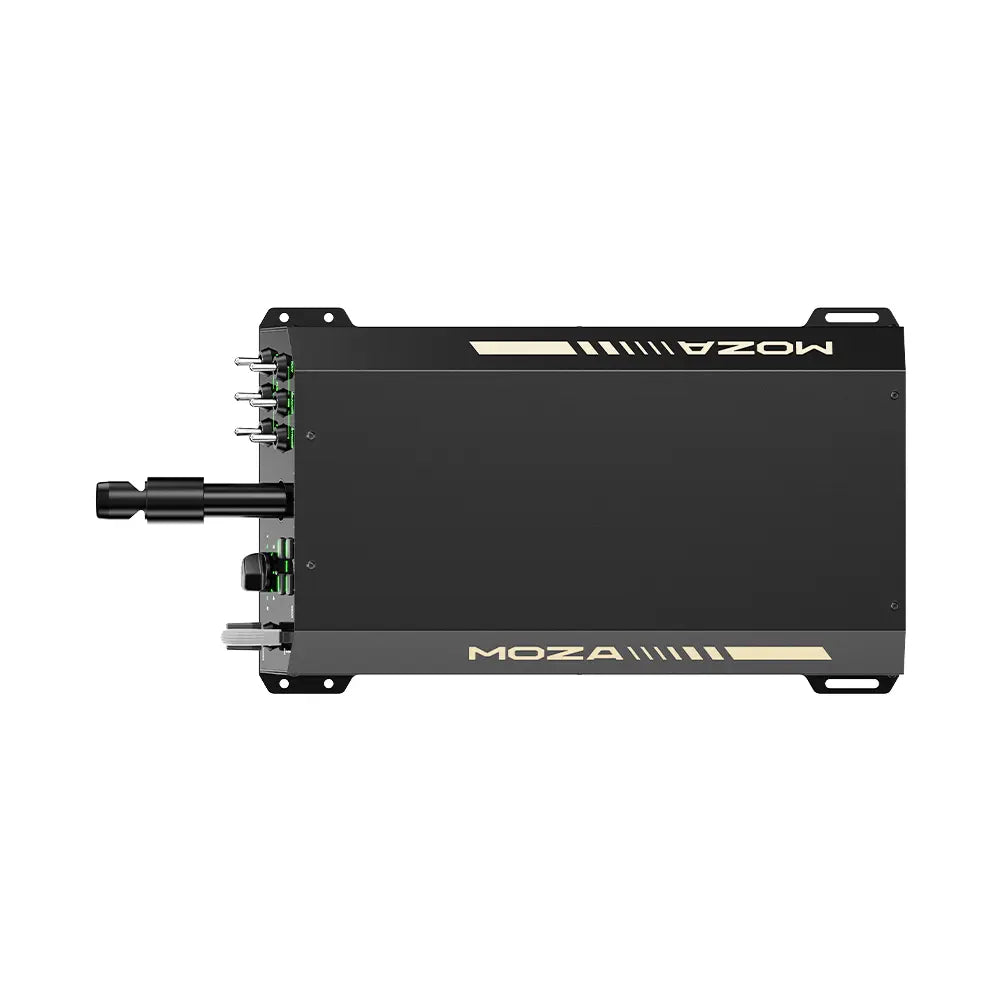
The AY210 base – belt-driven yoke FFB |
The MFY yoke – 34 inputs, hall effect joystick |
What pairs with the AY210 + MFY |
MOZA Cockpit + real-pilot Tony’s presets |
Vs Honeycomb Alpha, Thrustmaster TCA, Virpil Vector |
Who this is for |
Small things I noticed
What you get and what it costs
Two products that pair together. The AY210 Yoke Base is the motor + housing + quick-release mount, priced at $699 USD direct from MOZA (with a typical $797.99 retail listing through third-party channels). The MFY Yoke is the handles + buttons + grip that attaches via the quick-release, priced at $149 USD direct ($207.99 retail). Buy them together and your total is around $848 USD direct or just over $1,000 at retail. There’s also a bundled AY210 + MFY package on MOZA’s own store at a small discount versus separate purchase. Both bases ship with a USB Type-B cable, an RJ11 daisy-chain port, a Phillips screwdriver and mounting hex keys, and the standard MOZA accessories bag.
| Spec | AY210 Base | MFY Yoke |
|---|---|---|
| Role | FFB motor + housing + mount | Handles + grips + buttons |
| Direct price (USD) | $699 | $149 |
| Retail price (USD, third-party) | $797.99 | $207.99 |
| Continuous torque (roll) | 9 Nm | n/a |
| Peak pitch push force | 210 N | n/a |
| Travel range (pitch) | 150 mm | n/a |
| Roll axis range | ±90° (180° total) | n/a |
| FFB technology | MCLS belt-driven (same as AB9) | n/a |
| Programmable inputs | 13 switches on front panel | 34 configurable |
| Encoder | 15-bit magnetic | Hall effect (drift-free) |
| Material | Aluminium housing + high-strength steel internals | Fiberglass-reinforced PA66 composite |
| Weight | 8 kg | ~1.5 kg |
| Quick-release | Aluminium alloy QR (same as MOZA racing line) | QR-compatible mount |
| Connectivity | USB Type-B + RJ11 daisy-chain | QR connector to AY210 base |
| USB refresh | 1000 Hz | via base |
| Processor | 280 MHz | via base |
| Mounting options | Desktop clamp, suspended clamp, direct cockpit mount, aluminium profile | QR onto base |
| Software | MOZA Cockpit (shared with racing line) | MOZA Cockpit |
The base and the yoke – sold separately but designed as a pair:
Moza discount code: use SIMRACINGCOCKPIT at checkout for 3% off at mozaracing.com.
The autopilot trim move – the killer feature
Most reviews of force feedback flight kit get the value proposition wrong. They lead with “you feel turbulence” or “you feel stall buffet”. Those are real things FFB does, but they’re not the headline for a yoke specifically. The headline is the autopilot move.
Real airline yokes are mechanically connected to the control surfaces by cables and hydraulics. When the autopilot trims an aeroplane up or down in cruise, the elevator surface physically moves. On a real Boeing or Airbus yoke, that movement transmits back through the column to the pilot’s hands. The yoke shifts forward or aft as the autopilot makes corrections. In cruise this is constant low-level activity. In a climb or descent it’s substantial. You feel it through your hands without ever having to look at the instruments. Real pilots use this as an extra information channel – the autopilot is talking to them through the yoke.
Home-cockpit yokes have historically broken this. Honeycomb Alpha, Thrustmaster TCA Boeing, Turtle Beach VelocityOne – all spring-centred, no motor, autopilot engaged just means the yoke doesn’t move and the aircraft does its thing on screen. The disconnect is genuinely jarring once you’ve flown the alternative. The MOZA MFY paired with the AY210 base recreates the real-aircraft behaviour because the FFB motor pushes the yoke to its new trim position the moment the simulator’s flight model commands it. Autopilot banks into a turn, the yoke turns with it. Autopilot trims for climb, the yoke moves forward. Autopilot disconnects, you feel the moment of disconnection through the column. The first time I flew an Airbus A320 (Phoenix Simulations Pro) on autopilot from cruise to top of descent on the AY210, the yoke spent the whole sequence quietly moving as the aircraft trimmed itself – and that was when I understood why working airline pilots have been buying this setup specifically.
One observation worth flagging because no other review captures it: the trim move is constant. It never stops while autopilot is engaged. In a 90-minute cruise on a long-haul, your hands are gently being adjusted by the yoke the whole time. That sounds annoying written down. In practice it’s the opposite – it’s the sim doing what a real aircraft does, and after the first hour you stop noticing it as “the yoke moving” and start noticing it as the aircraft talking to you. It’s the difference between a simulator and a training aid.
The AY210 base – belt-driven yoke FFB
The AY210 uses the same MCLS belt-driven force feedback technology as the AB9 stick base, but configured for yoke axes rather than stick axes. The pitch axis pushes and pulls with a peak 210 N of force across a 150 mm travel range – that’s the long forward-back motion of pulling the yoke into your lap to climb. The roll axis turns at 9 Nm of continuous torque across a full 180° (±90° from centre) – the rotation you make to bank the aircraft. Both axes feel completely smooth under hand. There’s no cogging, no notchiness, no detectable mechanical signature. The same belt-driven transparency the AB9 has, applied to the yoke geometry.
The base itself is the largest piece of MOZA flight kit at 8 kg and 243 × 403 × 216 mm. The housing is aluminium alloy, the internals are high-strength steel for structural rigidity under the load the FFB motor generates. There’s a programmable switch panel on the front face with 13 physical switches – configurable via MOZA Cockpit for autopilot disconnect, gear, flaps, lights, anything you want. The 280 MHz processor and 15-bit magnetic encoder mean the input resolution is genuinely high – you can make tiny corrections in the centre of the yoke movement without feeling the encoder stepping.
Mounting matters more than people expect on the AY210 because of the weight and the torque the FFB motor generates. A desktop clamp works but the base will move under aggressive trim corrections on a flimsy desk. The proper answer is either a dedicated cockpit (Trak Racer’s flight rigs all support direct AY210 mounting, as does the FS3 Stand) or an aluminium profile rig you build yourself. The AY210 mount points underneath are standardised so any of the major cockpit makers ship compatible brackets. I cover the cockpit side of the decision in the flight sim gear buyer’s guide.
The MFY yoke – 34 inputs, hall effect joystick
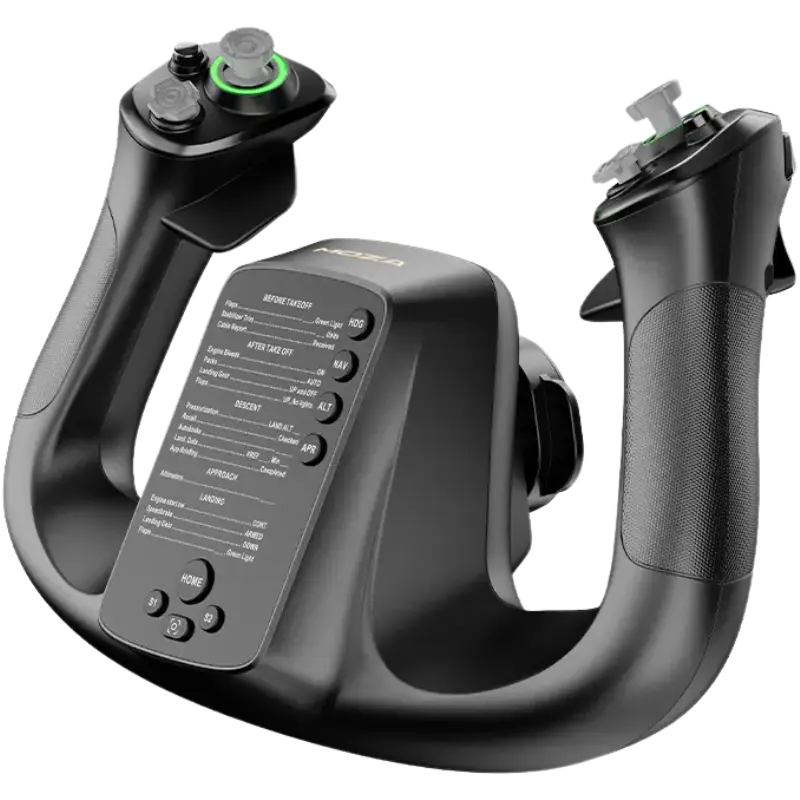
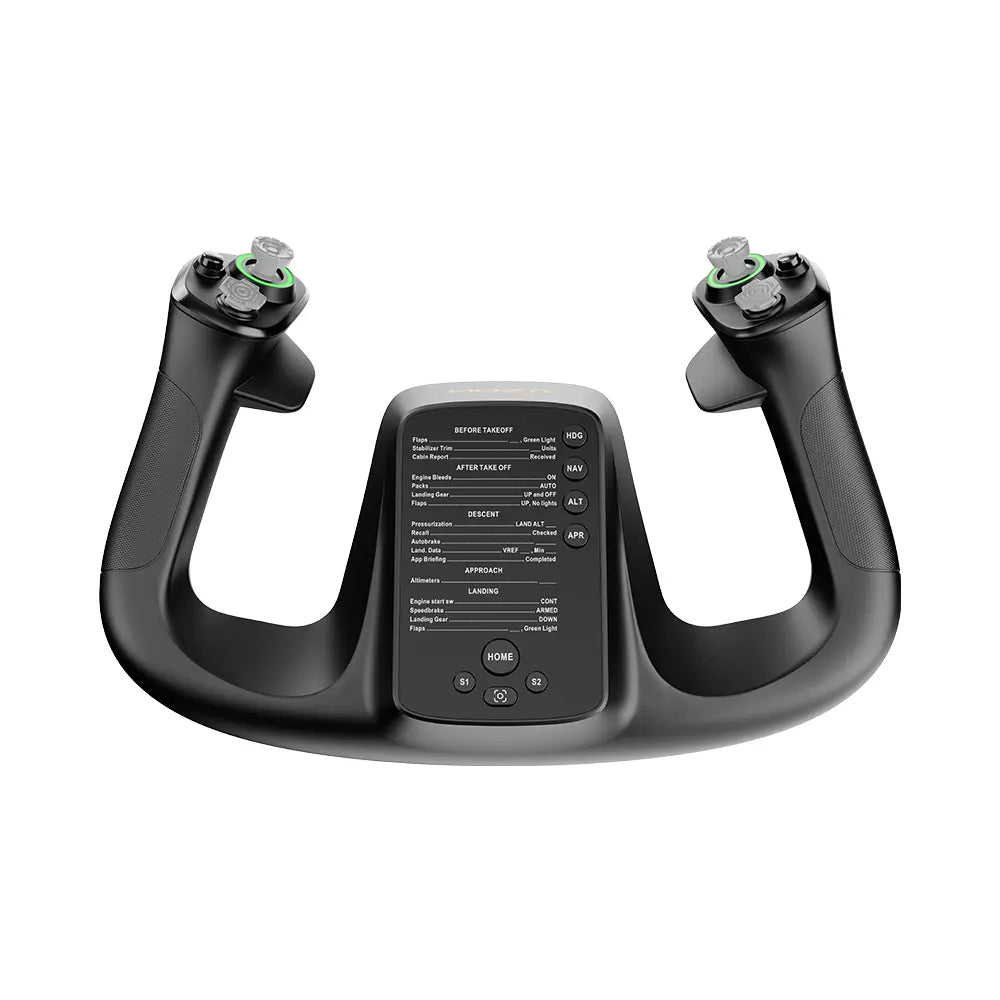
The MFY is the handle assembly that attaches to the AY210 base via the aluminium alloy quick-release mechanism. It’s been designed specifically to look and feel like a commercial airline yoke – which means substantial, slightly heavy, and laid out with the input density real pilots are used to. 34 configurable inputs total: trim switches, autopilot disengagement, microphone push-to-talk, navigation modes, multi-functional Hall effect joystick triggers for camera control, programmable button matrix on the inboard face. That’s significantly more input density than the Honeycomb Alpha (around 16 mappable inputs) and considerably more than the Thrustmaster TCA Yoke Boeing (around 21).
The Hall effect joystick triggers on the MFY are particularly worth flagging. Hall effect sensors are magnetic rather than mechanical – they don’t drift, they don’t wear out, they don’t develop a dead zone after a year of use. The mini joystick on top of the yoke is mapped by default to camera control in MSFS, which means you can look around the cockpit from the yoke itself rather than reaching for a separate hat switch or POV stick. For airline simulation where you spend a lot of time looking at the overhead panel or the centre console without leaving the seat, that’s surprisingly important.
Two magnetic panels on either side of the MFY can be swapped or removed to change the cockpit layout – one for VATSIM-heavy pilots who want frequency controls dominant, one for procedural-flying types who prefer trim and autopilot dominant. That’s a small thing but it’s the kind of detail that tells you MOZA’s iterating on customer feedback rather than shipping a one-shot design. The grip texture is comfortable for long sessions – I’ve done several three-hour MSFS flights on it without hand fatigue, which isn’t true of every yoke I’ve tried.
What pairs with the AY210 + MFY
The AY210 sits in the same MOZA flight ecosystem as the AB9 stick base, but they’re different products solving different problems – the AB9 is for fighter / combat / GA stick flying, the AY210 is for airliners and GA yoke flying. Most flight simmers eventually want both, but you start with whichever matches what you fly most. Beyond the base + yoke, the pairings most AY210 owners settle on are:
- MOZA MTQ Throttle Quadrant ($199 base + $39 lever packs) – the modular throttle that swaps between Boeing TQB, Airbus TQA, and fighter TQF lever sets. For the AY210 setup you want the Boeing or Airbus levers; the fighter ones don’t fit the airline-cockpit mental model. The MTQ chains directly into the AY210’s RJ11 daisy-chain port – one USB cable runs the whole rig to the PC.
- MOZA MRP Rudder Pedals ($349 + optional $65 damper) – aluminium-frame swing arm pedals, removable heel rest for GA-style flying. Detailed in the force feedback for flight sim explainer. Pairs cleanly with the AY210 for full airliner / GA setups.
- MOZA MTLP Expansion Panel ($149) – 27 programmable switches for takeoff / landing procedure flow. Less obviously useful with a yoke setup than with a combat stick, but airline-procedural pilots who like extra mappable switches will want one.
- A proper cockpit – the AY210’s weight + FFB torque really wants either a Trak Racer flight cockpit (TR8 Pro Flight, RS6 Flight, FS3 Stand) or a custom aluminium profile build. A desktop clamp works but isn’t ideal long-term.
MOZA Cockpit + real-pilot Tony’s presets
The AY210 + MFY combo runs on MOZA Cockpit, the unified driver MOZA uses for everything (racing wheels included). If you’ve got MOZA racing gear already, the AY210 appears as another device when plugged in – same profile system, same RGB controls if you use them, same hub architecture. Nothing to learn beyond the yoke-specific calibration step on first install.
The piece of community software that genuinely transforms the AY210 + MFY experience is real-pilot Tony’s MOZA preset library – linked from MOZA’s own MFY review video description. Tony is a working airline pilot and his per-aircraft profiles have been tuned with actual flight-deck muscle memory as the reference. Import in MOZA Cockpit, load the Fenix A320 at LOWI (Innsbruck) approach, and the way the yoke responds at the localiser intercept is the difference between “this feels like a simulator” and “this feels close to the real aeroplane”. The autopilot trim move – which is the headline reason to buy the AY210 in the first place – is heavily influenced by which profile is loaded. Tony’s profile makes it feel right. The default MOZA profile makes it feel okay. Import Tony’s. Day one.
The Intelligent Telemetry Force Feedback feature is worth mentioning – MOZA Cockpit reads MSFS / X-Plane / Prepar3D / DCS World telemetry directly without needing a separate plugin, which is genuinely unusual. Most flight FFB hardware requires SimConnect or a dedicated plugin to pull telemetry properly. The AY210 just listens. The implication: even on aircraft Tony hasn’t built a preset for, the default MOZA profile reads the telemetry and produces credible FFB without configuration. For people who fly a wide payware fleet, that’s a real ergonomic win.
Vs Honeycomb Alpha, Thrustmaster TCA Boeing, Virpil VPC Vector
The home-cockpit yoke landscape in 2026 isn’t large, so the competitive set is manageable. Four real alternatives worth knowing about.
- Honeycomb Alpha ($250-300 retail) – the default airline yoke recommendation for the last five years. Non-FFB (spring-centred), so it lacks the autopilot trim move entirely. Build quality is excellent for the price. If your budget tops out around $400, the Alpha + Bravo throttle combo (~$599 together) is what most people buy and it’s a defensible setup. But you’re getting an upgrade ceiling at that price – and the FFB difference is real.
- Thrustmaster TCA Yoke Pack Boeing ($329 retail) – Boeing-licensed, non-FFB. The build feels less premium than the Honeycomb Alpha despite the licensed paint. Comes with the TCA Quadrant. If you’re a Boeing-fleet pilot specifically and you want the official aesthetic, this is the route. Otherwise the Alpha is the better non-FFB pick.
- Turtle Beach VelocityOne Flight (~$500 retail) – yoke + integrated throttle quadrant in one product, USB connection, non-FFB. The all-in-one form factor is appealing for desks where mounting separate hardware is awkward. The trade-off is that the throttle and yoke share a chassis, so you can’t swap one without the other. Build quality is competent.
- Virpil VPC Vector Flight Yoke Base ($339.96 special, $399.95 regular, pre-order ETA late Q2 2026) – the modular enthusiast alternative, and it’s actually cheaper than the AY210 + MFY. Virpil’s MMJoy-style modular approach with swappable handles and control plates sold separately. Non-FFB at launch but the modular community will likely build FFB extensions. If you want hand-built community hardware with deep customisation, this is the route.
The AY210 + MFY at ~$848 sits at the upper end of consumer yokes, above the budget Honeycomb Alpha and the cheaper Virpil Vector base, but it’s still well under pro-tier kit. What it uniquely delivers vs all three is the FFB autopilot move – none of them have it. Brunner’s CLS-E yoke base does, but Brunner is in pro-tier territory ($1,499+ base only). For the home-cockpit pilot who specifically wants the autopilot trim feel, the AY210 + MFY is currently the only consumer-class answer.
Who this is for
- Airline simulation pilots who fly PMDG 737, A320 Phoenix Pro, iniBuilds A350, FlightFactor 757, and want the trim feel that a spring-centred yoke can’t deliver. This is the AY210’s strongest case.
- Real pilots keeping their hand in – working commercial pilots who want a home setup that delivers training-aid-level feedback. The autopilot trim move is one of the strongest pieces of muscle-memory training the home market offers.
- Sim racers crossing into flight who already have MOZA racing gear and want to plug in to the existing MOZA Cockpit ecosystem rather than learning a new driver stack.
- VR-first flight simmers – the pairing of Pimax Crystal Light or Super with the AY210 + MFY is what people refer to when they describe “the closest a home cockpit gets to real”. Detailed in the VR headsets for flight simulation guide and the force feedback for flight sim explainer.
Who this isn’t for: combat-jet pilots (you want the AB9 stick base instead), beginners who haven’t decided yet (start with the Honeycomb Alpha or a budget HOTAS – the AY210 + MFY isn’t the introductory route), or people on strict sub-$500 total flight gear budgets (the AY210 + MFY exhausts that on the yoke setup alone). For each of those, there’s a better answer.
Small things I noticed
- USB Type-B on the AY210 – same as the AB9, MTQ, MTP throttles. Cable is solid, easy to replace, but in 2026 the persistence of Type-B across the MOZA flight line is genuinely odd. Worth knowing before you spec the back of your PC.
- RJ11 daisy-chain port on the AY210 lets you chain the MTQ throttle and MRP rudder pedals through the yoke base – one USB cable to the PC for the entire stack. Same architectural choice as the AB9; tells you MOZA is thinking ecosystem-first.
- The 8 kg weight + 210 N pitch force genuinely deforms a flimsy desk. Proper rig mounting is more important on the AY210 than on the AB9. Flagging this earlier than most reviews do.
- The aluminium QR mechanism for the MFY-to-AY210 connection works on the same standard as the MOZA racing wheel QR system. If you’ve already got a MOZA wheelbase, you know exactly how this feels.
- The MFY’s Hall effect joystick on top of the yoke maps to camera control by default in MSFS. Surprisingly important for airline procedural flying where you want to look at the overhead panel without leaving the seat. Most yokes don’t have this and you don’t realise you need it until you have it.
- The 13 switches on the AY210 front panel are configurable via MOZA Cockpit but the default mappings are sensible: gear, flaps incrementally, autopilot disconnect on the prominent button, lighting controls scattered across the rest. Worth keeping the defaults for the first month before you start re-mapping.
- Tony’s MOZA preset library is the single highest-value piece of community software for this product. Free, easy to import, transformative. The fact that MOZA links it from their own MFY review video description rather than building it themselves into MOZA Cockpit is a missed opportunity, but the community has filled the gap cleanly.
Pimax flight bundle discount: if you’re pairing the AY210 + MFY with VR (and you should), use code SIMRACINGCOCKPIT at checkout on pimax.com for $25 off the Crystal Light or Crystal Super – both ship with free MSFS add-on bundles in 2026. OLED through canopy plus the autopilot-moving-yoke is the closest a home cockpit gets to real.
Sources, credits and where to read next
The autopilot-trim move is what turns the MFY from a simulator into something closer to a training aid. Real-pilot Tony’s MOZA preset library is the Fly-tier resource I’d recommend on day one. Mark at Your Flight Sim Channel’s FS Weekend 2025 interview with Pete Campbell at MOZA covered the next-generation MFY Pro (with screen replacing the blank panel), the MGX 1000 monitor module, and the Airbus Captain side stick prototype – all 2026 releases worth tracking.
Where to read next: the MOZA AB9 review covers the stick base counterpart for combat / fighter flying; the MOZA AB6 review covers the entry-tier FFB stick bundle; the AB6 vs AB9 comparison walks through the stick-side decision; the force feedback for flight sim explainer contextualises FFB across the category; the flight simulation guide is the hub. For comparable VR pairing, the VR headsets for flight simulation guide covers the headset side of the premium MSFS 2024 stack.

The Best Rally Games in 2026
The Best PS5 Racing Games in 2026
The Best VR Flight Games and Sims

Best Pimax VR Settings for F1 25 in 2026: A Damage-Control Guide

Best Pimax VR Settings for Le Mans Ultimate in 2026

Best Pimax VR Settings for Automobilista 2 in 2026
Topic: Flight Simulation